


When managed service providers (MSPs) evaluate new billing software, one of the first and most important questions they ask is, “Does this billing software integrate with the tools I already use?”
The answer to that question often determines whether a billing platform can genuinely deliver on its promise of efficiency and scalability.
A connected ecosystem ensures accurate invoice delivery, eliminates billing bottlenecks, and maintains smooth financial operations.
FlexPoint is purpose-built for MSPs with this goal in mind. When a billing/payment software like FlexPoint integrates with your PSA (Professional Services Automation) software and accounting software, it helps automate the entire billing lifecycle end-to-end.
These connections create a streamlined, end-to-end billing workflow that encompasses time tracking, invoice generation, client approval, revenue collection, and payment reconciliation.
By syncing key billing operations and financial systems, FlexPoint eliminates manual data entry, reduces billing errors, and accelerates payment collection.
In this article, we’ll explore the top five FlexPoint integrations MSPs ask about before booking a product tour or demo.
We’ll also discuss how FlexPoint seamlessly integrates into a modern billing tech stack, enabling your MSP business to deliver a better payment experience, receive faster payments, and achieve stronger profitability.
{{toc}}
Why Integration Matters in MSP Billing Software
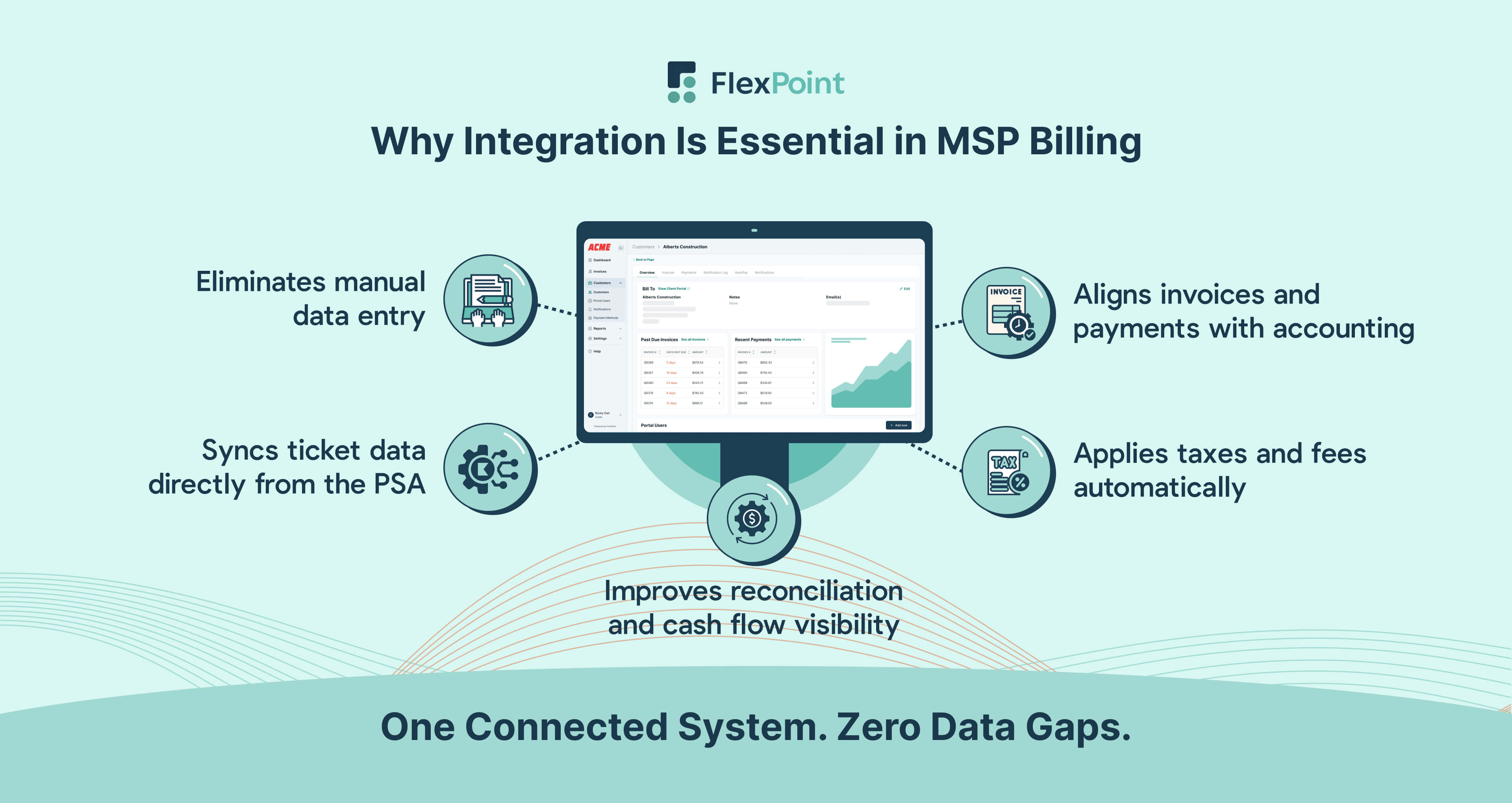
The integration of core applications is considered vital for delivering seamless service for 90% of MSPs.
When billing software doesn’t integrate seamlessly with your PSA and accounting platform, you’re left managing disconnected tools that don’t talk to each other.
This often results in the need for manual data copying from one system to another. Also, it leads to an increase in mistakes, duplications, or missing information.
Additionally, manual processes lead to mismatched invoice amounts, delayed payments, or time-consuming reconciliations at the end of the month for the MSP finance teams.
Disconnected systems mean inconsistent data across your tech stack. Integration eliminates these pain points by ensuring that information flows automatically between systems.
Time entries, usage data, and service adjustments are all captured directly into invoices. Invoices are connected to your accounting platform for accurate tracking, payment handling, and deposit reconciliation. Payments sync back into your billing software PSA to reflect status updates.
This streamlining not only boosts efficiency and accuracy, but it also frees your team to focus on client service, rather than on administrative cleanup.
Integrated billing is foundational in today’s MSP environment. Here are some core functions that depend on integration for smooth execution:
- Pulling Service Ticket Data From the PSA: Integrating billing software with a PSA enables the automatic transfer of service ticket data, including resource usage and service technician hours, from the PSA into the billing system. This eliminates manual data entry, ensures accuracy, and speeds up invoicing. With this integration, every billable action logged in the PSA is transmitted directly to the billing platform, enabling MSPs to generate timely, detailed, and error-free invoices based on actual service delivery.
- Syncing Invoice and Payment Records With Accounting Systems: Integrating billing software with accounting systems enables automatic syncing of invoice and payment records, reducing the need for manual entry. This ensures that financial data, such as invoices issued, payments received, and outstanding balances, is always up to date across both platforms. In addition, it also allows MSPs to instantly identify overdue payments and generate accurate aging reports, making it easier to follow up with clients and maintain healthy cash flow. As a result, MSPs gain accurate financial reporting, streamlined bookkeeping, and improved compliance while minimizing errors and saving time on administrative tasks.
- Applying Taxes, Surcharges, or Discounts Based on Service Packages: Integration helps automatically apply taxes, surcharges (for credit card payments only, where permitted by law), or discounts based on service packages by pulling data from your PSA. This data includes service types, customer location, and pricing tiers, and is synced with your billing and accounting systems. This ensures the correct tax rates, fees, or discounts are applied consistently according to predefined rules, without manual calculation. Furthermore, it reduces errors, speeds up invoicing, and ensures compliance with tax regulations across different regions or service levels.
- Reconciling Payment Records and Aging Receivables: Integration helps reconcile and manage aging receivables by automatically syncing payment data from accounting software directly into your billing software and vice versa. This real-time synchronization ensures that invoices are marked as paid when a transaction occurs, reducing manual entry and the risk of errors.
FlexPoint was designed for MSPs with integration in mind, not as a standalone tool that requires manual entries. FlexPoint offers a comprehensive payment automation solution that integrates seamlessly with existing MSP systems and is fully customizable to meet each client's unique needs.
{{ebook-cta}}
Top 5 FlexPoint Integrations MSPs Ask About
MSPs rely on FlexPoint not only for billing and payments, but also for its seamless integration with the systems they use daily.
Whether it’s syncing with a PSA, automating accounting workflows, or streamlining payment reconciliation, FlexPoint’s most requested integrations reflect the real-world priorities of MSPs.
The platform helps reduce manual work, improve data accuracy, and speed up payment collections.
Below are the top five integrations MSPs consistently ask about and for good reason:
1. QuickBooks Online
QuickBooks Online is a cloud-based accounting platform that automates critical financial processes for companies. This includes bookkeeping, bank reconciliation, expense tracking, financial reporting, and tax preparation.
For most small businesses, including MSPs, it’s an essential tool for maintaining accurate ledgers, generating profit and loss statements, and ensuring compliance with tax regulations.
FlexPoint offers a tight, two-way integration with QuickBooks Online (QBO), automating billing, reconciliation, and synchronizing invoice data.
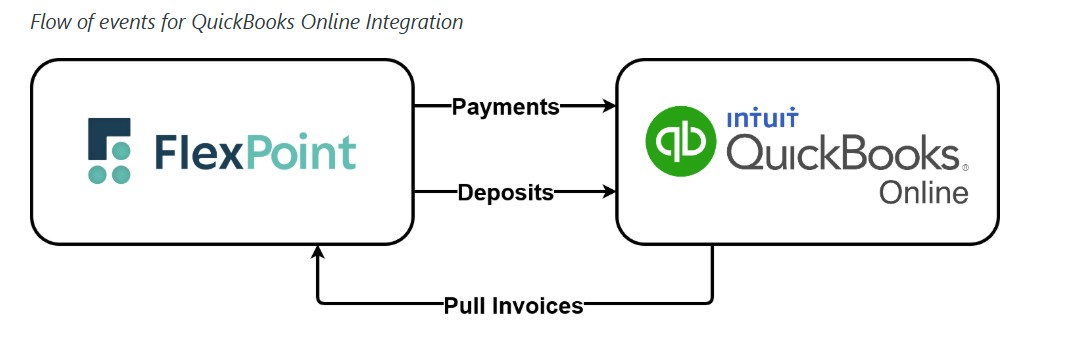
FlexPoint integrates seamlessly with QuickBooks Online in just a few simple steps.
Setting up the FlexPoint-QuickBooks Online integration is straightforward.
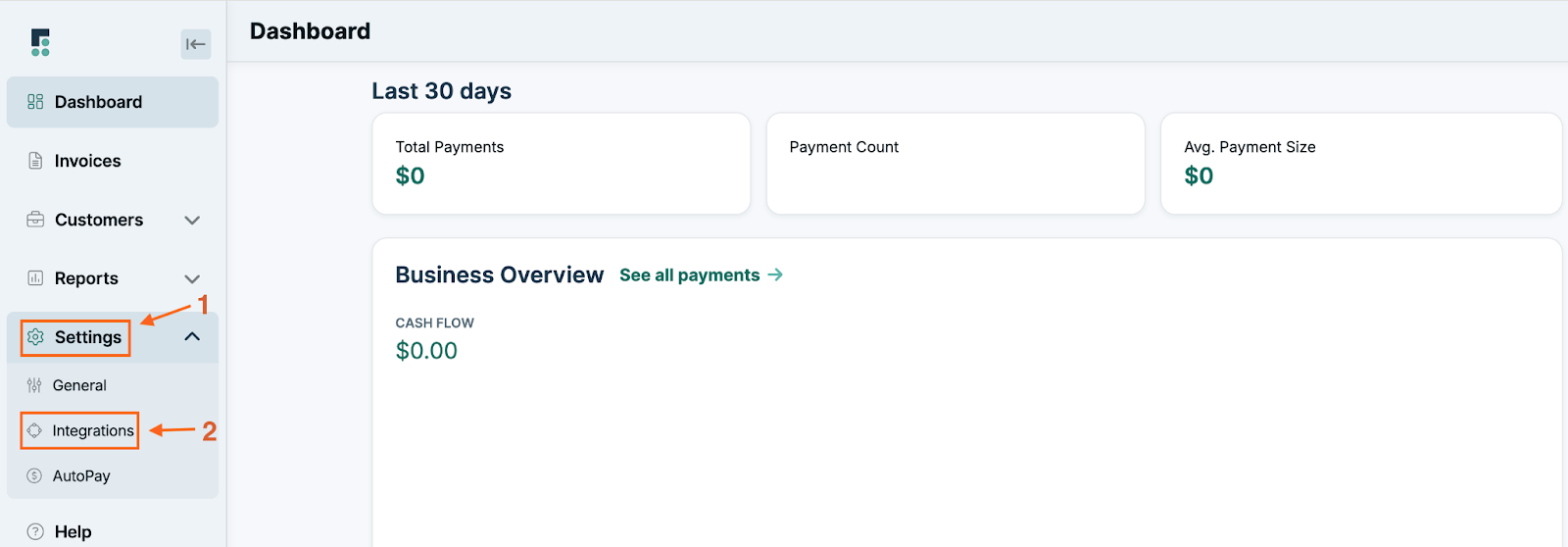
After logging into your FlexPoint account, users can navigate to the Integrations section and connect directly to QuickBooks Online.
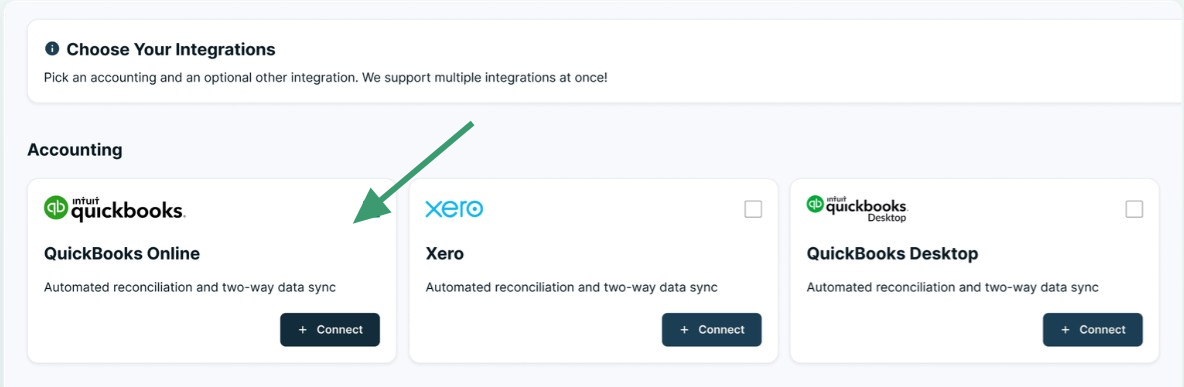
Once prompted, users can log in to their QuickBooks account and authorize the connection.
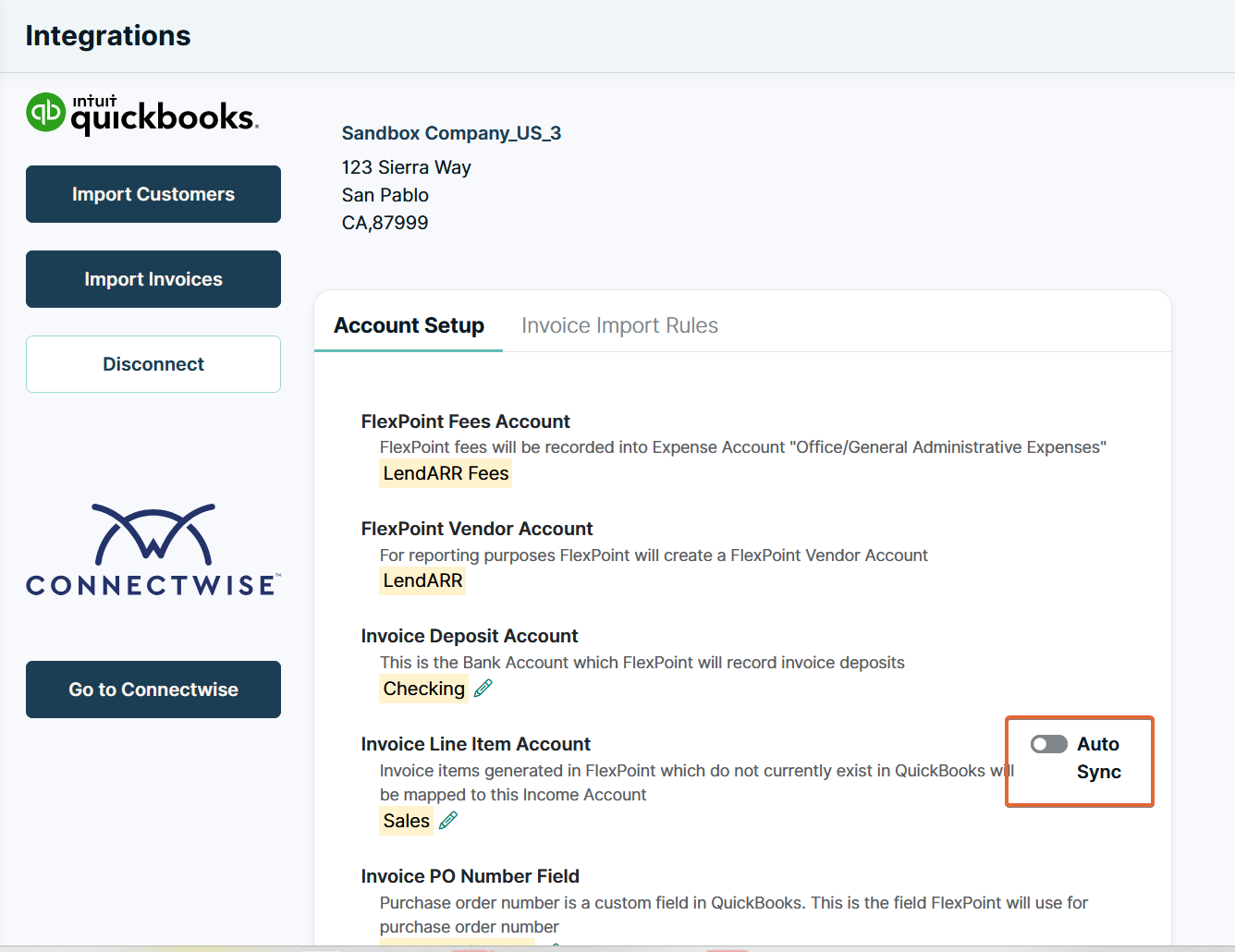
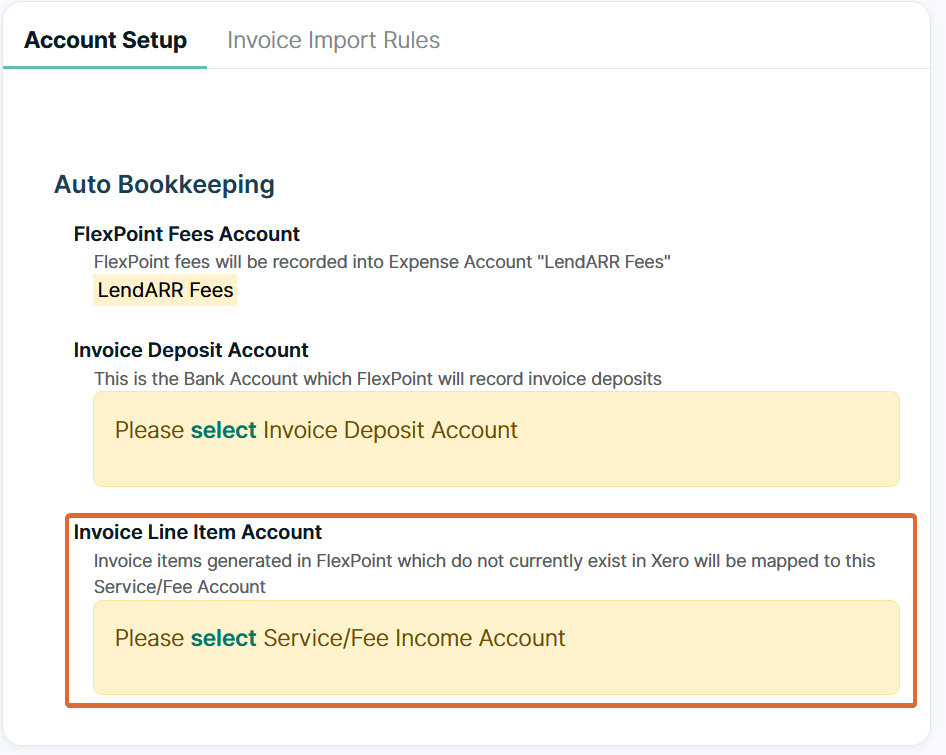
From there, syncing begins automatically pushing invoices, payments, and financial data from FlexPoint into QuickBooks (and vice versa) for accurate bookkeeping, reconciliation, and streamlined financial reporting.
Also, you can generate client invoices in FlexPoint, which then seamlessly syncs financial data with QuickBooks Online. This helps streamline bookkeeping, speeding up reconciliation and simplifying tax reporting without the need for manual data entry.
Alternatively, if the invoices are created and sent via QuickBooks Online, that data is also synced automatically to FlexPoint.
Let’s take, for instance, SkyCamp Technologies, an Ohio-based MSP, which was scaling its billing operations. However, managing payments became burdensome due to the need to juggle multiple payment processing platforms.
Specifically, their QuickBooks ACH lacked full integration with their former invoicing platform, resulting in the manual processing of each monthly ACH payment, as invoice amounts varied based on customer license counts.
The lack of integration meant that SkyCamp had to manually process payments, which was a time-consuming process. They sought end-to-end automation to reduce time spent on accounting and manual reconciliation and ensure error-free books.
Since switching to FlexPoint, SkyCamp experienced a significant overhaul of its billing operations.
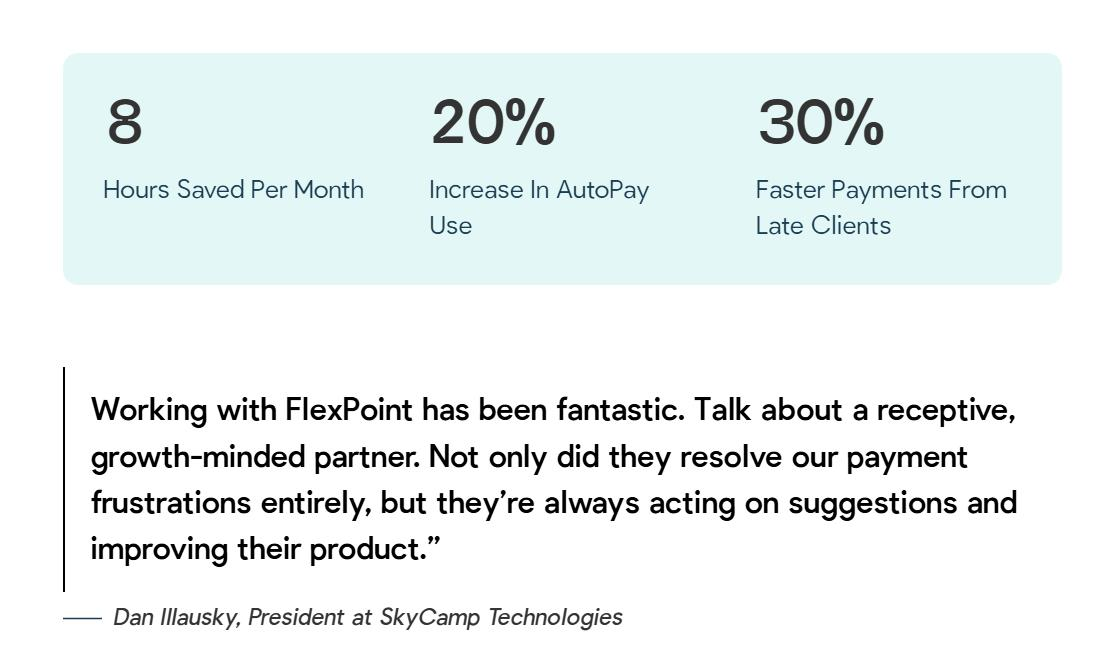
FlexPoint's auto-syncing and reconciliation with QuickBooks Online eliminated their existing payment processing issues, ensuring that all of SkyCamp’s accounting was in one centralized place and making reconciliation low-maintenance.
The Results of Using FlexPoint for SkyCamp Technologies:
- This has led to an 8-hour reduction in work per month.
- A 20% increase in AutoPay means predictable cash flow every month.
- They also increased payment speed from late clients by 30%.
2. QuickBooks Desktop
QuickBooks Desktop is a robust, on-prem (locally installed) accounting solution trusted by many small businesses (including MSPs) for its advanced financial management capabilities.
QuickBooks Desktop offers comprehensive features like detailed bookkeeping, invoicing, bank reconciliation, job costing, and tax reporting.
For MSPs, it delivers precision and control when tracking income and expenses, managing client accounts, and generating financial statements.
FlexPoint integrates with QuickBooks Desktop via the Intuit Web Connector, allowing seamless data exchange between the two platforms.
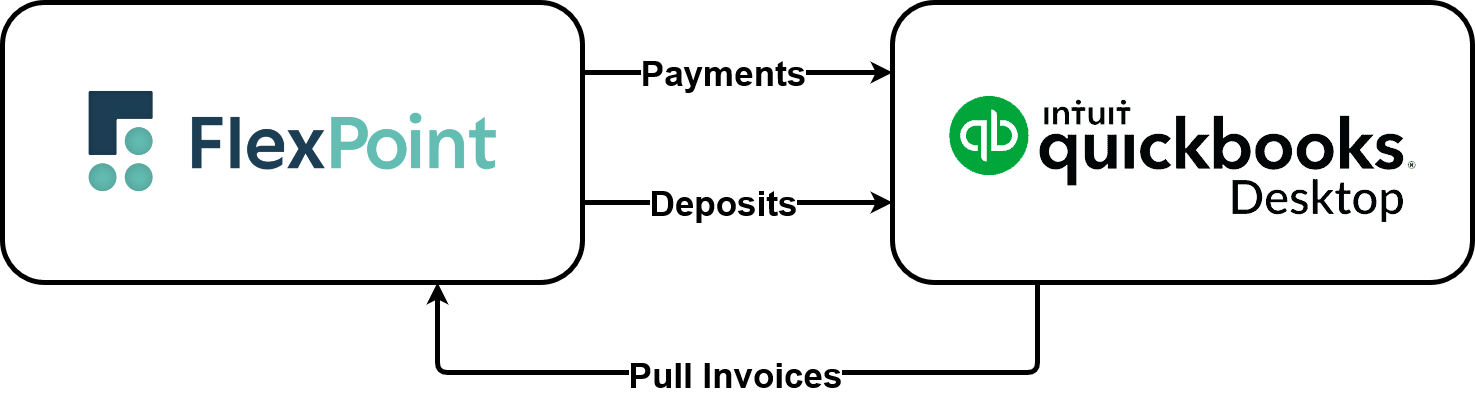
Setting up the FlexPoint-QuickBooks Desktop integration is straightforward.
To get started, users install the Web Connector, then download a configuration file directly from the FlexPoint Integrations page.
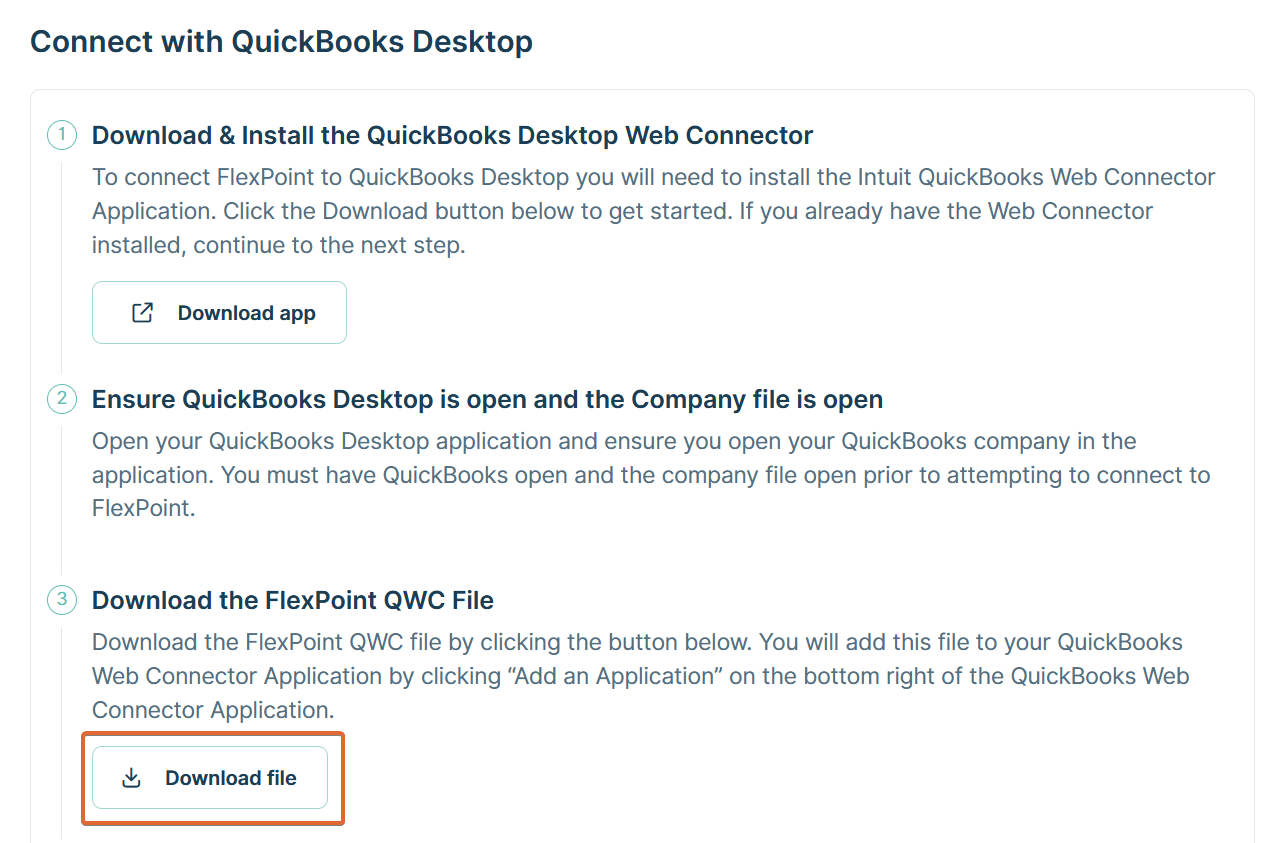
After launching the Web Connector, it is connected by importing the configuration file into QuickBooks Desktop.
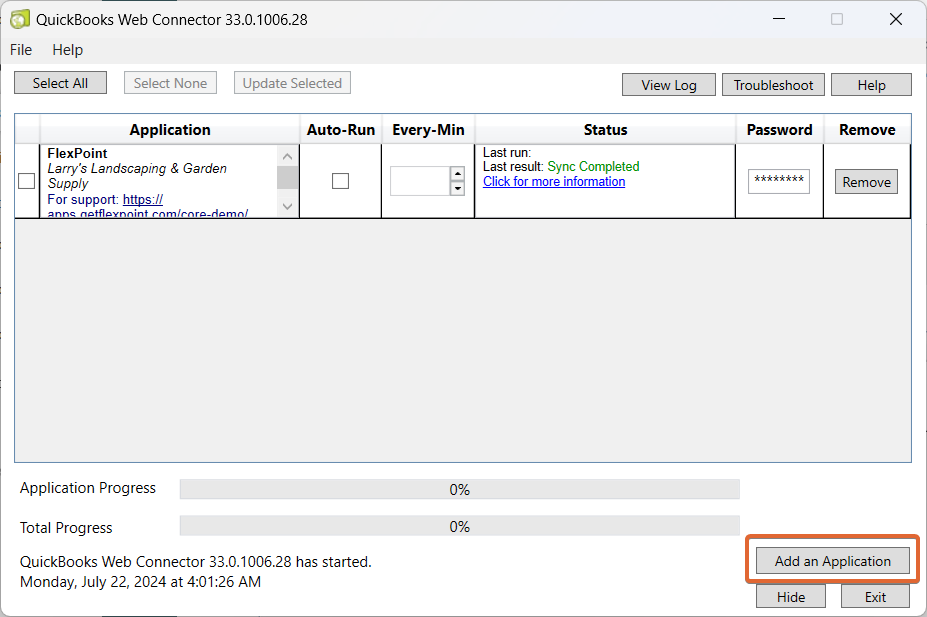
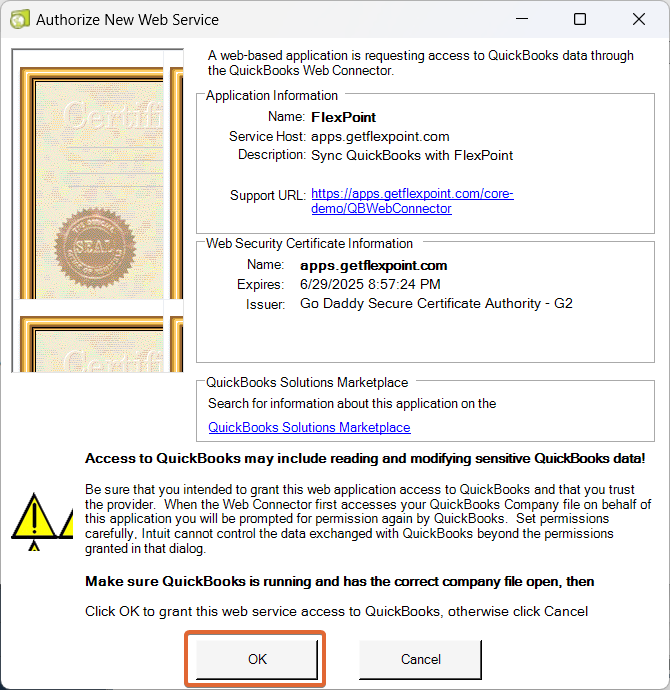
When integrated with FlexPoint, QuickBooks Desktop automatically receives the client invoice data created in FlexPoint. This sync eliminates manual data entry, making bookkeeping, deposit reconciliation, and tax reporting faster and more accurate.
Alternatively, if invoices are created and sent via QuickBooks Desktop, that data is also synced automatically to FlexPoint. This bi-directional syncing streamlines bookkeeping and ensures accurate reconciliation & financial reporting.
Let’s take the example of TAZ Networks, a Michigan-based MSP, which previously was manually sending invoices from QuickBooks Desktop.
They were spending time chasing past-due payments and re-sending invoices to clients, which was a compounding issue.
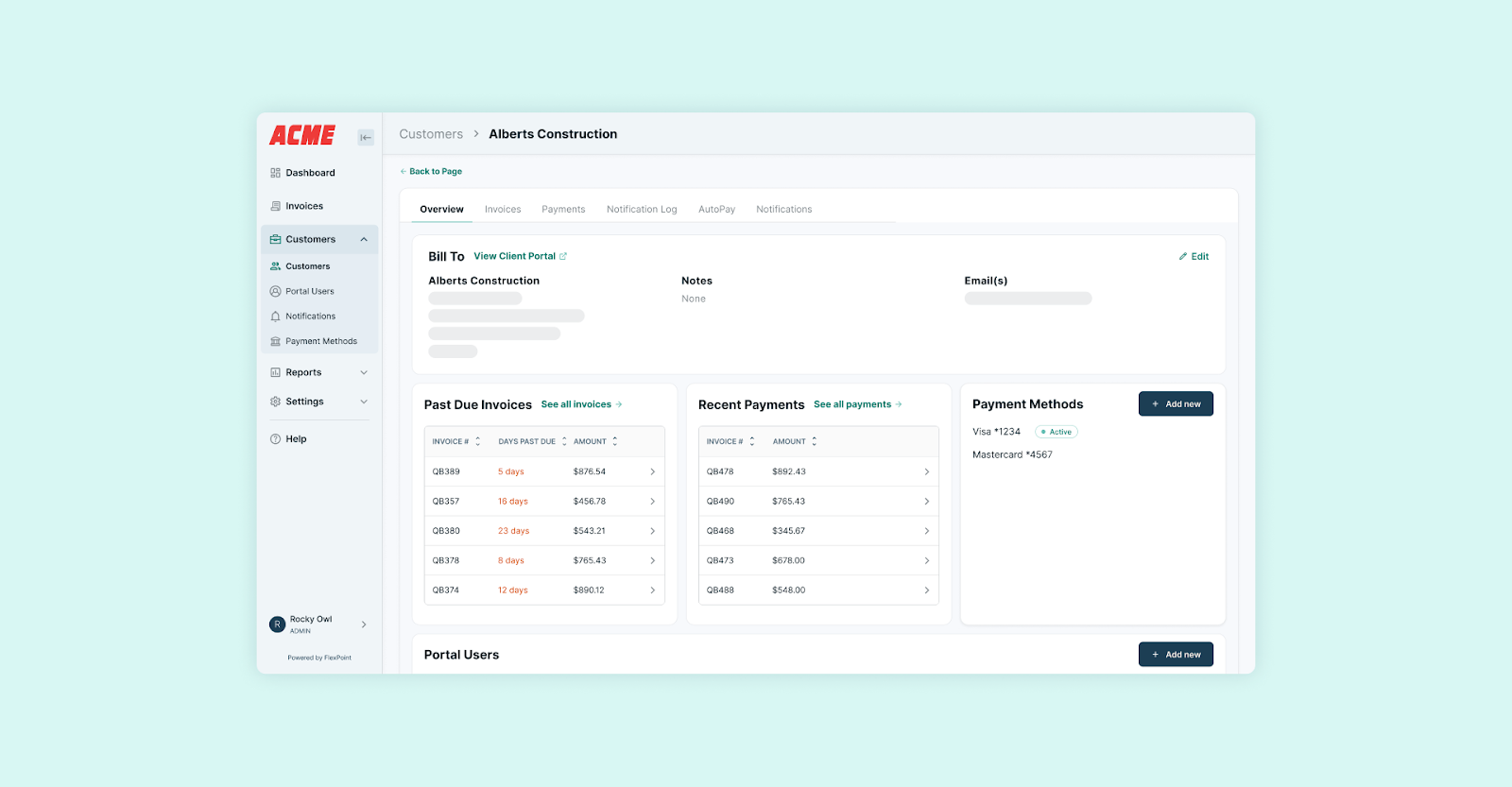
Due to the limitations of QuickBooks Desktop, TAZ Networks had accumulated a sizable past-due statement. In addition, their clients had no centralized place to look for their invoices (both paid and unpaid).
Since switching to FlexPoint, TAZ Networks has significantly reduced its manual workload in its accounting department.
The MSP’s owner was immediately impressed by FlexPoint’s reasonable pricing and easy-to-navigate interface. FlexPoint’s client portal became a hit from day one.
The Results of Using FlexPoint for TAZ Networks:
- They experienced a 4x reduction in AR aging.
- Additionally, a 30% decrease in invoicing time.

3. Xero
Xero is a cloud-based accounting platform tailored for small to medium-sized businesses.
The accounting software offers robust tools for invoicing, bank reconciliation, expense tracking, financial reporting, and tax compliance.
For MSPs, Xero provides a reliable financial foundation, enabling teams to manage day-to-day transactions effectively. Xero also helps maintain cash flow visibility and keeps accurate, audit-ready financial records at all times.
FlexPoint integrates tightly with Xero through a secure, two-way connection, ensuring that your invoicing and payment data remain accurate and up-to-date in both systems.
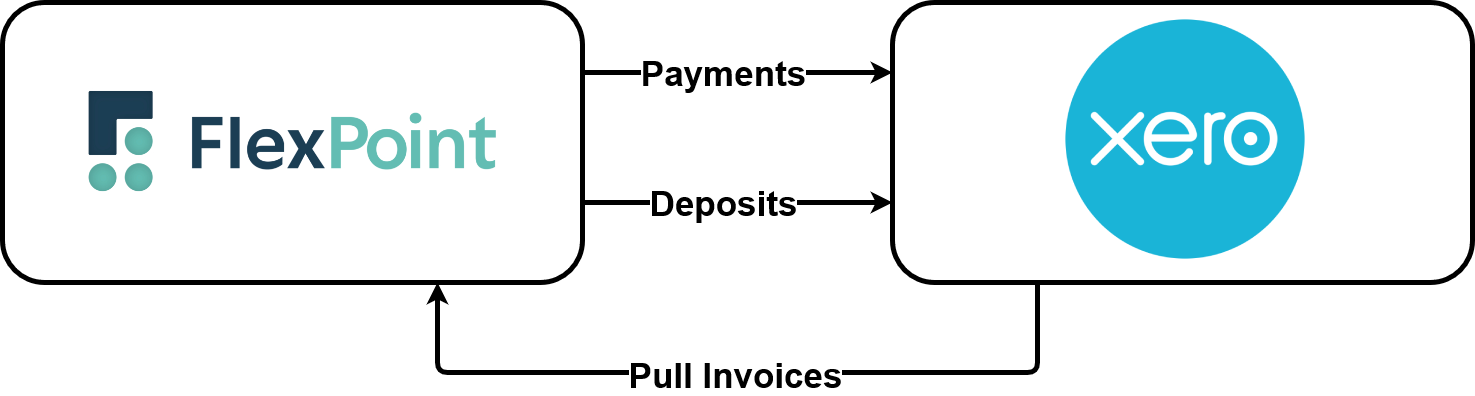
This eliminates the need for manual entry or reconciliation between billing and accounting platforms, reducing errors and freeing up valuable time for finance and operations teams.
Setting up the FlexPoint-Xero integration is straightforward.
After logging into FlexPoint, users can navigate to the Integrations section and select Xero.
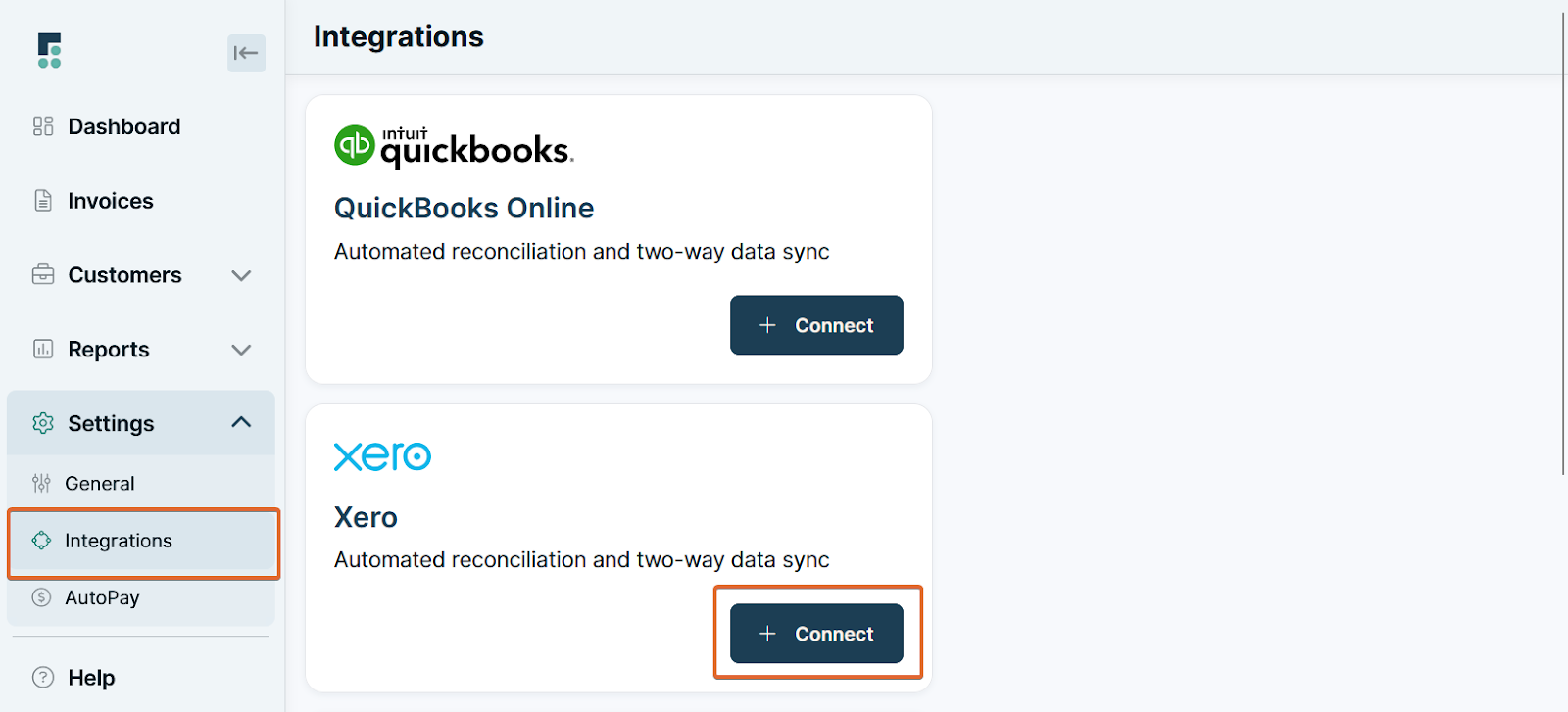
From there, they log into their Xero account and authorize the connection. Once linked, FlexPoint begins to automatically sync billing, invoice, and payment data.
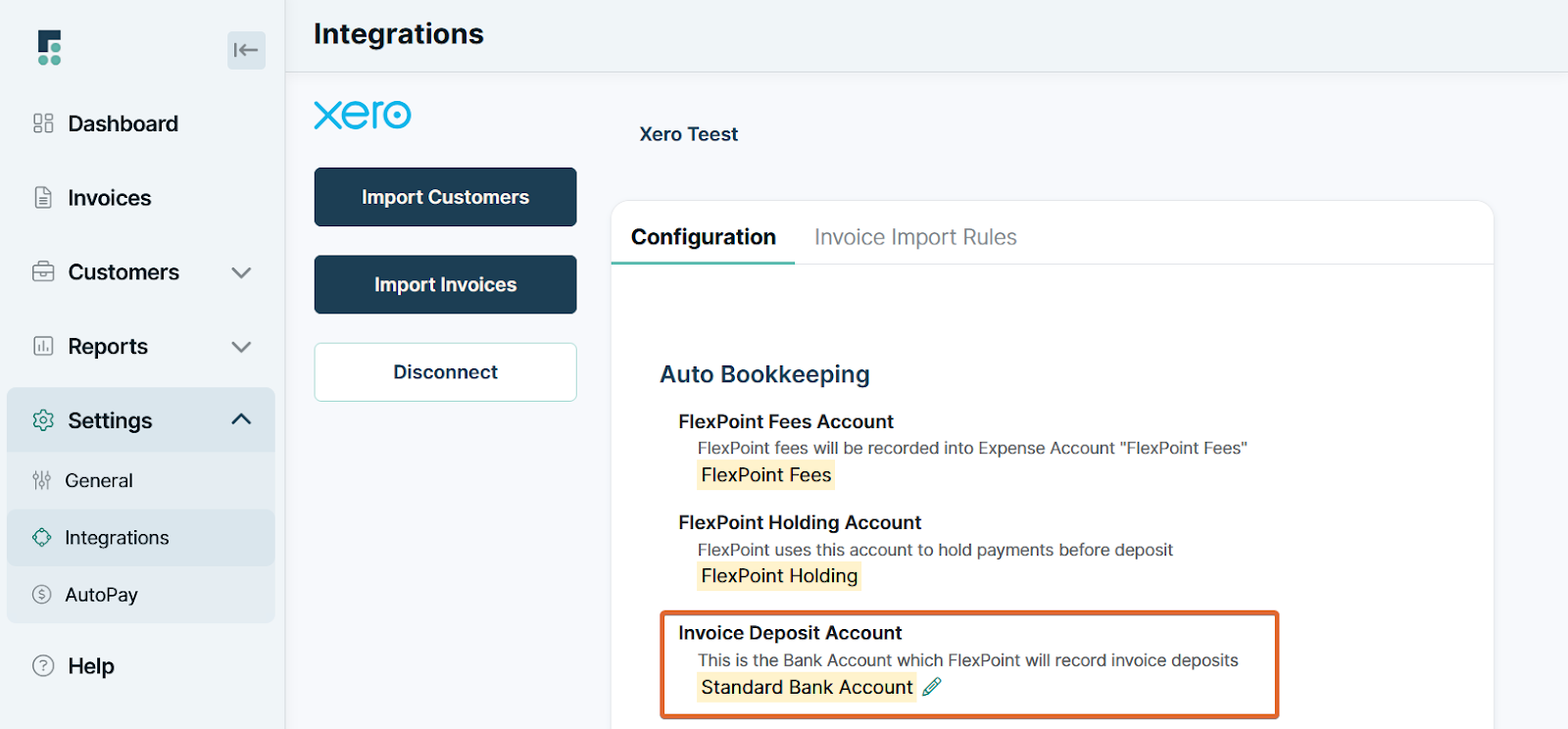
This integration supports a flexible billing workflow, whether invoices are created in FlexPoint or Xero. Both platforms remain synchronized, meaning payments recorded in one system are instantly reflected in the other, ensuring consistent records across your entire financial stack.
By automating these sync processes, the FlexPoint–Xero integration streamlines deposit reconciliation, speeds up accurate financial reporting, and simplifies billing compliance.
4. ConnectWise PSA
ConnectWise is a robust PSA platform that enables MSPs to manage client IT operations, track service delivery, manage inventory, and streamline internal processes, all from a single centralized system. The PSA software captures critical business data, including service tickets, technician time entries, client contracts, and project work, all in one single platform.
This helps MSP teams stay efficient and compliant with Service Level Agreements (SLA).
FlexPoint offers seamless, two-way integration with ConnectWise, automatically pulling real-time data, including tickets, time entries, and agreements, into your billing workflow.
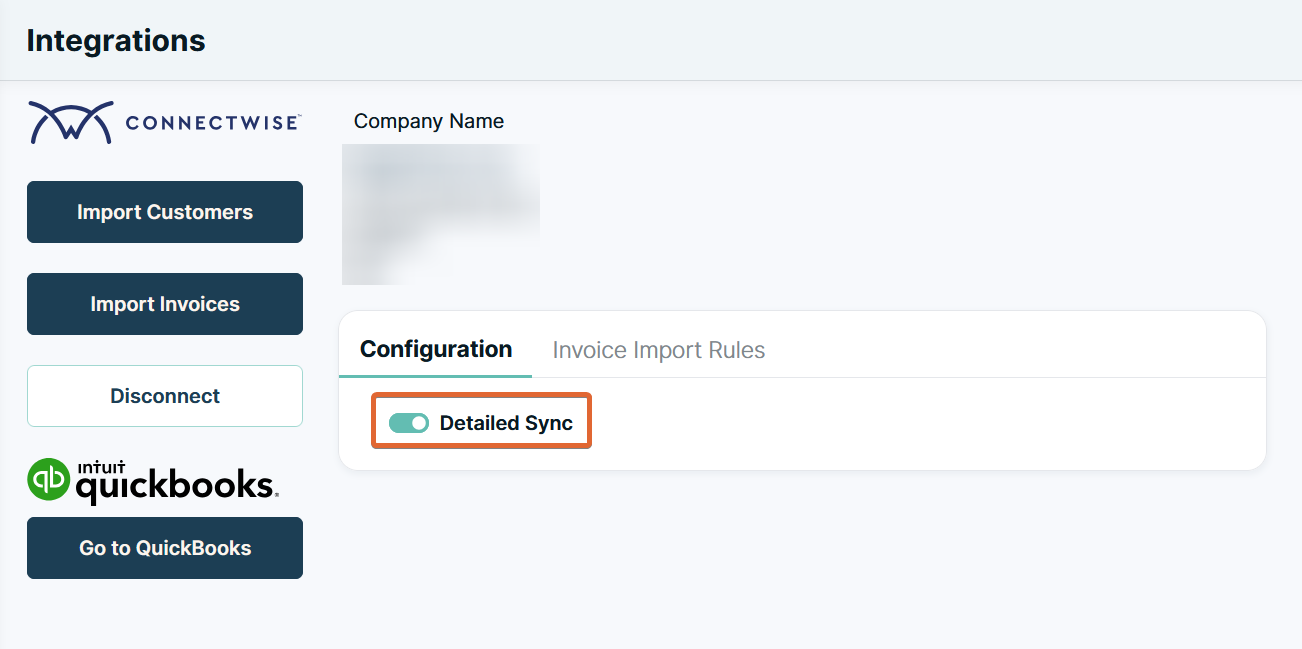
This connection ensures that every billable activity is accurately captured and invoiced, eliminating the need for manual input and reducing the risk of missed revenue.
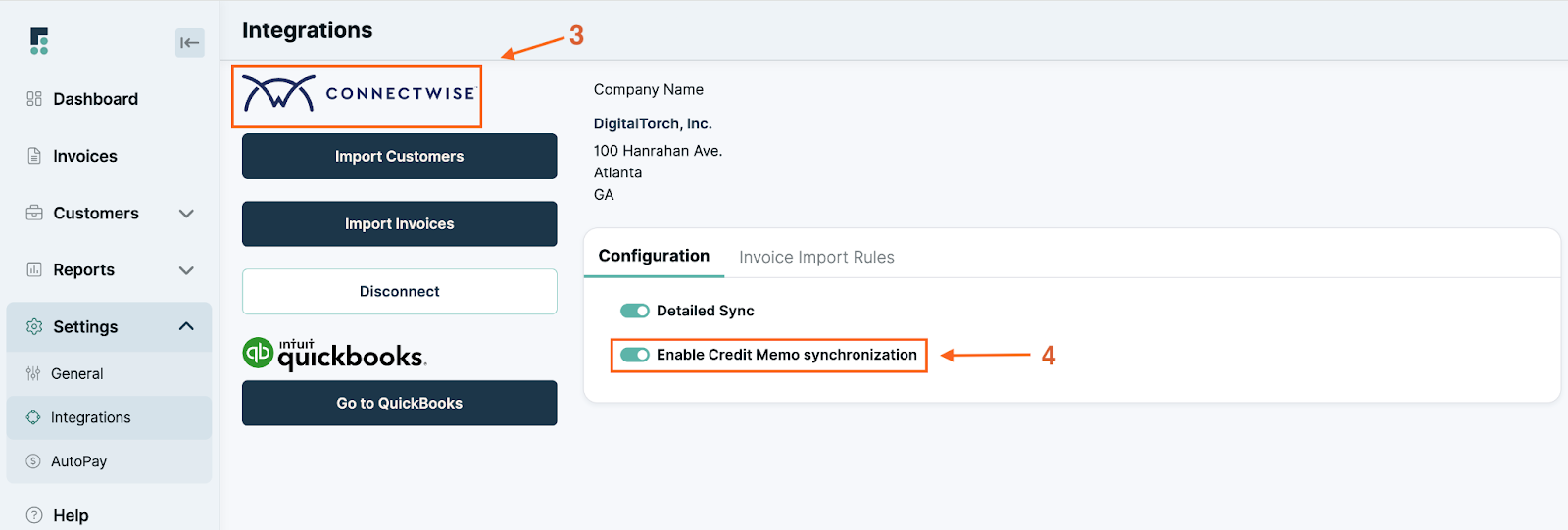
Setting up the FlexPoint-ConnectWise integration is straightforward.
After logging into ConnectWise, users simply create a new API Member, input FlexPoint-specific credentials, and generate API keys. These credentials are then added to the Integrations section within the FlexPoint platform.
Once connected, FlexPoint begins syncing billing-related data in real time, automating the generation of client invoices based on actual service delivery.
Whether you’re billing for hourly work, recurring contracts, or project milestones, FlexPoint ensures invoices are always accurate, timely, and aligned with data in ConnectWise. This integration streamlines your billing operations, improves revenue accuracy, and reduces administrative overhead across service and finance teams.
Consider, for instance, Excellent Networks, a Texas-based MSP, encountered significant hurdles with its invoicing and payment collection.
They used to send invoices through ConnectWise, and the majority of payments from customers were collected via physical checks, which sometimes went missing in the mail.
Mark Luna, President at Excellent Networks, was keen to find a solution to streamline their invoicing and eliminate this extensive manual work.
Upon researching payment portals used by other MSPs, Mark Luna discovered FlexPoint.
The onboarding process for FlexPoint was straightforward, requiring just a few clicks for Mark to set up his account and sync all of Excellent Networks' invoices to the platform.
From that point, FlexPoint streamlined and automated its payment processing with a single click.
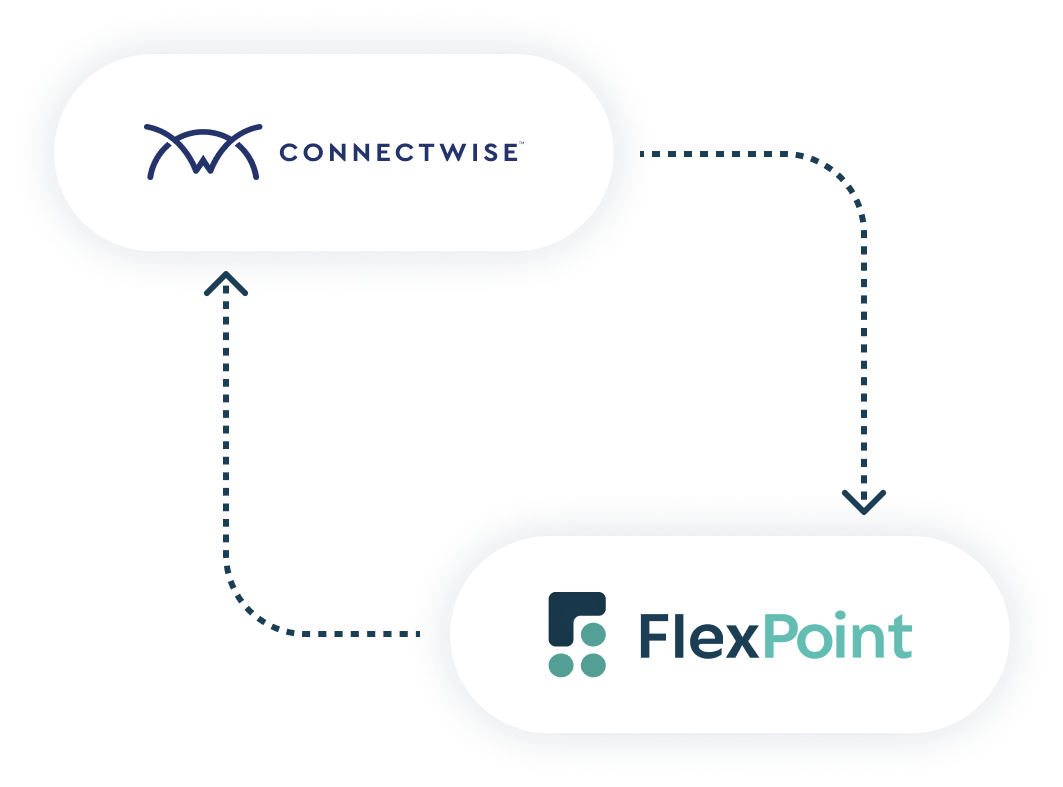
Excellent Networks integrated ConnectWise with FlexPoint to streamline their operations. This resulted in seamless data synchronization and improved invoice management.
Moreover, the integration significantly reduced manual data entry and improved the billing process.
The Results of Using FlexPoint for Excellent Networks:
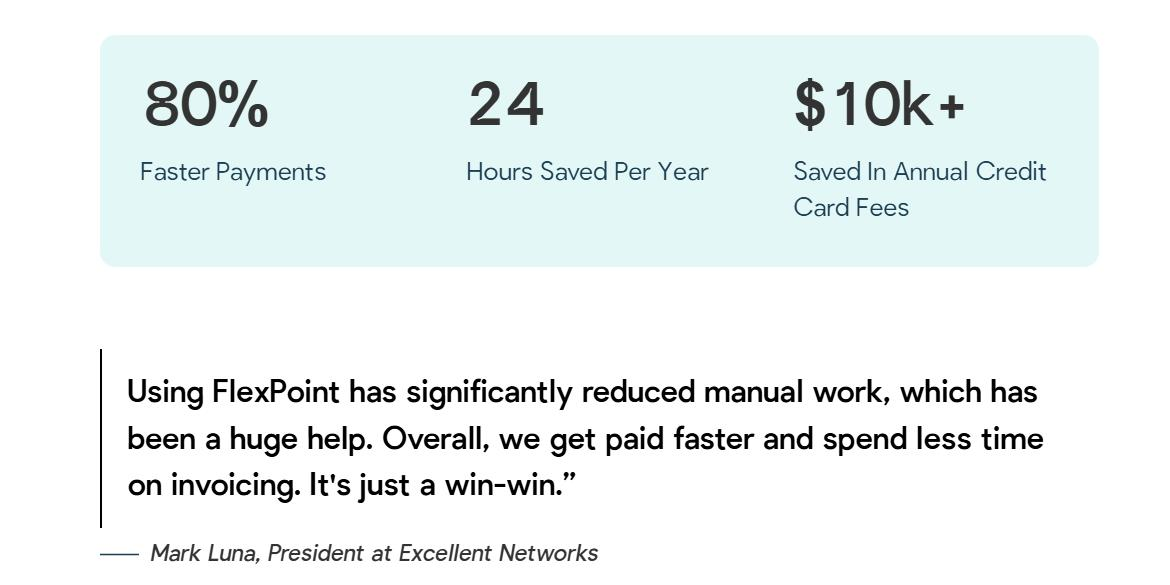
- Improved payment speed by 80%
- 24 hours saved per year in billing time due to FlexPoint’s integration.
5. SuperOps
SuperOps is a modern, cloud-based PSA platform purpose-built for MSPs to streamline daily operations, boost efficiency, and centralize service management.
The PSA/RMM platform serves as a centralized operational hub where MSPs can manage service tickets, client agreements, technician time, and asset lifecycles. The platform also helps ensure SLA compliance, all within one intuitive interface.
FlexPoint offers a seamless, two-way integration with SuperOps, enabling MSPs to synchronize billing workflows and eliminate manual data handling between systems.
This integration ensures that invoice and payment data stay consistent, accurate, and up-to-date across both platforms.
Setting up the FlexPoint-ConnectWise integration is straightforward.
Within SuperOps, users can genera




