

Your clients already live in CloudRadial. They open it to submit a ticket, check on an asset, or see what's happening with their account. It's built to be the front door to your business, and for MSPs running CloudRadial as their unified client portal, it's doing exactly that.
Now that front door opens onto payments too. With FlexPoint connected, the same portal clients use for support and account visibility becomes the place they go to view and pay an invoice, with one click and no separate login to remember. Billing stops being the one piece of the client relationship that lives somewhere else, and instead, becomes just another part of the unified experience CloudRadial was built to deliver.
That's what the FlexPoint integration adds to CloudRadial: a fully connected payment experience, powered by powerful AR automation running behind the scenes.
What is CloudRadial?
CloudRadial is the leading AI-powered service delivery and client success platform specifically designed for MSPs. The company's unified platform brings together artificial intelligence, self-service capabilities, automations, open APIs, and a unified client portal to help MSPs transform their service delivery and enhance client experiences. Trusted by over 1,000 MSPs worldwide, CloudRadial enables service providers to reduce cost, improve margins, and amplify productivity while delivering exceptional client outcomes.
For the MSP, CloudRadial centralizes the client relationship. For the client, it removes friction from getting help. But CloudRadial is a service and account management layer, not a billing or accounts receivable platform. It wasn't built to process a payment, manage a payment method on file, or automate a collections workflow, and it doesn't try to be.
That's a deliberate scope, and it's exactly where FlexPoint picks up.
How the FlexPoint + CloudRadial integration works
The FlexPoint and CloudRadial integration connects the portal your clients already use to the payment and AR automation engine running behind the scenes.
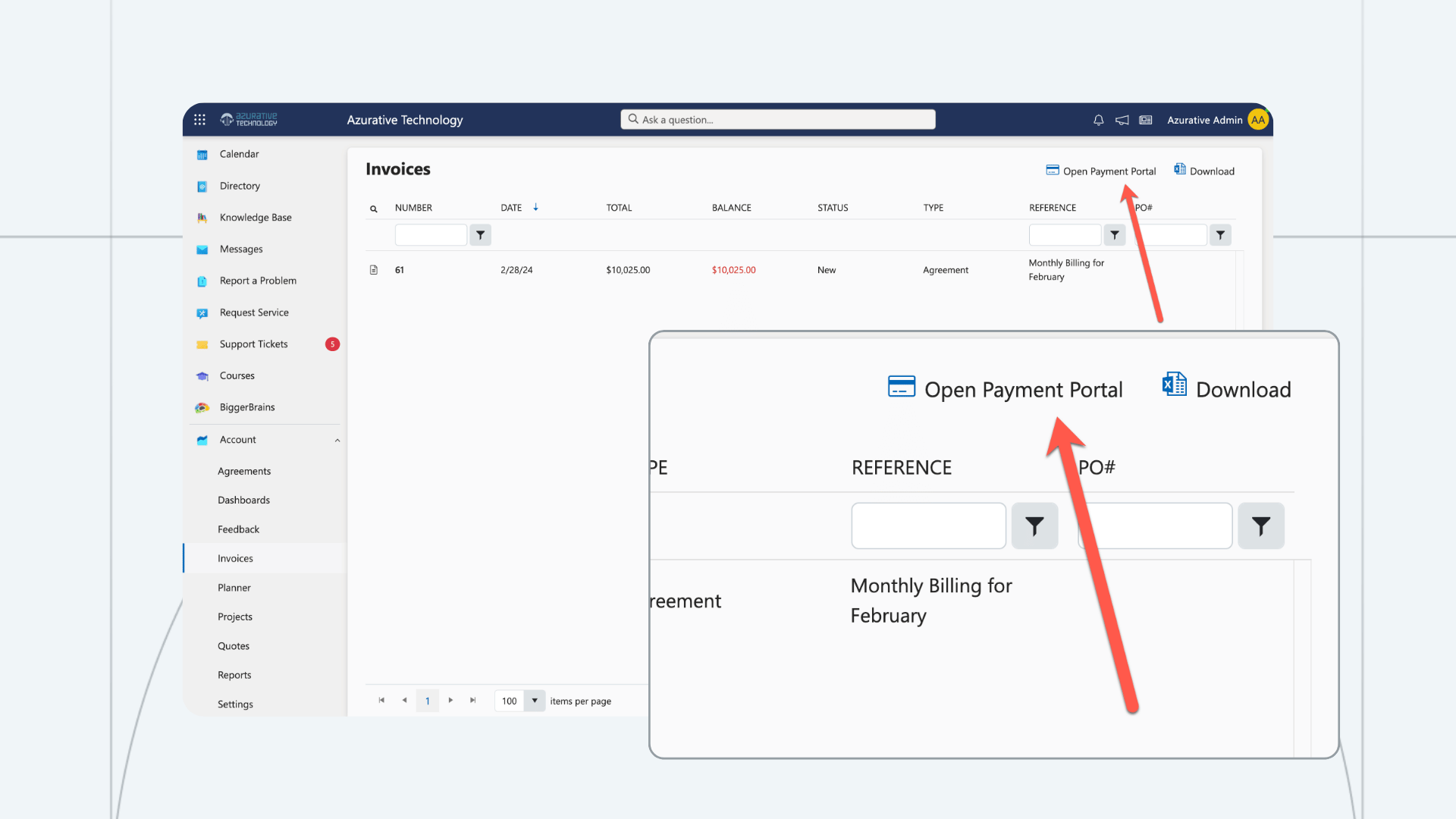
Once connected, clients see an Open Payment Portal button at the top right of the Account > Invoices page in their CloudRadial portal. One click, and they're signed into FlexPoint automatically. It eliminates the need for a second round of logging in, and no separate URL to bookmark.
It's worth noting how the two systems divide the work. The invoices clients see listed on that Account > Invoices page are pulled from your connected PSA, not from FlexPoint. CloudRadial's role is to surface those invoices and hand the client off to FlexPoint with a single click.
From there, your clients follow the typical FlexPoint payment portal experience. They can view current and historical invoices, add and update payment methods and portal users, plus pay invoices with ACH, credit card, and flexible financing/BNPL options.
That handoff is also fully behind the scenes for the people who set it up. Authentication between CloudRadial and FlexPoint is handled automatically for every user, so there's no per-client configuration to manage once the integration is live.
With the integration, MSPs can:
- Give clients single sign-on access from their CloudRadial portal straight into FlexPoint
- Remove the second login clients would otherwise need to find and pay an invoice
- Offer ACH, credit card, and FlexLine financing up to 12 months at checkout
- Automate payment reminders and past-due notices so collections don't rely on a manual follow-up
- Enable AutoPay for recurring invoices
- Keep the entire payment experience white-labeled under the MSP's own brand, not a third-party tool
- Surface the payment portal in additional places beyond Account > Invoices, such as a custom menu item in a client's Applications area, for teams that want more than one path to FlexPoint
Instead of asking clients to learn two systems, CloudRadial and FlexPoint together give them one continuous journey: get support, add a new user, and pay a bill, all without leaving the portal they already trust.
Why MSPs use FlexPoint and CloudRadial together
CloudRadial and FlexPoint solve different halves of the same relationship. CloudRadial owns the service and account experience. FlexPoint owns accounts receivable and getting paid. Connected, they remove the seam clients would otherwise fall into.
Remove payment friction, get paid faster
Every additional login is friction in the payment experience, which costs MSPs revenue. The SSO handoff from CloudRadial into FlexPoint removes that secondary login step entirely. Once your clients click “Open Payment Portal”, they are immediately taken to their invoices for a quick checkout experience within FlexPoint.
Check out the FlexPoint client portal experience below.
Keep the experience consistent, not fragmented
Clients don't think about your tech stack. They think about your brand. When the jump from CloudRadial to FlexPoint is invisible, seamless, and fully white-labeled, it reinforces that they're still dealing with your business, not being routed through a patchwork of vendors.
Support a growing client base without adding overhead
As an MSP adds clients, every disconnected step in the billing process gets multiplied across every account. A single sign-on path from the portal clients already use into automated collections means growth doesn't have to come with a proportional increase in support load or manual AR work.
Setting up the FlexPoint + CloudRadial integration
Connecting the two platforms is a short, one-time setup with no API keys or developer work required.
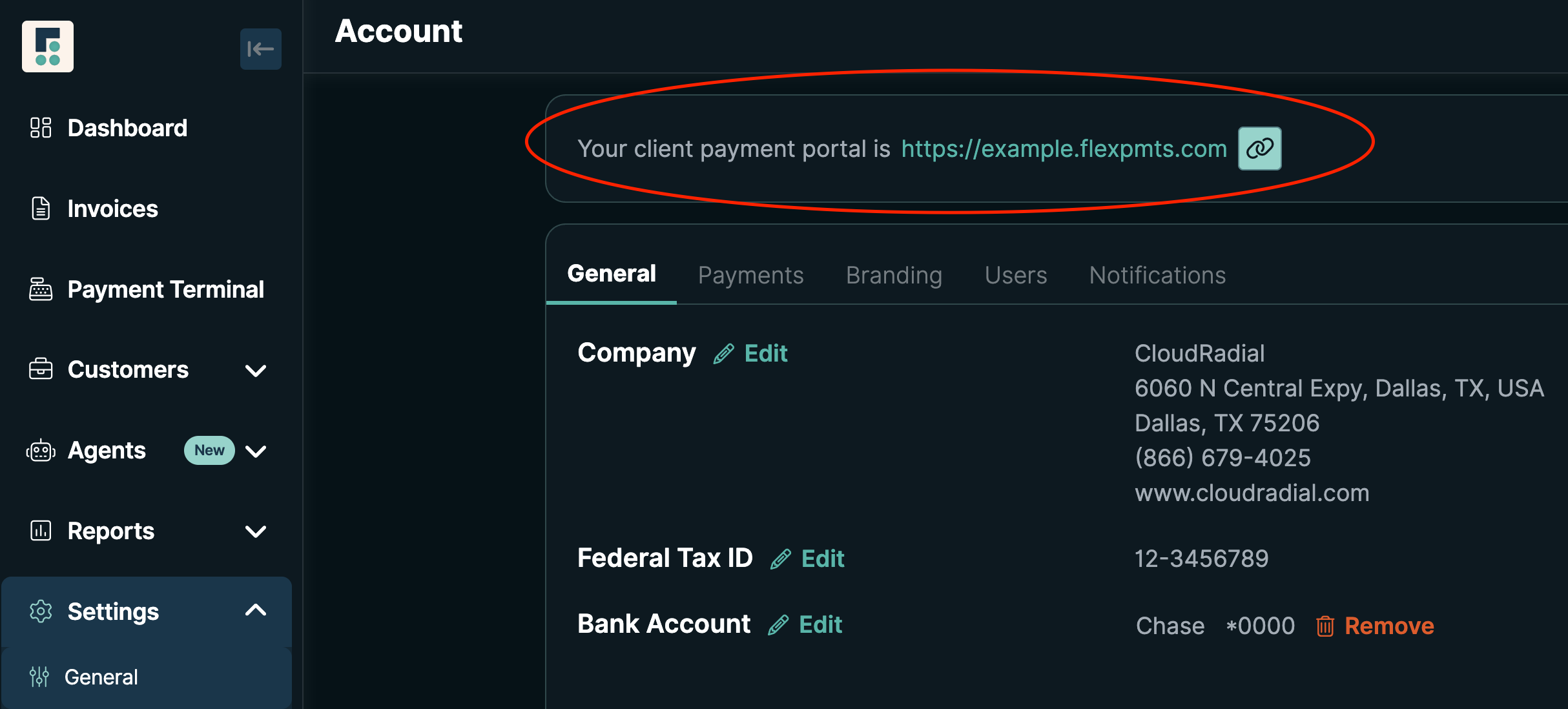
In FlexPoint:
- Log in to your FlexPoint account as an administrator
- Go to Settings > General
- Copy the client payment portal URL from the top message
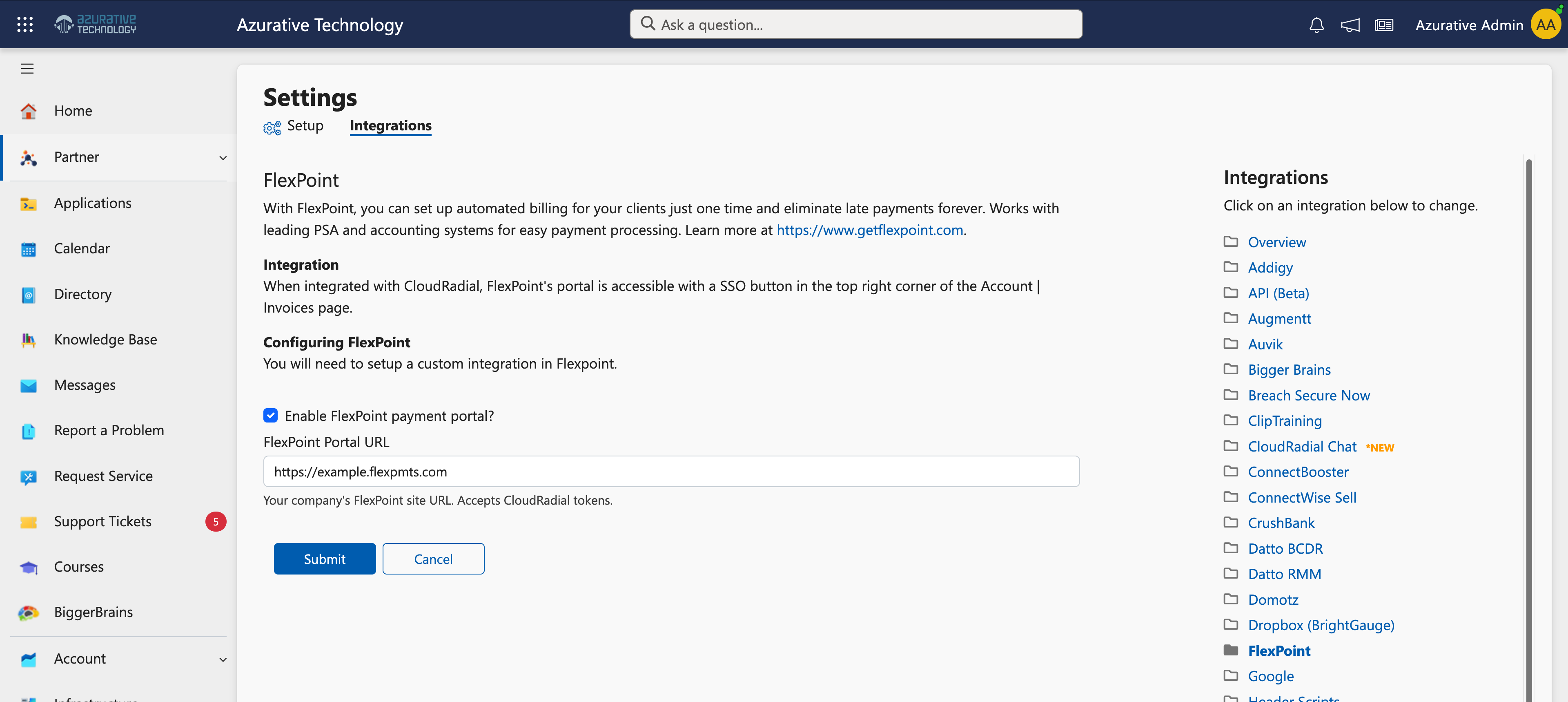
In CloudRadial:
- Log in to CloudRadial UCP as a Partner Administrator
- Go to Partner > Settings, then select Integrations > FlexPoint from the Configuration column
- Check the box to enable the FlexPoint payment portal
- Paste in the client payment portal URL copied from FlexPoint
- Click Submit
Once that's done, the Open Payment Portal button appears automatically on the Account > Invoices page for every client.
For MSPs that want to expose FlexPoint somewhere beyond that page, CloudRadial also supports adding a custom menu item under a client's Company > Applications area (or published to multiple clients via Partner > Content) using the URL token @PaymentPortal. This invokes the same SSO connection and is a common way to add a dedicated "Payments" or "Invoice Portal" link to the client-facing menu, and can be restricted to Admin-level users only if you'd rather keep it off the standard user menu.
A couple of things worth knowing before you flip the switch:
- CloudRadial supports one active payment integration at a time. If you're currently running a different payment integration, you'll need to remove it before enabling FlexPoint.
- To test the SSO connection, log in as an actual end-user account. Partner administrator accounts, and any account using CloudRadial's Impersonate feature, won't trigger the FlexPoint link.
For the full walkthrough, see CloudRadial's Integrating with FlexPoint support article or the FlexPoint Help Center.
Bring the client experience and the payment experience together
Clients don't distinguish between "the portal" and "the payment system." To them, it's all just your business. CloudRadial gives clients a single place to get support and manage their account. FlexPoint makes sure paying an invoice feels just as native.
If you already run CloudRadial, adding FlexPoint is a quick way to close the one gap left in your client experience: getting paid.
Ready to see how FlexPoint can bring single sign-on payments into your CloudRadial portal? Schedule a personalized demo today.