


As your MSP grows, so do your billing complexities. From managing recurring subscriptions to ensuring financial accuracy, the demands on billing processes can quickly become overwhelming.
Common payment challenges, such as delays, errors, and missed payments, can erode revenue and client relationships.
Relying on manual methods or fragmented systems is no longer an option. That’s why MSPs must select the best billing software to meet their needs. These automated tools streamline invoicing, accelerate payments, and provide real-time financial insights, enabling them to scale their operations while confidently maintaining top-notch client service.
This article explores the leading MSP billing solutions for 2026 and beyond. We discuss billing software designed for MSPs to simplify invoicing & billing, reduce manual effort, and strengthen your MSP’s financial health.
{{toc}}
Quick Comparison: MSP Billing Softwares at a Glance
Before the detailed breakdowns, here's how the six platforms compare across the features MSPs ask about most.
For a deeper look at what each of these features actually does, see: MSP Payment Software: 9 Must-Have Features to Look for in 2026
Why MSP Billing Software is Essential for Managed Service Providers
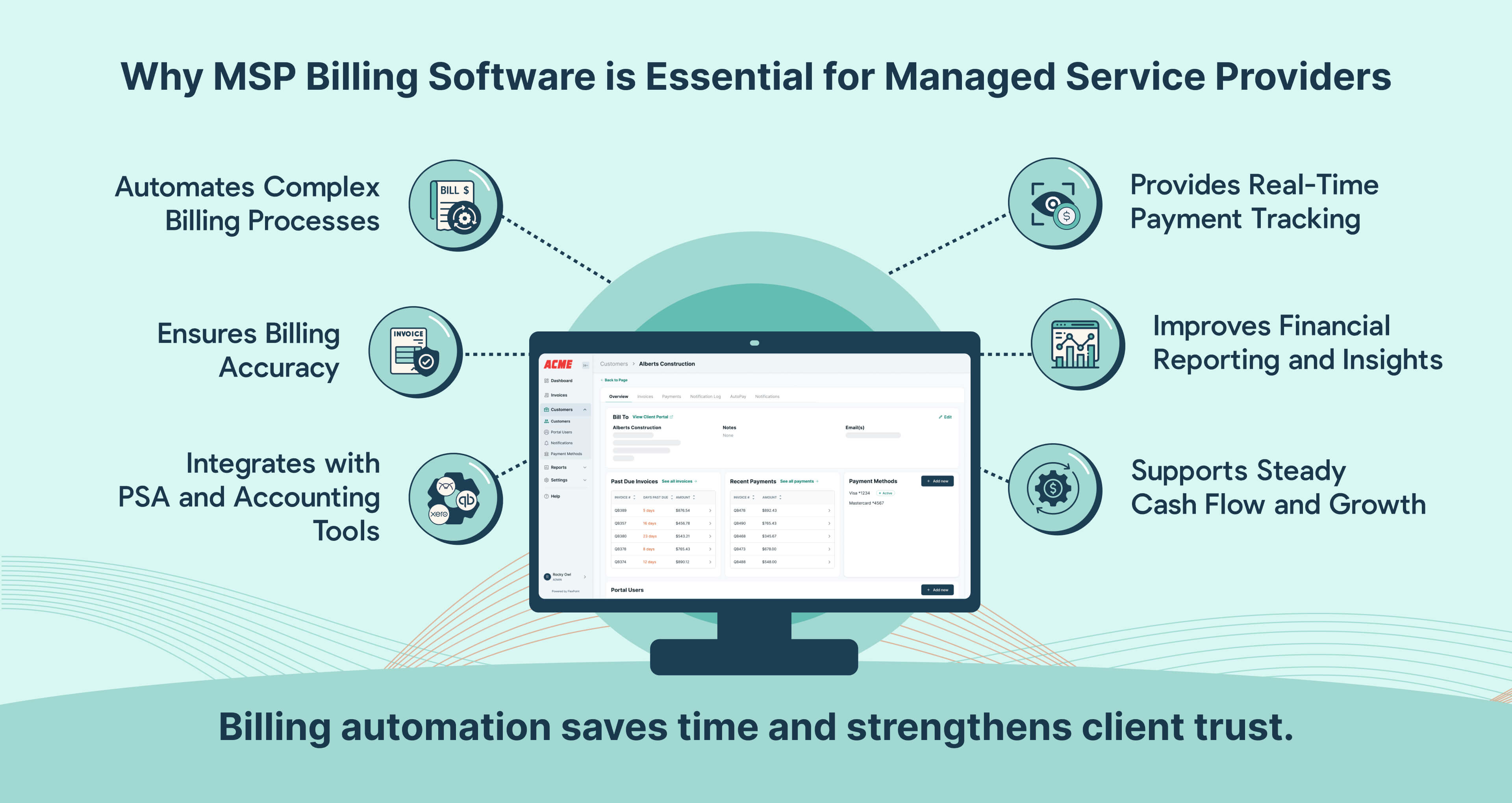
When handled manually, managing various billing scenarios, such as recurring subscriptions, various pricing models, and one-time project fees, can quickly become overwhelming.
Manual invoicing often requires significant time and effort, increasing the likelihood of billing errors that can lead to billing disputes, delayed payments, and strained client relationships.
Adopting an automated billing solution streamlines these processes, ensuring accuracy, saving time, and enhancing the overall efficiency of financial operations.
MSP billing software saves time by integrating with PSA and accounting platforms. This eliminates manual data entry and ensures accurate, real-time client information, invoices, and payment data syncing.
Integrated billing software simplifies workflows by seamlessly connecting client service projects and deliverables into invoices, saving time and reducing manual billing tasks. It also gathers all data in one place, making it easier to create reports and giving a clear overview of finances and operations.
Similarly, MSP billing software eliminates these pains with automation, accuracy, and efficiency.
Unlike generic billing tools, MSP billing software is purpose-built to meet the unique needs of managed service providers (MSPs). A robust software automates repetitive tasks like sending invoices and following up on late payments, freeing your team to focus on strategic, high-impact activities such as service delivery and client acquisition.
Real-time payment tracking ensures accurate billing, reduces disputes, and boosts client trust.
In addition, automated payment reminders and multiple payment options help maintain a steady cash flow and prevent revenue delays.
Financial reporting is another critical advantage. With real-time insights into cash flow, outstanding payments, and billing trends, you can make smarter financial decisions and plan for sustainable growth. This financial visibility strengthens both stability and profitability.
For context on how billing gaps create cash flow problems: MSP Cash Flow Problems: Why They Happen and How to Fix Them in 2026
For instance, an MSP that manages 50+ clients with diverse service agreements would use billing software to track payments, usage, and renewals smoothly.
Automated billing sends timely invoices, resulting in steady cash flow, happier clients, and more vigorous financial health.
Already know what you're looking for? Book a FlexPoint demo to see how it handles invoicing, AutoPay, Same-Day ACH, and reconciliation in a single workflow.
How to Choose MSP Billing Software: What Actually Matters

Comparison pages tend to list features, but this section is about which features to actually weigh when making a decision.
PSA integration depth: This is the most important variable for most MSPs. A billing platform that integrates with your PSA pulls time entries, ticket data, contract terms, and device counts into invoices automatically. A platform without native PSA integration means manual data entry at every billing cycle. Confirm whether the integration is bidirectional and whether it syncs in real time or on a schedule.
Accounting sync: Your billing platform needs to post payments and reconcile invoices back into QuickBooks, Xero, Sage Intacct, or whichever accounting tool you use. Without this, reconciliation is a manual monthly task. Confirm whether reconciliation is automated or whether your team still needs to match payments to invoices.
ACH availability and settlement speed: Credit card processing fees run 2.5 to 3% per transaction. For an MSP billing $100,000 per month, that's $2,500 to $3,000 in fees, or $30,000 to $36,000 per year. ACH typically costs $0.25 to $0.50 per transaction. The math is significant. Same-Day ACH matters for cash flow timing, if your platform only supports standard ACH, funds take three to five business days to clear. For a full comparison of ACH versus credit cards: ACH vs. Credit Card Payments for MSPs: Fees, Security, and Which to Use
AutoPay reliability: AutoPay is only valuable if it actually runs reliably and handles failures gracefully: retrying failed payments automatically, notifying the right people, and logging the outcome for reconciliation. A basic AutoPay that requires manual intervention on failures adds overhead rather than removing it.
Client financing: For MSPs working on larger projects or hardware purchases, the ability to offer clients payment over time while receiving funds upfront removes a common objection and improves cash flow on both sides. Not all platforms offer this.
Branded client experience: A payment portal that uses your domain and company identity is more trustworthy and more resistant to phishing than a generic processor link. Clients who recognize where they're paying are more likely to pay promptly and less likely to call your team with questions.
One thing worth flagging: if you're evaluating billing software because cash feels tight but your pricing seems right, the two issues are often connected. Billing platforms that aren't keeping pace with your pricing create the illusion of underpricing. See: Are You Undercharging Your MSP Clients? 5 Signs and How to Fix It
5 Key Features to Look for in Managed Services Billing Software

This section highlights essential billing software features you must prioritize: automation, financial reporting, and payment flexibility.
Understanding these critical features lets you choose the right solution for efficient billing and sustainable growth.
1. Automated Invoicing
Ardent Partners says automated invoices are processed 80% faster than manual invoices.
Automated invoicing enables you to generate, schedule, and send invoices automatically, reducing manual tasks and minimizing invoicing errors.
Manual invoicing can be tedious and requires extensive data entry and reconciliation. Automation generates invoices based on pre-configured rules, service agreements, or usage data, allowing you to process billing quickly and consistently.

Streamlining invoicing boosts efficiency, enhances billing accuracy, and strengthens client trust, allowing them to focus on delivering exceptional service.
2. Recurring Billing
This helps automate the billing process for recurring charges, ensuring that clients are invoiced accurately and on time for subscription services, such as monthly maintenance plans, cloud hosting, or subscription software licenses.
One of the primary benefits of recurring billing is its ability to simplify monthly billing operations.
For MSPs managing multiple clients and service tiers, manually tracking and invoicing recurring charges can be time-consuming and error-prone.
Recurring billing automates this process, eliminating the need for repetitive data entry and ensuring that invoices are consistent and error-free.
3. Integrations
A survey of IT decision-makers found that a lack of integrated technology costs businesses an average of $500,000 annually.
Seamless integration with PSA and accounting tools is essential for your billing software.

This integration eliminates manual data entry by syncing real-time service details, invoices, and payments across all platforms. Additionally, integrations improve financial visibility and decision-making.
Real-time synchronization lets you access up-to-date insights into revenue, outstanding invoices, and cash flow patterns from a single dashboard.
This holistic view makes allocating resources better and planning financial activities easier.
4. Customizable Reporting
Reporting dashboards allow you to create tailored financial reports that provide insights into revenue, cash flow, and client payment trends.
Unlike standard reports, a customized report will allow you to see key metrics like monthly recurring revenue (MRR) and outstanding invoices. With data, you can identify late payments, forecast cash flow, and improve financial planning.
This proactive approach enhances decision-making, boosts operational efficiency, and strengthens financial stability for business growth.
5. Client Portals
According to LLCBuddy, a personalized client portal can help revenue rise by 10%-15%.
A robust client portal allows clients to easily access their billing history, outstanding balances, and payment methods, encouraging timely payments.
By providing transparency, it simplifies payments, reduces support inquiries, boosts trust, and enhances the overall client experience.
Explore FlexPoint's client portal below:
This streamlined approach fosters trust, accelerates cash flow, and minimizes business administrative workload, leading to stronger financial health.
Top Managed Services Billing Software Options in 2026
In this section, we will review the leading MSP billing automation software. We focus on the key features, integration capabilities, and user feedback to aid MSPs in choosing the ideal billing software for their businesses.
Each software review is structured to give a quick yet comprehensive overview of its utility for MSPs.
1. FlexPoint

FlexPoint is a billing, accounts receivable, and payment platform designed specifically for Managed Service Providers (MSPs) to simplify and automate their billing processes.
FlexPoint Features:
- Automated Reconciliation: Eliminates manual payment reconciliation between tools.
- AutoPay: Increases cash flow predictability through automatic payments.
- Branded Client Portals: These offer clients a white-label, user-friendly, secure payment portal to manage and pay invoices.
- Same-Day ACH: Unique to FlexPoint, Same-Day ACH enables MSPs to access funds on the same business day 5x faster than standard ACH.
- Dual-Sync Capabilities: bi-directional syncing available to automatically sync data across ConnectWise and QuickBooks Online.
FlexPoint Integrations:
- Accounting Systems: QuickBooks Online, QuickBooks Desktop, and Xero
- MSP-Specific PSAs: ConnectWise, Autotask, SuperOps, and HaloPSA
Pros of using FlexPoint:
- FlexPoint’s client portal lets customers easily view invoices and make payments, improving their overall experience.
- The automation features for invoicing and payment processing reduce manual tasks, saving time and speeding up payment cycles.
- Multiple payment methods, including ACH (same-day ACH), credit card, and flexible financing.
Cons of Using FlexPoint:
- Limited direct integrations beyond PSA and accounting tools, but looking to expand shortly based on MSP/customer feedback.
FlexPoint Pricing Information:
- Pricing information is available on request. A scalable pricing model depends on MSP needs.
- Essentials Plan: Includes up to $50k in monthly processing and everything an MSP needs to get started
- Growth Plan: their most popular plan, with up to $100k per month in monthly processing and $50k of Same-Day ACH at no premium cost
- Plus Plan: Unlimited monthly processing with $100k of Same-Day ACH at no premium cost
FlexPoint Customer Review:
Here is a list of what customers are saying about FlexPoint:
- Pileus Technologies
- FortPoint IT
- Limetree Labs
- Pro IT
- Dega Systems
- Tomorrows Technology Today
- TAZ Networks
- IT Vortex
- Net-Tech
- Excellent Networks
- SkyCamp Technologies
- WJP Technology
- Circuit Saviors
- tekRescue
2. ConnectBooster

ConnectBooster is a billing software designed to streamline accounts receivable for managed service providers.
ConnectBooster Features:
- Automated Dunning Notices: MSPs can configure and automate dunning notifications to send to customers who are behind on payments.
- Point-to-Point Encryption: The platform utilizes point-to-point encryption to protect customer credit card information throughout the payment cycle.
ConnectBooster Integrations:
- PSA: Autotask and ConnectWise.
- Accounting: Netsuite, Sage Intact, Microsoft Dynamics, and Xero.
Pros of using ConnectBooster:
- It automates the entire invoice creation and delivery process.
- It offers detailed reports that provide insights into billing cycles, payment trends, and outstanding invoices.
Cons of using ConnectBooster:
- Does not offer a same-day ACH payment option.
- Its pricing can be a barrier for some businesses, especially smaller ones.
- No financing options are available for your clients
- PCI compliance and email tracking come at an additional cost
- No automated deposit reconciliation capabilities



.png)



