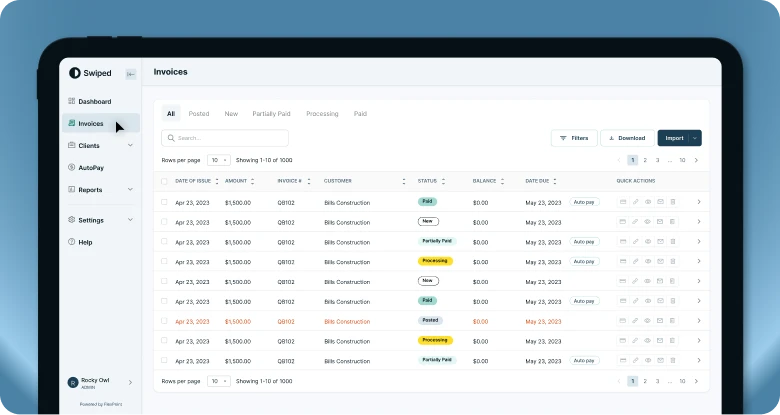



Maybe Alternative Payments worked for your MSP when you first signed up. But as your business grows, the way you bill and get paid can start to demand more from your payment platform.
You may be processing more each month and running into additional costs. You may want faster access to ACH payments without paying for faster payouts. Or maybe you’re finding limitations you didn’t expect.
Whatever brought you here, switching payment platforms is a good opportunity to fix those problems rather than simply move them somewhere else.
And the good news is that this isn't like replacing your PSA.
A payment-platform migration is much more focused. The important pieces are reviewing your agreement, knowing what Alternative Payments handles today, choosing the right replacement, moving the information that can be migrated, rebuilding any rules that don’t transfer, and coordinating the transition with your team and clients.
The goal is to come out of the switch with a billing and payment workflow that works better for your MSP than the one you started with.
Here's how to do it.

Quick answer: Switching from Alternative Payments starts with reviewing your current agreement and payment setup, comparing replacement platforms, and choosing a realistic transition date. Before cancelling, confirm how your stored payment methods, AutoPay configurations, PSA and accounting integrations, scheduled payments, billing links, and any active financing arrangements will be handled.
1. Check your Alternative Payments contract and current setup
Start with the agreement you signed.
Confirm your subscription term, renewal date, cancellation requirements, and any fees that could apply when you leave. Alternative Payments' public Terms of Use allow users to delete an account, but they don't establish one universal cancellation window or early-termination policy for every commercial customer agreement.
In other words, don't assume deleting an account is the same thing as satisfying every contractual or payment-processing obligation.
You'll also want a clear picture of what you're currently paying for. Depending on your setup, that could include the Alternative Payments subscription, credit card processing, faster payout options, synchronization capabilities, additional processing volume, and other add-ons.
Alternative Payments Pricing, Rates & Fees
Then inventory the parts of the platform your MSP uses:
- Credit card and ACH processing
- Stored client payment methods
- AutoPay
- PSA and accounting integrations
- Automated invoice reminders
- Client billing links
- Pay in Installments (if applicable)
This is also the time to ask about data and payment-method migration fees.
Alternative Payments does not publish a standard fee for moving data out of the platform. However, customer reports have mentioned additional migration costs around $500.
Because that isn't a publicly posted Alternative Payments fee, confirm what applies to your specific account before building it into your transition budget.
2. Decide what you actually want from your next payment platform
There's not much point in switching platforms only to recreate the same limitations somewhere else.
Start with why you're considering leaving Alternative Payments in the first place.
Maybe your payment volume has grown and you want a pricing structure that scales differently. Maybe you want faster ACH funding without purchasing an accelerated payout add-on. Maybe your finance team is spending too much time on reconciliation, or you want deeper synchronization between your PSA and accounting software.
Alternative Payments currently offers standard ACH processing without per-transaction ACH fees. Its published accelerated payout options include T+2 (two business days) and T+1 (one business day), available as add-ons. Neither is the same as receiving ACH funds on the day a payment is initiated.
Use those existing pain points to create a much shorter list oFFf priorities for your next platform.
For most MSPs, the biggest questions are:
- How quickly can we access our money?
- How much reconciliation and AR work will still fall on our team?
- How well will the platform work with our PSA and accounting stack?
- What happens to our costs and workflow as we grow?
Think about where your MSP is going, too. A platform that works for today's payment volume and software stack may be less useful if you expect either to change substantially over the next few years.
3. Compare Alternative Payments alternatives
Once you know what you're trying to improve, compare several providers against those requirements.
And don't limit the comparison to starting subscription prices.
Consider what your MSP would actually pay at its current volume, what happens as that volume grows, which capabilities cost extra, and what work your team will still be doing after implementation.
That can include payment-processing rates, ACH funding speed, AutoPay flexibility, PSA and accounting integrations, deposit reconciliation, AR automation, client experience, financing, contract terms, and migration support.
Read more about the top options here: Best Alternative Payments Alternatives for MSPs
Ask potential providers about the transition itself, too.
How long does implementation typically take? Can they migrate stored payment methods? What will your clients need to do? What support will you receive during cutover?
Expect the provider you're moving to to be equally clear about how it will get you there.
4. Make a transition plan before cancelling Alternative Payments
Once you've chosen a replacement, work backward from the date you want it to become your primary payment platform.
Give yourself enough time for implementation, integrations, internal testing, client communication, and payment-method migration where available.
There are a few pieces to map out before cutover.
First, determine what happens to stored credit card and ACH information. Then identify clients enrolled in AutoPay. Stored payment credentials and any payment rules don’t exist in the same place, so even if payment methods migrate successfully, your AutoPay configurations may need to be set up in the new platform.
This is also a good opportunity to revisit your AutoPay strategy instead of automatically recreating the old setup. If you have clients who would benefit from AutoPay but aren't currently enrolled, the transition gives you a natural point to introduce the option.
Next, review payments that are scheduled or already processing so you don't inadvertently attempt to handle the same invoice through both systems.
Plan the timing of your PSA and accounting integrations as well.
Finally, keep the records you'll need after the transition. Alternative Payments currently allows payment and payout reports to be exported as CSV files from the dashboard. Its documentation notes that those reports include transactions with a Paid status rather than transactions that are still processing.
If you use Alternative Payments' Pay in Installments functionality, identify active financed invoices separately and confirm how those existing arrangements will be handled after you stop sending new payments through the platform.
Can I migrate Alternative Payments payment methods to my new billing platform?
Potentially, yes.
Alternative Payments does not publicly document a universal process or fee for transferring those stored credentials out of the platform.
That's why you should ask both Alternative Payments and your replacement provider about payment portability before establishing your final cancellation date.
As noted above, customer reports have put data migration costs from Alternative Payments at around $500. Confirm any actual costs directly before proceeding.
If you're moving to FlexPoint, eligible stored credit card and ACH payment methods can be securely migrated from supported existing processors. FlexPoint currently includes data migrations at no additional cost.
When payment methods can be migrated successfully, clients don't have to manually re-enter the same card or bank information just because your MSP changed platforms.
Moving from Alternative Payments? Talk to FlexPoint about your existing setup and payment-migration options.
5. Prepare your internal team
Before migrating, bring in the people who actually touch the workflow: typically whoever owns finance or accounting, billing operations, relevant integrations, and client communication.
Give everyone a shared transition date and clear ownership over the pieces that affect them. That may include platform implementation, PSA and accounting connections, AutoPay setup, client communication, and billing questions during the transition.
Then test the new workflow internally.
Run through the experience from both sides. Can your team see the information it needs? Are payments flowing correctly? Are your integrations updating? What does a client see when they receive an invoice or make a payment?
Client-facing employees don't need to become experts on the underlying migration. They just need answers to the questions they're likely to hear:
Where do I pay now? Is my existing payment method still there? Is my AutoPay still active? Do I need to do anything?
If your team can answer those questions proactively before go-live, you're in good shape.
6. Prepare clients for the payment change
On that note of cluing clients in to the change, they should hardly notice anything. While it may be significantly less technical than the rest of the plans around migrating, it is equally important.
Give affected clients advance notice and tell them exactly what matters to them:
- What's changing
- When the change takes effect
- Where they'll pay
- Whether their existing payment method will carry over
- Whether they need to take action for AutoPay
- Who to contact if they have a question
There's another easy-to-miss detail: your Alternative Payments billing link.
Alternative Payments encourages MSPs to put their billing link in invoices, reminder emails, and even the payment button on their website.
Make a list of everywhere you've used it and replace those links at cutover.
Otherwise, a client could follow an old invoice or bookmark and end up back at the payment experience you're trying to retire.
Coordinate your automated reminders at the same time so clients don't receive conflicting payment instructions from the old and new platforms.
Clients whose payment methods migrate successfully should require very little action. So prioritize communication with anyone who needs to re-enter payment information, reconfigure AutoPay, or address an active financing arrangement.
7. Make the switch and verify the new workflow
Once the replacement has been configured, tested, and communicated, establish a clear final processing date for Alternative Payments.
Account for transactions that are scheduled or already processing, then make the new platform your primary payment workflow.
Don't consider the migration finished just because the new portal is live.
Verify that:
- Clients can successfully make payments
- AutoPay is operating as expected
- PSA and accounting integrations are updating correctly
- Deposits and payouts are appearing as expected
- Reconciliation is working
- Old Alternative Payments billing links are no longer in active communications
- Old reminders aren't still being sent
Once the new workflow is operating correctly, complete the cancellation steps required under your Alternative Payments agreement.
Switching from Alternative Payments to FlexPoint
If you're already doing the work of switching platforms, it's worth asking whether your replacement is really improving upon any of your pain points.
For MSPs moving from another platform, FlexPoint supports secure migration of stored credit card and ACH methods cost-free.
But migration support is the smallest piece.
FlexPoint is purpose-built for MSP billing, payments, and accounts receivable, with automation designed to reduce recurring work across your finance team.
Same-Day ACH is included on every FlexPoint plan, rather than requiring an upgrade to faster next-day funding. Same-Day is not a feature Alternative Payments supports. FlexPoint also automatically reconciles deposits to the individual payments behind them, reducing the duplicate work involved in matching money in the bank with payment and invoice records.
FlexPoint supports most MSP integrations including ConnectWise, Autotask, HaloPSA, and SuperOps. For applicable ConnectWise and QuickBooks Online workflows, GL Connect full-sync functionality is included on Growth and Plus plans. This same layout is an additional cost with Alternative Payments.
Check out GL Connect here:
And FlexPoint’s latest AI Agents for Accounts Receivable monitor late invoices and autonomously handle past-due follow-up, keeping recurring AR work moving without requiring someone on your team to personally monitor every account.
Make the switch an opportunity to improve your billing workflow
Moving away from Alternative Payments doesn't mean your MSP needs to reinvent its entire billing operation.
But, as mentioned, it offers a great opportunity to decide what you want that operation to look like next and allow for a switch that supports you as you scale.
Go back to the reasons you started considering a switch in the first place and remain firm on those changes.
If reconciliation was too manual, make automated deposit reconciliation a requirement. If funding speed mattered, compare actual ACH settlement times. If integrations were creating work, evaluate how information moves between the replacement platform, PSA, and accounting system.
And if your team is still manually monitoring overdue accounts after the migration, ask what tools may be able to really support you in this.
Long story short: get the new workflow running, verify that it works for your team and clients, and then retire Alternative Payments.
A good migration should leave your MSP with less manual work, a smoother client experience, and a platform that gives you more room to grow.
Planning a move from Alternative Payments? See how FlexPoint compares with Alternative Payments.
Related articles