

WisePay and Alternative Payments both help managed service providers (MSPs) manage billing and collect payments. But the differences between them go beyond how clients pay an invoice.
WisePay is owned by ConnectWise and operates within a broader ecosystem of PSA, accounting, and payment tools. Alternative Payments is an independent payments and financial operations platform with published subscription tiers, a broader advertised integration catalog, and additional AR capabilities.
For an MSP comparing the two, the important question isn't simply which platform accepts ACH or supports AutoPay. It's how each one fits into your existing systems, what it costs as payment volume grows, and how much billing and accounts receivable (AR) work your team will still manage.
Here's how WisePay and Alternative Payments compare across pricing, ACH funding, AutoPay, integrations, reconciliation, client experience, and AR automation.
Quick answer: WisePay is worth considering for MSPs already using ConnectWise PSA or Autotask and looking for payment functionality alongside their existing synchronization setup. Alternative Payments offers a broader financial operations platform, published volume-based pricing, and additional features such as invoice reminders and client financing. Neither publicly advertises Same-Day ACH, and both require a closer look at total cost, integration capabilities, and ongoing manual work.
1. WisePay vs. Alternative Payments at a glance
Both platforms cover important parts of the billing process. The differences become clearer when you look at what happens before and after a payment is made.
2. How do WisePay and Alternative Payments pricing compare?
The first challenge is that WisePay and Alternative Payments don't publish pricing in the same way.
WisePay pricing
WisePay doesn't provide a straightforward, current public subscription-price table that applies to every MSP.
Actual costs depend on the software, synchronization capabilities, and merchant-processing arrangement involved. An MSP using WisePay alongside Wise-Sync may have a different cost structure from one purchasing payment functionality under another agreement.
When evaluating a WisePay quote, account for:
- Software and subscription charges
- Credit card processing rates
- ACH processing fees
- PSA-to-accounting synchronization
- Payment gateway or merchant-account charges
- Any additional setup, support, or transaction fees
ConnectWise's publicly hosted WisePay terms date back to 2022, around the time it acquired the Wise-Sync businesses. Those terms shouldn't be treated as a substitute for a current quote.
The practical takeaway is to ask for the complete cost of your intended setup, not just the price of accepting payments.
Related: WisePay Pricing, Rates & Fees
Alternative Payments pricing
Alternative Payments takes a more transparent approach to its starting subscription prices.
Its published U.S. accounts receivable plans list:
Alternative Payments also advertises standard ACH processing without per-transaction ACH fees.
Its published card-processing rates have included 2.9% + $0.30 for Visa and Mastercard and 3.5% + $0.30 for American Express. Confirm current rates and eligibility with the provider before making a purchasing decision.
Some capabilities, including accelerated payouts and additional synchronization functionality, may require separate fees.
This is where payment volume becomes important.
An MSP processing $40,000 each month has different requirements from one processing $150,000. A subscription that looks attractive at a lower volume may become less competitive as the business grows or adds paid capabilities.
When comparing WisePay and Alternative Payments, calculate what each would cost at your actual payment volume, including processing fees, integrations, and any additional services you need.
Related: Alternative Payments Pricing, Rates & Fees

3. WisePay vs. Alternative Payments for ACH payments
ACH is particularly important for MSPs collecting recurring payments from business clients.
Even small differences in fees and funding timelines can affect operating costs and cash flow when a substantial portion of monthly revenue comes through bank transfers.
WisePay ACH payments
WisePay supports bank-account payments and allows clients to save bank details for future transactions.
Its documented functionality includes scheduled payments and Automatic Payments using supported bank accounts.
However, WisePay doesn't publicly advertise Same-Day ACH as a standard capability.
ACH pricing also depends on the MSP's merchant-processing arrangement. Before choosing WisePay, confirm the transaction fee, any applicable caps, funding timeline, transaction limits, and return fees.
A low transaction rate is useful, but it doesn't tell you how quickly funds will become available.
Alternative Payments ACH payments
Alternative Payments advertises no standard ACH transaction fees under its published pricing.
For MSPs processing a high volume of bank payments, that can be attractive.
The tradeoff is funding speed.
Alternative Payments has offered standard ACH funding alongside faster T+2 and T+1 payout options as paid add-ons. T+2 generally refers to two business days, while T+1 refers to one business day.
Neither is equivalent to Same-Day ACH.
For MSPs managing payroll, vendor payments, and recurring operating expenses, the difference between receiving funds today and receiving them one or two business days later may matter more than the ACH transaction fee alone.
The key distinction: Neither WisePay nor Alternative Payments currently advertises Same-Day ACH. Compare actual funding timelines and total costs, not just whether ACH is supported.
4. How do AutoPay and payment automation compare?
AutoPay is one of the most valuable features a billing platform can offer an MSP.
It reduces the need for clients to manually pay recurring invoices and helps make monthly cash flow more predictable.
But not every AutoPay system works the same way.
WisePay AutoPay
WisePay supports Automatic Payments using saved credit cards and bank accounts.
Its configuration can involve several connected components, including the PSA, accounting software, payment gateway, billing terms, and payer payment-method mappings.
Clients can also schedule payments and manage saved payment methods through the WisePay portal.
The important consideration is setup complexity.
A payment platform can support recurring payments while still requiring significant configuration to get every client enrolled and every billing rule working correctly.
For an MSP already using WisePay and Wise-Sync, this may be a familiar process. For an MSP implementing the system for the first time, it's worth understanding exactly what the setup requires.
Ask how Automatic Payments are configured, what clients must do to enroll, and how exceptions are handled when payment information changes or a transaction fails.
Alternative Payments AutoPay
Alternative Payments also supports AutoPay and automated invoice-payment workflows.
Its broader AR functionality includes payment reminders and other tools intended to reduce manual billing administration.
However, MSPs should evaluate how much control they have over AutoPay rules.
For example, can you configure different payment requirements for different customers or invoice types? Can clients use different payment methods for recurring services and one-time purchases? What happens when an invoice needs an exception?
Those details matter for MSPs with a mix of managed services agreements, project invoices, hardware purchases, and other charges.
Alternative Payments provides useful payment automation, but MSPs with more complex billing arrangements should test whether its available rules support their specific requirements.
And with either provider, don't assume that automated payment processing means every reconciliation task is automated, too.
5. WisePay vs. Alternative Payments integrations
A payment platform rarely operates independently inside an MSP.
It needs to work with the systems already responsible for agreements, invoices, customer records, accounting, and payment status.
This is one of the more meaningful differences between WisePay and Alternative Payments.
WisePay integrations
WisePay is closely associated with the ConnectWise ecosystem.
It supports workflows involving ConnectWise PSA and Autotask PSA, with accounting connectivity that includes QuickBooks Online and Xero.
Wise-Sync has historically provided synchronization between PSA and accounting systems, and ConnectWise continues to describe those capabilities in its marketplace.
For an MSP already using ConnectWise PSA, WisePay may be a natural option to evaluate.
However, payment processing and full accounting synchronization shouldn't be treated as interchangeable features.
Confirm which product handles invoice creation, payment application, customer synchronization, accounting entries, and error management.
Also determine whether the required synchronization is included in your agreement or involves additional software.
Does WisePay integrate with HaloPSA?
WisePay's publicly documented PSA support centers on ConnectWise PSA and Autotask. MSPs using HaloPSA should confirm compatibility directly rather than assume the same functionality is available.
Alternative Payments integrations
Alternative Payments advertises integrations across a wider range of PSA, accounting, and business systems.
Its published integration catalog includes ConnectWise, Autotask, HaloPSA, SuperOps, QuickBooks, Xero, NetSuite, Microsoft Dynamics 365, FreshBooks, and Zoho Books.
That breadth can be useful for MSPs working outside the ConnectWise ecosystem or using multiple business systems.
However, the number of integrations doesn't necessarily indicate how much information moves between them.
For example, connecting a payment platform to ConnectWise PSA is different from synchronizing invoices, customer records, products, payments, and general ledger information between ConnectWise and QuickBooks Online.
Alternative Payments offers additional ConnectWise-to-QuickBooks Online synchronization functionality through its Sync Tool.
When comparing integrations, ask what data syncs, how often it updates, what happens when an error occurs, and whether the required capabilities cost extra.
The best integration is the one that reliably supports your existing workflow, not necessarily the provider with the longest list of logos.
6. How do the client payment experiences compare?
It's easy to focus on what the finance team sees inside a billing platform.
But clients interact with the payment experience, too.
They receive invoices, save payment methods, enroll in AutoPay, and occasionally need to find an old receipt or update their billing information.
The amount of effort required to complete those tasks can affect both client satisfaction and the number of billing questions your team handles.
WisePay client experience
WisePay provides a client payment portal where payers can make payments, view payment history, save supported payment methods, schedule payments, and configure Automatic Payments.
Clients who want to use registered payer functionality generally need to complete an account setup process.
ConnectWise's documented registration workflow includes accepting an invitation, setting up credentials, and configuring payment methods and Automatic Payments as needed.
That gives clients access to useful self-service functionality, but it also introduces onboarding steps.
For an MSP with hundreds of clients, even a relatively simple registration process can create work when people need help getting started.
Alternative Payments client experience
Alternative Payments also provides a client-facing payment experience supporting cards, ACH, AutoPay, and payment reminders.
It offers additional functionality such as Pay in Installments, which allows eligible customers to finance qualifying invoices.
Published financing options have included terms of up to 150 days, subject to approval and program requirements.
That can be valuable for MSPs whose clients need more flexibility when paying larger invoices.
However, financing isn't a substitute for evaluating the everyday payment experience.
Consider how clients receive access, whether they can pay without creating unnecessary accounts, how they manage saved payment methods, and what happens when an invoice or payment needs attention.
For both platforms, test the process as a client rather than relying entirely on the administrative feature list.
7. Which is better for MSP accounts receivable?
WisePay and Alternative Payments both automate parts of the billing process, but they approach the surrounding AR workflow differently.
WisePay is primarily relevant in the context of payment acceptance and the connected PSA and accounting environment.
Alternative Payments offers a broader set of financial operations capabilities, including invoice reminders, AutoPay, and payment-related automation.
For an MSP that needs more than a basic payment portal, those additional tools are worth considering.
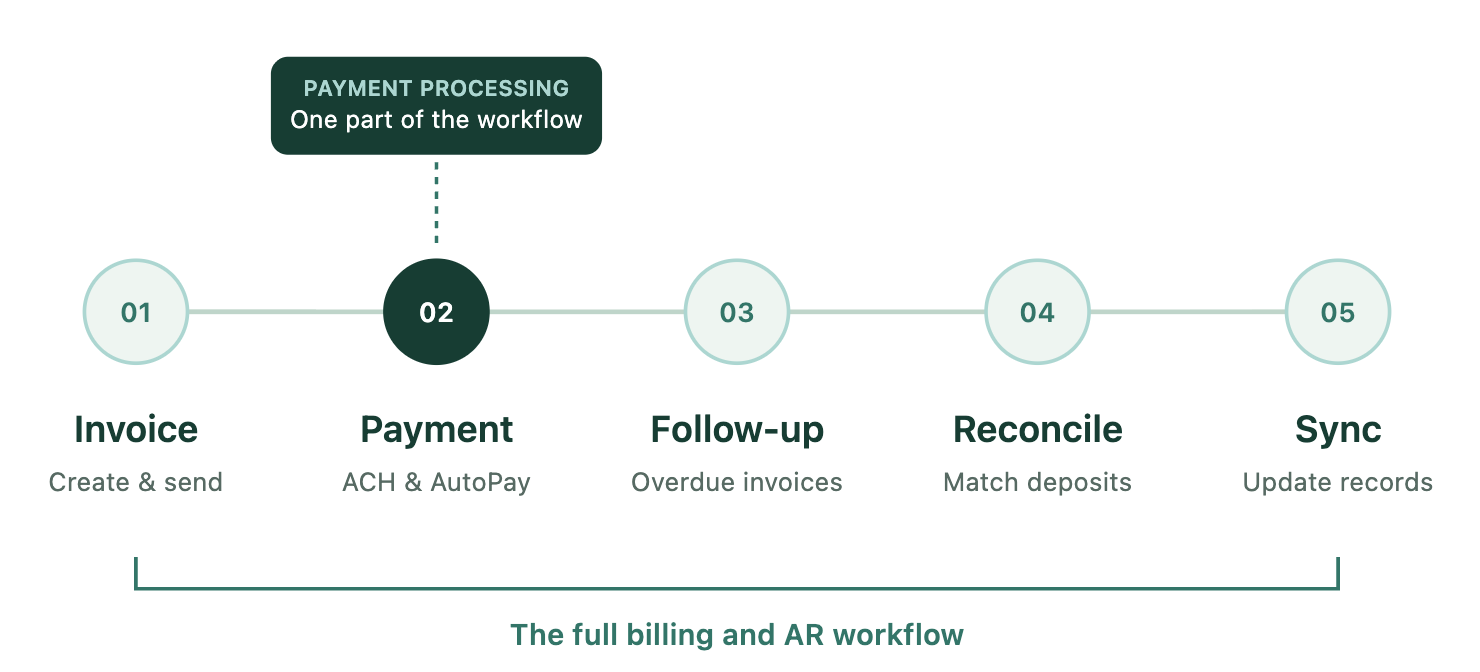
Still, there's an important distinction between automating individual billing tasks and reducing the ongoing work of managing accounts receivable.
Consider what happens when a client misses a payment.
Does the platform send a scheduled reminder? Can it identify which accounts need attention? Can it handle follow-up based on account context? Does your team still need to review every overdue balance and decide what happens next?
Then consider what happens after a payment arrives.
Can the finance team see exactly which invoices and transactions make up a deposit? Are records synchronized with the PSA and accounting system? How much manual reconciliation remains?
Those are the questions that reveal how much operational capacity a platform actually adds.
A billing platform may automate payment collection without eliminating the administrative work around it.
For MSPs trying to scale without adding finance headcount at the same rate, that distinction becomes increasingly important.
8. How does FlexPoint compare with WisePay and Alternative Payments?
WisePay and Alternative Payments both address meaningful parts of MSP billing.
But MSPs evaluating either platform should also consider whether they want a payment solution or a more connected approach to billing and accounts receivable.
FlexPoint is built specifically for MSP billing, payments, and AR automation, bringing together capabilities that can otherwise require separate tools or ongoing manual work.
Here's where the differences become especially relevant.
Same-Day ACH
FlexPoint includes Same-Day ACH on its subscription plans, with monthly included allowances that vary by plan.
That gives eligible MSPs access to faster ACH funding without needing to purchase a separate next-day payout add-on. Transaction fees, allowances, eligibility, and cutoff requirements still apply.
Neither WisePay nor Alternative Payments publicly advertises an equivalent Same-Day ACH offering.
Automated deposit reconciliation
FlexPoint automatically reconciles payments and deposits, helping finance teams understand which transactions make up the money arriving in their bank accounts.
This reduces the manual work of matching deposits to payment and invoice records.
When evaluating WisePay or Alternative Payments, MSPs should confirm whether their exact configuration provides equivalent deposit-level reconciliation or requires additional accounting work.
PSA and accounting integrations
FlexPoint supports native integrations with ConnectWise, Autotask, HaloPSA, and SuperOps.
For MSPs using ConnectWise PSA and QuickBooks Online, GL Connect provides additional synchronization capabilities, including visibility into integration activity and errors.
Availability and pricing depend on the selected plan and current product configuration.
More flexible AutoPay and client onboarding
FlexPoint supports rules-based AutoPay, including customer-level and invoice-type configurations, along with customizable payment communications.
Its client onboarding workflows and passwordless payment experience are designed to reduce the setup required for clients to begin paying.
For MSPs with complex billing arrangements, those capabilities can help create a more consistent experience without requiring every customer to follow the same payment rules.
AR Agents
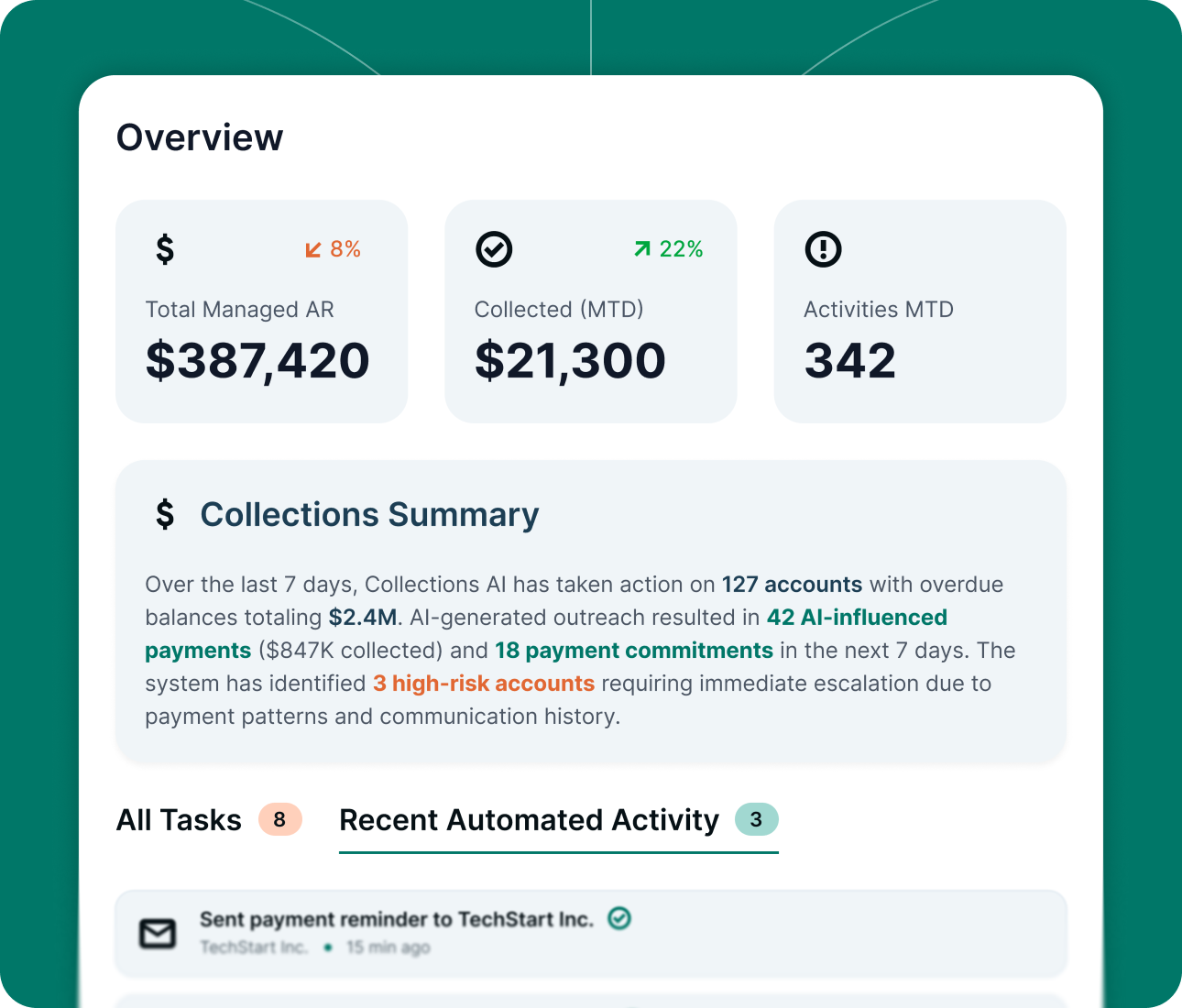
FlexPoint's AR Agents take recurring accounts receivable work off the team's plate.
They monitor accounts, follow through on overdue invoices, and help manage the next steps in the payment process, with human involvement when needed.
Rather than relying entirely on scheduled reminders or requiring someone to manually review every account, MSPs can add operational capacity without immediately adding headcount.
Client financing
FlexPoint also offers FlexLine financing for eligible invoices, with repayment terms of up to 12 months.
Alternative Payments offers financing through Pay in Installments, with shorter published terms. WisePay does not publicly identify a directly comparable financing program.
Actual financing availability and terms depend on eligibility and approval.
The bigger picture
The difference isn't simply that one platform has more features than another.
It's how those features work together.
An MSP may have payment processing, invoice reminders, PSA synchronization, and reporting tools, but still spend hours investigating deposits, monitoring overdue accounts, and handling billing exceptions.
FlexPoint is designed to reduce that recurring work across the billing lifecycle.
Related: FlexPoint vs. WisePay
Related: FlexPoint vs. Alternative Payments
Which platform should your MSP choose?
WisePay may be worth considering if your MSP already operates within its supported PSA and accounting environment and wants payment functionality that fits alongside those tools.
Alternative Payments may be a better fit if you value its published subscription structure, standard ACH without transaction fees, broader advertised integration catalog, or client financing options.
But if your priority is reducing the amount of work your team does across billing, payments, reconciliation, and AR, it's worth evaluating a platform that connects more of those processes.
Before making a decision, ask yourself:
- What will the platform cost at our actual monthly payment volume?
- How quickly will we receive ACH payments?
- Which integrations and synchronization capabilities are included?
- How much work is required to configure AutoPay and onboard clients?
- What happens after an invoice becomes overdue or a deposit reaches our bank account?
The right platform should do more than process payments successfully.
It should make the billing operation easier to manage as your MSP grows.
If you're comparing WisePay, Alternative Payments, and FlexPoint, take a closer look at how FlexPoint brings payments, billing automation, reconciliation, and AR Agents together in one MSP-focused platform.
Related articles