.png)
QuickBooks Payments is a natural choice for MSPs already using QuickBooks Online. It's built into the platform, activates in minutes, and makes processing payments easy. For many service providers, that convenience is hard to ignore. Though convenient to set up, it doesn't stay efficient as you grow.
QuickBooks Payments works fine for basic transactions, but it wasn't built for MSP billing models. As your client list grows and your revenue sources become more varied, its limitations become clear. QB Payments might work for up to 10 clients with monthly retainers, but it cannot handle 50 clients with billing models ranging from tiered pricing to project fees, usage-based billing, and auto-renewals.
As your MSP business grows and billing becomes more complex, QuickBooks Payments may not be able to keep up. You could end up manually managing payments, chasing overdue invoices, or losing margins to high credit card processing fees. These issues slow down your MSP's cash flow, burden your finance team, and hinder your growth.
In this article, we will walk you through the most common challenges MSPs face with QuickBooks Payments and explain how they impact your billing operations and bottom line. We will also discuss how an MSP-specific solution helps fill operational gaps.
{{toc}}
Why MSPs Choose QuickBooks Payments?

QuickBooks Payments is a straightforward choice for MSPs because it’s already built into QuickBooks Online (QBO). With setup taking only minutes and no extra tools to learn, it feels like a simple, low‑risk way to start collecting payments faster.
Here’s why QuickBooks Payments may seem appealing to MSPs:
- Easy setup with no extra tools. It’s fully integrated inside QuickBooks Online, so MSPs don’t need additional platforms, logins, or configurations. You can enable payments, connect your bank account, and start accepting ACH and credit card payments within a couple of days (subject to merchant account approval). This simplicity helps MSPs get paid quickly without bringing in extra accounting support.
- Centralized payment workflow inside QuickBooks: All invoices, payments, client records, and accounting data live inside the same system. Payments applied through QuickBooks Payments sync automatically with invoices, reducing manual entry and making reconciliation easier. For MSPs that rely primarily on recurring invoices, this consistency feels dependable and requires minimal training.
- Familiar branding and built‑in trust: QuickBooks is widely known, and both clients and finance teams are comfortable with the platform. Because the accounting team already uses QBO daily, many MSPs assume QuickBooks Payments is the logical, convenient option for collecting payments.
Where Does QuickBooks Payments Fall Short for MSPs?
QuickBooks Payments is fine for basic billing needs, but it isn’t designed for MSP billing models. It creates operational gaps as your client list grows and your billing becomes more complex. As your transaction volumes rise and billing needs become more complicated, its lack of flexibility results in more manual work, delayed reconciliations, and reduced efficiency. QuickBooks Payments struggles to provide the control, customization, and visibility that a scaling MSP requires.
Here are the key areas where QuickBooks Payments falls short for MSPs:
- Not Built for MSP-specific Billing Models: Handles simple invoices well but cannot support recurring agreements, usage-based billing, or multi-tier service packages.
- Basic Collections Automation: Lacks automated payment reminders, escalation workflows, or invoice tracking. Finance teams must manually chase every overdue payment.
- No Credit Card Surcharge Option: MSPs must absorb all credit card fees, which reduces their profit margins.
- Fragmented Data and Reconciliation Issues: Payment, service, and financial data are stored in separate systems, increasing admin workload and delaying reconciliation.
- Limited Payment Visibility: Minimal insight into client behavior, as invoice view tracking, payment preference analytics, or aging insights are not available.
- No Branded Client Portal: Clients cannot view & manage invoices, payment methods, or billing history in a self-service portal. Experience is generic and disconnected from your MSP brand.
- Scaling issues as MSPs Grow: Issues that seem small early on become major bottlenecks as more clients, higher billing volume, and more complex service packages are added.
Common QuickBooks Payments Challenges for MSPs
Most MSPs outgrow QuickBooks Payments' capabilities as their operations scale. The operational and financial friction costs you time, money, or both.
Here are the common QuickBooks Payments challenges for MSPs:
1. High Processing Fees With No Surcharge Option:
QuickBooks charges a credit card processing fee of 2.99% to 3.5% per transaction. For MSPs with recurring billing and tight margins, these credit card fees can quickly add up as the number of clients who pay by credit card increases.
An MSP processing $50,000 in credit card payments each month at a 3.5% rate pays $1,750 in fees ($50,000 × 3.5% = $1,750). Annually, it amounts to $21,000 in processing costs, directly reducing your profit margin.
Surcharging is legal in most U.S. states, but QuickBooks doesn't support it. QuickBooks Payments does not offer a built-in way to pass processing fees to clients. Absorbing these fees is not always beneficial for your MSP, as they quickly erode profits as billing frequency and transaction amounts grow.
2. High ACH Processing Fees:
QuickBooks Payments charges 1% per ACH transaction. For merchants who signed up before September 6, 2023, that fee is capped at $10–$15 per transaction, depending on their plan. For those who signed up on or after that date, the 1% ACH fee is no longer capped, which makes large ACH payments more expensive over time.
If your MSP processes $100,000 in ACH payments annually through QuickBooks Payments, you would pay about $1,000 in fees.
By contrast, many MSP-focused platforms offer much lower ACH costs, such as 0.5% or even a flat per-transaction fee. FlexPoint, for example, charges as little as $0.25 per ACH transaction.
So if you are encouraging clients toward ACH to avoid high credit card fees, QuickBooks Payments still leaves you with a painful trade-off: ACH payments that are slower than cards and still expensive enough to erode your margins, especially without a fee cap.
3. Delayed ACH Transfers:
QuickBooks Payments takes 2-5 business days to deposit ACH payments. MSPs often face tight cash flow due to payroll, vendor payments, software costs, and subcontractor payments. Even a slight delay from one ACH transaction can cause cash flow problems. The issue snowballs into stalled operations if it happens with many clients.
QuickBooks Payments offers an ‘Instant Deposit’ feature for MSPs at an additional premium of 1.75% on the total deposit amount. It adds to the already high ACH fees and is permitted for up to 5 transactions per day. When client payments are delayed by nearly a week, it creates gaps that force you to either postpone your outgoing payments or rely on expensive lines of credit.
4. Limited Payment Flexibility:
QuickBooks Payments is designed for straightforward transactions, but MSP billing is more complex. QuickBooks Payments does not have native support for payment plans, so if a client needs to split a hefty project invoice into installments, you will need to manage that manually. It's also difficult to accept partial payments, which can be a problem when clients want to pay in installments or when disputes result in partially settled invoices.
QuickBooks Payments doesn't let you collect payments for multiple invoices in a single transaction. If a client wants to pay several open invoices at once, you're forced to apply each payment individually or use journal entries as a workaround. This makes the process clunky, time-consuming, and increases the risk of reconciliation errors.
These limitations slow down your MSP's operations, create payment friction, and provide a poor client experience. These unnecessary payment issues can harm client retention.
5. Lack of Collections Automation:
QuickBooks Payments doesn't offer advanced dunning or late payment collection features. Manual follow-ups and collections work for small MSPs with a handful of clients, but as you scale to 30 or 50+ clients, they become unsustainable.
Due to the lack of an automated payment reminder system or escalation process for overdue invoices, your finance team spends hours each week chasing payments. They need to send reminder emails, make follow-up calls, or manually track aged invoices.
Additionally, it offers limited insight into which clients are late on payments or require follow-up. The centralized dashboard does not show what actions you have already taken for overdue invoices, and repeated follow-ups may frustrate clients. As client numbers grow, the risk of unpaid invoices being overlooked increases, directly affecting your Days Sales Outstanding (DSO) and damaging client relationships.
6. No Usage-Based or Tiered Billing Support:
MSP pricing models become complex as they scale. You may start with a base retainer, but you may soon need to invoice for usage-based fees for additional devices, per-user software licenses, or tiered rates based on service levels. QuickBooks Payments is not capable of handling these dynamic billing models, so MSPs must manually calculate these charges.
The lack of native support for recurring usage or tiered billing introduces inefficiency and increases the risk of billing errors. Reconciling these invoices is also time-consuming, diverting valuable resources from other essential tasks.
Additionally, QuickBooks Payments does not offer native integrations with MSP-specific Professional Services Automation (PSA) tools such as ConnectWise PSA, Autotask, or HaloPSA. It requires third-party apps, which add to setup complexity and introduce data-sync issues for MSP billing workflows. Clients may become frustrated by billing inaccuracies or invoice confusion, leading to strained relationships and potential business losses.
7. Weak Dispute Support:
Chargebacks and dispute management can be a headache for MSPs. Clients may overlook auto-renewals, be confused about service terms, or dispute the project scope. Their bank then reverses the payment, meaning you lose the revenue from that sale and have to pay a $20 to $100 chargeback fee.
With QuickBooks Payments, MSPs have to pay a flat $25 chargeback fee. If the chargeback is upheld, you will lose the funds and be required to pay the fee. If you win, it can still take weeks to recover the payment from the client.
MSPs have limited visibility or control over chargebacks as Intuit handles dispute resolution. You may feel financially and reputationally disconnected from the client, as there is no mechanism to handle escalations or provide support.
How These Challenges Impact Billing, Collections, and Cash Flow
QuickBooks Payments’ limitations are functional inconveniences that create ripple effects across revenue operations, service delivery, and financial predictability. As MSPs scale, these issues compound and begin influencing profitability, client experience, and operational efficiency.
Here are the real-world consequences of these challenges for MSPs:
1. Reduced Profit Margins:
MSP profit margins are already under pressure from rising labor costs, vendor price increases, and competitive pricing. QuickBooks Payments requires MSPs to absorb processing fees for credit card and ACH payments, as well as chargeback fees. These costs seem like a small deduction on a few invoices, but they directly impact your MSP’s profitability as your transaction volume increases.
The damage is worse as most MSPs operate on relatively thin margins. According to MSP360, the average MSP profit margin ranges from 8% to 18% for best-in-class MSPs. If you pay a 3.5% processing fee every time a client uses a credit card, that eats up a big chunk of your profit for each sale. With QuickBooks Payments, there’s no easy way to add a surcharge, so you are forced to absorb those fees, making margins even tighter.
2. Cash Flow Inconsistencies:
MSPs rely on predictable cash flow to run their operations smoothly. ACH deposits through QuickBooks Payments take 2 to 5 business days. Without reliable cash flow estimates, finance teams can't effectively plan, forecast, or manage working capital.
For MSPs with large monthly recurring invoices, delayed ACH timelines can cause operational delays. Your finance team may have to hold off on purchases, delay vendor payments, or maintain larger operating reserves.
These delays also contribute to AR aging issues. When payments take longer to clear, invoices appear “unpaid” or “pending,” creating confusion and additional follow-up work. Without same-day ACH options or faster settlement, MSPs lose the agility needed to manage operations uninterrupted.
3. Increased Administrative Burden
Billing and collections already consume a considerable amount of time for MSP finance teams. Manually following up for overdue invoices for 5 clients is manageable. At 10 clients, it becomes a part-time task, but with 50+, it fully drains your finance team's time. QuickBooks Payments adds to that burden because it lacks automation for invoices, reminders, dunning sequences, escalations, or failed-payment workflows. Every reminder email, follow-up call, or overdue notice depends on manual effort.
Without collections automation, your finance staff must manually track down late payments in spreadsheets, monitor aging receivables, reconcile deposits line by line, and verify which payments correspond to which invoices. These manual tasks increase the risk of billing errors and do not offer a centralized view of which clients need attention. It may damage client relationships and create unnecessary stress for your team.
4. Client Friction:
QuickBooks Payments does not offer clients a self-service payment portal, partial payment options, or multi-invoice payment support, which creates unnecessary payment friction.
Clients need to process each invoice separately if they want to pay multiple at once. Those with temporary cash flow issues can’t make partial payments. Clients also lack visibility into outstanding balances or past payments.
A poor billing experience leads to slower payments, as clients seek assistance, increasing support tickets for the MSP. It also impacts client satisfaction, especially when clients feel compelled into rigid payment processes that don’t align with their needs. It makes your MSP appear less flexible or professional, influencing renewal decisions or opening the door for competitors.
5. Lack of Real-Time Insight:
Without real-time reporting and automation, QuickBooks Payments doesn't give you a clear view of your A/R aging. There's no dashboard that highlights at-risk accounts, flags patterns in late payments, or shows trends in collections performance over time. Your finance team must piece together reports from multiple screens within QuickBooks to accurately forecast revenue, assess financial health, or intervene early with clients who consistently pay late.
By relying on manual reviews and ad hoc monitoring, your MSP risks more overdue accounts and slower decision-making.
If you don't have up-to-date A/R data, it is difficult to prioritize which clients to follow up with. You may not be able to adjust your collections strategy based on performance trends. It increases the risk of revenue leakage. Unpaid invoices and missed follow-ups can severely impact cash flow and inflate your Days Sales Outstanding (DSO) before you even notice.
Individually, these limitations might seem like small inefficiencies. Together, they represent a structural limitation for MSPs trying to operate with precision and scale.
FlexPoint: Solving the Operational Gaps in QuickBooks Payments
QuickBooks Payments is a basic payment processing tool, but as MSPs scale, they realize it doesn’t keep up with the high-volume, contract-driven, and ticket-heavy financial needs.
Instead of replacing QuickBooks Online, FlexPoint enhances it by adding the automation, flexibility, and cost efficiency MSPs need but don’t get from QuickBooks Payments
Here is how FlexPoint addresses the operational gaps of QuickBooks Payments:
1. Client Fee Recovery
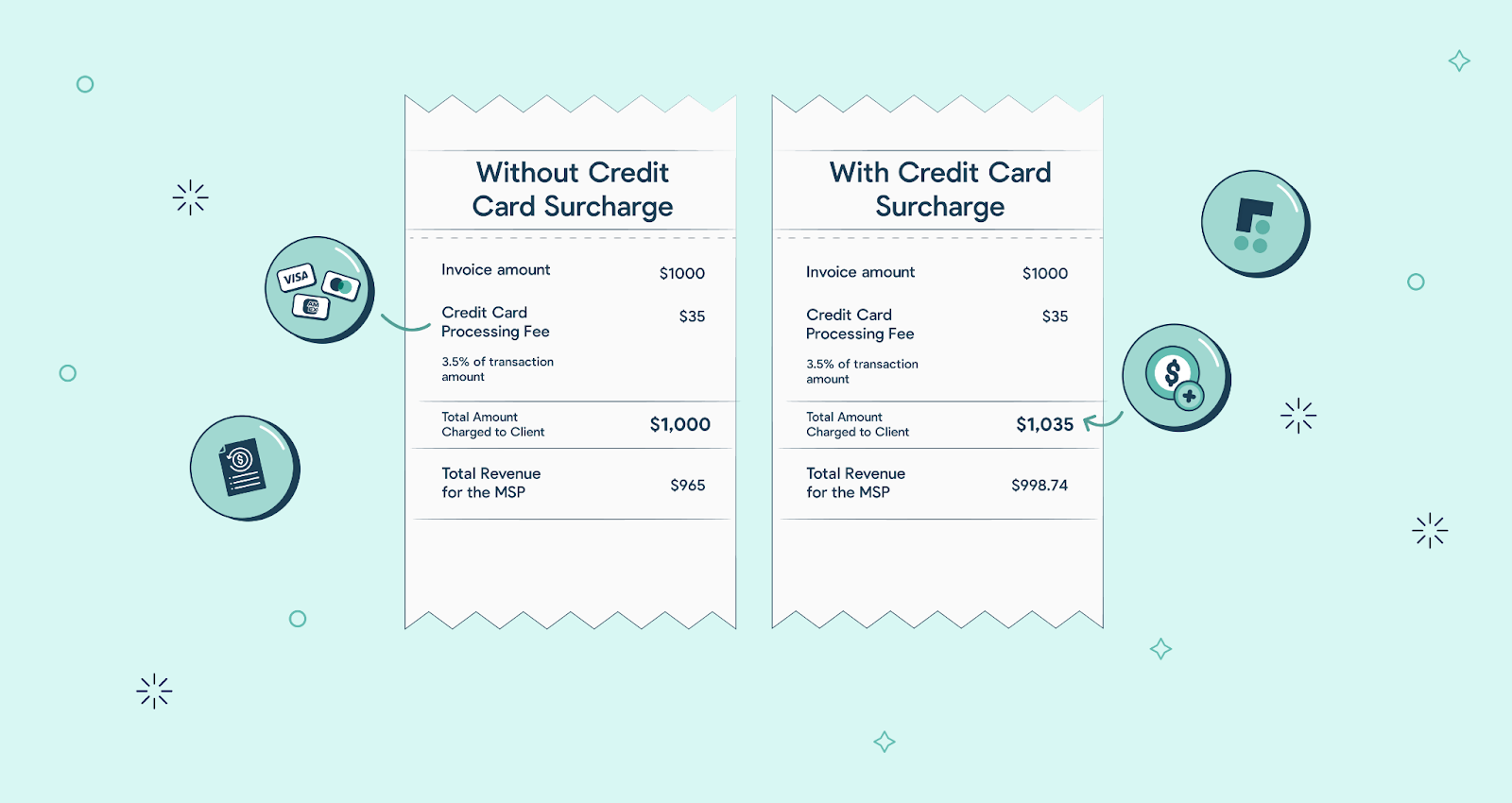
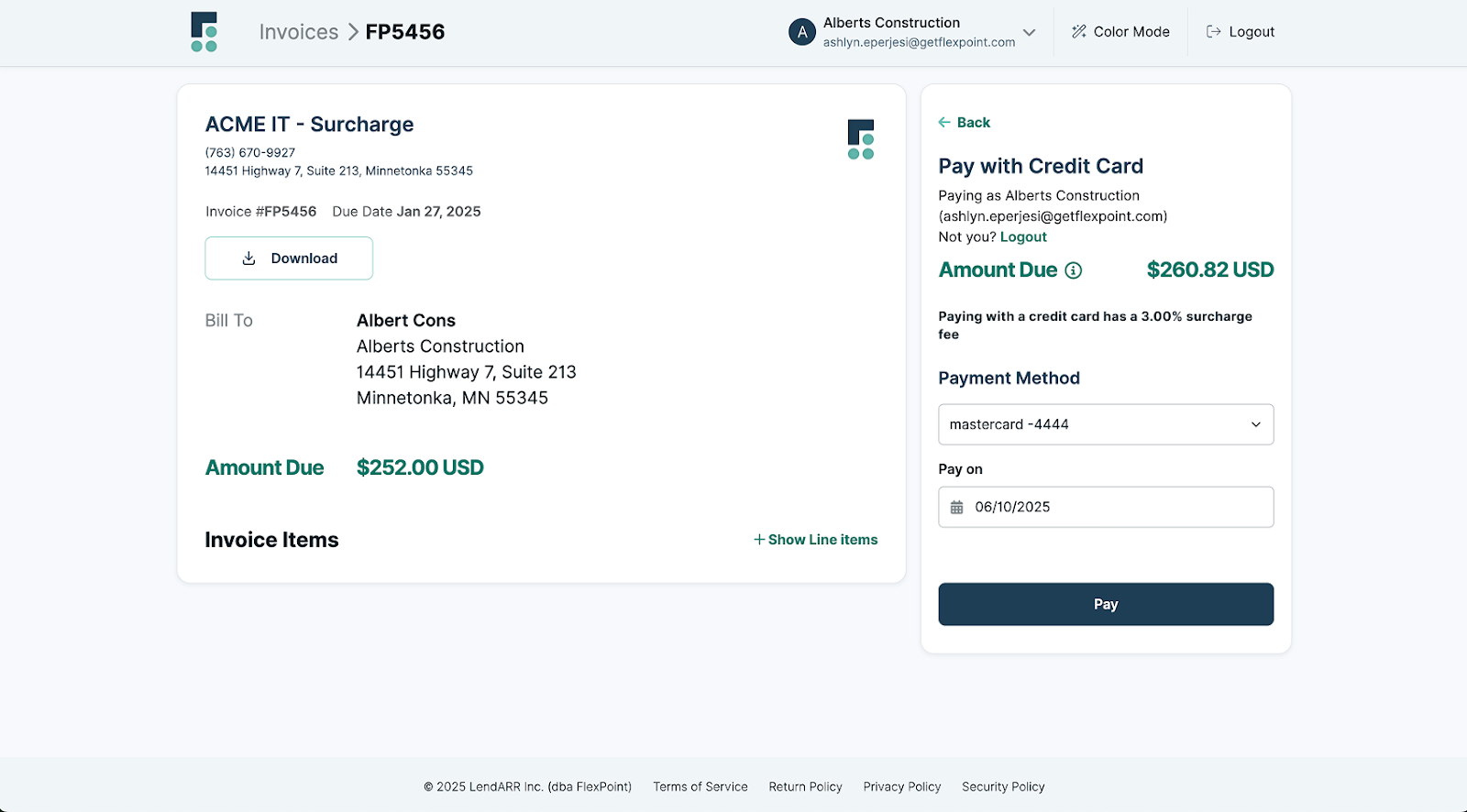
FlexPoint enables MSPs to pass credit card processing fees to clients in a legally compliant and transparent manner. Instead of absorbing 3.5% on every card transaction, you can offset those costs and protect your margins. It is helpful for MSPs with many clients who prefer card-based payments.
FlexPoint’s native fee-recovery engine handles all the compliance rules, including state-specific surcharging laws, invoice disclosures, and card network guidelines. MSPs can pass on the full or partial costs of credit card processing to their clients without risking legal action.
For an MSP billing $30,000 per month, enabling fee recovery can add over $10,000 in extra profit each year. FlexPoint automates the calculation and integration of surcharge at checkout. The feature ensures clients see the surcharge clearly at checkout, preventing hidden fees that can cause payment friction or damage trust.
2. Fast, Flat-Rate ACH Transfers:
FlexPoint charges a flat rate for ACH processing with no percentage cuts or hidden fees. It makes your costs predictable and much lower than QuickBooks Payments' 1% fee. Your ACH fee remains the same, whether you process a $500 invoice or a $50,000 annual contract.
FlexPoint also supports Same-Day ACH, unlike QuickBooks' long ACH payment processing timeline. Same-Day ACH gives you the flexibility to time deposits around payroll, vendor payments, or any other cash flow need without waiting nearly a week for money that's already been paid.
MSPs know what each transaction will cost before it hits the bank, making forecasting far more accurate. FlexPoint ACH delivers funds to your account faster, so it doesn’t strain cash flow or operations.
3. Custom Billing Model Support:
FlexPoint can handle the complexity of modern MSP pricing, including recurring service plans, usage-based fees, tiered service levels, hardware-as-a-service, pass-through charges, prepaid blocks, overages, and occasional project-based invoices. With FlexPoint, you can combine multiple billing models on a single invoice, automate calculations based on usage data, and create bundled service packages without manual workarounds.
Unlike QuickBooks, which requires manual upload of usage data, FlexPoint handles tiering, metering, and invoice generation automatically. Additionally, FlexPoint allows you to customize billing cycles and payment terms to fit your clients' needs.
FlexPoint eliminates the need for spreadsheets, custom invoice templates, or manual adjustments each billing cycle by directly gathering real-time service and usage data from your PSA. If a client exceeds their device count, FlexPoint automatically syncs the data from the PSA and calculates the overage charge. If you're passing through cloud storage or licensing costs, those line items populate dynamically based on actual usage.
FlexPoint’s invoicing system is accurate and consistent because it pulls service data from your PSA in real time. By letting the PSA handle metering and service tracking, FlexPoint eliminates the reliance on estimates, memory, or manual notes. As your pricing evolves, your billing system grows with it, allowing you to introduce new pricing models or adjust them to client needs.
4. Payment Collections Automation:
FlexPoint automates the entire collections process, sending payment reminders and escalating accounts after regular intervals. You don’t need to manually track which clients need a follow-up or draft individual reminder emails.
The platform includes automated dunning workflows that escalate based on the length of time an invoice has been overdue. For example, you can set it to send a gentle reminder at 7 days past due, a firmer notice at 30 days, and a final warning at 60 days. These workflows run automatically, freeing your finance team to focus on more critical tasks.
FlexPoint automates the entire collections lifecycle. It tracks when a client opens an invoice email, sets up automated reminder sequences, and triggers intelligent follow-up workflows for overdue invoices. This dramatically reduces aging receivables and the time your team spends chasing payments.
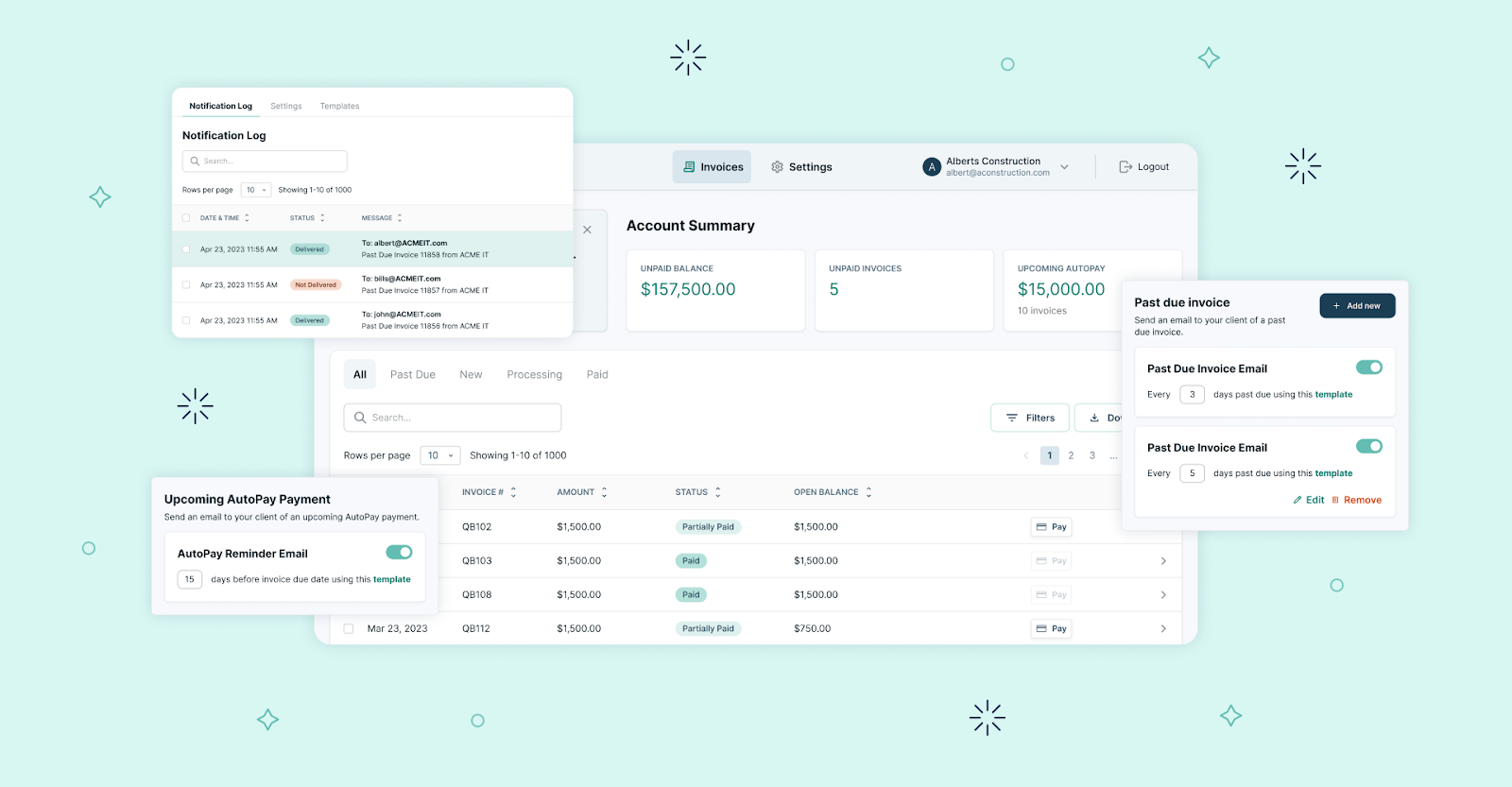
FlexPoint's collections dashboard gives you real-time visibility into A/R health. You can see which clients are overdue, how long they've been overdue, which reminders have been sent, and which accounts are at risk. These insights allow you to prioritize follow-ups, identify clients who consistently pay late, and intervene to prevent cash flow problems. This results in faster collections, lower DSO, and healthier cash flow, with less manual effort.
5. Client Portal + Self-Service:
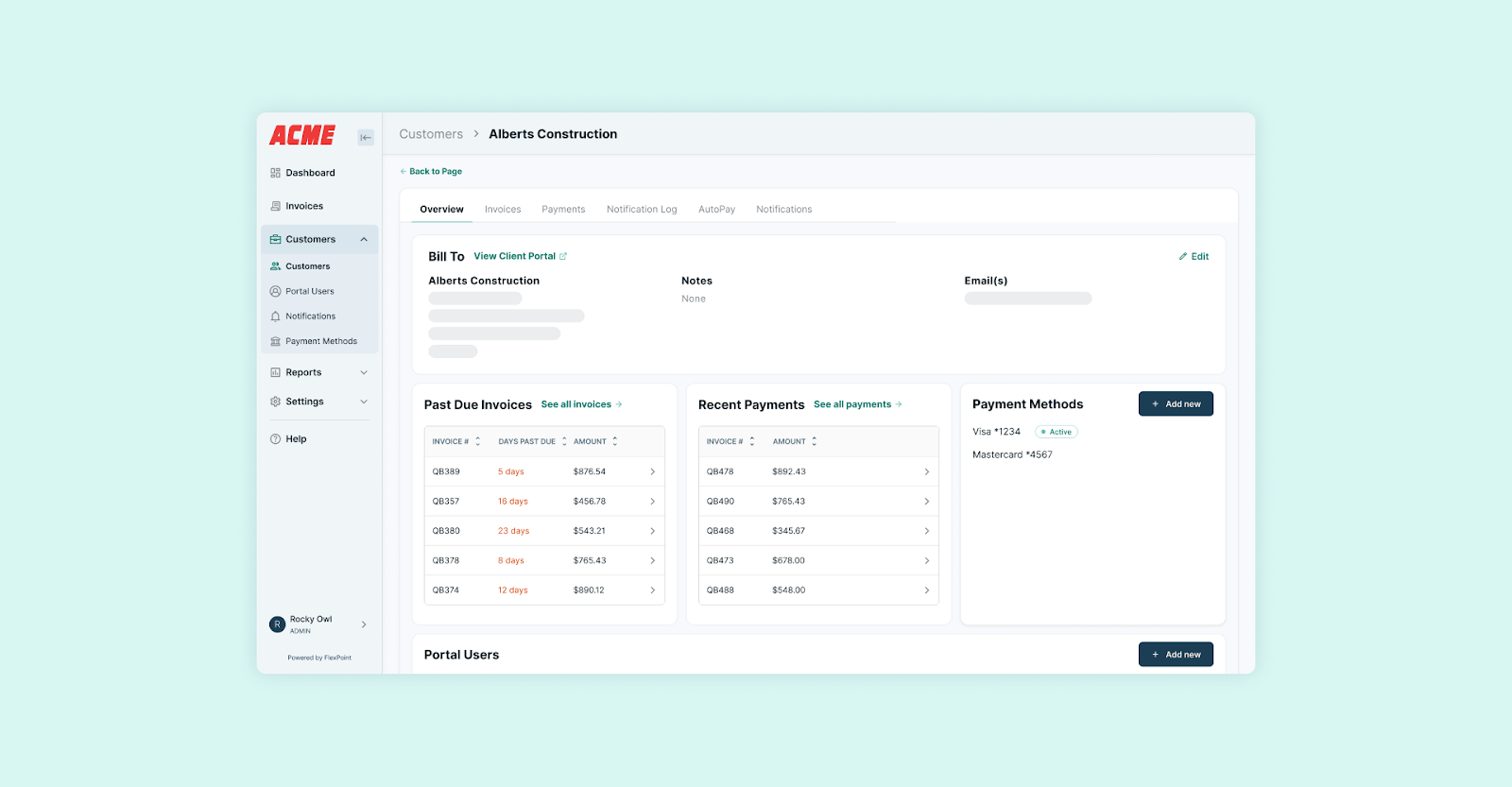
FlexPoint offers a branded client portal where your customers can log in at any time to view outstanding invoices, download past statements, update payment methods, and set up AutoPay. The self-service functionality reduces support requests to your team and gives clients control over their payments.
Clients can also make partial payments, pay multiple invoices in a single transaction, or select flexible payment plans. FlexPoint also allows clients to set up a passwordless AutoPay option for recurring invoices. With AutoPay, payments are processed automatically on the due date, eliminating missed payments and reducing manual follow-ups for your team.
FlexPoint’s branded client portal strengthens client relationships by making billing transparent and accessible. Clients no longer have to wonder about upcoming invoices or dig through their emails for past ones. The information is organized, easy to find, and available 24/7, improving the client experience.
6. Automated Deposit Reconciliation:

FlexPoint seamlessly integrates with accounting software, such as QuickBooks Online (and also QuickBooks Desktop) or Xero, as well as PSA tools (such as ConnectWise PSA , AutoTask, HaloPSA, and SuperOps). Every payment processed through FlexPoint is automatically synced with PSA and accounting systems in real time, eliminating the need for manual data entry. It eliminates reconciliation issues caused by separate payment processors. Your team doesn’t need to match deposits to invoices, correct wrong payments manually, or do end-of-month cleanup.
Two-way data syncs ensure your finance team always has accurate, up-to-date information without toggling between platforms or running manual reconciliation reports. When payments sync automatically, there's no risk of human error in data entry, no missed payments that fall through the cracks, and no discrepancies between what your PSA shows and what QuickBooks reflects.
For MSPs scaling quickly, operational efficiency is a competitive advantage. Automated deposit reconciliation ensures uninterrupted service delivery, improving the client experience and increasing retention rates. Additionally, with accurate, timely payment data, you can make informed resource-allocation and budgeting decisions and forecast future growth.
FlexPoint works alongside QuickBooks, not as a replacement. QuickBooks handles your accounting, while FlexPoint provides the billing and payment solutions MSPs need to operate more effectively. It adds automation, fee efficiency, flexible billing, and improved cash flow control to address the gaps QuickBooks Payments doesn’t.
Conclusion: Know the Risks Before You Commit to QuickBooks Payments
QuickBooks Payments offers convenience by integrating payment processing directly into the QuickBooks accounting software you already use. However, it's not designed for the specific needs of a growing MSP and can cause significant long-term problems.
For MSPs, accepting payments isn't the real challenge. The actual cost isn't just what you're paying in fees or what you're losing from delayed deposits. It's staying stuck in manual workflows, margin erosion that compounds as your revenue grows, and the time spent on repetitive tasks. Payment friction leads to cash flow issues, and poor client experience chips away at retention.
Sticking with a bad payment platform slows growth, hardens costs, and makes scaling more expensive for fast-growing MSPs. FlexPoint solves these issues specifically for MSPs. It works with QuickBooks and your existing tech stack.
FlexPoint extends your MSP's capabilities with billing automation, flexible payment plans, surcharging transaction fees, and a client-specific branded portal. Its MSP-centric features help in the following ways:
- Surcharge fee recovery protects your margins.
- Same-Day ACH accelerates cash flow and improves forecasting.
- Collections automation reduces DSO without adding headcount.
- Custom billing support scales with your pricing complexity.
- Branded client portal reduces payment friction and support requests.
- Two-way data sync automatically keeps your data clean across QuickBooks and your PSA.
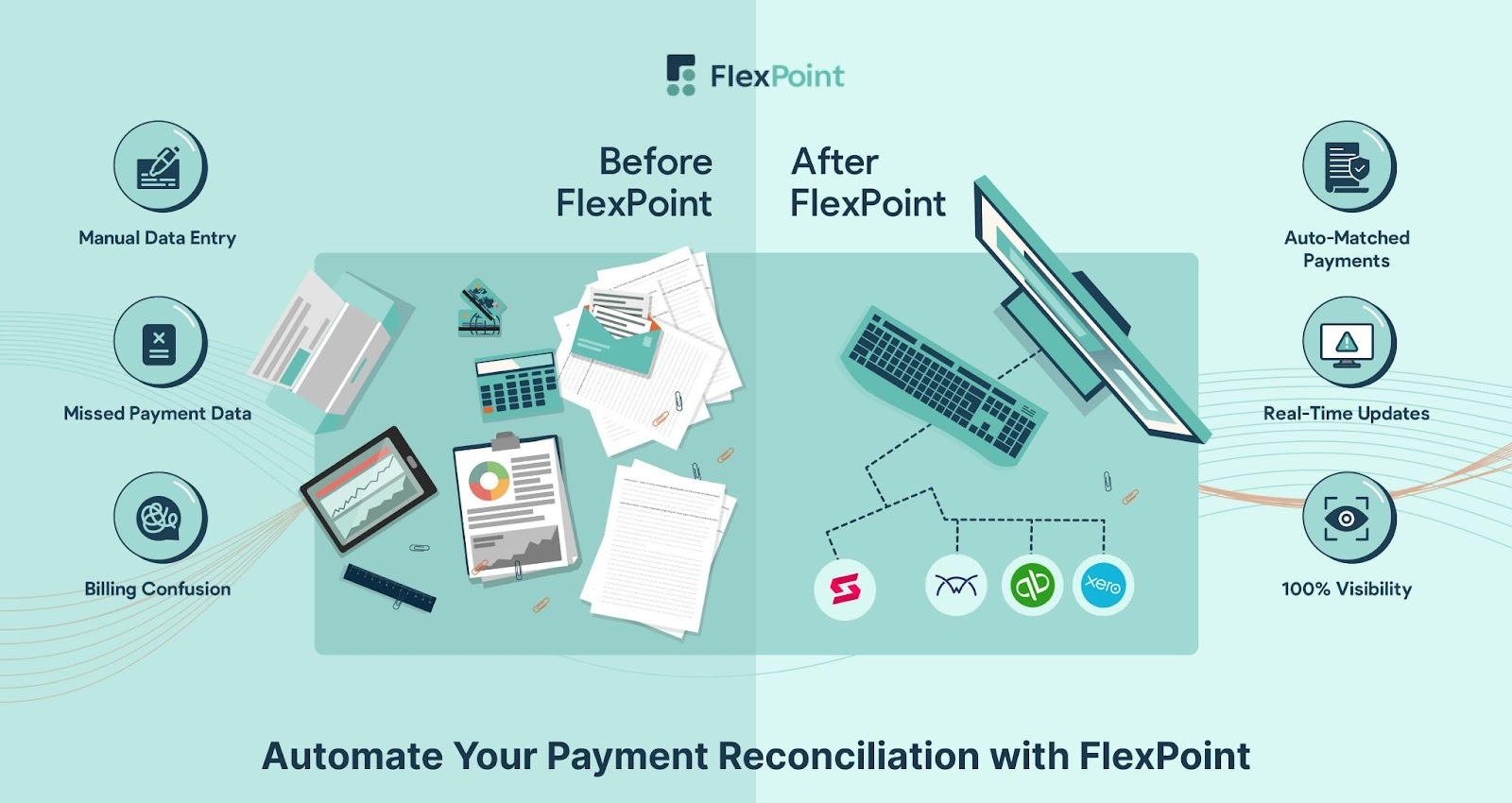
FlexPoint automates billing, payment collections, and reconciliation for MSPs. The platform is a better way to scale your AR operations efficiently and maintain your cash flow.
Consider SkyCamp Technologies, an Ohio-based MSP that tried to scale while juggling disconnected billing tools. The MSP tried collecting ACH payments through a credit card processing platform and even considered QuickBooks ACH. But due to a lack of proper integration, the team spent hours each month manually reconciling invoices, updating license counts, and chasing down payment discrepancies.
After implementing FlexPoint, SkyCamp connected its PSA and QuickBooks Online to a single automated billing and payment system. Invoices, usage data, and payments are synced in real time, eliminating manual work and accelerating payment collection by 30%.
With FlexPoint’s passwordless portal, customers can view invoices and make payments effortlessly. The MSP now saves about 8 hours each month and has a more predictable cash flow. FlexPoint provided the operational efficiency that growing MSPs miss when relying solely on QuickBooks Payments.

SkyCamp Technologies isn't alone; MSPs nationwide are using FlexPoint to streamline billing, accelerate payments, and save hours every month.
Don’t settle for payment tools that hold your MSP back.
FlexPoint + QuickBooks gives you automation, visibilty, and savings where it matters most.
Schedule a demo to see how it works.
Additional FAQs: QuickBooks Payments Challenges for MSPs
{{faq-section}}
.png)

.png)
.png)