


For MSPs seeking reliable cloud accounting solutions, FreshBooks and QuickBooks Online are two strong choices. However, they differ in features, usability, and automation, which affect MSPs' billing accuracy and financial efficiency.
FreshBooks is best known for its ease of use, client-focused invoicing, and time-tracking tools. It appeals to service-based businesses seeking simple, streamlined accounting and robust client collaboration features.
QuickBooks Online, on the other hand, is a full-featured accounting platform. It offers advanced invoicing, expense management, reporting, and tax support. This makes it one of the most well-known and widely used platforms for small businesses, including MSPs.
For MSPs with recurring contracts and complex billing models, the choice for an ideal accounting software isn’t just about features. It’s about finding a platform that automates billing workflows, cuts down manual errors, and keeps finances running smoothly.
In this article, we’ll compare FreshBooks and QuickBooks Online side by side. We’ll look at their features, pricing, usability, and integrations. We’ll also demonstrate how pairing QuickBooks Online with FlexPoint enables MSP-specific billing automation, transforming accounting into a driver of growth.
{{toc}}
FreshBooks vs QuickBooks Online: Why MSPs Are Comparing These Platforms
MSPs are comparing FreshBooks and QuickBooks Online (QBO) to find the right balance between simplicity and functionality. Both accounting platforms deliver cloud-based accounting and invoicing, but differ in depth, scalability, and automation.
FreshBooks appeals to MSPs that prioritize ease of use and straightforward billing. It provides easy tools for tracking projects, time logs, expenses, and recurring invoices, making it ideal for smaller MSPs with simpler contracts and fewer clients.
QuickBooks Online, on the other hand, provides a more complete accounting solution. It offers strong reporting, expense tracking, recurring invoicing, and integrations with PSA and billing tools. Clients can also set up automatic payments for ongoing services, making collections faster and easier.
In short, MSPs choose FreshBooks for simplicity and ease, or QuickBooks Online for automation and scalability. Both handle recurring billing and client management, but the best choice depends on your business complexity and growth needs.
Features Comparison: FreshBooks vs QuickBooks Online for MSPs
When evaluating accounting platforms for MSP operations, the depth and functionality of the features are crucial. They directly impact daily efficiency and financial accuracy.
Here's how FreshBooks and QuickBooks Online compare across critical MSP requirements:
Invoicing and Billing Capabilities
FreshBooks: Simplifies invoicing with customizable templates, recurring billing, and built-in time tracking. It helps connect directly to project invoices, which is helpful for MSPs billing on an hourly basis.
QuickBooks Online: Supports recurring services and one-time project billing. QBO also has built-in integrations with PSA tools and billing software (such as FlexPoint) for seamless billing and streamlined deposit reconciliation.
Expense and Time Tracking
FreshBooks: Offers expense management with mobile receipt capture, automatic categorization, and project-based time tracking. This helps you manage billable hours.
QuickBooks Online: Supports expense tracking (with bank feeds), time tracking via its Projects feature (or via add-ons), and recurring invoice automation.
Reporting and Analytics
FreshBooks: Provides basic reports like profit and loss, client profitability, and project analytics. These tools work well for simple operations. But it lacks the depth required for strategic decisions and detailed analysis for growing MSPs.
QuickBooks Online: Gives detailed financial reporting, real-time dashboards, customizable templates, and advanced analytics. The reports cover cash flow, client profitability, and full financial statements. This helps you with planning and compliance.
User Roles and Permissions
FreshBooks: User role controls are simpler than those in accounting platforms such as QBO. The handling of internal users and permissions may be less flexible, especially in lower plans.
QuickBooks Online: Supports role-based permissions across most plans, letting you restrict access for service technicians, project managers, or admin users. Some advanced controls may depend on your subscription level.
Integrations and Ecosystem
FreshBooks: Its integration ecosystem is strong for its niche, but it's smaller in scope than those of broader accounting platforms and enterprise systems. FreshBooks lacks integrations with MSP-specific tools.
QuickBooks Online: Offers extensive integration with various software tools. This includes PSAs such as ConnectWise PSA, SuperOps, HaloPSA, and Autotask, as well as MSP-specific payment processors like FlexPoint.
Automation and Workflow Tools
FreshBooks: Provides basic automation for invoice reminders, recurring billing, and payment notifications. While helpful, the automation capabilities are limited to core accounting functions.
QuickBooks Online: Enables automatic bank reconciliation, and via additional tools or add-ons, you can implement approval workflows. Premium pricing tiers include additional QBO integrations and workflow automation.
Feature Comparison Summary - QuickBooks Online vs FreshBooks
Pricing & Value: What MSPs Get With Each Platform
Understanding the total cost of ownership goes beyond subscription fees.
You must evaluate feature value, scalability costs, and integration expenses to make an informed financial decision.
In this section, we will show the pricing structures for FreshBooks and QuickBooks Online, along with what you get for each subscription.
FreshBooks Pricing Structure
Subscription Models: Priced monthly with tiered plans tailored to business size and feature requirements.
- Lite Plan: $21/month
- Plus Plan: $38/month
- Premium Plan: $65/month
- Select Plan: Custom pricing for advanced needs
A 30-day free trial is also available.
Included Features by Tier:
- Lite Plan: Basic invoicing, expense tracking, time tracking
- Plus Plan: Adds project management, proposals, and team time tracking
- Premium Plan: Includes advanced reporting, double-entry accounting, and custom fields
- Select Plan: Includes dedicated support, branded customization, and advanced onboarding.
Add-On Costs: MSPs can incur extra charges for payment processing, additional users, and access to advanced features.
QuickBooks Online Pricing Structure
Subscription Model: Priced monthly, with plans based on user count and feature depth.
- Simple Start: $38/month
- Essentials: $75/month
- Plus: $115/month
- Advanced: $275/month
A 30-day free trial is also available.
Features by Tier:
- Simple Start: Core invoicing, income and expense tracking, receipt capture
- Essentials: Adds bill management, time tracking, and multi-user access
- Plus: Includes project profitability tools, inventory management, and advanced reporting
- Advanced: Includes workflow automation, enhanced reporting, and dedicated account support
Add-On Costs: Extra fees may apply for QuickBooks Payments, international transfers, or expedited payment services.
Value Analysis for MSPs
- FreshBooks: Offers substantial value for small MSPs with fewer than 50 clients. It provides a lower entry cost and an intuitive interface that minimizes training time. It's built-in time tracking removes the need for separate tools, while the simple pricing structure ensures predictable costs.
- QuickBooks Online: Provides a comprehensive feature set that scales with business needs. It is also backed by an extensive integration ecosystem that simplifies billing management.
Trials and Promotion
- FreshBooks: Offers a 30-day free trial. In some cases, they offer promotional discounts, like 70% off for the first three months, to new users. They also offer 50% off for 6 months.
- QuickBooks Online: Offers a 30-day free trial, with occasional promotions like 50% off for the first three months for new users.
Summary: FreshBooks offers simple, tiered pricing with a focus on ease of use and project-based billing. QuickBooks Online provides a comprehensive accounting suite with advanced features and higher-tier plans designed for scaling businesses.
The best value depends on whether you prioritize straightforward invoicing and usability or comprehensive financial management with deeper integrations.
Usability, Integrations, and Support: Choosing the Best Fit
The day-to-day user experience has a significant impact on adoption success and operational efficiency.
Both platforms approach usability differently, affecting how your teams interact with financial data.
User Experience and Interface
FreshBooks: Focuses on simplicity with an easy-to-use dashboard that needs little training. Its clean interface is ideal for simple invoicing workflows. This might be a struggle with very advanced MSP-specific accounting or PSA-level complexity.
QuickBooks Online: Provides a detailed dashboard with deeper functionality. With the right integrations or third-party connectors, QuickBooks Online can support more complex MSP billing.
Onboarding and Training Resources
FreshBooks: Emphasizes guided onboarding, has strong documentation, and offers support channels, including chat.
QuickBooks Online: Comprehensive training library, webinar series, and community forums with broader learning resources for advanced features
Customer Support Quality
FreshBooks: Provide hands-on support for standard issues. However, advanced or highly technical accounting problems may require escalation or external accounting support.
QuickBooks Online: Offers phone, chat, and email support, plus access to a large community and expert network to help with complex MSP needs.
Integration Ecosystem Depth
FreshBooks: Integrates broadly with payment, CRM, project, and automation tools via its API, Zapier, and native connectors. However, it lacks deep native support for many MSP-centric PSAs compared to specialized accounting/PSA tools.
QuickBooks Online: Offers extensive integration with many PSA/MSP tools. It also has a large app marketplace and is well-connected to the banking and financial services industry.
Real-World MSP Feedback
FreshBooks: Users say it is good for smaller operations with simple billing, but it falls short as businesses grow and their needs become more complex. Users like its simplicity, but often outgrow it as their client base grows.
QuickBooks Online: Users often praise it for supporting complex billing through integrations and its broader ecosystem. Also, in some cases, billing tools like FlexPoint are used to bridge the gap in billing automation (we will discuss this in detail in the next section).
Summary: You should match platform choice with current complexity and growth trajectory. FreshBooks suits simple operations, while QuickBooks Online provides the foundation for scaling financial management.
FlexPoint + QuickBooks Online: Automated Billing for MSPs
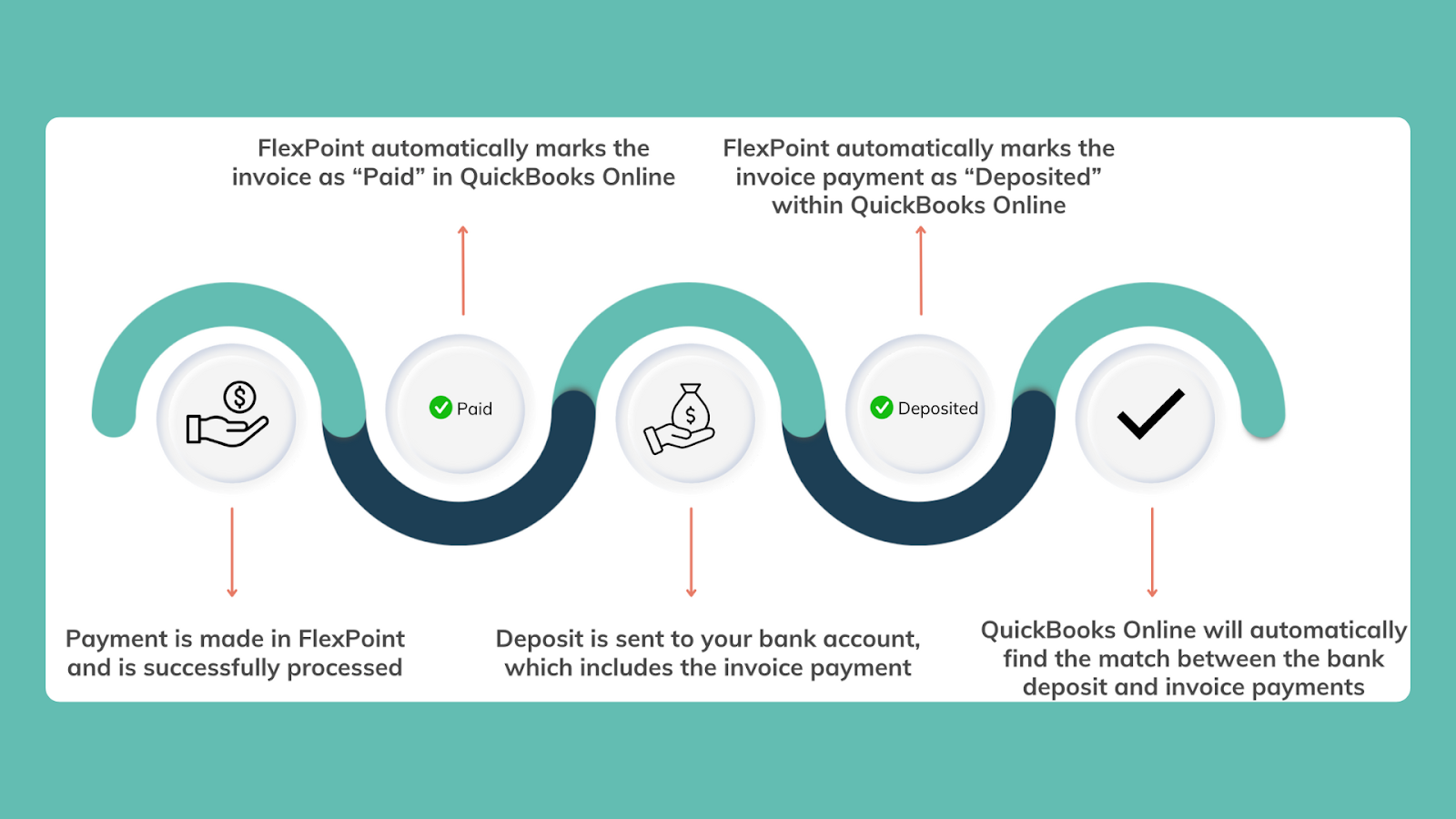
FlexPoint transforms QuickBooks Online from a standard accounting tool into a complete MSP billing automation platform.
This eliminates manual effort, improves accuracy, and accelerates cash flow.
By connecting your PSA, payments, and accounting data, FlexPoint creates a unified, cloud-based financial system tailored to your operations.
Exclusive Integration for QuickBooks Online: FlexPoint connects directly with QuickBooks Online to automate billing, collections, and reconciliation. This makes Invoices, payments, and deposits. It also keeps your records accurate and eliminates manual entry.
Streamlined and Error-Free Billing: Whether you bill on recurring contracts, usage-based services, or custom projects, FlexPoint automates it all. Invoices and payments sync instantly with QuickBooks Online, reducing billing errors, saving time, and ensuring fast, accurate reconciliation each month.
Comprehensive PSA Integration: FlexPoint integrates with PSA tools such as ConnectWise PSA, HaloPSA, SuperOps, and Autotask. This helps sync tickets, agreements, and time entries with QuickBooks Online for accurate invoicing and reporting. It also ensures your service and financial data stay perfectly aligned.
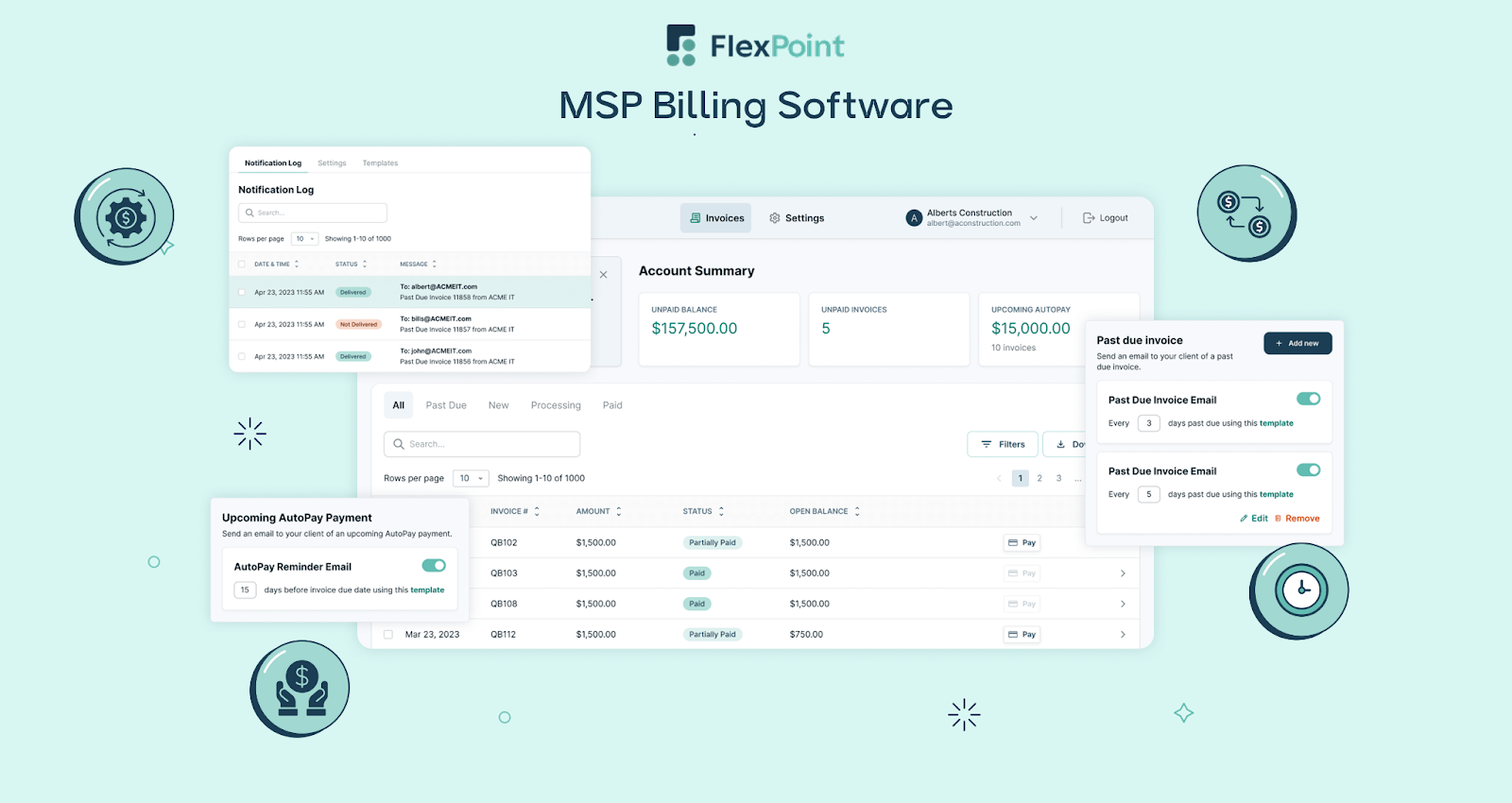
Branded Client Portal: Provides a branded portal for your clients to view invoices. They can set up and use AutoPay, update payment methods, and download invoices/statements. This ensures a consistent and professional user payment experience for your clients.
Flexible Payment Options: FlexPoint supports ACH (including Same-Day ACH), credit cards, and flexible financing plans. This gives clients flexible payment options that boost satisfaction and speed up cash flow.
Real-Time Financial Visibility: Integrated dashboards provide real-time insights into key billing metrics, including A/R aging, DSO, and cash flow. With QuickBooks Online at the core, FlexPoint keeps data accurate and up to date, enabling confident, data-driven decisions.
Scalability and Cloud Continuity: As your MSP expands, FlexPoint + QuickBooks Online scales effortlessly. From small operations to multi-location MSPs, the system automates high-volume billing, simplifies reconciliation, and supports your growth without additional administrative overhead.
Note: FlexPoint integrates exclusively with QuickBooks Online (and also with QuickBooks Desktop). The platform currently does not support FreshBooks integration.
For MSPs seeking complete billing automation, QuickBooks Online (powered by FlexPoint) delivers the most scalable, cloud-based financial foundation available.
Conclusion: Choosing the Right Accounting Software for Your MSP
Comparing FreshBooks and QuickBooks Online is essential for MSPs to align their financial management with business needs.
FreshBooks offers simplicity and ease of use for straightforward billing, while QuickBooks Online provides advanced features, integrations, and scalability for more complex operations.
Understanding these differences helps MSPs choose the platform that supports efficiency, growth, and long-term success.
Both FreshBooks and QuickBooks Online bring value to MSPs, but the best fit depends on how complex your workflows are, the level of automation you require, and the depth of integration needed to support your operations.
For MSPs seeking modern, automated billing and collections, FlexPoint maximizes the benefits of QuickBooks Online.
FlexPoint helps MSPs automate billing, invoicing, and payments while syncing directly with QuickBooks Online.
It reduces errors, saves time, and offers features like payment reminders, client portals, and real-time reporting to enhance cash flow and the client experience.
Take, for instance, Excellent Networks, a Texas-based MSP that previously managed invoicing through ConnectWise and processed most payments manually. Checks often got lost in the mail, and credit card payments in QuickBooks incurred additional fees.
Mark Luna, President at Excellent Networks, sought a billing solution to eliminate the time and money spent on these manual tasks.
After switching to FlexPoint integrated with QuickBooks Online, the payment process was streamlined and automated.
Mark approves invoices in QuickBooks, which then automatically sync to FlexPoint.
FlexPoint then collects and deposits payments, and the platform automatically reconciles all transactions across all systems.
FlexPoint's AutoPay feature and auto-reconciliations save Mark several hours per month in billing time, totaling 24 hours saved per year.
Payment times improved by 80%, reducing the invoice turnaround time from 25 days to just 5.

The billing improvements seen at Excellent Networks are far from unique. MSPs nationwide are cutting manual billing tasks, eliminating payment confusion, and delivering a smoother client experience, all while saving thousands of dollars each month with FlexPoint.
Ready to transform your MSP's accounting and billing?
FlexPoint integrates with QuickBooks Online to deliver end-to-end payment automation.
Schedule a demo to see how FlexPoint + QBO can streamline your billing operations.
Additional FAQs: FreshBooks vs QuickBooks Online for MSPs
{{faq-section}}




