


.png)
Let's be honest: MSPs spend too much time just trying to get paid.
Send invoices. Follow up on late payments. Reconcile accounts manually.
These tasks slow down cash flow, create errors, and distract your team from serving clients. Accounts receivable automation solves these problems. It streamlines invoicing, payment collection, and reporting while reducing costly manual work.
AR automation allows MSPs to get paid faster and deliver a better client experience. This guide explains what AR automation is, why MSPs need it, and how the right accounts receivable software can support your business.
What Is Accounts Receivable Automation?
Accounts receivable automation puts the tedious parts of billing on autopilot. Instead of spending hours creating invoices, sending reminders, and reconciling deposits, dedicated software takes care of the heavy lifting.
For MSPs, AR automation cuts through the chaos of spreadsheets and scattered systems. It makes sure invoices land in clients’ inboxes on time, payments hit your accounts correctly, and your team spends more time solving client problems instead of chasing dollars.
Modern AR software also integrates with your PSA, accounting tools, and even quoting solutions to keep all your data in sync. The result is a smooth, end-to-end billing workflow that’s accurate, reliable, and (hear us out) even enjoyable to manage.
Why AR Automation Matters for MSPs
The MSP industry faces unique challenges with billing. You juggle monthly recurring revenue, one-time project invoices, hardware sales, and credit card fees. Manual processes cause delays, errors, and friction for clients. AR automation fixes these issues and improves your overall business operations.
1. AR Automation Speeds Up Cash Collection
AR automation sends invoices immediately after a job is completed, or a recurring billing cycle starts. The system sends automated reminders when payment is due and overdue.
Clients can pay using ACH, credit card, or AutoPay, or even flexible financing. Faster payments mean MSPs improve cash flow and reduce financial stress. Collecting revenue becomes predictable and consistent.
With a modern AR platform, AutoPay should be simple to set up. See it in action, below.
2. AR Automation Reduces Manual Errors
Manual billing increases the risk of mistakes. Teams can enter the wrong amount, skip line items, or misfile payments. These errors frustrate clients and create additional work.
Accounts receivable software securely stores all billing data in one place and updates it automatically. When you use AR automation, your invoices, payments, and accounting records always match – especially when integrated into your back-office tech stack, like QuickBooks Online and ConnectWise PSA. MSPs gain confidence that every payment is accurate, and every client's record is up to date.
Want to see what we mean? Watch automatic syncing between ConnectWise, QuickBooks Online, and FlexPoint below.
3. AR Automation Improves Cash Flow Visibility
AR automation gives MSPs clear, real-time visibility into their accounts receivable. You can see which invoices are paid, which are overdue, and which are scheduled to be paid.
The next gen of AR solutions grants even more visibility into your cash flow, such as real-time payment status updates. See entire activity logs, including when invoices are created, sent, viewed, and paid – down to the minute.
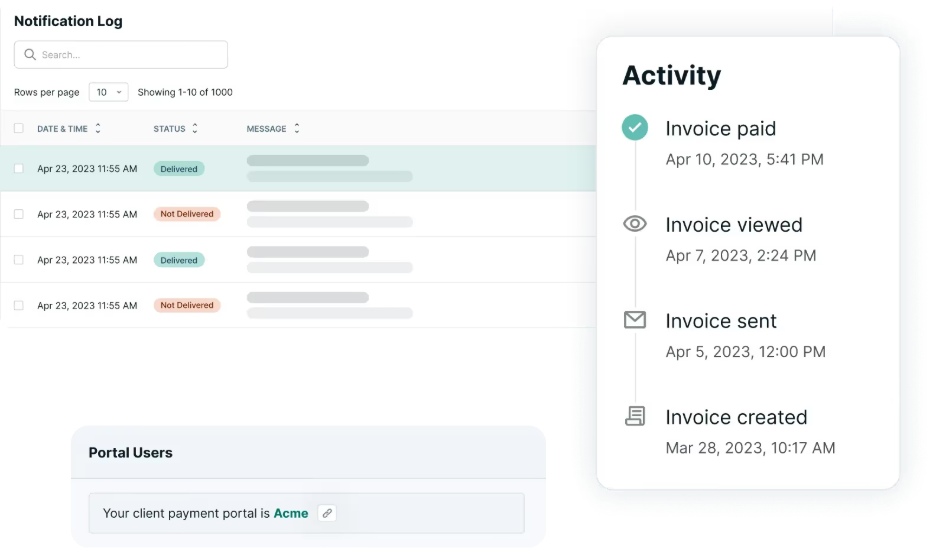
Dashboards and reports let you identify trends, forecast revenue, and plan business operations more effectively. Knowing your cash flow in real time helps MSPs make informed decisions about hiring, expansion, or investing in new tools.
4. AR Automation Improves the Client Experience
Clients want simple ways to pay. AR tools let them use self-service portals, AutoPay, and multiple payment methods to reduce payment friction.
When paying is easy, clients pay faster and avoid frustration. MSPs reduce the number of emails and phone calls they send. Automation creates a professional, consistent experience that builds trust with clients.
How AR Automation Works for MSPs
AR automation combines multiple processes into one system. Here’s what a typical workflow looks like:
Automated Invoicing
Software generates invoices automatically using data from your PSA or accounting software. Your team no longer creates invoices manually and could save on invoicing fees by choosing a modern AR platform. MSPs like Dega Systems save 36 hours annually on invoice management, plus see 15% reductions in monthly invoices costs.
Smart Payment Collection
Clients pay via secure online portals, using ACH, credit cards, and flexible financing options. The system records payments instantly and syncs data across your accounting and PSA tools. Your team avoids manual processing, entry errors, and missed payments. Service providers, like Pileus Technologies, see a 5% increase in new customers by offering smarter payment options such as one-click financing.
Automated Reminders
The automation software sends reminders before and after payment is due. MSPs set rules once, on global and per-client levels, and the system follows through consistently. Your team avoids awkward conversations and wasted time. MSPs, such as Fort Point IT, experience a 65% reduction in overdue payments by utilizing AR automation.
Automated Deposit Reconciliation
The software matches incoming payments and bank deposits to invoices automatically. You don’t need spreadsheets or manual reconciliation. Payment data flows directly into your accounting system and is accurately reconciled.
See automated deposit reconciliation in action, below.
Reporting and Dashboards
AR tools track key metrics like AR aging, collection efficiency, and cash flow trends. Dashboards give MSPs the insight needed to make quick, informed financial decisions.
Integrations
Most AR tools connect with PSA systems like ConnectWise, Autotask, HaloPSA, or SuperOps, as well as accounting platforms like QuickBooks or Xero.
FlexPoint combines these features into a single workflow. It keeps your billing accurate, simple, and client-friendly.
Common MSP Use Cases
AR automation solves real problems that show up in every single billing cycle. MSPs deal with recurring service contracts, surprise project work, hardware orders, and clients who all pay differently. These moving parts create friction, slow payments, and drain time. Automation cuts through that noise and keeps everything running smoothly.
Recurring Monthly Billing
Most MSPs live on monthly recurring revenue. Manual invoicing slows down your cycle and introduces errors. Automation sends invoices on a set schedule, applies payments instantly, and keeps your recurring billing predictable. Your team gains a clear picture of cash flow and avoids end-of-month scrambles.
Project and Hardware Invoices
At the same time, project work and hardware sales never line up neatly with your monthly rhythm. These invoices demand accuracy and a quick turnaround. Automation creates invoices as soon as the work is complete, giving clients a clear breakdown by automatically syncing line items and giving your team faster revenue recognition.
Managing Large Client Lists
Growth brings administrative pressure. When your client list expands, manual billing becomes chaotic. Automation organizes the entire process and removes the stress of keeping track of who paid, who’s overdue, and who needs follow-up.
Handling Late Payers Without Added Stress
Every MSP has clients who fall behind. Chasing late payments takes time and creates uncomfortable conversations. Automation sends reminders consistently and keeps communication professional. Your team avoids awkward outreach, and clients receive clear notice when payments slip.
Optimizing Payment Processing Costs
MSPs that accept credit cards often absorb unnecessary fees – as much as 3-4% on every transaction. Automation gives you tools to offset or reduce these costs through built-in payment settings and surcharging workflows. Your margins improve without adding manual work or clunky steps for clients.
Supporting Clients Who Want Faster, Simpler Payments
Clients expect modern payment options. Automation gives them online payment links, AutoPay, and a self-service dashboard. They pay faster because the process feels effortless. Your team spends less time answering billing questions and fixing preventable issues.
Keeping AR and Accounting Clean
Disconnected tools create mismatched records. Automation keeps invoicing, payments, and reconciliation in sync with your PSA and accounting platform. You avoid duplicate entries and get clean books without chasing data across systems.
Signs Your MSP Needs AR Automation
You may already feel the strain of manual billing. AR automation fixes the pressure points that slow down payments and frustrate your team. If any of these situations sound familiar, it’s time to upgrade your process.
1. Invoices Take Too Long to Send
Your team spends hours building invoices, attaching PDFs, and sending them manually. Delayed invoices lead to delayed payments.
2. Clients Pay Late More Often Than You’d Like
Late payments disrupt cash flow and force your team to follow up repeatedly. Consistent reminders and simple payment options reduce this problem.
3. Your Accounting System Requires Constant Manual Updates
If your PSA and accounting software never match, your team wastes time updating both systems. Manual syncing leads to mistakes and confusion.
4. Your AR Aging Report Never Feels Accurate
When your aging report changes depending on who pulls it, you lose clarity on cash flow. Clean reporting helps you plan and forecast with confidence.
5. Your Team Uses Different Collection Methods
One person follows up by email. Another calls. Someone else waits for the next invoice cycle. Inconsistent outreach creates uneven results and slows down collections.
6. Clients Ask for Easier Payment Options
You may hear requests for online payments, autopay, or a cleaner invoice format. When clients ask for convenience, meeting that need speeds up payment.
7. Your Staff Spends Too Much Time Chasing Payments
Payment follow-up distracts your team from client work. Automation handles follow-up so your staff can stay focused on service and project delivery.
8. You Feel Stuck with Your Current Billing Tools
If your current system feels clunky, slow, or disconnected, automation can give you a clear path forward.
How MSPs Should Evaluate AR Tools
Selecting the right AR platform affects every part of your billing process. MSPs need tools that support clean workflows, remove manual work, and give clients a smooth payment experience. Use these criteria to guide your evaluation:
1. Integration and Workflow Fit
Look for tools that connect directly to your core systems. Strong integrations prevent extra work and keep billing accurate.
- Connects to PSA platforms like ConnectWise, Autotask, HaloPSA, or SuperOps
- Syncs cleanly with your accounting software
- Updates records automatically so your team avoids duplicate entry
2. Payment Experience for Clients
Your clients want simple payment options that work on any device. A strong AR tool improves collection speed and reduces support tickets.
- Clear payment links and branded payment pages
- AutoPay for recurring invoices
- Straightforward checkout flow that avoids confusion
3. Automation That Reduces Manual AR Work
Automation should remove repetitive tasks and keep your team focused on service, not spreadsheets.
- Automatic invoice delivery
- Scheduled reminders for upcoming and overdue payments
- Real-time payment posting without staff intervention
4. Security and Compliance
MSPs handle sensitive financial data. The platform must protect that data without slowing down your workflow.
- PCI compliance
- Encrypted payment processing
- Role-based permissions and access control
5. Reporting That Supports Operational Decisions
A modern AR tool should give you visibility into performance, trends, and problem accounts.
- Real-time AR aging
- Clear insight into cash flow
- Tracking for collection performance
6. Pricing and Long-Term Fit
Evaluate pricing based on your current size and planned growth. Make sure the tool supports higher invoicing volume and new services as you scale.
Use FlexPoint’s Buyer’s Guide to Go Deeper
If you want a full framework for evaluating AR and payment platforms, FlexPoint created the MSP Payment Software Buyer’s Guide. It outlines what MSPs should look for, common pitfalls to avoid, and how to match a platform to your exact billing model. It gives you a structured way to compare AR tools and choose one that supports long-term growth.
FlexPoint uses these same standards in its own platform, giving MSPs a unified way to automate billing, collect payments, and track AR performance in one workflow



%20(1).jpg)



