


Switching from WisePay isn’t as simple as choosing a new payment processor and turning the old one off.
For most MSPs using it, WisePay sits in the middle of a much larger workflow involving client payment methods, AutoPay, ConnectWise PSA, accounting software and if using QuickBooks Online, Wise-Sync functionality.
That means a successful migration needs to account for both how clients pay you and what happens to the financial data around those payments.
The good news? With some planning, you can make the move without unnecessarily disrupting your billing workflow or asking every client to start from scratch.
Here’s how to switch from WisePay, from reviewing your existing agreement to migrating stored payment methods and preparing clients for the new experience.
Quick answer: Switching from WisePay starts with reviewing your current agreement and billing workflow, identifying whether you need to replace payments, synchronization functionality or both, and selecting a replacement that supports those requirements.
1. Check your WisePay agreement and current setup
Before setting a switch date, figure out exactly what you’re replacing.
Start with your current WisePay agreement. While WisePay’s publicly available Terms of Service describe month-to-month service unless another term is specified, those terms were last updated in September 2022. In practice, most MSPs are operating under annual agreements today.
Your individual agreement should be the source of truth.
Check your renewal date, notice requirements and any cancellation terms before establishing your migration timeline. If you’re currently under contract, you may want to time the transition with the end of your term or ask prospective vendors whether they offer contract buyout options.
You should also review any separate merchant or payment-processing agreements. WisePay’s published terms note that payment-provider services can be governed by separate third-party agreements, so cancelling WisePay does not necessarily terminate every service involved in accepting payments.
Then map what WisePay currently does for your MSP.
Are you using it for:
- Client payments and saved payment methods?
- Automatic Payments?
- ConnectWise PSA and accounting synchronization?
- All of the above?
This distinction matters because WisePay and Wise-Sync historically worked together across the payment and accounting workflow.
ConnectWise currently describes Wise-Sync as synchronizing ConnectWise PSA data with accounting platforms including QuickBooks Online and Xero, while WisePay handles the payment side of that workflow.
If you rely on both, replacing only the payment portal leaves part of the problem unsolved.
Finally, calculate what the current setup actually costs across software, payment processing, synchronization and any other applicable fees. That gives you a much better baseline for evaluating alternatives than the monthly software price alone.
Curious about what you're actually paying? WisePay Pricing, Rates & Fees
2. Compare WisePay alternatives based on why you’re leaving
Before comparing platforms, define what you actually want to improve.
MSPs that contributed to our WisePay & Wise-Sync Migration Toolkit highlighted several reasons for reevaluating their setup, including:
- reducing manual reconciliation
- gaining more control over the client payment experience
- reducing limitations to just the ConnectWise ecosystem
- improving synchronization between ConnectWise and QuickBooks Online
But it’s important to use your own pain points as the criteria for your replacement.
Then when it comes to comparing WisePay alternatives, consider all aspects like: pricing and contract structure, PSA support, accounting synchronization, stored-payment migration, AutoPay, deposit reconciliation, ACH funding speed, AR automation, and client onboarding and implementation support.
Integration depth deserves particular attention.
For example, even if you use ConnectWise today, you may not use it forever.
Our migration toolkit recommends considering how easily a replacement can integrate with new PSA or accounting systems and what limitations exist outside a single vendor ecosystem.
In the same vein, don't settle for seeing your PSA and accounting software listed on an integrations page. Look at what data actually synchronizes between them and what happens when a sync fails.
This is also a great opportunity to simplify your stack.
Instead of recreating every part of the existing WisePay/Wise-Sync setup with separate products, look at whether one platform can handle more of the workflow.
Ready to start planning? Download our WisePay & Wise-Sync Migration Toolkit for the complete migration checklist, platform evaluation framework, and client communication resources.
Also check out all relevant WisePay alternatives for MSPs here.
3. Build your WisePay migration plan
Once you’ve chosen a replacement, work backward from your target cutover date.
It can be tempting to one-fell-swoop everything, but don't wait until the week your WisePay agreement ends.
One of the biggest (and more complicated) things you'll have to consider is what happens to stored client payment methods.
Can you migrate stored payment methods from WisePay?
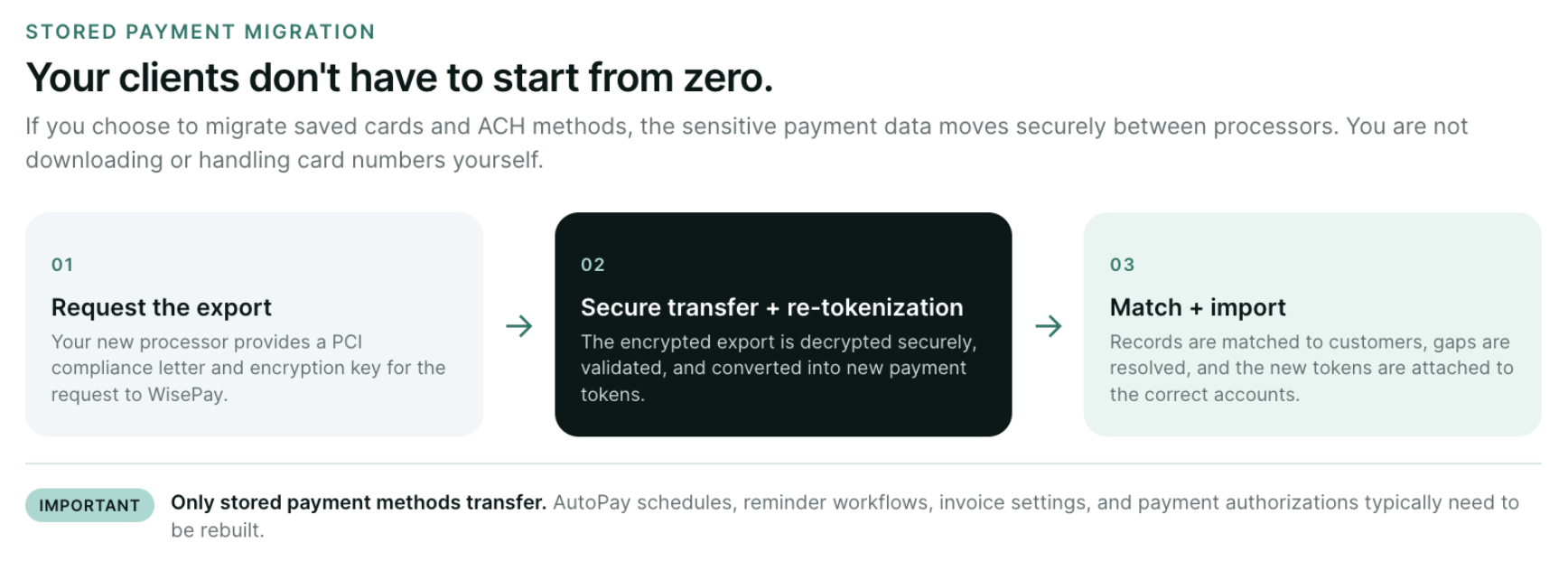
Potentially, yes, but it depends on your payment processor and new provider.
WisePay allows clients to save both credit card and bank account payment methods. However, WisePay does not store the underlying credit card information itself. ConnectWise states that encrypted payment information is sent to its payment-processing providers, while WisePay retains a tokenized value for future payments.
Because of that setup, migrating stored payment methods isn't as simple as exporting them directly from WisePay and uploading them somewhere else. Whether those credentials can be securely transferred depends on the processor currently holding the payment data and the capabilities of your new provider.
For MSPs moving to FlexPoint, eligible stored credit card and ACH payment methods can be securely migrated from an existing processor. This prevents clients from having to manually re-enter their payment information.
Our WisePay Migration Toolkit recommends considering a payment migration when you have 25 or more stored payment methods, a high percentage of clients using AutoPay, or simply want to minimize the number of clients who need to re-enter their payment details. For an MSP with relatively few stored methods or many expired cards, starting fresh may make more sense.
There’s one more important distinction to make:
Migrating payment methods does not mean migrating your entire WisePay configuration.
AutoPay schedules, reminder workflows, invoice settings, and payment authorizations typically need to be rebuilt separately.
What does a WisePay payment migration involve?
The exact process depends on your existing processor and new provider, but our WisePay migration process generally follows four stages:
A. Migration initiation: Request migration instructions from the new processor. This includes receiving the appropriate PCI compliance documentation and encryption key and submitting the export request.
B. Data intake and preparation: The encrypted payment data is securely processed, payment methods are re-tokenized, and records are checked for missing or mismatched information.
C. Customer mapping: Any payment methods that cannot automatically be matched with the correct customer need to be reviewed and mapped.
D. Final import: The new payment tokens are attached to the appropriate customer records and the migration is completed.
For this process, allot around approximately one calendar month, although timing can vary based on how quickly the current processor completes the export.
4. Prepare your team before the switch
A payment-platform migration touches your whole team one way or another.
Bring in the people responsible for billing, accounting, PSA administration and client communication early enough that everyone knows:
- When the transition is happening
- What systems are changing
- Who owns the migration internally
- Who handles client communication
- How AutoPay rules will be rebuilt
- How payment questions will be handled during the transition
Clean up your data before moving it, too.
Our migration checklist recommends confirming your total stored payment methods, cleaning up PSA and accounting customer records, reducing duplicates, and more.
Then test.
And before announcing the final switch, run sample transactions, verify migrated payment methods, validate PSA and accounting synchronization, and test your rebuilt AutoPay rules.
You want to find the weird stuff before your clients do.
5. Inform clients about the change
.png)
Your clients don't need an essay about your billing infrastructure.
But they need to know three central things:
Why is this changing? What do I need to do? Will my billing experience stay consistent?
It's important to answer those proactively.
Give affected clients advance notice of the transition date and explain how they'll access the new payment experience.
If their stored payment method migrated successfully, tell them. If they need to enter a new one, make that action extremely clear.
The same goes for Automatic Payments.
If clients need to accept a new authorization or configure something again, don't bury that requirement in a general announcement or newsletter or social media post.
Prioritize outreach to clients who actually need to take action and send reminders as the cutover approaches.
The WisePay & Wise-Sync Migration Toolkit also includes a ready-to-use client announcement template and FAQ you can adapt for your own rollout.
Also helpful is our post: How to announce payment system changes to clients without losing trust.
6. Switch from WisePay to the new platform
After all of that comes the final cutover.
Establish a final processing cutoff and identify any scheduled or already-processing transactions that need to clear.
Then activate the new workflow and verify it end-to-end. Here are just a few important questions to confirm:
- Can a client successfully receive an invoice and pay it?
- Does the payment appear where it should?
- Does the transaction synchronize correctly between your PSA and accounting software?
- Does reconciliation work?
- Are your AutoPay rules behaving as expected?
Only after the replacement workflow is functioning should you complete the cancellation steps required under your applicable WisePay and merchant-processing agreements.
Keeping the systems overlapped briefly may feel less tidy, but it's much better than discovering a missing integration or payment configuration after the old workflow is gone.
Switching from WisePay to FlexPoint
If you're replacing both WisePay and Wise-Sync, you don't necessarily need to rebuild the same stack with two new tools.
FlexPoint combines billing, payments, and AR functionality for MSPs, while supporting the pieces of the workflow that need to move during a WisePay transition.
That includes secure migration of eligible stored credit card and ACH payment methods, helping reduce how many clients need to re-enter their payment information.
FlexPoint also supports ConnectWise, Autotask, HaloPSA and SuperOps, giving MSPs more flexibility if their PSA changes later.
For MSPs replacing Wise-Sync specifically, GL Connect provides synchronization between ConnectWise and QuickBooks Online. It synchronizes invoices, payments, customers, products, tax names, and other data and is included on applicable FlexPoint plans.
See GL Connect in action, below.
Beyond replacing existing WisePay functionality, FlexPoint also adds automated deposit reconciliation, Same-Day ACH allowances with every plan, a branded client portal, automated onboarding, and AR Agents to keep recurring AR work moving without requiring someone to manually monitor every account.
And the transition itself doesn't have to be something your MSP figures out alone. FlexPoint's U.S.-based team will actively support with both payment migration and onboarding. (Worried about your client’s onboarding? FlexPoint has onboarding sequences built for them.)
Curious about all the differences? Compare all features with FlexPoint vs. WisePay.
Planning your move from WisePay?
Download the WisePay & Wise-Sync Migration Toolkit for the full technical migration timeline, platform evaluation framework, readiness checklist, client announcement template, FAQ, and more.
The toolkit walks you through the process all the way from evaluating alternatives through final cutover so you can switch without disrupting your billing.




.png)