.png)
Choosing the right payment platform shapes how your MSP invoices, gets paid, and manages receivables. QuickBooks Payments and Stripe are both popular options, but neither was built with the realities of MSP billing in mind.
QuickBooks Payments is designed primarily for small businesses that run within QuickBooks Online. Stripe is designed for software and e-commerce teams that want a flexible payment infrastructure. MSPs, however, operate in a different world.
Managed services billing often includes recurring contracts, mid-cycle changes, usage-based add-ons, pass-through charges, and project work. You also need automation to reduce manual follow-up, protect cash flow, and maintain accurate accounting as volume grows.
Just as important, payments need to sync cleanly with QuickBooks Online and connect to PSA-driven workflows so invoices, expenses, and service activity stay aligned.
In this article, we compare QuickBooks Payments vs. Stripe across the features that matter most to MSPs: billing flexibility, automation and reconciliation, integrations, and total cost.
We will also explain why many MSPs move to FlexPoint, an MSP-first billing and payments platform that adds purpose-built automation, two-way PSA and QuickBooks sync, and better control over processing costs as you scale.
{{toc}}
QuickBooks Payments vs Stripe: Why MSPs Compare These Platforms
MSPs often compare QuickBooks Payments and Stripe because both are widely adopted payment platforms that can be launched quickly and support invoice-based payment collection.
QuickBooks Payments is a natural option for MSPs already using QuickBooks Online and QuickBooks Desktop for invoicing and accounting. Stripe, on the other hand, appeals to teams that manage recurring billing or serve clients through online portals.
- Ease of Setup: Both platforms are relatively easy to get started with, but the setup process differs. QuickBooks Payments is built directly into QuickBooks Online so that you can enable payments with minimal configuration. Stripe can also be activated quickly, but aligning it with an MSP’s billing and accounting workflow typically requires custom configuration or third-party tools.
- Integrated Payment Processing: Each platform allows clients to pay directly from invoices, which is a key reason MSPs compare them. QuickBooks Payments posts transactions directly to QuickBooks Online, simplifying basic syncing and reconciliation. Stripe offers more customization in how payments are collected, but syncing payments back to accounting and reconciling deposits often requires additional tools or structured workflows.
- Growing billing needs: As MSPs grow, they need more than off-the-shelf payment processing. As billing becomes more complex, flexibility, control, and automation become the real differentiators. MSPs want payment workflows that fit recurring services, usage-based charges, project invoicing, and pass-through expenses without creating manual cleanup in the back office. Ultimately, this comparison is not just about features. It is about choosing a platform that can support the complexity and growth of MSP billing.
Features Comparison: QuickBooks Payments vs Stripe for MSPs
When MSPs evaluate payment platforms, the real question is not just whether the tool can process payments. It is whether it can support MSPs' billing as complexity increases. That means handling recurring invoices, client payment collection, automation, reconciliation, and integrations without adding more manual work to your back office.
Below is a feature-by-feature comparison of QuickBooks Payments and Stripe across the areas MSPs care about most.
Invoicing and Payment Collection
QuickBooks Payments: Built directly into QuickBooks Online so that you can accept credit card and ACH payments straight from your invoices. This works well for straightforward billing workflows. But once you introduce more complexity, such as invoice changes, multi-line billing, or partial payments, many MSPs end up tracking details outside QBO to stay organized, which creates extra manual work.
Stripe: Offers modern checkout experiences through hosted payment pages and embedded flows that make it easy for clients to pay. These frictionless payment options can improve conversion. However, Stripe is not an invoicing and accounting system, so supporting MSP invoice workflows often requires additional setup and third-party tools to connect billing, payments, and accounting.
Recurring Billing and Subscriptions
QuickBooks Payments: Supports recurring payments tied to recurring invoices, which can cover basic MSP retainers and subscription services. It is typically sufficient for simple monthly or annual billing, but it becomes limiting when pricing models get more complex.
Stripe: Strong subscription infrastructure that supports recurring charges, usage-based billing, and more flexible pricing models. This is useful for MSPs with evolving service packages, but it often requires technical configuration and ongoing management to keep billing logic aligned with real-world service delivery.
Automation and Reconciliation
QuickBooks Payments: Payments automatically sync to QuickBooks Online and match invoices, simplifying basic reconciliation. Where MSPs run into friction is when payment scenarios get messier, such as partial payments, failed payments, changes in payment status, or exceptions that require follow-up. These cases often push teams back into manual tracking.
Stripe: Offers advanced payment-level automation, including retry logic and programmable workflows. The drawback is that reconciliation and accounting sync are not native to Stripe, so you typically need middleware or a third-party connector to keep your books accurate, which adds complexity and maintenance overhead.
Fees and Surcharge Controls
QuickBooks Payments: Supports credit card and ACH processing but does not offer robust built-in controls for fee recovery or credit card surcharging. As transaction volume grows, MSPs often end up absorbing more credit card fees, and the impact on margins becomes harder to ignore.
Stripe: Offers flexibility in how payment processing is configured and priced, but it does not natively solve fee recovery for MSPs. If your goal is to recover card fees or influence payment method selection, you typically need custom configuration or additional tools.
Integrations and Ecosystem
QuickBooks Payments: Deeply embedded inside QuickBooks Online, so accounting integration is automatic. The limitation is that its ecosystem is designed for general small-business needs, not for MSP billing workflows that require more automation, PSA connectivity, and multi-system visibility.
Stripe: Known for its broad ecosystem and developer-friendly APIs, with integrations across many platforms. The tradeoff is that it is not a native QuickBooks tool, so connecting payments to accounting often requires additional integration layers, which increases setup time and ongoing upkeep.
MSP-Specific Capabilities and Scalability
QuickBooks Payments: A strong fit for smaller MSPs that keep billing and accounting fully inside QuickBooks Online and have relatively simple invoicing. As MSPs scale, limitations around automation, billing flexibility, and operational controls can create friction.
Stripe: Built for scalable, high-growth environments and supports global payments, multiple currencies, and advanced billing structures. But it is not designed for MSP operations, so it does not include MSP-specific workflows for billing automation, reconciliation alignment, or managed services billing, requiring further customization.
Summary Table: Features that Matter for MSPs: QuickBooks Payments vs Stripe

Pricing and Fee Structure: What MSPs Can Expect to Pay
When MSPs compare QuickBooks Payments and Stripe, the pricing conversation usually comes down to two things: (1) the baseline processing rates for cards and ACH, and (2) whether the platform helps you control those costs as payment volume grows.
In most cases, neither platform is designed to help MSPs systematically recover card fees or reduce processing costs through MSP-specific billing workflows.
Below are the typical cost expectations for each platform.
QuickBooks Payments

Stripe
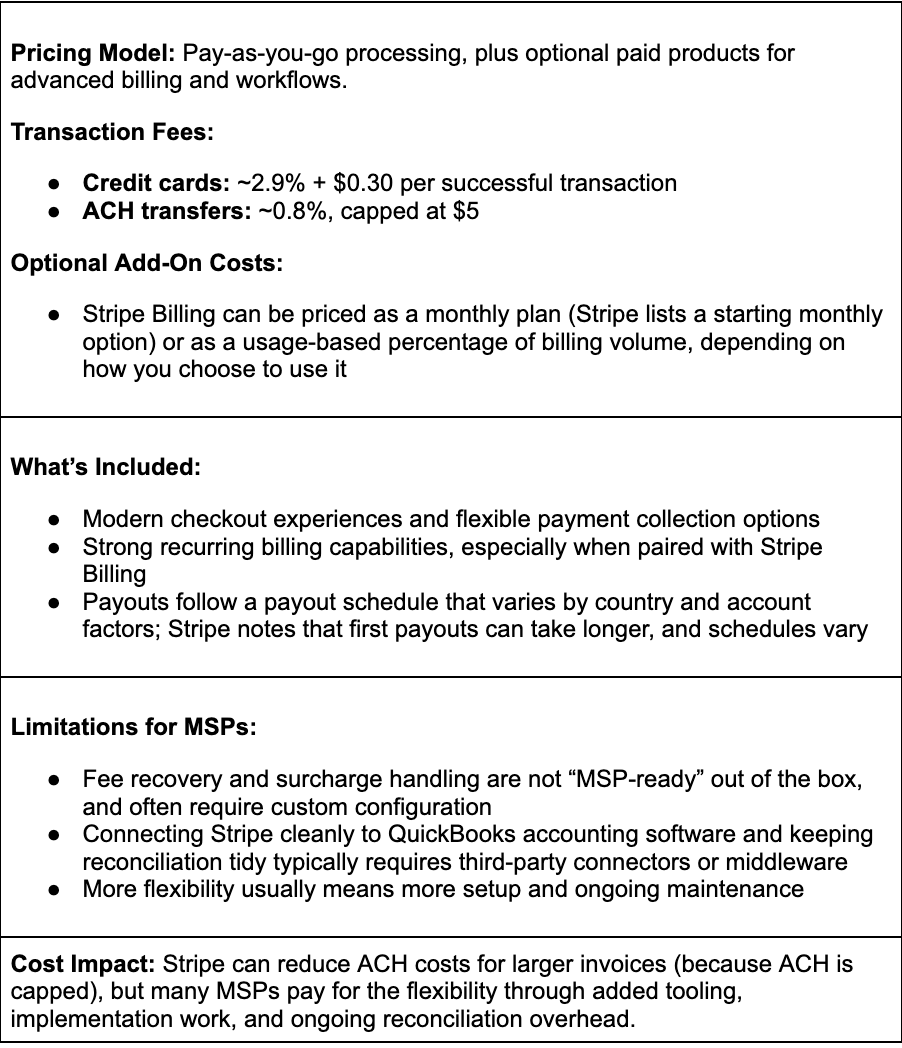
Trials and Setup Considerations
- QuickBooks Payments: No separate trial. You pay when you process transactions via QBO/QBD. However, requires merchant account approval from Intuit.
- Stripe: No formal trial, but Stripe supports testing in a sandbox-style environment before going live.
A good way to evaluate real costs is to model your typical monthly invoice mix (invoice size, card vs. ACH split, recurring volume), then calculate how fees change as revenue scales.
Value for MSPs
- If you want the simplest path inside QuickBooks Online, QuickBooks Payments is convenient, but the fee structure tends to stay percentage-based as volume grows.
- If you want more payment flexibility and strong subscription tools, Stripe is powerful. Still, MSPs often add connectors, billing products, or custom workflows to make it fit accounting and reconciliation needs.
Note: For many MSPs, the biggest issue is that neither platform is designed to help you consistently control or recover processing fees as recurring billing scales. That is why MSPs often consider purpose-built alternatives that combine fee recovery options, predictable (or flat-rate) ACH pricing, and automation across billing, payments, and reconciliation.
Billing Flexibility and Integration: Which Platform Fits MSP Workflows?
MSP billing is rarely static. Invoices change mid-cycle, usage varies, projects are added, and pass-through costs appear unexpectedly. The best-fit platform is the one that can handle those realities without forcing your team into manual workarounds or disconnected systems.
Here is how QuickBooks Payments and Stripe stack up when you look at real MSP workflows.
Billing Flexibility and Workflow Fit
QuickBooks Payments: Works best when your billing is simple and consistent, such as a fixed monthly retainer billed through QuickBooks Online. Because it is tightly tied to QBO invoicing, collecting payment is straightforward. The downside is that it is not built to accommodate MSP billing variations. Usage-based charges, mid-cycle changes, and more complex billing structures often require manual adjustments inside QBO and extra tracking outside the payment flow.
Stripe: Highly flexible, but requires resources to configure. It is strong for SaaS-style subscriptions and customizable checkout experiences. For MSPs, the gap is that Stripe does not come with MSP-ready billing workflows out of the box. To support the way MSPs invoice, you typically need custom development, additional billing tools, or third-party integrations to connect invoicing, payment collection, and accounting.
Scalability as Billing Complexity Increases
QuickBooks Payments: Easy to adopt early on, but it becomes more restrictive as you add clients and your billing logic gets more detailed. Over time, manual invoice adjustments and limited automation can increase administrative workload, especially when handling exceptions such as partial payments, payment failures, and changes to invoice amounts.
Stripe: Can scale technically, but it often scales with added operational complexity. As billing rules evolve and reporting and accounting needs expand, the setup typically requires ongoing upkeep. That can mean higher internal effort to maintain integrations, troubleshoot reconciliation, and keep billing logic aligned with service delivery.
Overall MSP Suitability
QuickBooks Payments: A reasonable fit for smaller MSPs that keep billing simple and manage everything inside QuickBooks Online. It becomes harder to rely on as you move toward mature MSP billing that is driven by PSA activity and requires more automation.
Stripe: A better fit for product-led teams or organizations with engineering capacity that want deep customization. For most MSPs, the technical and integration overhead can outweigh the upside unless Stripe is paired with a dedicated billing layer designed for services.
Native PSA Integration
QuickBooks Payments: QuickBooks Payments does not natively integrate with MSP PSA platforms like ConnectWise or Autotask. If your invoicing starts in your PSA, you typically need a connector or middleware to move data into QuickBooks and keep payment status aligned.
Stripe: Stripe also lacks native integrations explicitly built for MSP PSA tools. Connecting PSA data to Stripe usually requires third-party tools or custom development, especially if you want to automate invoice creation, payment posting, and status updates.
Client Portal and Self-service Billing
QuickBooks Payments: There is no dedicated, branded client billing portal for ongoing self-service. Clients can pay invoices, but they typically cannot manage payment methods, view the full billing history, or handle billing changes in one place. That often leads to more back-and-forth with your team.
Stripe: Stripe supports modern payment experiences, but it does not provide a complete self-serve client portal for MSP-style billing and account management by default. Any true portal experience usually needs to be built or implemented through additional tools.
FlexPoint: A Purpose-Built Alternative for MSP Billing
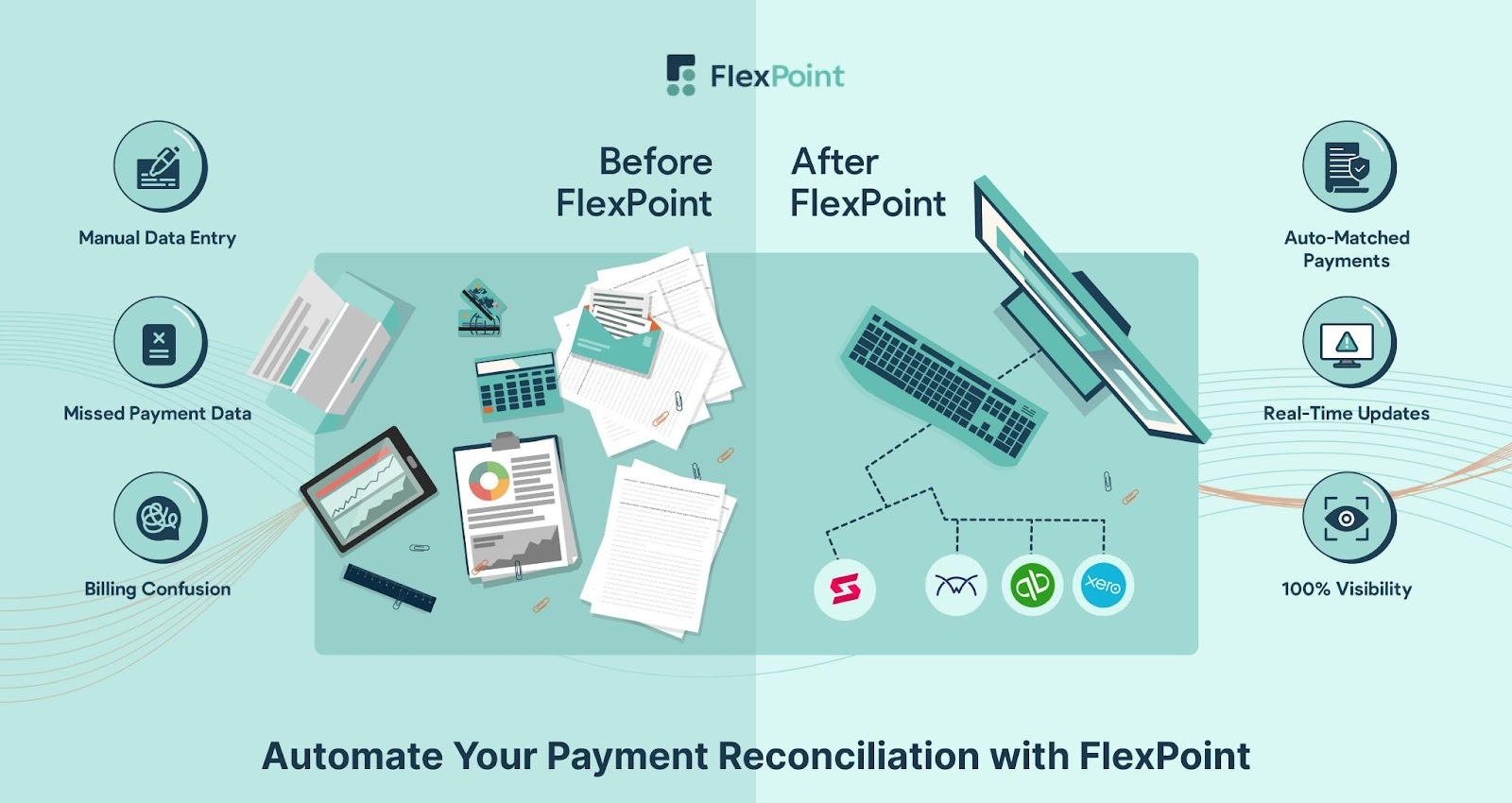
FlexPoint is an MSP-first billing and payments platform designed to address the gaps MSPs encounter with generic processors like QuickBooks Payments and Stripe.
Instead of stitching together tools for invoicing, payments, reconciliation, and collections, FlexPoint brings these workflows into a single end-to-end system built for MSP billing complexity. The result is less manual work, more predictable cash flow, and better control over margins as you scale.
Here is what FlexPoint adds that general-purpose payment tools typically do not:
- Credit Card Fee Recovery: FlexPoint includes compliant surcharge tools that enable MSPs to recover eligible credit card processing fees from clients. This protects margins and offsets the 1.15%-4% processing fees common with general-purpose payment processors, which can add up to thousands per year.
- Flat-Rate ACH Fees: FlexPoint offers low, flat-rate ACH fees so your processing costs stay predictable as volume grows. This also makes it easier to encourage clients to pay via ACH instead of higher-fee card transactions.
- Automatic Deposit Reconciliation: FlexPoint automatically matches payments to deposits and syncs payments, deposits, and fees into QuickBooks/Xero in real time. This reduces manual entry, speeds up month-end close, and minimizes reconciliation errors.
- Bi-directional PSA + QuickBooks Sync: Acting as the operational hub of your financial workflow, FlexPoint integrates directly with your PSA and QuickBooks. This two-way sync automates invoice creation, payment posting, and reconciliation. It ensures that service activity, billing data, and accounting records remain perfectly aligned.
- Automated Collections Workflow: FlexPoint streamlines A/R with automated reminders, email tracking, and overdue follow-ups, helping reduce DSO and maintain consistent cash flow without constant chasing.
- Branded Client Portal: Clients can securely log in to their branded portal to view invoices and make payments. They can also set up AutoPay and download receipts without contacting support. This self-service experience reduces administrative burden and accelerates payment collection.
- Built for MSP Billing Models: FlexPointsupports recurring billing, usage-based charges, project fees, and software pass-through costs. It also supports tiered pricing, allowing you to manage the full range of billing models without workarounds or custom development.
Note: FlexPoint delivers end-to-end billing automation, deep PSA (such as ConnectWise PSA, Autotask PSA, HaloPSA, SuperOps), and accounting integrations (QuickBooks Online, QuickBooks Desktop, Xero), and complete financial control without requiring extra tools, complex add-ons, or engineering resources.
Conclusion: Choose the Right Payment Platform for Your MSP
QuickBooks Payments and Stripe can both be solid options if you only need basic payment processing. But as your MSP grows, billing rarely stays simple. You start dealing with recurring contracts, usage-based charges, project work, pass-through costs, and PSA-driven invoices. At that point, general-purpose tools often fall short because they are not built to automate the whole billing workflow or keep your PSA and accounting systems aligned.
When you compare platforms, do not stop at transaction fees. The real cost shows up in the friction around billing operations: manual reconciliation, disconnected workflows, slow deposits, and high credit card fees that quietly eat into margins. Over time, those hidden costs can outweigh the convenience of a basic processor.
FlexPoint is explicitly built for MSPs. The platform gives you control, billing flexibility, and automation missing from mainstream platforms, while connecting your PSA and accounting tools into a single streamlined workflow. For MSPs ready to modernize billing and simplify collections, FlexPoint offers a more scalable, cost-efficient path forward.
SkyCamp Technologies, an Ohio-based MSP, is a good example. They ran into limitations when using generic tools like QuickBooks because the workflow did not align with their billing process. Their team ended up piecing together multiple payment tools, and their president, Dan Illausky, had to process ACH payments manually each month. The result was slow, error-prone, and hard to scale.
After switching to FlexPoint, SkyCamp consolidated billing and payments into a system designed for MSP workflows. FlexPoint synced with QuickBooks Online and automated payment syncing and reconciliation, removing the manual steps that created delays and accounting headaches.
The outcome was measurable: SkyCamp saved 8 hours per month and improved payment speed from late-paying clients by 30%.
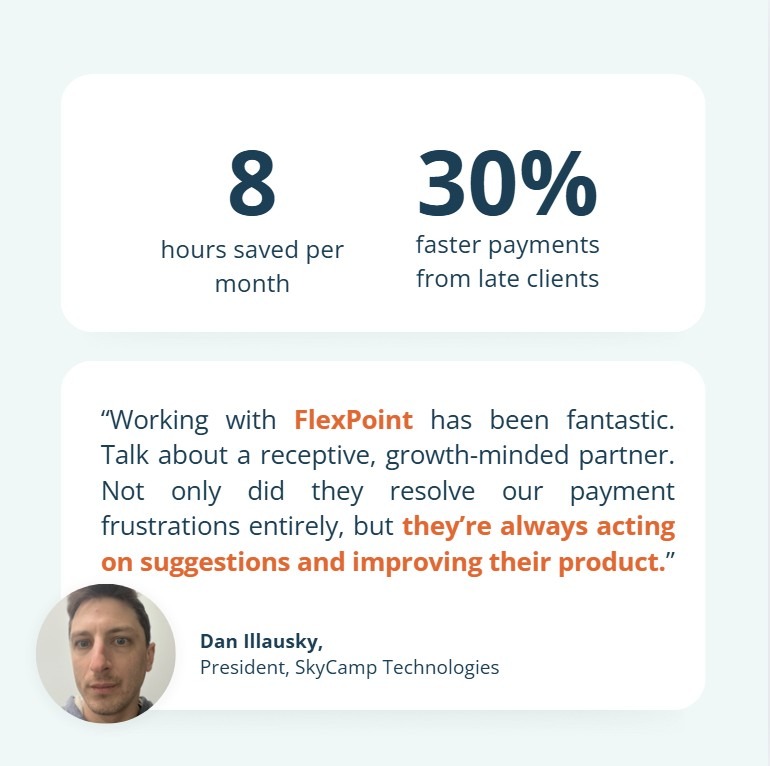
SkyCamp Technologies isn't alone; MSPs nationwide are using FlexPoint to replace rigid, general-purpose platforms with a purpose-built system that streamlines billing, accelerates payments, and saves hours every month.
If you are hitting the ceiling with QuickBooks Payments or Stripe, FlexPoint is the next step when you want billing that is built for MSP complexity, not adapted to it.
FlexPoint gives MSPs the automation, visibility, and fee savings you need to scale.
Book your FlexPoint demo today.
Additional FAQs: QuickBooks Payments vs Stripe for MSPs
{{faq-section}}
.png)

.png)
.png)