
MSP Accounting
How MSPs Can Legally Pass On Payment Processing Fees with FlexPoint


.png)
Managed Service Provider (MSP) accounting teams are grappling with rising credit card processing costs, typically ranging from 1.10% to 3.15% per transaction, according to Motley Fool Money. These fees eat into already thin margins and put MSPs in a tough spot.
Many MSPs would like to pass these charges on to clients. However, they fear running afoul of compliance rules, state-level restrictions, card network limitations, or upsetting clients.
Traditional tools, such as QuickBooks, don’t support automatic surcharging (passing fees on to clients).
This leaves MSPs to absorb the costs or resort to risky manual workarounds. The result is often frustrated bookkeepers and eroding profits.
In this article, we will provide MSP owners, finance leaders, and operations teams with a clear framework for legally passing on credit card processing fees.
We will outline the compliance requirements (so you know what rules must be followed) and highlight the common mistakes that occur when surcharging is handled manually.
Finally, we’ll show how FlexPoint helps MSPs automate compliant fee recovery. This enables MSPs to recoup processing fees transparently, maintain accurate books, and avoid audit risks.
The goal is to protect your margins in a legally permitted manner while maintaining client trust and operational efficiency.
{{toc}}
What Does Passing On Payment Processing Fees Mean for MSP Finance Teams?
Passing on payment processing fees means adding a credit card surcharge to client payments so that the client covers the transaction cost instead of the MSP.
From an accounting and bookkeeping perspective, this involves a few critical elements:
Applying a Credit Card Surcharge:
The MSP adds a small percentage (often around 2–3%) or fixed fee to the client’s invoice or payment total whenever a credit card is used.
This surcharge is designed to offset the merchant fees charged by Visa, Mastercard, and other card networks.
Note: It must apply only to credit card transactions, not to ACH, checks, or debit card payments (more on that later).
Ensuring Proper Invoice Display:
The surcharge amount must be clearly itemized on invoices, receipts, or payment confirmations, rather than hidden in the total.
For example, if a client’s invoice is $5,000 and they pay by credit card, an MSP might add a 3% surcharge line of $150 so the client sees the fee explicitly.
Accounting and bookkeeping teams need to maintain this transparency so clients know exactly what they’re being charged and why.
Accurate Accounting Mapping:
Bookkeepers must map surcharge amounts cleanly into the accounting system (e.g., QuickBooks or Xero) for reconciliation. This often means recording the surcharge as a separate line item or account entry that offsets processing fees.
When done correctly, the invoice amount, surcharge, and net deposit all line up in financial reports.
Consistency is key across one-time invoices, recurring billing, and usage-based charges: every credit card fee passed through should be captured and categorized the same way.
Compliance with Rules:
MSP finance teams must comply with state laws and card network regulations when implementing surcharges.
This includes:
- Staying within legal fee limits
- Only surcharging permissible card types (credit cards and not debit cards)
- Providing required disclosures to clients (before and after payment)
We’ll detail these rules in the next section.
Compliance is non-negotiable, as violations can lead to penalties or unhappy clients. MSPs must treat surcharging with care.
Automation to Reduce Manual Work:
Ideally, passing on fees should not add a huge manual burden. If accountants manually add fees to invoices or calculate percentages for each transaction, it’s time-consuming and error-prone.
MSP finance leaders value solutions that automate the surcharge calculation and posting, ensuring accuracy at scale.
The process should be “set it and forget it,” with the system handling fees automatically once configured.
Passing on processing fees requires compliance, accuracy, clarity, and consistency.
MSP bookkeepers must:
- Protect compliance (staying within state and card rules)
- Maintain accuracy in the books (surcharges recorded properly for every payment), ensure clarity for clients (so they aren’t caught off guard by fees)
- Seek automation (to remove tedious manual steps)
With the right approach, an MSP can recover credit card costs in a transparent way that keeps both the finance department and clients comfortable.
6 Common Mistakes MSPs Make When Trying to Pass On Fees
Many well-intentioned MSPs run into trouble when they attempt to surcharge clients without a proper system in place.
Here are the biggest mistakes and compliance pitfalls that accounting teams must avoid:
1. Surcharges Can Only Apply to Credit Cards (Never Debit Cards)
Legal Requirement: Both U.S. law and card network rules prohibit surcharging debit card transactions.
Fee recovery is only allowed for credit card payments.
Common Mistake: Using a generic payment processor or a manual method that applies a fee across all card payments, without distinguishing debit vs. credit.
For example, an MSP might add a 3% “processing fee” on every card transaction and inadvertently surcharge a client’s debit card.
Accounting Risk: This not only violates rules but also creates headaches for refunds and reconciliation.
The finance team might have to reverse those charges, handle client payment disputes, and correct the books.
It’s far safer to never surcharge debit cards in the first place. In fact, most platforms that support surcharging automatically block or exempt debit card payments for this reason.
2. State-Specific Rules Must Be Followed
Legal requirement: Credit card surcharge laws vary by state, and MSPs must comply with each client’s local regulations.
In most U.S. states, surcharging is legal, but a handful of states ban the practice outright.
For instance, Connecticut, Maine, and Massachusetts prohibit businesses from adding credit card surcharges.
Some other states allow surcharges but impose special conditions or caps. Colorado, for example, permits surcharges but caps the fee at 2% by law.
Common Mistake: Ignoring state restrictions.
An MSP operating nationally might roll out a 3% surcharge across all clients, not realizing a client in Connecticut should not be charged at all or that a client in Colorado should be charged less.
Accounting Risk: Violating state law can lead to fines and legal trouble (e.g., Connecticut can impose civil penalties up to $500 per violation).
It also means the finance team may need to retroactively credit those fees to clients and adjust invoices, resulting in messy accounting corrections.
MSPs must research and follow each state’s surcharging rules, or use a tool that has these rules built in, before passing fees to clients.
3. Surcharge Amounts Must Not Exceed Actual Processing Costs
Legal Requirement: Surcharges are meant to recoup the merchant fee, not serve as a profit center.
Card networks and many state laws stipulate that the surcharge percentage cannot exceed the business’s actual processing cost, often with a hard cap of around 3%–4%.
For example, Visa’s rules cap surcharges at 3% for Visa transactions (Mastercard allows up to 4%).
“If a merchant’s merchant discount rate for Mastercard credit cards is 2.50%, the cap on the surcharge that this merchant may charge a consumer is 2.50%, not 4%.
The 4% cap only becomes relevant in the rare instances where a merchant is paying more than 4% for Mastercard acceptance.”
Common Mistake: Setting an arbitrary or excessive surcharge rate (5%, surcharging on top of already inflated prices, etc.).
Sometimes MSPs fix a percentage but don’t update it when their processing costs change, leading to over-collection.
Accounting Risk: Overcharging fees can misstate your revenue and expose the company to compliance audits.
According to the National Federation of Independent Business (NFIB), a surcharge cannot legally exceed the merchant's cost of accepting the card. Charging more could be deemed deceptive or unlawful.
For MSPs, excessive surcharges also complicate sales tax and income recognition issues.
Keep the surcharge at or below your actual cost (typically no more than about 3%) to stay compliant and accurate.
4. Surcharges Must Be Disclosed Before Payment
Legal Requirement: Clients must be informed about any credit card surcharge before they finalize their payment.
Both consumer protection laws and card network policies require clear disclosure of the fee in advance.
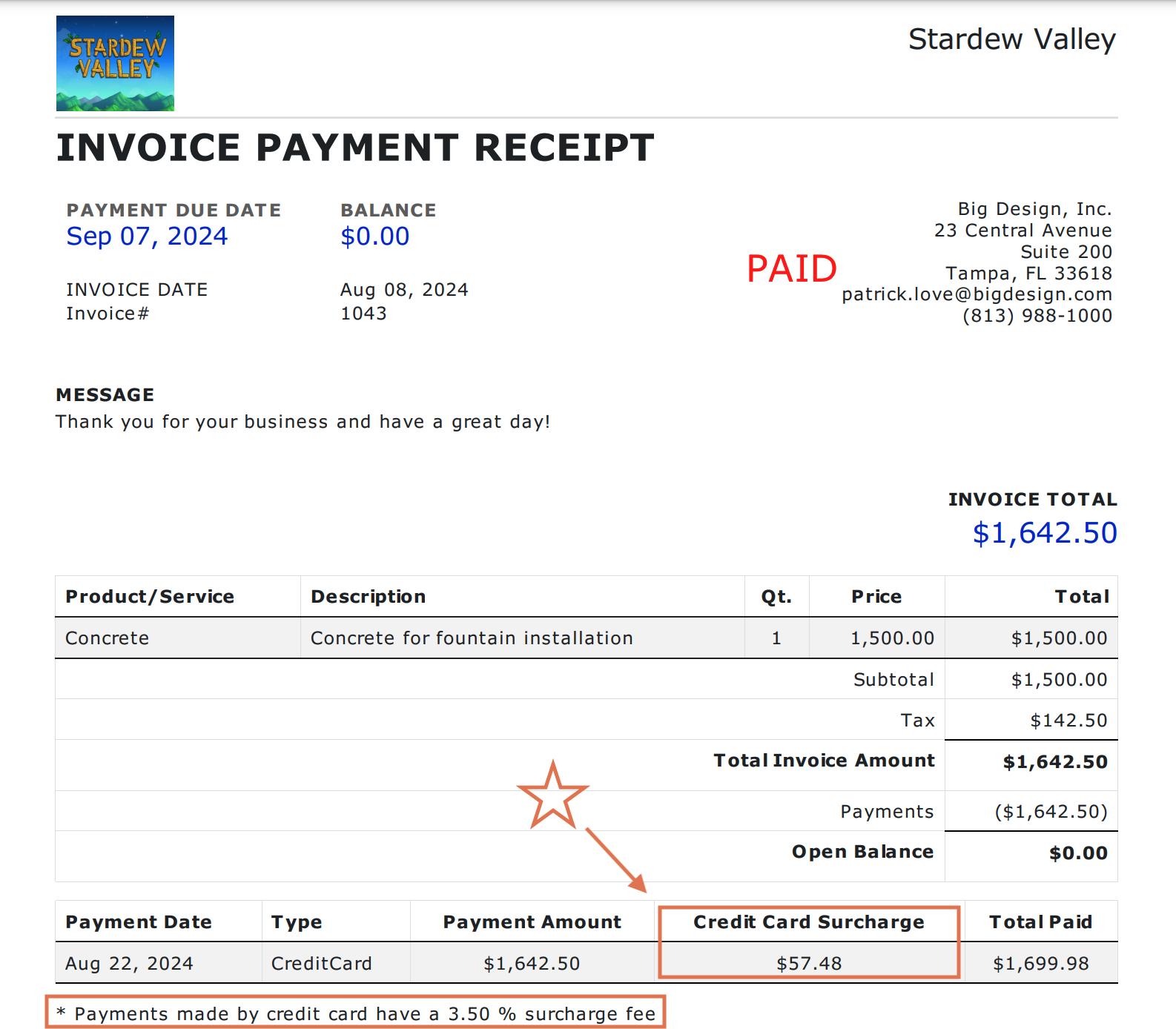
In some jurisdictions, this means posting notices (e.g., a sign at the point of sale or a note on the payment page) and always showing the total price, including the surcharge, before the client clicks “”.
Common Mistake: Revealing the fee only after the transaction is processed.
For example, adding the surcharge on the back end so the client’s receipt shows an extra charge they weren’t expecting, or burying the fee in fine print.
Another scenario is emailing an invoice for $100 and, when the client goes to pay by card, silently charging $103 without any prior indication.
Accounting Risk: Failing to disclose surcharges upfront can lead to client disputes and chargebacks.
Clients may refuse to pay the surprise fee, leading your team to issue refunds or write off the charges. This also undermines trust and can result in lost business.
From an accounting perspective, undisclosed fees might need to be voided or adjusted off the invoice, creating extra work to reconcile the intended payment with the actual payment.
Always ensure the client is aware of the surcharge before payment; it should never come as a post-transaction surprise.
5. Surcharges Must Be Itemized on Transaction Records
Legal Requirement: Every surcharge must appear as a separate line item on receipts, invoices, or payment records.
In other words, the client’s receipt should clearly show the base amount and the surcharge amount as distinct entries (e.g., “Service Fee: $5,000; Credit Card Surcharge: $150”).
Simply lumping the fee into the total without labeling it is not allowed.
Common Mistake: Manually adding surcharges but not itemizing them.
For example, an MSP might edit an invoice’s total from $5,000 to $5,150 to cover fees, but not list a “surcharge” line.
This makes the receipt and accounting records ambiguous. Was the extra $150 revenue from an additional service? Tax? Something else?
It also fails compliance because card rules require the surcharge to be clearly identified.
Accounting Risk: When fees aren’t separately tracked, reconciliation becomes a major challenge.
The books might overstate revenue (since that extra $150 wasn’t for services but for fees) and understate the processing expense, throwing off your gross margin calculations.
Auditors or tax authorities could flag this if surcharges are effectively hidden in sales.
Moreover, if a client questions the bill, your team will struggle to explain or justify the charge without a clear paper trail.
Always record surcharges as a distinct item on invoices and receipts. This keeps your records transparent and aligned with legal requirements.
6. Manual Surcharge Management Leads to Errors and Inconsistencies
Even if you know all the rules above, manually implementing them is extremely challenging. Each client might have different needs or restrictions (one client might be exempt due to state law, another due to a special agreement, etc.).
Handling these payments on a case-by-case basis, either in spreadsheets or by editing invoices one by one, is prone to mistakes.
Common issues include:
- Forgetting to remove a surcharge for a tax-exempt client
- Accidentally charging a fee on a debit card payment
- Using the wrong rate
Over time, these inconsistencies add up: some invoices have fees, others don’t; some fees are 3%, others 3.5%, without a clear reason.
Your PSA and accounting system can quickly fall out of sync if surcharges aren’t applied uniformly. Reconciliation becomes messy when deposits don’t match invoice totals because of ad hoc fees.
Manually surcharging is risky and time-consuming. QuickBooks and basic tools don’t offer an easy way to assign fees only to card payments. MSPs are left to either eat the cost or resort to slow, manual workarounds.
Most finance teams conclude that doing this by hand isn’t worth the risk of compliance slip-ups and bookkeeping errors. This realization often drives MSPs to seek an automated solution that enforces all the rules for them (and we’ll discuss that next).
After reviewing these common mistakes, it’s clear why automating the surcharge process is so valuable.
Manually surcharging clients without the proper controls can lead to illegal charges, upset clients, and a lot of cleanup work for your accounting department.
In the next section, we’ll explore how FlexPoint addresses each of these issues by automating compliant fee recovery for MSPs.
How FlexPoint Automates Compliant Fee Recovery for MSP Accountants & Bookkeepers
Manually managing surcharges is risky, but the right software can eliminate that risk.
FlexPoint is an MSP-specific billing and payments platform with built-in surcharge automation, meaning it handles fee recovery in line with required rules and with minimal effort from your team.
Below, we outline how FlexPoint helps MSP accountants and bookkeepers safely pass on processing fees:
1. Per-Customer Surcharge Configuration:
FlexPoint recognizes that one size doesn’t fit all when it comes to surcharging. The platform allows you to enable or disable surcharges on a per-client basis.
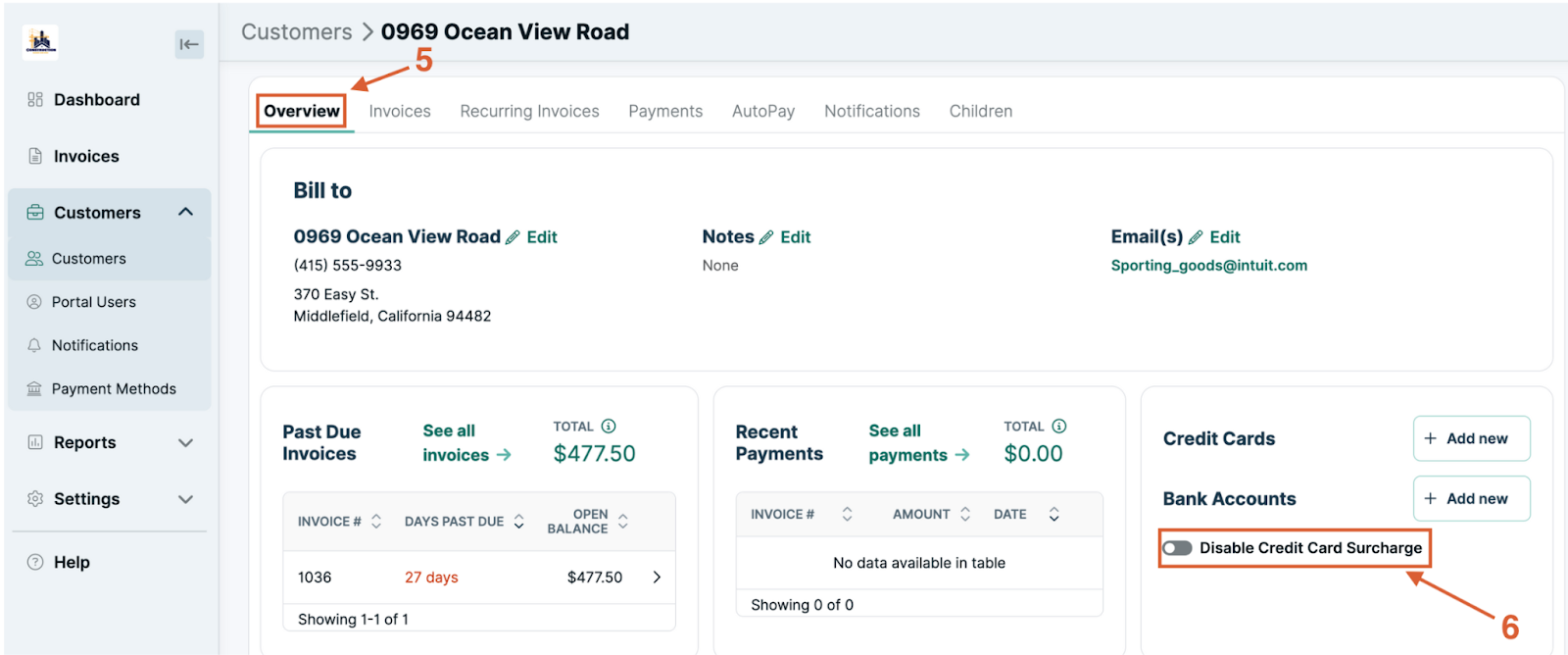
This feature is ideal for MSPs with clients in different states or under different agreements.
For example, if you have a VIP client or a client in a state that bans surcharges, you can simply turn off the credit card fee for that specific client while still charging it for others.
In FlexPoint’s admin portal, it’s as easy as selecting the client and toggling their surcharge setting; no custom invoice edits or separate payment processes needed.
This flexibility means your finance team can address special cases (such as waiving fees for a large account) without violating compliance requirements.
You maintain control over who is charged the processing fee and who isn’t, all within one system.
2. Built-In Surcharge Rules Enforcement:
FlexPoint has the card network and legal rules baked into its platform logic, so bookkeepers don’t have to manually police each transaction.
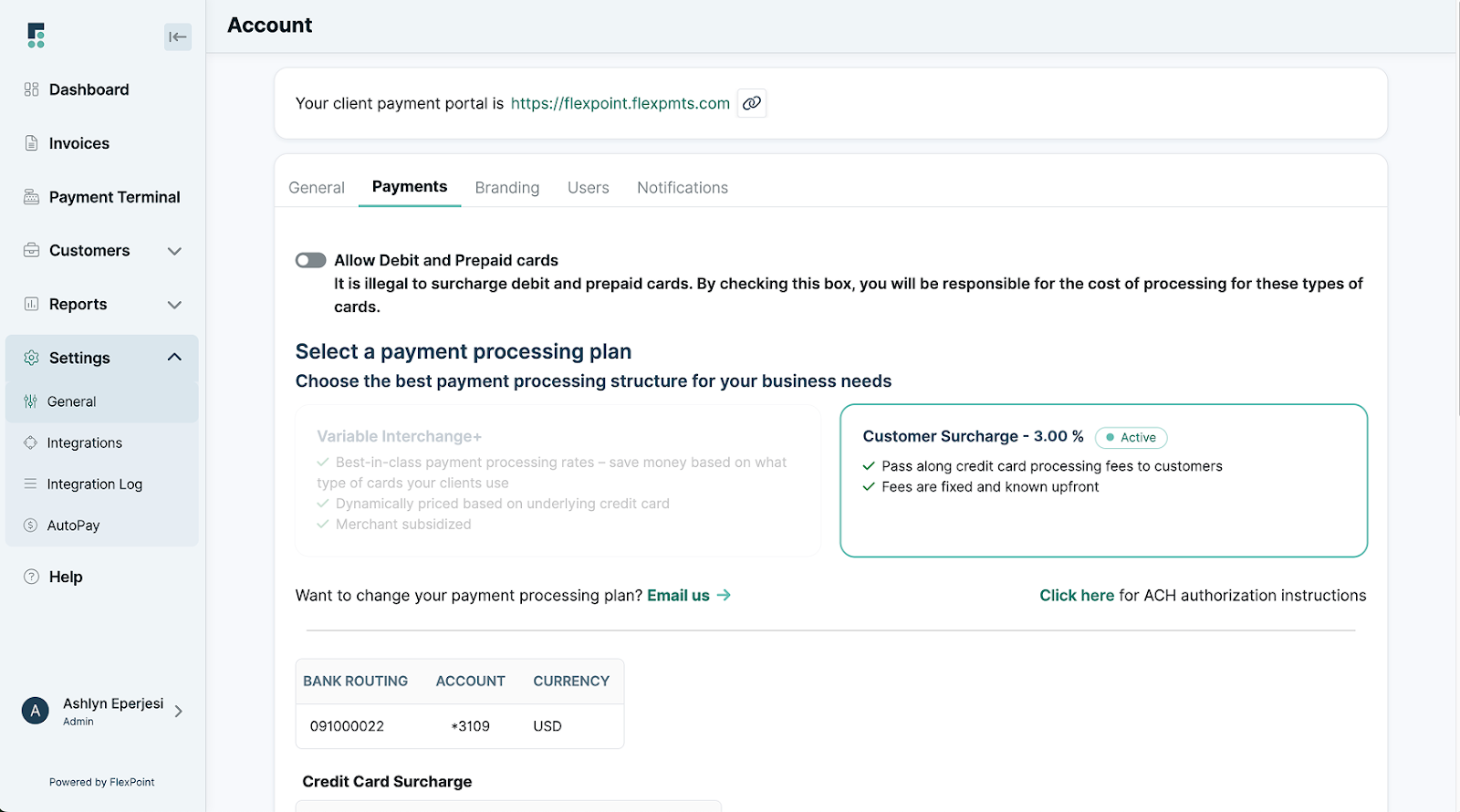
The software automatically applies surcharges only to eligible transactions. In practice, that means credit card payments only, never debit cards.
If a client tries to pay with a debit card on a surcharge-enabled plan, FlexPoint simply won’t add a fee (in fact, by default, the platform will not even accept debit payments on the Customer Surcharge Plan, ensuring you comply with the law).
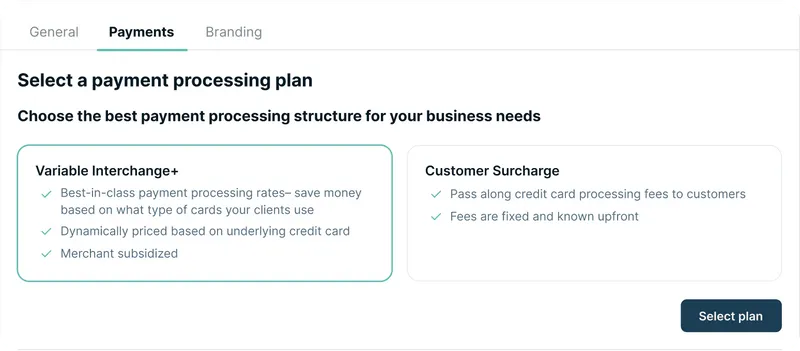
FlexPoint also keeps surcharge amounts within allowed limits. The standard setting is a 3% surcharge on credit cards, which aligns with the typical cap imposed by Visa and state laws.
This fixed rate ensures you’re not accidentally overcharging beyond what’s permitted. (FlexPoint gives you the option to pass on the full 3% or only a portion of it; however, it won’t let you exceed the legal max.)
Because the system handles the surcharge, your team doesn’t need to double-check card types, percentages, or state rules on each invoice. FlexPoint enforces those rules automatically.
This significantly reduces the chance of human error that could lead to non-compliance.
3. Transparent Surcharge Display in the Client Portal:
A key strength of FlexPoint is its clear presentation of fees to your clients, maintaining transparency.
When clients pay an invoice through your white-label payment portal, the system alerts them in advance whether a credit card surcharge will apply.
For example, if a client selects a credit card as the payment method, they’ll immediately see a note such as, “Paying with a credit card has a 3% processing fee” on the screen
Clients must actively accept the surcharge as part of the payment to avoid surprise fees.
This disclosure appears in multiple places:
- When adding a payment method
- When initiating a payment
- In the final confirmation
This ensures the client is fully aware.
After payment, the portal generates a detailed receipt for both the client and the MSP, including a line-by-line breakdown that shows the surcharge amount.
This level of transparency reduces disputes and chargebacks.
Clients might still dislike paying the fee, but they can’t say they weren’t informed; it’s clearly communicated and itemized.
For MSP finance teams, this means fewer support tickets or billing questions about “mystery charges.”
FlexPoint essentially takes on the job of explaining the fee to the client in a consistent, professional manner.
4. Clean Accounting Sync to QuickBooks and Xero:
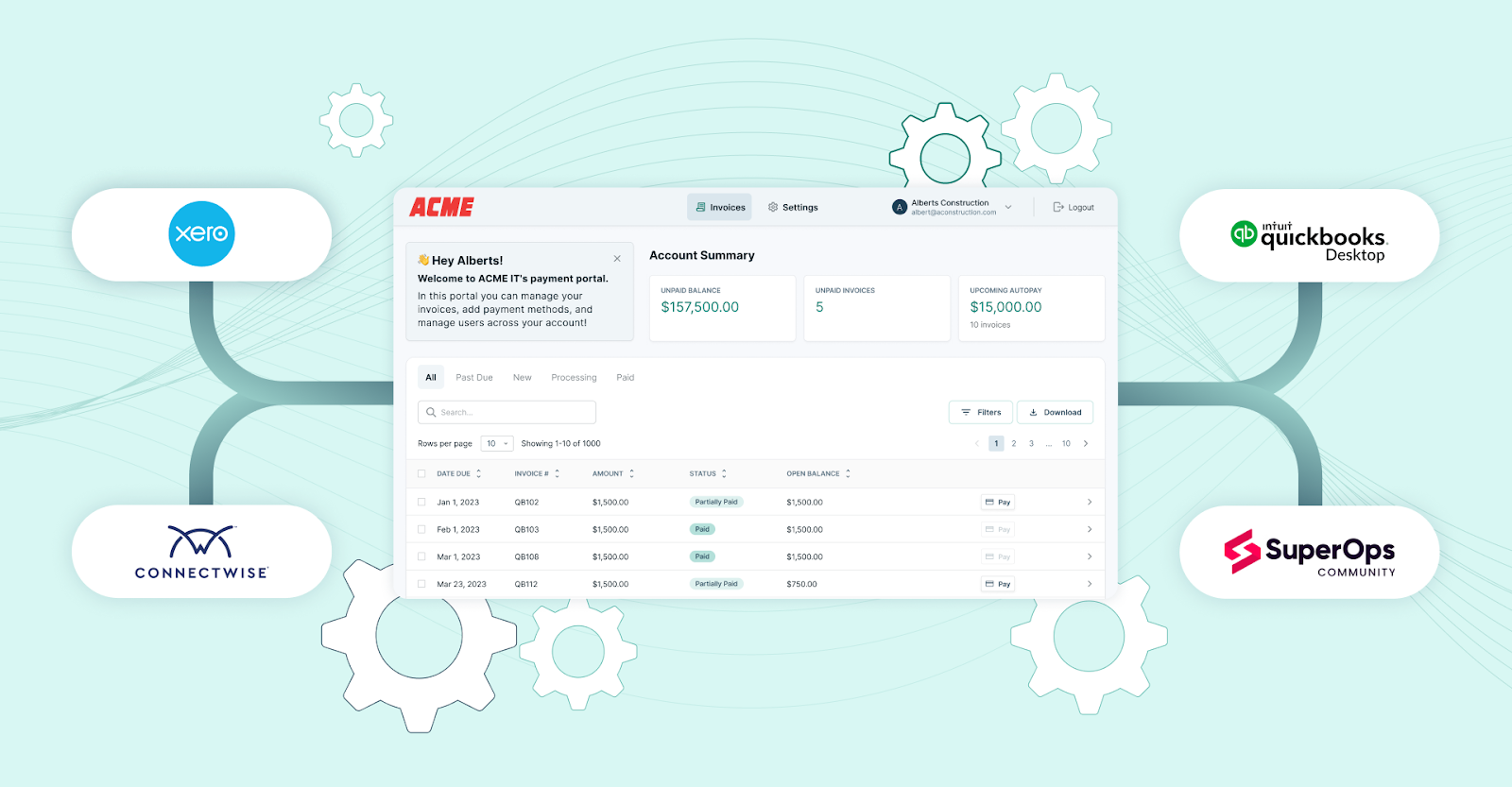
One of the most significant advantages for bookkeepers is how FlexPoint handles surcharge accounting.
The platform integrates with popular accounting software (such as QuickBooks Desktop, QuickBooks Online, and Xero) and automatically syncs surcharge entries appropriately.
When a client pays an invoice through FlexPoint, and a surcharge is applied, FlexPoint will record the payment and the fee in the accounting system as separate line items or transactions.
This means your QuickBooks invoice can reflect the original amount, and the surcharge can be recorded to a specific “Credit Card Fees” income or offset account, for example, rather than messing with your service revenue.
Reconciliation becomes seamless. FlexPoint deposits funds to your bank in a way that matches these records.
This way, the amount you receive corresponds to the invoice plus the surcharge (minus any processor cut, if applicable).
Payment records and fee adjustments are automatically synced back to QuickBooks.
In turn, no manual journal entries are needed to account for fees.
Your finance team doesn’t have to spend hours each month matching net deposits or splitting out fees by hand; the system keeps everything aligned.
FlexPoint keeps your books clean:
- Every surcharge is tracked
- Your revenue accounts aren’t inflated by fee amounts
- Your processing fees are offset by the surcharge income as intended
Come month-end or audit time, you can easily show what portion of your collections were processing fees passed to clients, because FlexPoint has recorded it all for you.
5. Easy Adjustments and Updates to Surcharge Settings:
FlexPoint makes it easy to modify your surcharge configurations as needed, without disrupting your billing workflow.
If you decide to start surcharging or stop surcharging for all clients, it’s a quick setting change in FlexPoint’s Payment Processing Plans; no need to reissue invoices or alter contracts manually.
More granularly, as mentioned, you can change the surcharge setting per client with just a few clicks. This is useful if a client’s status changes (say, a regular client becomes a high-value account and you choose to waive their fees going forward).
You don’t have to create a whole new process for them; you simply turn off the surcharge for that client in FlexPoint, and all their future credit card payments won’t include the fee.
Conversely, if a previously exempt client should start paying fees, you can enable it for them.
The ability to update surcharge rules at any time means you can quickly adapt to new laws or policies.
For instance, if a state legalizes surcharging or raises the cap, FlexPoint can centrally accommodate a new percentage limit.
Alternatively, if card network rules change, FlexPoint will update its compliance logic accordingly and push that to all users.
FlexPoint provides operational agility: you’re never stuck with a rigid setup.
Bookkeepers remain in control but without the burden of manually recalculating fees or editing each invoice; the platform handles the heavy lifting once you change the settings.
6. Accurate Reconciliation and Reporting:

Every aspect of FlexPoint’s surcharge feature is designed to keep your financial data accurate and audit-ready.
In your transaction reports and deposit summaries within FlexPoint, credit card fees are clearly delineated.
You can run a report to see total surcharge collected in a period, which should closely mirror (or exactly match) your processor’s fees, giving you confidence that you’re net neutral on those costs.
This clarity extends to your accounting reports after sync: you might see a separate income line for “Client Paid Card Fees” or a reduction in expense, depending on how it’s configured.
Either way, it’s transparent.
Should you ever face an audit or need to answer a CFO’s questions about “how much are we paying in processing fees vs. passing to clients,” that data is readily available and trustworthy.
Moreover, because FlexPoint maintains compliance automatically, you can be confident that every surcharge in your records was applied within the legal guidelines.
There won’t be unpleasant surprises, such as discovering you surcharged a Massachusetts client (since you would have turned that off per client) or that you charged 4% when the cap is 3%.
Those scenarios can’t happen with the platform set up correctly.
FlexPoint not only simplifies day-to-day bookkeeping but also gives MSP finance leaders peace of mind. The surcharge recovery process becomes “audit-proof” and consistent.
Instead of chasing down discrepancies, your team can focus on higher-level financial analysis, knowing that the fee recovery is working smoothly in the background.
FlexPoint removes the manual guesswork from surcharging.
In one integrated workflow, the platform handles:
- Who gets charged
- Which transactions to apply it to
- How much to charge
- How to present it to the client
- How to record it in the books
For MSP accountants and bookkeepers, this means no more worrying about accidentally breaking a rule or misrecording a fee. The system acts as a compliance guardrail, ensuring fee recovery is done right every single time.
Ultimately, FlexPoint enables MSPs to protect their margins by passing processing fees along, while keeping the entire process efficient, legal, and transparent.
Conclusion: Protect Margins While Maintaining Compliance & Accuracy
Credit card processing fees can significantly erode an MSP’s profit margin, especially as clients increasingly prefer the convenience of card payments. Recouping those costs is a smart business move, but only if it’s done in a compliant and accurate way.
As we’ve discussed, navigating surcharge rules and manual fee handling is complex and risky for finance teams.
The legal requirements (no debit surcharges, state bans, caps, disclosures, etc.) create a minefield of potential errors when done manually. Even a small mistake can lead to compliance penalties, upset clients, or hours of reconciliation work to fix the books.
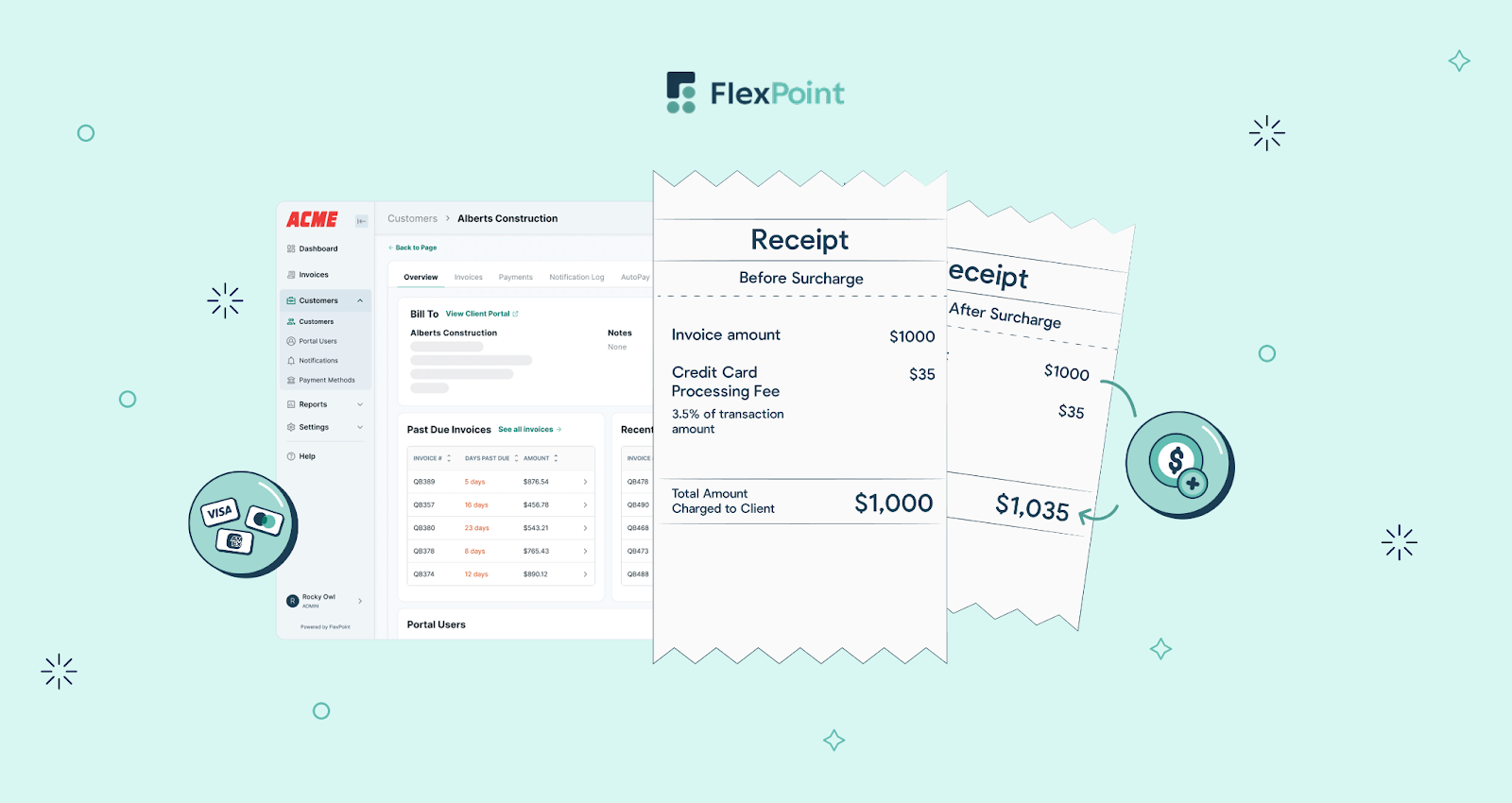
FlexPoint offers MSPs a safe and efficient path forward. By automating the surcharge process, FlexPoint ensures that you recover credit card fees legally and transparently.
Your team no longer has to choose between eating into costs by 3% or doing tedious manual calculations on every invoice; the platform handles it seamlessly.
Compliance is built in, invoices and receipts stay clear, and your accounting remains clean.
The end result is that you protect your margins without sacrificing client trust or devoting extra hours to administrative tasks.
Staying compliant while passing on processing fees doesn’t have to be a headache. With the right solution, MSPs can offset their credit card fees, keep their books accurate, and maintain a positive client experience.
Ready to pass on credit card processing fees the right way?
See how FlexPoint automates compliant surcharging and keeps your MSP profitable.
Additional FAQs: Payment Processing Fees & Compliance
{{faq-section}}

As of January 2026, in most U.S. states, it’s permitted for businesses (including MSPs) to add a credit card surcharge to client payments.
However, you must follow card network rules and state laws when doing so.
For example, a few states, such as Connecticut, Maine, and Massachusetts, ban surcharges entirely, so MSPs operating there cannot pass credit card fees on to clients.
Also, surcharging is never allowed on debit card transactions, even if a debit card is run “as credit”.
Learn more in our state-by-state guide to credit card surcharging laws on the FlexPoint website.
Most states allow credit card surcharges, but a small number impose restrictions.
As of January 2026, states including Connecticut, Maine, and Massachusetts do not allow merchants to surcharge credit cards, and a few others have specific limitations. For example, Colorado permits surcharges but caps the fee at 2% by law.
Most other states have no state-level ban, meaning businesses can surcharge as long as they follow the card network rules.
Keep in mind that laws can change, so MSPs need to stay up to date on the laws in the states where they operate.
FlexPoint automatically enforces all key rules to keep MSPs compliant. The platform will apply surcharges only to credit card payments and will exclude debit cards, so you never accidentally charge a debit transaction.
FlexPoint also limits the surcharge rate to the legally permitted percentage (in line with card network caps and state laws).
Additionally, FlexPoint clearly discloses the surcharge to clients in the payment portal before they pay, and itemizes the fee on receipts.
Yes. FlexPoint gives you granular control over which clients incur credit card surcharges and how those fees are handled. You can easily enable or disable the surcharge on a per-client basis in the FlexPoint dashboard.
Conversely, you can have the fee on for the rest of your clients. This client-specific setting means bookkeepers can accommodate special arrangements without manual billing changes.
FlexPoint makes surcharge visibility very clear to all parties.
In the client portal, whenever a client chooses to pay an invoice by credit card, the applicable surcharge (e.g., “3% credit card fee”) is prominently displayed before they confirm payment.
The client’s payment receipt will then show the surcharge as a separate line item alongside the invoice amount, so they have a record of the fee.


