


QuickBooks Payments makes it easy for clients to pay invoices using a credit card. However, that convenience comes at a cost: each transaction incurs a percentage fee that quickly adds up.
MSPs may underestimate the impact of credit card processing fees on their profit margins using QuickBooks Payments, and they may not realize that there are alternatives that better suit their business model.
In this article, we will uncover the actual fee percentages QuickBooks charges for credit card payments, how those fees impact an MSP’s profitability and cash flow, and why FlexPoint offers a smarter way for MSPs to manage and even recover these costs.
{{toc}}
What Are QuickBooks Payments Credit Card Fees?
QuickBooks Payments is the built-in payment processing service for QuickBooks Online and Desktop. Users have access to it after signing up through Merchant Services.
Whenever a client pays an MSP by credit card through QuickBooks, Intuit charges a processing fee.
This fee is a percentage of the transaction amount and varies depending on the payment method.
Below, we will discuss the various QuickBooks fees for different payment methods and other important considerations to keep in mind if you plan to use this service.
Different Rates for Different Methods:
As you will see in a moment, QuickBooks’ fee for a swiped card payment (in person with a card reader) is lower than for an online invoice payment. This is important to note because MSPs don’t operate with brick-and-mortar locations where clients pay in person.
If you email an invoice and the client pays online (or you charge a saved card on file), the fee is slightly higher.
Manually keyed-in cards (i.e., entering card details) typically incur the highest fee, as they carry a higher risk of fraud.
The primary point is that QuickBooks Payments charges a percentage fee on each credit card transaction.
No Monthly Subscription:
There’s no monthly fee for QuickBooks Payments’ standard plan, which appeals to small businesses because you “pay as you go.”
However, without a monthly plan, the per-transaction fees remain relatively high and do not decrease with volume.
Applies to All Major Cards:
QuickBooks supports all major card types (Visa, Mastercard, Discover, American Express) under this same flat-rate structure. That means that whether a client uses an American Express (Amex) or a Visa, the percentage fee is generally the same.
Unlike some processors, QuickBooks doesn’t offer built-in ways to pass these fees to your clients; the MSP bears the cost of each transaction.
QuickBooks Credit Card Fee Percentages and Cost Structure
The exact credit card processing fees on QuickBooks Payments depend on how the card is processed.
As of November 2025, here is a breakdown of the standard rates for MSPs using QuickBooks Online’s pay-as-you-go plan:
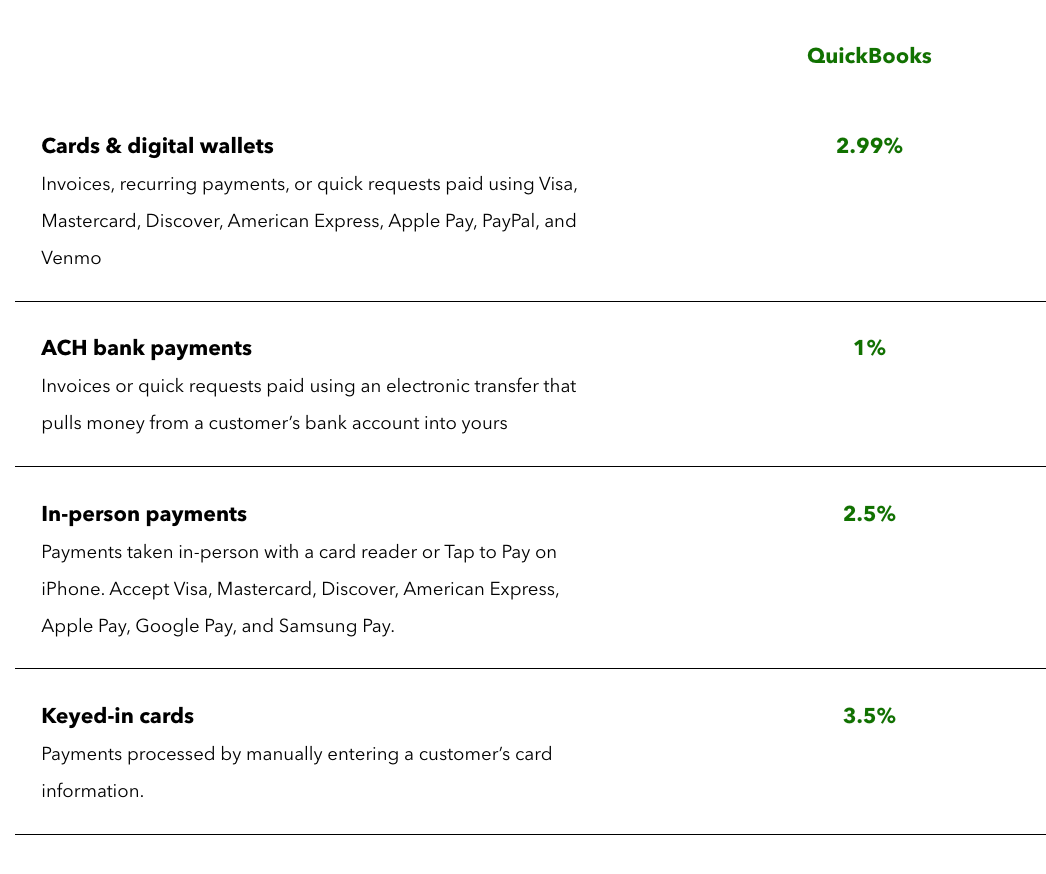
Cards and Digital Wallets (Card Not Present): 2.99% per transaction
This applies when clients pay via invoices, recurring payments, or quick requests paid by:
- Visa
- Mastercard
- Discover
- American Express
- Apple Pay
- PayPal
- Venmo
For example, a $5,000 invoice paid online would incur a $149.50 fee to QuickBooks.
Swiped or Tapped Transactions: (In Person): 2.5% per transaction.
These lower fees apply if you use a QuickBooks card reader to physically swipe the card. MSPs don’t often use in-person payments. However, if you do, the fee on a $10,000 swiped payment would be $250.
As Intuit explains, it includes payments taken in-person with a card reader or Tap to Pay on iPhone.
Manually Keyed Credit Cards: 3.5% per transaction.
This highest rate is charged when you manually enter the card details (or if a client’s card on file is charged without a prior authorization).
A manually entered $8,000 payment would cost $280 in fees.
ACH Bank Payments: 1% per transaction.
QuickBooks also lets clients pay via bank transfer (ACH). This 1% fee is much lower than card fees.
For example, a $5,000 ACH payment would incur a $50 fee.
Previously, there was a $10 fee cap on ACH payments. However, it was removed as of September 6, 2023, so there is no fee cap for accounts created after that date. For pre-existing accounts, the $10 cap was raised to $15 per transaction.
Considering that newer QuickBooks Payments users no longer receive that cap, larger ACH transactions can result in notably higher costs.
For instance, if an MSP processes a $20,000 ACH payment, older accounts would pay a total of $15, while accounts opened after September 6, 2023, would pay $200 at the 1% rate (that means $200 for the transaction).
That difference can add up quickly for high-value invoices, making it worthwhile for MSPs to consider low-cost ACH options through FlexPoint instead (we will discuss more in detail in upcoming sections).
It’s important to note that these fees are flat and public for all users, with no automatic volume discounts. Whether an MSP processes $5,000 a month or $500,000, QuickBooks’ standard rates remain the same.
Intuit notes that if you process over $2,500 per month, you may qualify for up to 25% off transaction costs. Although they might consider custom rates if you negotiate and process large volumes, most QuickBooks users are on the default plan.
There are also no built-in surcharge capabilities on QuickBooks: you cannot add a line item to automatically charge the client for the fee.
As a result, QuickBooks deducts these fees from your payouts. When a client pays an invoice by credit card, QuickBooks will deposit the net amount to your bank account (the invoice total minus processing fees).
For example, if a client pays a $1,000 invoice by card, you might receive roughly $970 after the ~3% fee. QuickBooks effectively takes its cut before the money hits your account.
While this simplifies fee collection, it complicates your accounting: your QuickBooks invoice will mark $1,000 as paid by the client. However, your bank only receives $970, so you must account for the $30 fee to ensure your books reconcile.
Currently, the workaround offered is to manually add the credit card fee to the client’s invoice as a service item.
However, this manual effort can significantly slow your collections process, affecting both profitability and cash flow for an MSP.
How These Fees Affect MSP Profitability and Cash Flow
QuickBooks Payments credit card processing fees can make a significant impact on an MSP’s profitability and cash flow.
Below, we outline five ways these fees reduce profit margins and complicate financial management for service providers using QuickBooks. Each one highlights a different aspect of how seemingly small percentages can add up to substantial revenue loss.
1. Eroded Profit Margins:
Every percentage point in processing fees chips away at an MSP’s profit.
At first glance, a 2.99% fee might sound small. However, consider an MSP that bills $100,000 per month via client credit cards.
At 2.99%, that’s $2,990 in fees lost every month, or over $35,880 per year that never reaches your bank.
This is revenue you earned but had to give to the payment processor. For MSPs with tight margins, such losses make a big difference in annual profit.
2. No Control Over Fee Recovery:
QuickBooks Payments does not facilitate straightforward credit card surcharging or fee recovery.
Instead, MSPs must either absorb these costs, raise their service prices across the board, or perform a manual workaround that slows down the collections process.
3. Difficult Pricing Adjustments:
Passing the fees on to all clients by increasing rates can be difficult. It may make your services less competitive or upset clients who pay via cheaper methods.
Without a straightforward way to assign the cost to those who choose credit card payment, you’re essentially penalized for offering a convenient payment option to clients.
4. Net Deposits Complicate Forecasting:
Another impact is on cash flow and forecasting.
QuickBooks subtracts fees before depositing funds, so the money in your bank account is always a bit less than the invoice total. This can complicate forecasting and budgeting, since the gross billing amount isn’t what you actually receive.
If you’re not careful, you might project cash based on invoices and then come up short by a few percentage points each month due to fees.
MSP finance teams must account for this “leakage” when planning expenses such as payroll, software subscriptions, and taxes.
Reconciliation also becomes more involved.
For each QuickBooks payout, you may need to record the fee as a separate expense line so the net deposit matches your bank statement.
It’s an extra step that, at scale, adds time to your bookkeeping processes.
MSPs dealing with dozens or hundreds of payments monthly will find that these netted-out deposits require careful tracking to ensure every invoice is fully paid (i.e., the client has paid in full), even though the deposited amount is less than the fee.
5. High Fees Penalize Convenience:
High processing fees can also discourage growth or preferred client behavior.
MSP clients appreciate the convenience of paying by credit card, which often means the MSP receives payment faster than waiting for a check.
However, when an MSP knows they’ll lose ~3% off the top, there’s a temptation to push clients to slower, less convenient methods (such as check or ACH) to save money.
In other words, you’re stuck between offering client convenience and protecting your margin.
This trade-off can hinder your ability to scale smoothly.
Ideally, MSPs want to accept credit cards to improve the client experience and ensure timely payments, without sacrificing 3% of their revenue each time.
How FlexPoint Helps MSPs Recover Credit Card Fees
QuickBooks Payments may feel “built in,” but MSPs are not powerless against these fees. FlexPoint is an MSP-focused billing and payments platform that integrates with QuickBooks, offering a more cost-effective approach.
One of FlexPoint’s fundamental advantages is that it allows MSPs to recover or eliminate credit card processing fees, legally and transparently, which QuickBooks alone does not support.
Legal Credit Card Fee Recovery:
FlexPoint enables compliant credit card surcharging for MSP invoices. In states where it’s legal and permitted, you can configure FlexPoint to automatically add a small percentage surcharge to credit card transactions.
This means when a client pays, they cover the processing fee instead of you. FlexPoint’s platform calculates and applies the surcharge in accordance with card network rules and state laws, ensuring you remain compliant.
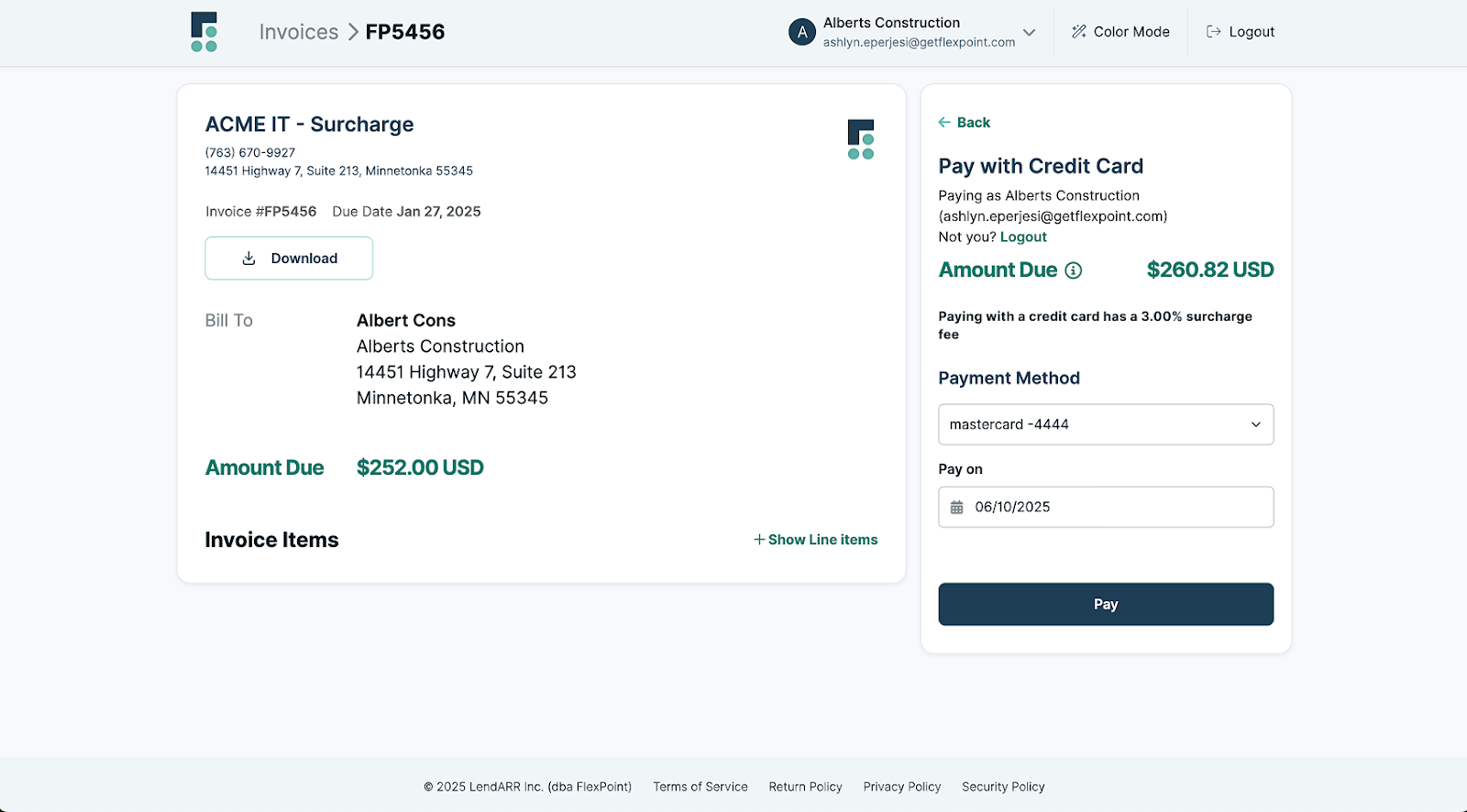
The result: your MSP can recoup 100% (or a portion) of the fee, protecting your margins while still giving clients the choice to pay by card.
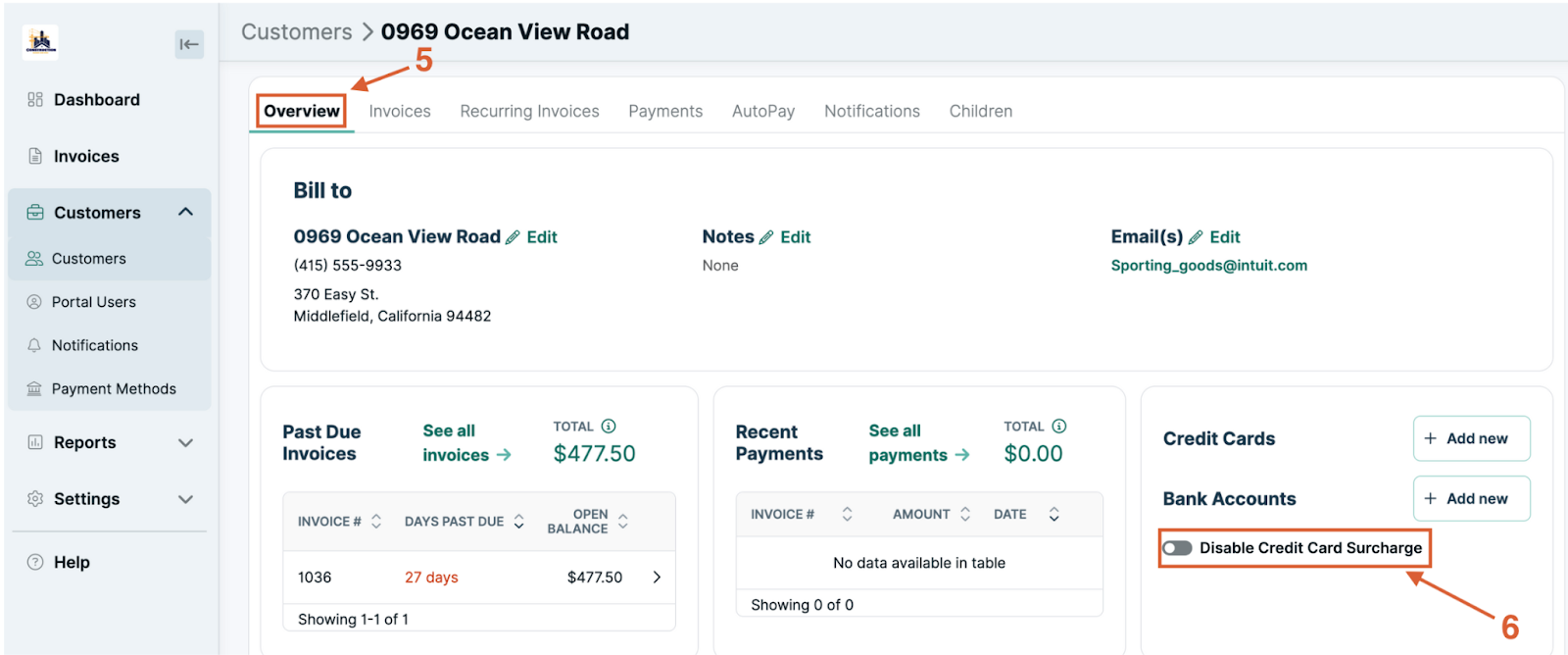
This feature is only available if you choose FlexPoint’s Customer Surcharge payment processing plan. You can enable or disable it on a client-by-client basis.
Flat-Rate ACH as an Alternative:
FlexPoint also encourages clients to use lower-cost payment methods by offering flat-rate ACH payments.
Through FlexPoint, ACH bank transfers cost $0.25 per transaction. This is significantly cheaper than QuickBooks’ 1% ACH fee.
With FlexPoint, an MSP can encourage clients to opt for ACH, knowing that even a $50,000 payment will incur only a few cents or a flat quarter in fees.
By shifting even a portion of clients to ACH, MSPs can save thousands in processing costs annually. FlexPoint supports Same-Day ACH as well, so you don’t sacrifice speed when clients pay from their bank accounts.
Full MSP Billing Model Support:
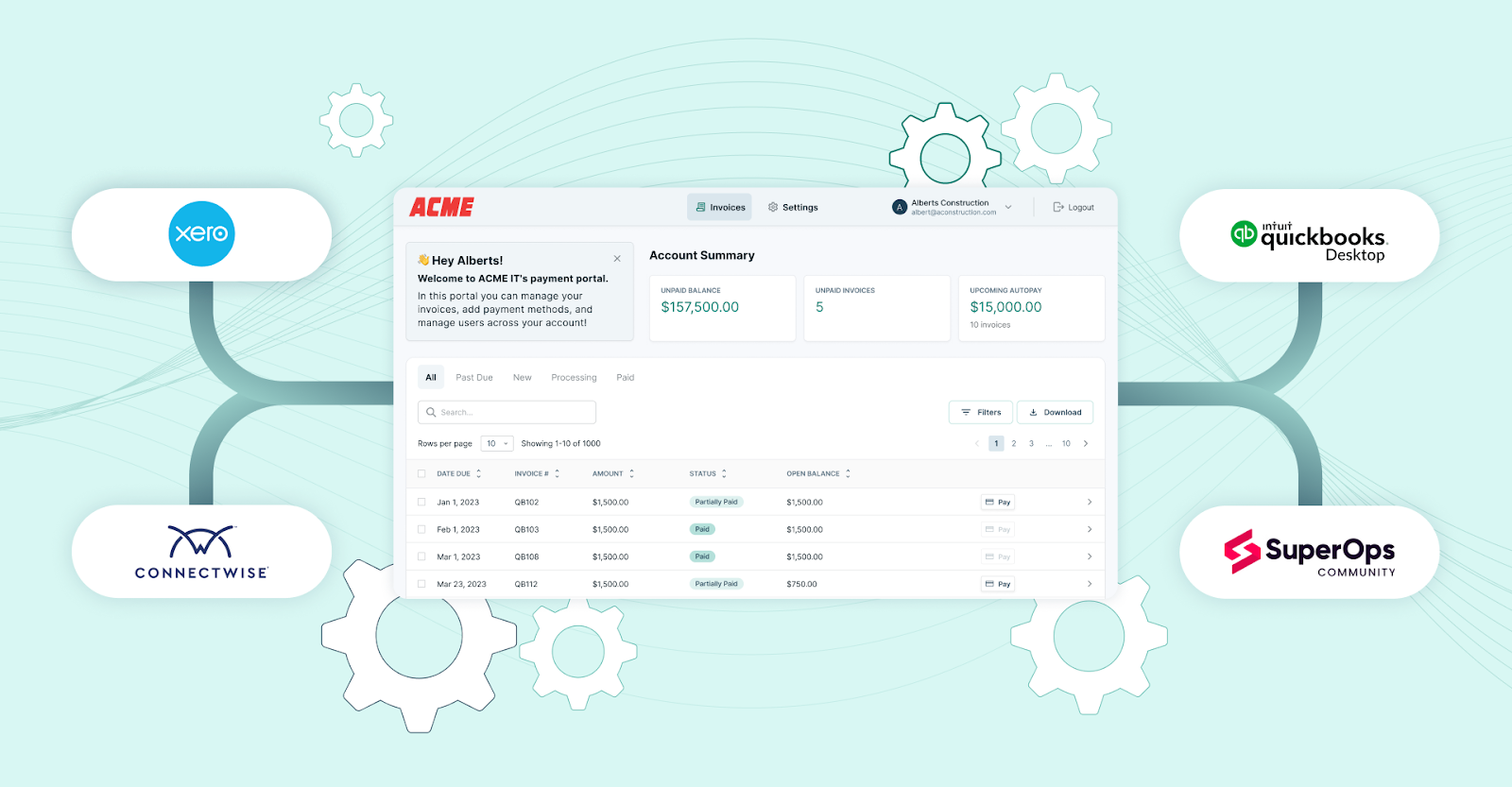
FlexPoint is designed to slot into an MSP’s existing workflow.
The platform integrates with popular PSA systems (ConnectWise PSA, Autotask, SuperOps, HaloPSA, etc.) and with QuickBooks Online/QB Desktop for accounting. This means that when a client pays via FlexPoint’s portal, the payment records and fee adjustments are automatically synced back to QuickBooks.
Reconciliation is handled for you. No more manually matching net deposits or adding journal entries for fees.
By connecting the dots between your PSA, FlexPoint, and QuickBooks, the platform automates invoice updates, payment posting, and deposit reconciliation, saving your finance team time and reducing errors.
You ultimately get to keep using QuickBooks for your ledger; however, FlexPoint becomes the engine that moves the money and manages fees more efficiently.
Branded Client Portal:
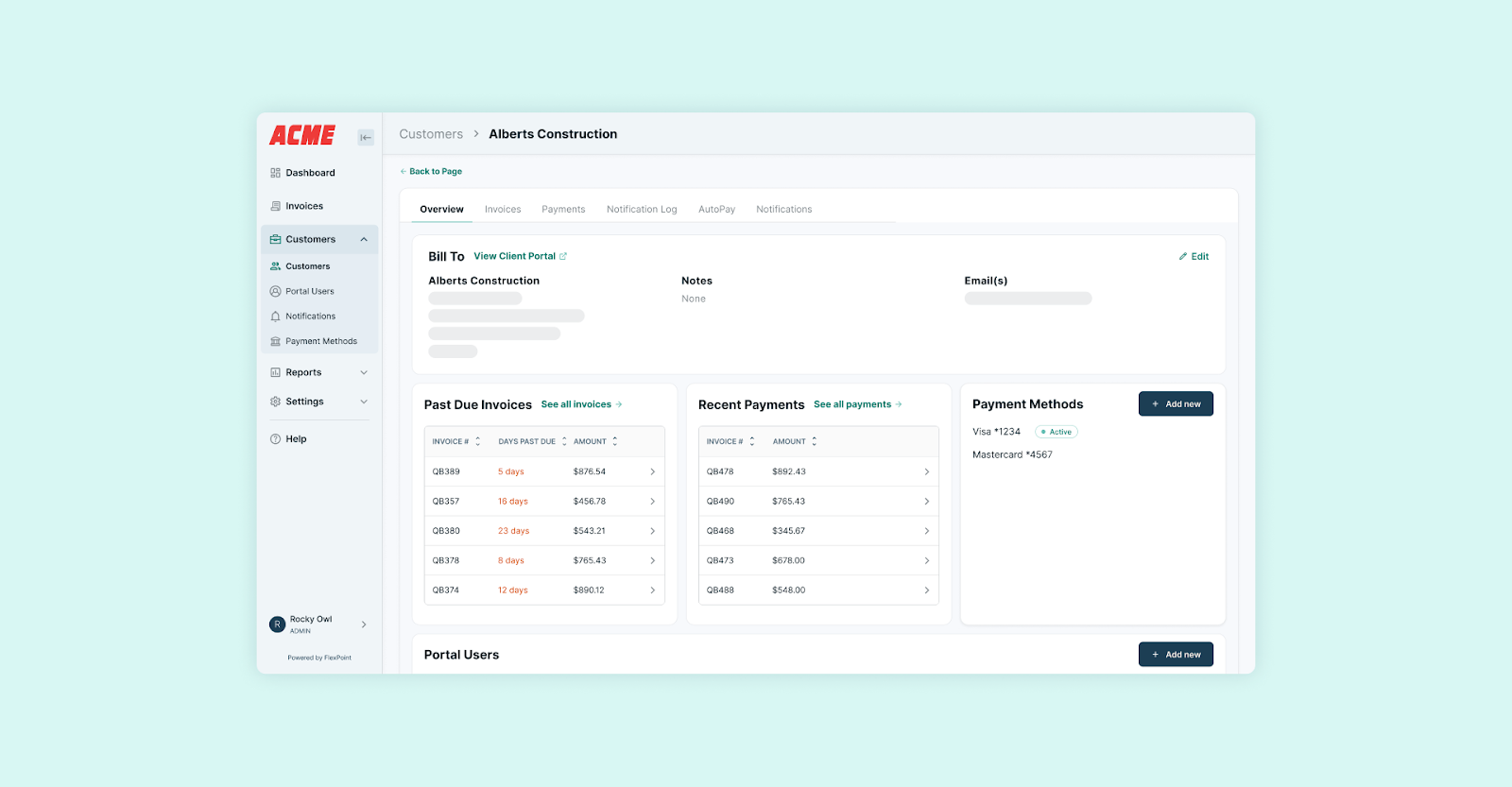
With FlexPoint, MSPs get a branded payment portal to offer to their clients.
Instead of a generic Intuit “Pay Now” link, your clients enter a portal under your MSP’s name and domain. This portal securely presents all their invoices and available payment methods (credit card, ACH, or installment plans), along with any applicable surcharges or discounts.
The fee transparency is built in. If a client chooses to pay by card and a surcharge is enabled, they will see the additional fee clearly labeled before confirming payment.
This transparency helps maintain trust, as clients understand there’s a cost for the convenience of card payments.
The portal experience is modern and user-friendly, reflecting well on your company’s professionalism.
Clients can also set up AutoPay, save preferred payment methods, and view payment history in this portal. This enhances their overall experience while FlexPoint handles the heavy lifting behind the scenes.
In summary, FlexPoint gives MSPs the tools to take control of payment processing costs. You can continue to offer the speed and convenience of credit card payments without incurring the fees or spending hours on accounting adjustments.
By recovering fees where legal and promoting ultra-low-cost payment options such as ACH, FlexPoint helps you retain more of your revenue on each transaction.
Meanwhile, its tight integration and automation ensure your billing operations remain seamless (with far less manual work than using QuickBooks Payments alone).
Conclusion: Understand and Control Your Credit Card Processing Costs
Credit card processing fees are a real cost of doing business for MSPs. If you rely solely on QuickBooks Payments, those fees will continue to chip away at your profits on every invoice paid by card.
Convenience for your clients comes at the expense of your bottom line when you can’t offset the 2.99%–3.5% per transaction.
However, it doesn’t have to stay that way.
By understanding what QuickBooks is charging and how it impacts your finances, you’ve taken the first step. The next step is to explore solutions, such as FlexPoint, that provide MSPs with greater control.
QuickBooks Payments offers basic functionality but lacks MSP-specific features such as fee recovery, PSA integrations, and custom payment experiences.
FlexPoint fills those gaps. The platform works alongside QuickBooks to provide the automation, flexibility, and cost-saving mechanisms that modern MSPs need to stay profitable while keeping clients happy.
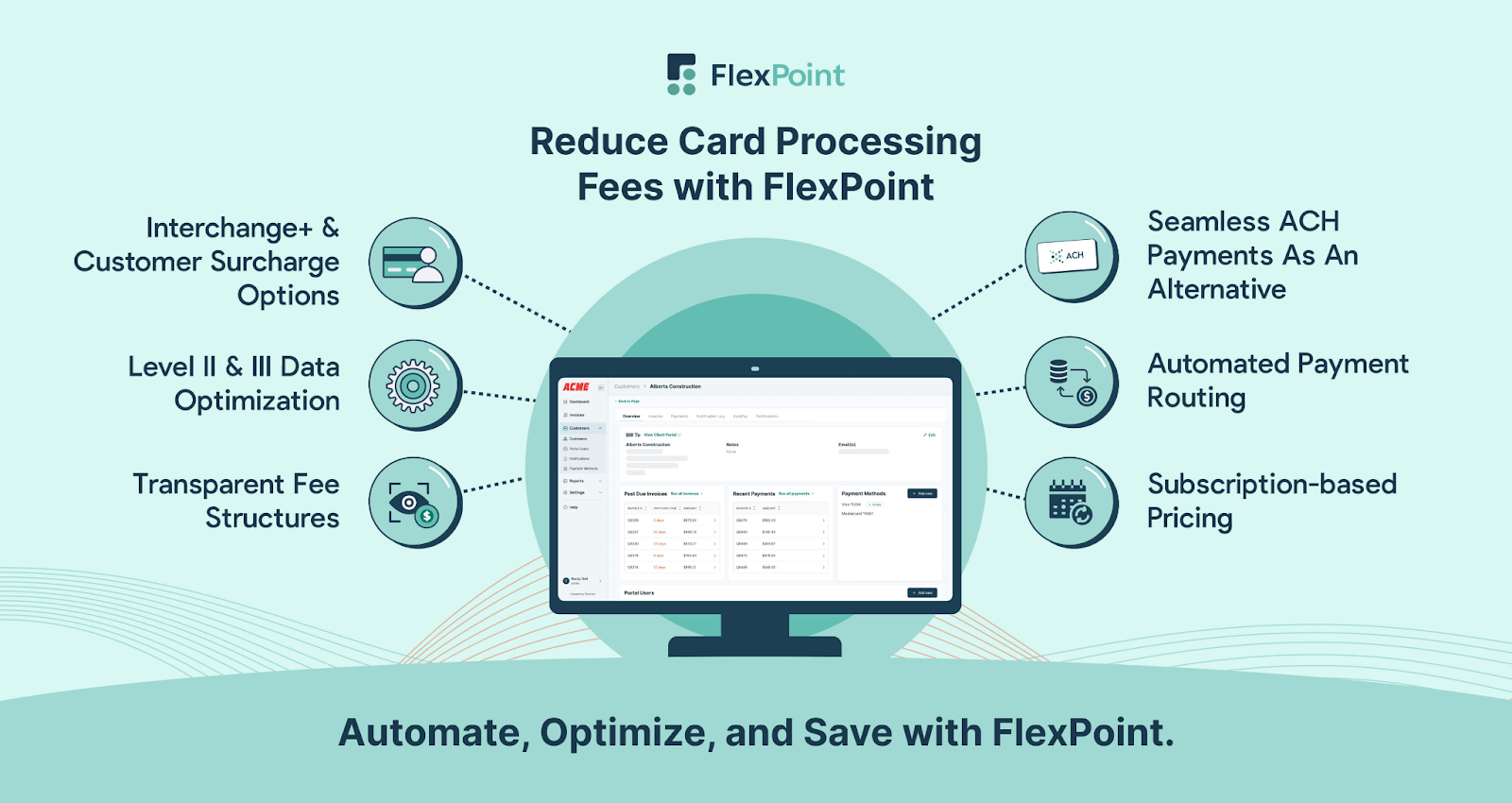
With FlexPoint, you can continue to offer clients the speed and rewards of credit card payments without sacrificing your margins.
FlexPoint empowers MSPs to do just that, through compliant surcharging, lower-cost payment channels, and seamless integration into your existing systems.
Want to stop losing money to credit card fees?
Book your FlexPoint demo today
Additional FAQs: QuickBooks Credit Card Fees for MSPs
{{faq-section}}




