.png)
Many MSPs start by looking for a simple, reliable way to collect client payments. Two of the most common options that show up early are PayPal and QuickBooks Payments. They are familiar, widely trusted, and easy to activate, which makes them appealing when you just need to start accepting payments quickly.
But familiarity does not always equal fit. MSP billing is rarely a one-time transaction. It is recurring, contract-driven, and often includes add-ons, pass-through costs, and invoice changes, requiring clean workflows and accurate reconciliation.
As MSPs scale, gaps in general-purpose payment tools tend to surface quickly, especially around processing fees, billing flexibility, and the manual effort required to keep payments and accounting in sync.
In this article, we compare QuickBooks Payments vs. PayPal across the areas that matter most to MSPs: transaction costs, payment flow, reconciliation effort, billing model support, and workflow fit inside a growing MSP stack.
We will also introduce FlexPoint, an MSP-first billing and payment automation platform that adds fee recovery options, predictable ACH pricing, deeper integrations, and collections automation designed for service providers.
{{toc}}
QuickBooks Payments vs PayPal: Why MSPs Compare These Tools
Many MSPs start with familiar payment gateways like QuickBooks Payments and PayPal because both are widely trusted, easy to activate, and require little to no implementation effort. If you need to start collecting payments quickly without adding a new system or a complicated rollout, these tools are often the first options that come to mind.
MSPs compare them for a simple reason: they cover the basics well enough early on. The differences become more apparent as billing becomes more operational and complex.
Name Recognition and Accessibility
Both QuickBooks Payments and PayPal have strong brand awareness and low barriers to entry. A small MSP team can enable payments quickly, with minimal technical work. That convenience matters when resources are limited, and you need a fast way to accept cards or bank payments.
QuickBooks Online Integration
QuickBooks Payments is built directly into QuickBooks Online (QBO). Payments collected in QuickBooks can be automatically tied to invoices and recorded in your books, making it easier to keep financial records accurate without exporting or importing data between systems. For MSPs managing billing inside QBO, this embedded workflow is a major reason QuickBooks Payments stays on the shortlist.
General-Purpose Use Cases
It is important to call out the shared limitation: neither QuickBooks Payments nor PayPal is designed around MSP billing workflows.
Both are general-purpose payment tools meant to serve a wide range of businesses. MSPs often adopt them because they are available and familiar, not because they solve recurring managed services contracts, PSA-driven billing, or complex invoicing structures.
Key Consideration Points for MSPs
When comparing QuickBooks Payments and PayPal, MSPs typically evaluate:
- Transaction Fees: Processing costs add up fast at scale. Credit card fees can be significant, especially when most clients pay by card and invoice volume grows.
- Client Experience: The easier it is for clients to pay, the faster you collect. A clean payment experience reduces friction and follow-up.
- Billing Logic Support: MSP billing often includes tiered pricing, renewals, usage-based add-ons, and software pass-through charges. General payment tools like QB Payments or PayPal can struggle here, which leads to workarounds and errors.
- Reconciliation Complexity: The more automated the payment-to-invoice sync and deposit matching, the less time your team spends cleaning up books and tracking down discrepancies.
Note: QuickBooks Payments and PayPal are convenient starting points, but many MSPs outgrow them as billing complexity and payment volume increase. That is usually when they start looking for more specialized solutions designed to automate MSP billing end-to-end.
Features Comparison: QuickBooks Payments vs PayPal for MSPs
When MSPs evaluate payment platforms, the real question is how well each tool supports recurring revenue, billing automation, reconciliation, and financial control as invoice volume grows. QuickBooks Payments and PayPal can both accept payments, but they behave very differently once you apply them to MSP billing, where invoices often include recurring services, add-ons, projects, and pass-through costs.
Below is a comparison of QuickBooks Payments vs. PayPal across the areas that matter most to MSPs.
Payment Processing and Billing
QuickBooks Payments: Built directly into QuickBooks Online, so you can accept ACH and card payments from invoices while keeping payment records tied to your books. Payments are automatically applied to invoices, which reduces manual work for basic billing. The main limitation for MSPs is cost control. There is no built-in, compliant way to recover credit card fees, so MSPs often absorb processing costs as volume increases.
PayPal: PayPal is a standalone platform where clients typically pay through PayPal checkout, payment links, or invoices issued through PayPal. Clients can pay with their PayPal balance, cards, or bank transfers, and PayPal also supports recurring billing via subscriptions. The drawback for MSP workflows is that billing and accounting are not naturally connected. Payments are processed through PayPal first, and many MSPs then manually reconcile those transactions back to their accounting systems or use connectors.
Client Experience and Portals
QuickBooks Payments: Clients can pay online from a QuickBooks invoice, but the experience is mostly invoice-first. There is no dedicated MSP-focused or branded client portal for ongoing account management, payment method updates, or invoice history beyond what is provided in the QuickBooks payment flow. It also does not support more complex client-facing billing experiences, such as usage-based billing displays.
PayPal: Offers a familiar checkout experience that many clients already trust. However, it is primarily transaction-focused and does not function like a true B2B billing portal. Clients usually do not receive an MSP-style billing hub that allows them to view service context, manage multiple invoices, or configure account-level payment settings in a structured way.
Reporting and Reconciliation
QuickBooks Payments: Because payments post directly into QuickBooks Online, reporting and invoice status tracking are simpler. For standard invoices, this reduces manual reconciliation and keeps records cleaner. MSPs can still run into payment friction with more complex invoices, partial payments, or workflows driven outside QBO, but the accounting tie-in remains a major benefit.
PayPal: Reporting is centered on transactions and payouts, not on accounting-grade invoice reconciliation. That can create extra work for MSPs managing high invoice volume or multiple services per client, especially when you need to match deposits, fees, and invoice records across systems.
Automation and Scalability
QuickBooks Payments: Supports recurring invoices and basic recurring payment workflows. It is typically fine for smaller MSPs with stable billing, but it becomes limiting as billing logic grows more complex. There is limited support for usage-based billing, flexible payment rules, and fee management, which can slow down scalability.
PayPal: Recurring payments are supported, but automation tends to be lighter than on platforms built for subscription billing and complex invoicing workflows. For many MSPs, PayPal works best as a simple payment acceptance option rather than a scalable billing engine for managed services.
Reconciliation and Administrative Overhead
QuickBooks Payments: Native to QuickBooks Online, so payments post directly against invoices and your books stay updated without exporting data or importing transactions. This keeps day-to-day reconciliation simple for standard invoices. The overhead becomes apparent when MSP billing becomes more complex. Partial payments, bundled service lines, mid-cycle invoice edits, and usage-based charges can create exceptions that require manual review to confirm what was paid, what is still owed, and how deposits and fees should be reflected. Collections tools are also light, so your team often has to manage follow-ups and exception handling manually when payments fail or go overdue.
PayPal: Reconciliation in QuickBooks Online can be cumbersome because transactions are often grouped into payouts or lack invoice-level detail, which requires manual matching or third-party connectors. PayPal can also create added administrative work through disputes and chargebacks, which are time-consuming to manage and may include additional dispute-related fees.
Summary Table: Features that Matter for MSPs: QuickBooks Payments vs PayPal
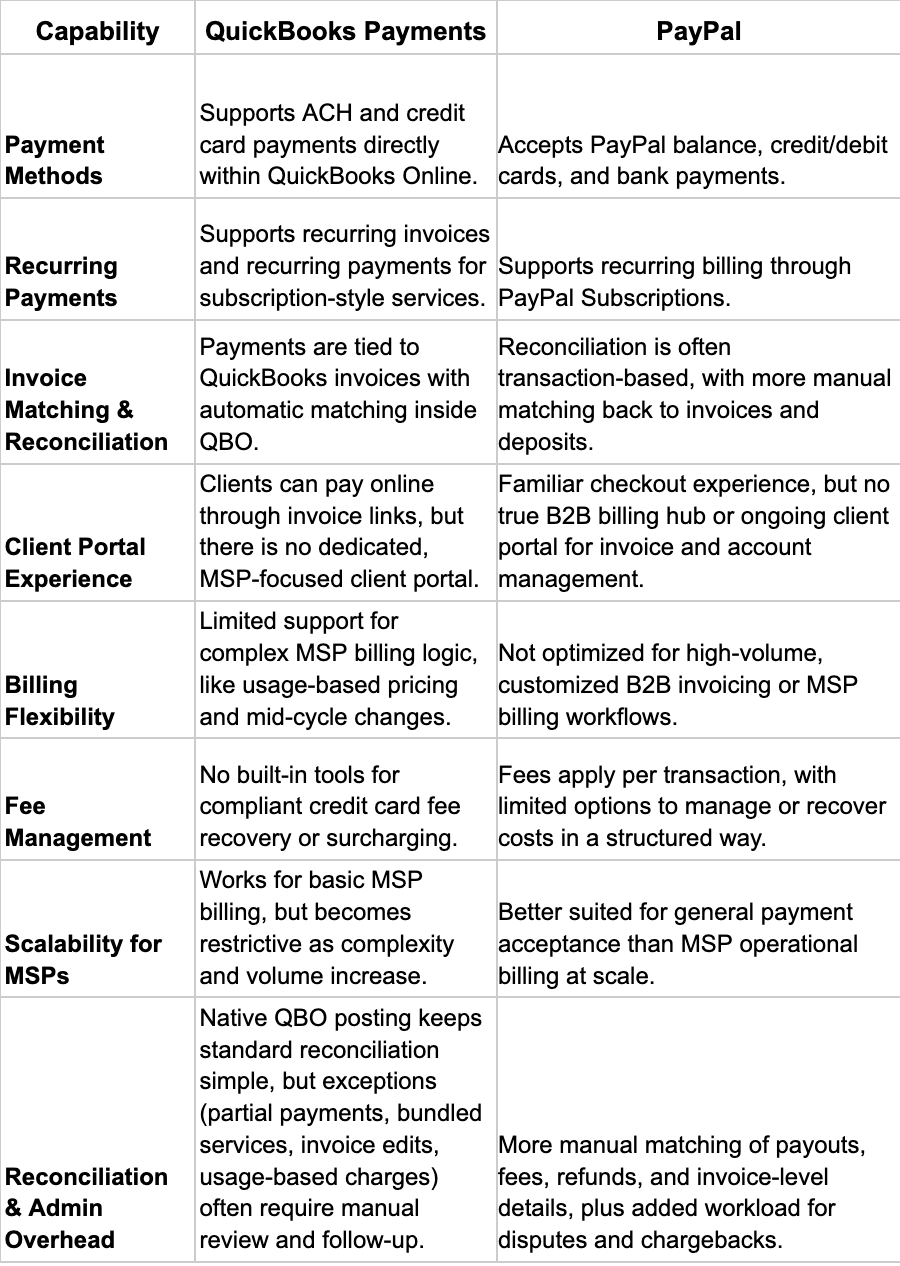
Transaction Fees, Payment Flow, and Value for MSPs: QuickBooks Payments vs PayPal
When MSPs compare payment processors, the real cost is not just the posted rate. It is how fees, deposits, and reconciliation scale as invoice volume grows, recurring revenue increases, and billing becomes more complex.
Both QuickBooks Payments and PayPal both use pay-as-you-go pricing, but neither is built to help MSPs consistently recover card fees or reduce processing costs through MSP-specific billing workflows.
Below is what MSPs can typically expect and how it impacts real-world value.
QuickBooks Payments Fees

PayPal Fees
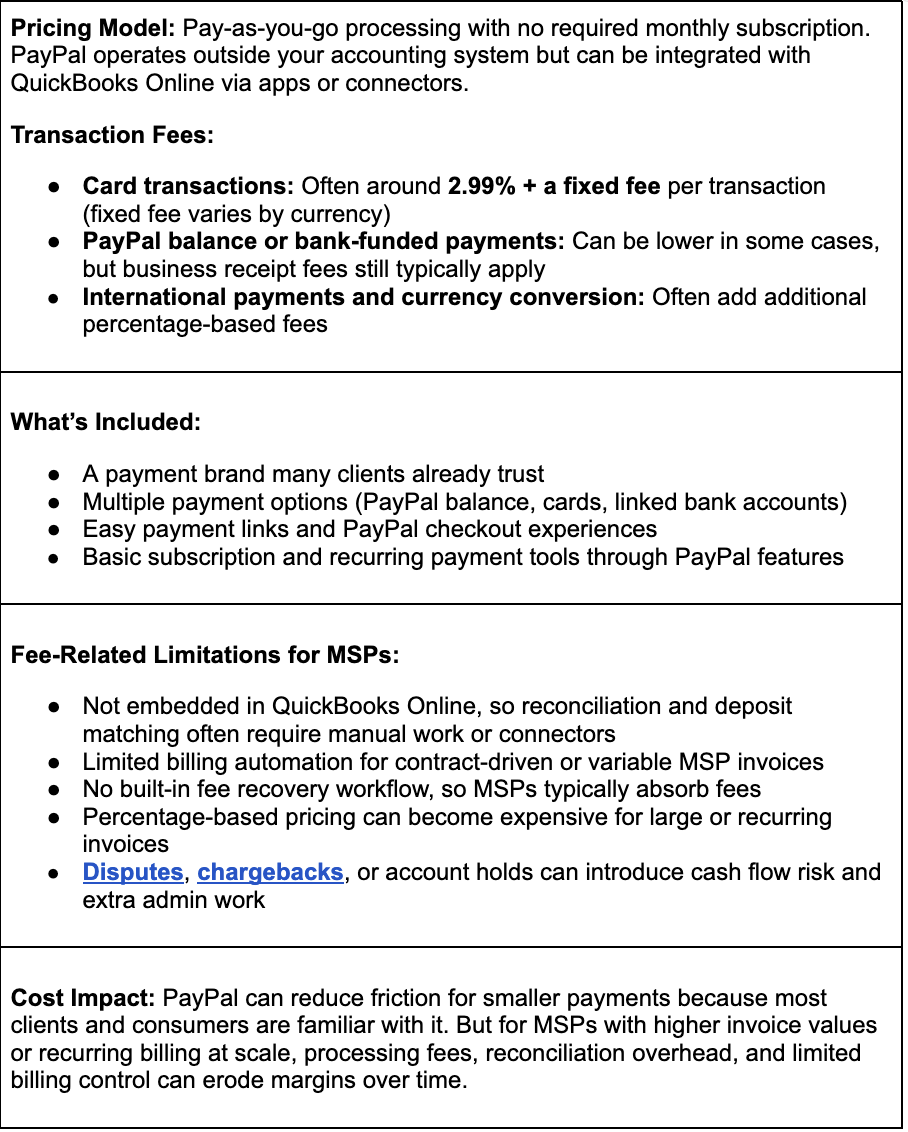
Trials and Setup Considerations
- QuickBooks Payments: No separate trial. Fees apply once you process live transactions. Setup is straightforward if you already use QuickBooks Online, as payments are enabled in QBO.
- PayPal: No formal trial. MSPs can create an account quickly and accept payments immediately, with fees applied from the first transaction. Developer sandbox testing exists, but most MSPs experience the workflow only after going live.
A practical way to compare total cost is to model your typical monthly billing mix: average invoice size, card vs. bank payment usage, and recurring volume. That makes it easier to see how percentage-based fees change as revenue grows.
Value for MSPs
- If you want the simplest option inside QuickBooks Online, QuickBooks Payments is convenient and requires minimal setup. The tradeoff is that costs scale with revenue, and there is little built-in support for fee control.
- If you want a payment option many clients recognize, PayPal can reduce friction. The trade-off is more reconciliation work, less control over the billing workflow, and higher effective fees in certain scenarios, especially for larger or international payments.
Note: For many MSPs, the core issue with both tools is fee control. With recurring billing, it becomes difficult to consistently recover processing fees or steer clients toward lower-cost payment methods. That is why many MSPs explore purpose-built alternatives that support fee recovery, predictable ACH pricing, and automation across billing, payments, and reconciliation.
Platform Fit: Which Tool (PayPal vs QuickBooks Payments) Works Better for MSP Billing Models?
MSP billing is rarely one-size-fits-all. Even if you start with simple monthly retainers, most teams eventually introduce usage-based add-ons, tiered service packages, pass-through costs, and project work. The key question is how well QuickBooks Payments and PayPal support those billing models as client volume and complexity increase.
Fitfor MSP Billing Models
QuickBooks Payments: Works adequately when billing is straightforward, such as flat-fee retainers billed through QuickBooks Online. As billing evolves to include usage, tiers, or pass-through charges, many MSPs end up relying more on manual processes, invoice adjustments, and external tools to maintain accurate, consistent billing.
PayPal: Primarily designed for general payments and ecommerce transactions. It is often misaligned with structured, contract-based billing that is common in managed services, where invoices are recurring, detail-heavy, and tied to service delivery.
Handling MSP Billing Complexity
QuickBooks Payments: Supports recurring invoices and basic recurring payments, but lacks native support for advanced MSP billing logic such as usage-based pricing, partial payments, tiered services, or complex contract structures. As complexity grows, MSPs often run into limitations that require manual workarounds.
PayPal: Offers subscription functionality, but flexibility is limited. It can be difficult to adapt PayPal to variable service charges, detailed invoice structures, or billing rules that change month to month.
Native PSA Integrations
QuickBooks Payments: Integrates tightly with QuickBooks Online, but it does not natively connect with PSA platforms such as ConnectWise PSA, Autotask, HaloPSA, or SuperOps. That makes it harder to automate invoice creation based on service-delivery data and to keep billing aligned with operational systems.
PayPal: Does not offer native PSA integrations. Most MSPs that use PayPal rely on manual exports, invoice re-entry, or third-party connectors, which increases reconciliation effort and raises the risk of errors.
Client Portal and Branding Experience
QuickBooks Payments: Lets clients pay directly from a QuickBooks invoice, but it does not provide a dedicated, MSP-branded client portal. The experience is invoice-centric and offers limited self-service for account-level billing management.
PayPal: Payments typically run through PayPal-branded flows. That familiarity can help some clients pay quickly, but it can also reduce transparency and create confusion for larger B2B invoices or recurring managed services payments.
Optimized for Service-Based or Contract Billing
QuickBooks Payments: Built for general small business billing. It can work for simple service contracts, but it becomes harder to scale when you manage long-term agreements, bundled services, or variable usage.
PayPal: Optimized for transactional payments and ecommerce more than recurring service contracts. Many MSPs find it is not a strong fit for relationship-driven billing where invoices, service context, and collections need to stay tightly connected.
FlexPoint: A Purpose-Built Alternative to PayPal and QuickBooks Payments
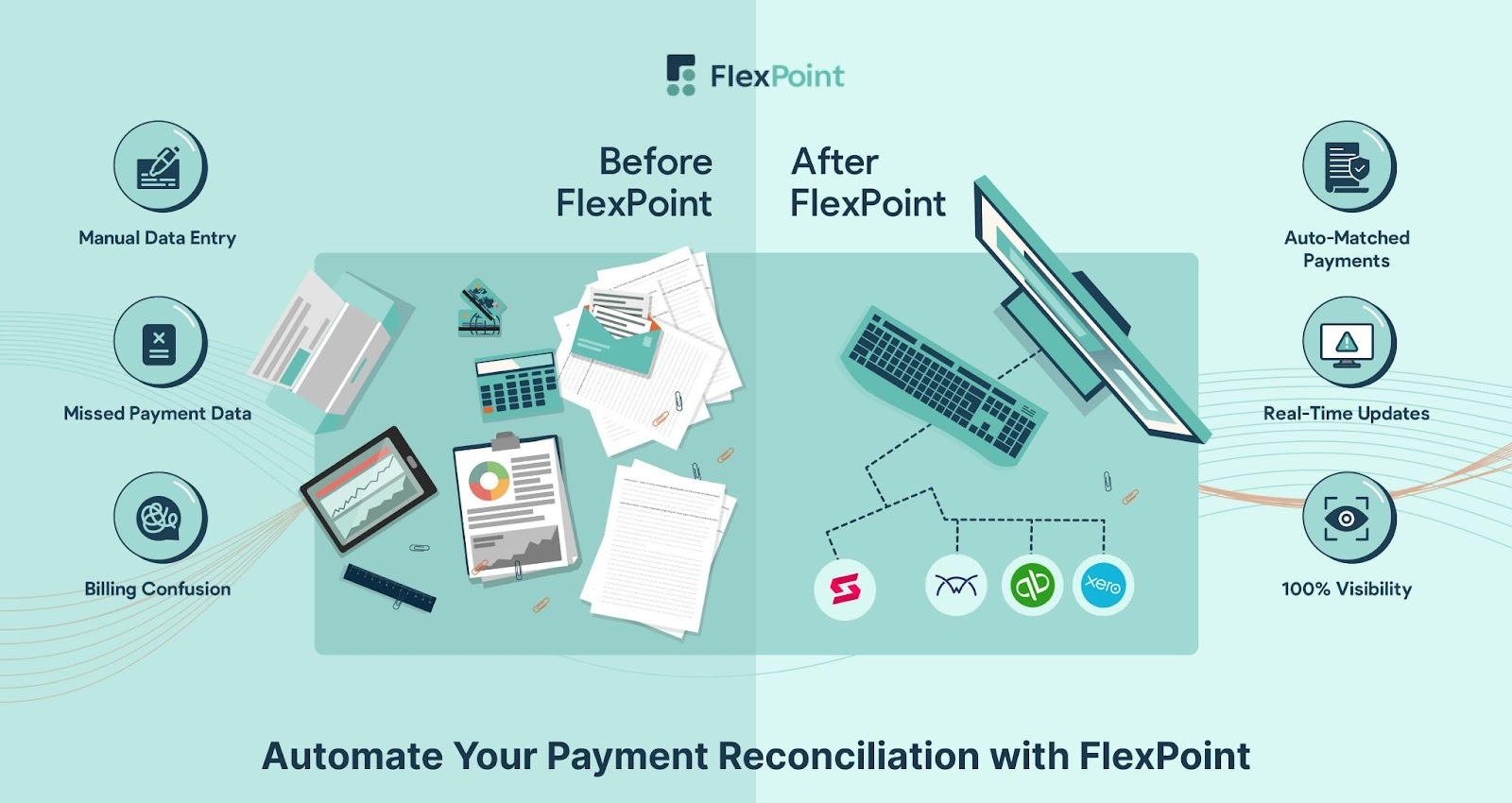
An MSP-first billing platform like FlexPoint delivers a different outcome. Instead of forcing you to adapt general-purpose processors to MSP workflows, FlexPoint is explicitly built to support the way MSPs bill, collect, and reconcile payments as they scale. It combines billing automation, payment processing, and deep integrations to help you reduce manual work and protect margins without adding more tools.
- Credit Card Fee Recovery: FlexPoint helps solve the margin drain caused by credit card processing fees (often 1.15% to 4% per transaction) by providing compliant fee recovery. With its payment processing plans, you can legally pass eligible card fees to clients, helping preserve profitability as recurring invoice volume grows.
- Flat-Rate ACH Fees: FlexPoint promotes lower-cost ACH payments through transparent, predictable flat-rate fees (e.g., $0.25 per transaction). This keeps costs stable as your MSP grows and encourages clients to choose a payment method that avoids percentage-based card fees.
- Automatic Deposit Reconciliation: FlexPoint reduces administrative overhead by automating reconciliation. Payments, deposits, and fees are matched to the correct invoices in accounting platforms like QuickBooks Online, QuickBooks Desktop, and Xero in real time. This removes the manual steps many MSPs face when tracking deposits and clearing payments across systems.
- Branded Client Portal: lexPoint improves the client payment experience and reduces back-and-forth with your team through a secure, branded portal. Clients can log in to view open and past invoices, download receipts, manage payment methods, and enable AutoPay without contacting support.
- Bi-directional PSA + QuickBooks Integration: FlexPoint acts as the operational hub between service delivery and finance. It offers two-way integrations with MSP PSA tools (such as ConnectWise PSA, Autotask, HaloPSA, and SuperOps) and syncs with accounting systems like QuickBooks & Xero. This keeps invoices, payments, and reconciliation data aligned across your stack, streamlining the ticket-to-cash workflow.
- Automated Collections Workflow: FlexPoint automates collections with email tracking, reminders, and follow-ups before and after due dates. This reduces time spent chasing overdue invoices, improves on-time payments, and helps lower DSO.
- Built for MSP Billing Models: FlexPoint supports the billing structures MSPs actually use, including recurring services, tiered plans, usage-based charges, project billing, and pass-through costs. You can manage complexity without workarounds or custom development.
FlexPoint gives MSPs control over payment costs, billing logic, automation, and integrations, without the limitations of adapting QuickBooks Payments or PayPal to MSP workflows.
Conclusion: Choose a Payment Platform That Scales With Your MSP
Many MSPs start with QuickBooks Payments or PayPal for simple reasons: they are familiar, easy to activate, and fit into an existing stack. For basic billing, a small client list, and occasional card payments, either option can work well enough.
But as your MSP grows, convenience becomes less of a deciding factor. The platform you choose needs to support the realities of managed services billing: recurring contracts, changing invoice details, predictable collections, and clean reconciliation across your systems.
That is why decision-makers should look beyond brand recognition and evaluate whether a payment solution can handle contract complexity and integrate deeply with the tools you already run, especially your PSA and accounting platform.
FlexPoint stands out as a purpose-built, MSP-first alternative that unifies billing and payments into a single streamlined workflow. The platform simplifies A/R and automates collections at scale, while also giving you more financial control through tools like compliant fee recovery and low-cost flat-rate ACH.
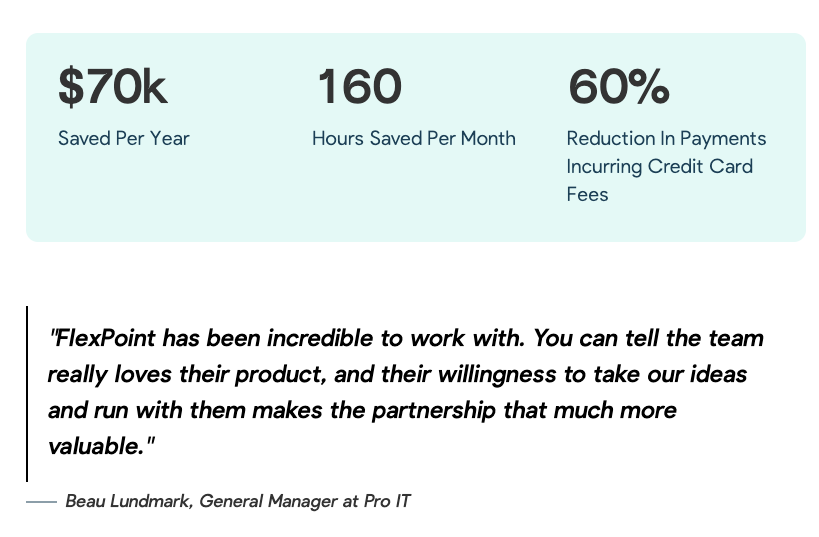
Pro IT is a clear example of why this matters. As they scaled, payment processing created more friction, not less. Clients needed help navigating the payment process, leading to frequent support requests. At the same time, rising credit card fees were cutting into profit margins. General Manager Beau Lundmark needed a solution that would make billing easier, reduce fees, and save time.
After a quick 15-minute demo, Pro IT switched to FlexPoint. The platform replaced clunky payment workflows with a smoother client experience, enabling customers to access their accounts and pay without assistance. It also reduced the company’s exposure to expensive credit card fees.
The outcome was measurable: Pro IT saved $70,000 per year, reduced the time spent on client payment inquiries by 160 hours per month, and reduced the share of payments that incur credit card fees by 60%.
Pro IT isn't alone; MSPs nationwide are using FlexPoint to streamline billing, accelerate payments, and save hours every month.
Ready to move beyond basic payment tools?
Book a demo to see how it works.
Additional FAQs: QuickBooks Payments vs PayPal for MSPs
{{faq-section}}
.png)

.png)
.png)