


Many MSPs assume that accepting ACH bank transfers in QuickBooks is virtually free, a cheap alternative to credit card payments. In truth, QuickBooks Payments charges fees for ACH transactions, and those costs can add up quickly for MSPs with recurring invoices or high payment volumes.
Before long, these fees, combined with multi-day settlement delays, reduce profit margins and slow cash flow.
In this article, we will break down how ACH payments work within QuickBooks Payments, what MSPs actually pay per transaction, and why FlexPoint offers a more cost-effective alternative with flat-rate ACH pricing.
You’ll learn the actual ACH fee structure and limitations in QuickBooks, and learn how switching to FlexPoint can significantly lower your processing costs while speeding up your billing operations.
{{toc}}
How ACH Works in QuickBooks Payments
ACH is often viewed as a simpler and more affordable way for MSPs to collect payments, particularly when compared to credit cards. QuickBooks Payments integrates this functionality into its platform by allowing ACH payments to be made directly through online invoices.
While the process looks streamlined on the surface, there are key details MSPs should understand before relying on it entirely:
Bank Transfer Setup:
QuickBooks makes it easy to start accepting ACH payments.
MSPs using QuickBooks Online (QBO) can enable the “Pay by Bank Transfer” option on customer invoices. A “Pay Now” button appears on emailed invoices, allowing clients to enter their bank account details and pay via ACH directly from the invoice link.
This convenient setup can reduce reliance on paper checks or third-party payment portals, since clients can pay you straight through QuickBooks.
Payment Initiation and Approval:
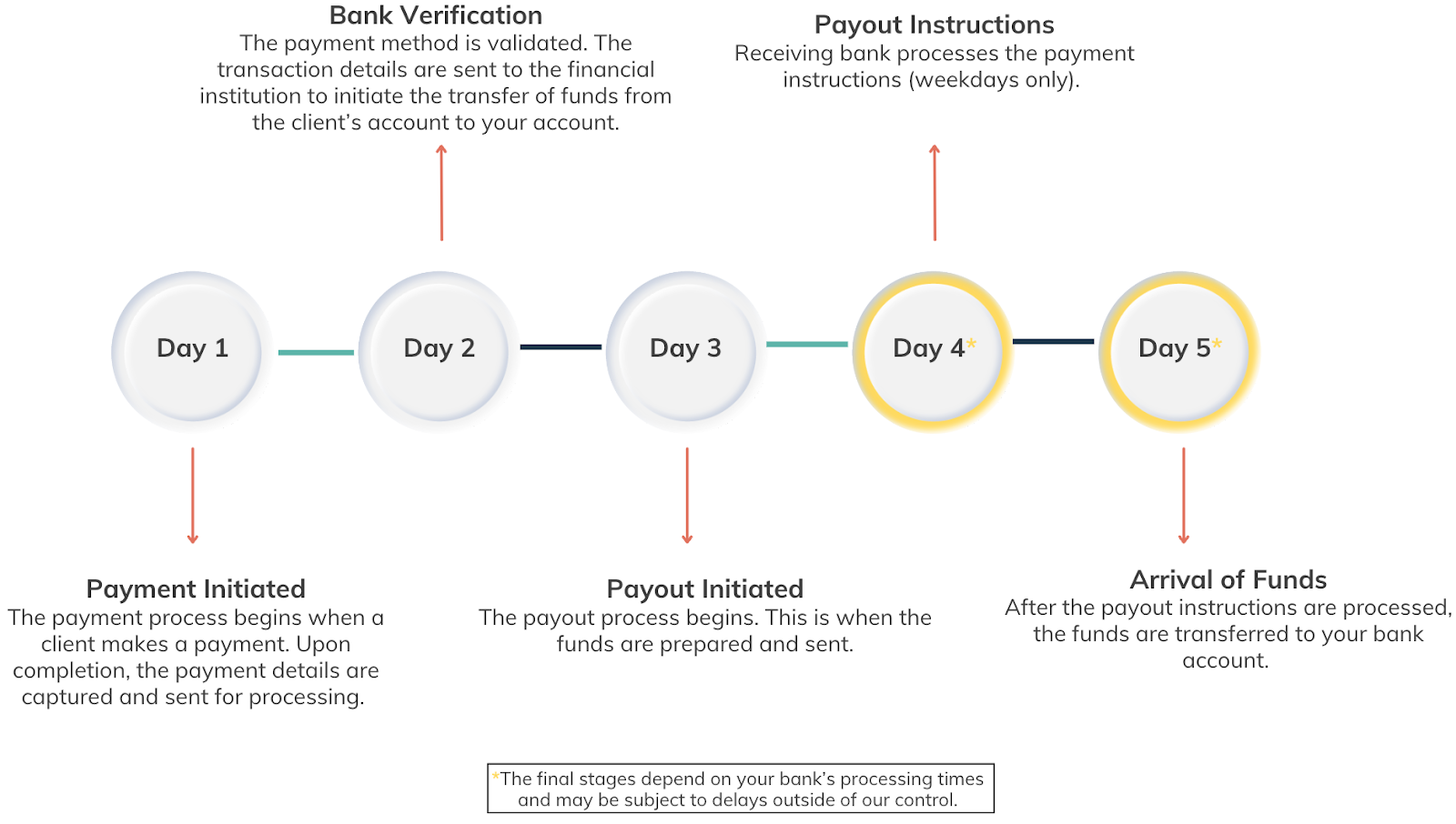
Your client’s bank acts as the originating depository financial institution (ODFI). This is where the authorized payment is converted into an ACH file that includes the payment amount and your business’s bank details.
After the file is created, the ODFI adds it to a batch of ACH transactions collected throughout the day. These batches are sent to the Automated Clearing House (ACH) network, which serves as the central system for sorting and routing ACH files.
The clearing house reviews all incoming batches and distributes each transaction to the correct receiving bank.
Your bank, as the receiving depository financial institution (RDFI), collects the ACH entries sent to it in that batch.
At this stage, the transaction appears as pending for both your client and your MSP until settlement is complete.
Once the clearing house delivers the batch and posts the debit and credit entries, the settlement phase begins. The ODFI verifies that your client has sufficient funds.
After funds are confirmed, your client’s bank debits their account. Your bank then receives the matching credit and applies it to your account.
QuickBooks Payments sits on top of this process as the payment processor. It handles authorization, manages communication between the banks, and updates the payment status in your QuickBooks file once the settlement is complete.
Deposit Timeline:
ACH transfers in QuickBooks are not instant. Funds typically take 2 to 7 business days to deposit into the MSP’s bank account after the client makes an ACH payment.
In some cases, new QuickBooks Payments users or first-time ACH transactions may take up to a week, as banks perform additional verification checks.
This means if a client pays an invoice on Monday, you might not see the money in your account until late in the week (or even the following week).
Currently, there are no built-in same-day ACH options in standard QuickBooks Payments to expedite this process, unless you utilize the Instant Deposit feature (more on that later).
MSPs should be prepared for these timelines, as delayed deposits can impact cash flow planning.
Invoice Sync and Reconciliation:
One benefit of using QuickBooks Payments is that it syncs payments with your invoices in QuickBooks Online in real-time.
When a client’s ACH payment clears, QuickBooks automatically matches it to the corresponding invoice and marks it as paid in your accounting records. According to Intuit, this integration reduces manual matching by 60%.
Your QuickBooks Online ledger updates itself, reducing billing errors and saving your finance team time. Effectively, QuickBooks creates a single workflow that spans invoice issuance, payment receipt, and bank deposit.
ACH in QuickBooks is marketed as a cost-saving, integrated solution (especially compared to the ~3% fees on credit card payments).
However, QuickBooks still charges a fee for ACH transactions.
As we detail below, those percentage-based fees and slow deposit speeds can become pain points as your MSP’s billing volume grows.
QuickBooks Payments ACH Fees: What MSPs Should Expect to Pay
Using ACH inside QuickBooks may avoid hefty credit card fees, but it isn’t free.
MSPs need to understand the actual costs of relying on QuickBooks Payments for ACH transactions:
Standard Fee Rate
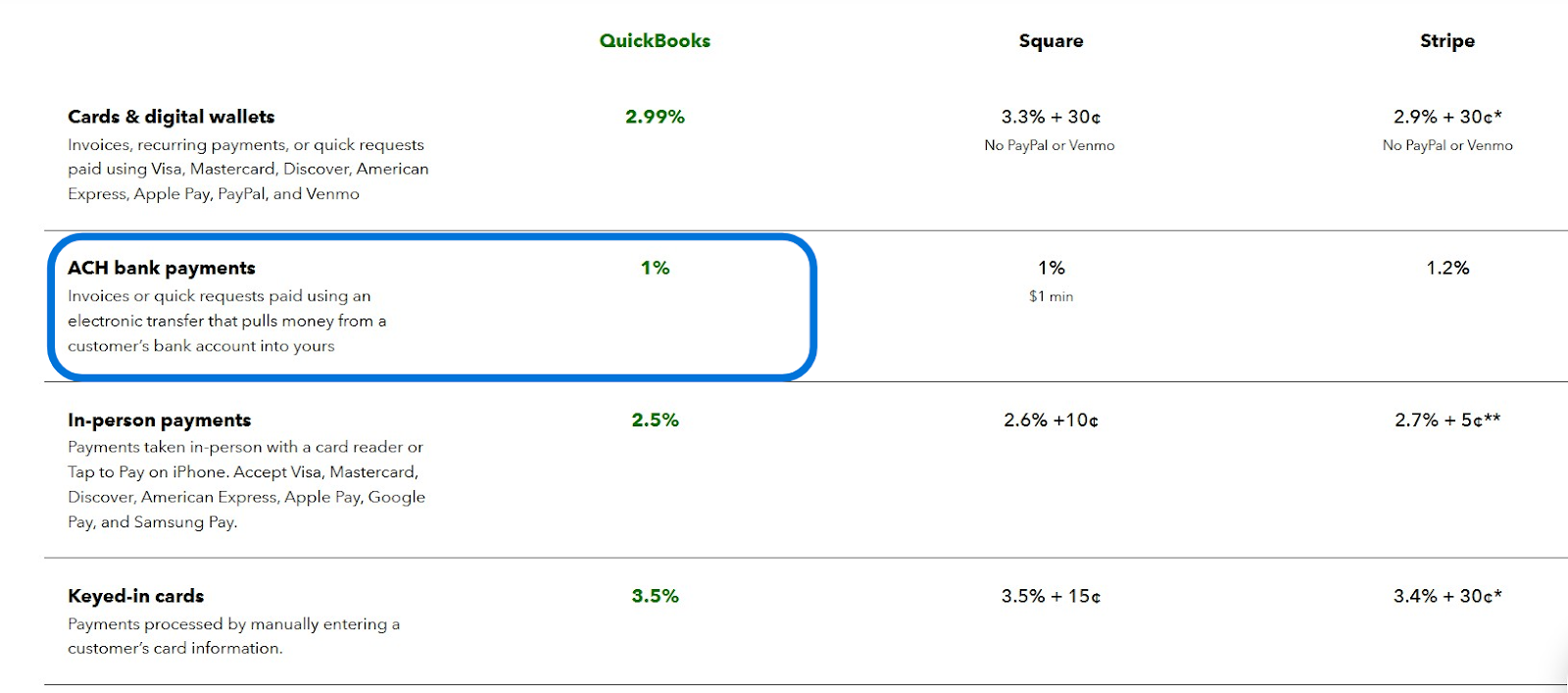
QuickBooks typically charges a 1% fee on the transaction amount for each ACH
payment you receive.
For example, if a client pays a $5,000 invoice via ACH, QuickBooks would deduct a $50 fee.
Historically, Intuit advertised a cap on ACH fees (e.g., 1% capped at $10 per transaction). However, policy changes in late 2023 removed the cap for many users. For existing users, the ACH fee cap was raised to $15 per transaction.
New QuickBooks Payments accounts opened after September 6, 2023, are often subject to a full 1% fee with no maximum. This means that a larger ACH payment can incur a cost significantly higher than $15.
The takeaway: if your MSP receives higher-value ACH payments, do not assume the fee tops out at $15. You could be paying hundreds of dollars on a single large transfer under the newer fee structure.
No Tiered Discounts:
Unlike some payment processors, QuickBooks Payments does not automatically offer lower ACH rates for higher monthly volumes.
Every ACH payment is charged the same 1% fee, whether you process $1,000 or $100,000 in ACH invoices. There are no built-in tiered discounts or wholesale rates for large MSPs.
In fact, an MSP processing tens of thousands of dollars via ACH will continue paying 1% on each dollar. In theory, some businesses can negotiate custom rates with Intuit or may access a lower rate by subscribing to QuickBooks’ highest-tier plans.
That said, these are exceptions rather than the rule.
For most MSPs, QuickBooks treats ACH transactions equally, so high volume doesn’t translate to fee savings. The more you grow your recurring revenue, the more total fees you’ll pay.
Hidden Costs in High Volume:
At first glance, 1% might seem small. However, MSPs should calculate the impact on their margins over time.
Consider an MSP billing $50,000 per month via ACH through QuickBooks.
A 1% fee means $500 in fees each month, or $6,000 per year, paid out to Intuit simply for moving your clients’ money.
Over multiple years, these fees can quietly erode the profitability of your managed service contracts.
Moreover, because the fee is percentage-based, larger invoices incur bigger absolute fees: there’s effectively a “tax” on growing client accounts.
MSPs operating on typical net profit margins (often between 10% and 30% in the industry) will feel that ACH fees directly reduce their bottom line.
While 1% is lower than credit card processing rates, it’s not negligible, especially as revenue scales up.
No Real-Time ACH Options (Without Extra Fees):
QuickBooks does not support standard same-day ACH processing. The default ACH transfers always follow the 2-5 day clearing window.
If you need faster access to funds, QuickBooks’ solution is the Instant Deposit feature. However, it comes with an additional 1.75% fee for each instant transfer (when moving funds to an external bank account).
In other words, to get your ACH payment immediately, you’d pay significantly more than the base 1% fee.
Instant Deposits only accelerate the deposit after the payment is processed; they do not speed up ACH clearing.
QuickBooks Money users (Intuit’s banking product) can get free instant deposits into a proprietary account, but that still keeps your money tied within the Intuit ecosystem.
The lack of true same-day ACH in QuickBooks Payments means MSPs must either wait for the standard delay or pay a premium, which isn’t ideal for time-sensitive cash flow needs.
Operational Impact:
Beyond the direct cost, QuickBooks’ ACH fee structure can introduce operational inefficiencies for MSPs.
Waiting nearly a week for deposits can slow down your financial workflows: reconciliation is delayed, month-end closing may be extended, and forecasting becomes trickier when revenue isn’t immediately in the bank.
Additionally, because the fee is deducted from each deposit, your accounting team must account for those fee deductions when reconciling payments (QuickBooks categorizes them, but it’s another line item to track).
Over time, the combination of paying a percentage on every invoice and enduring multi-day delays can erode the efficiency benefits that ACH is intended to provide.
The bottom line: QuickBooks ACH fees are lower than credit card fees, but they are still a significant expense with no volume relief.
For MSPs sending many recurring invoices, the 1% fees add up quickly and should be factored into pricing or profitability analysis.
ACH Payment Limits and Settlement Delays in QuickBooks
Relying on QuickBooks for ACH collections comes with certain limitations that can impact growing MSPs.
Here are key constraints to be aware of:
Transaction Limits:
QuickBooks Payments imposes limits on the size of individual ACH transactions, often initially capping single payments at a certain amount.
Until 2023, the cap for a single ACH payment in QuickBooks Online was $50,000. Intuit has since increased the single-transaction limit to $100,000 for eligible merchants. This means an MSP can, in theory, collect up to $100K in one ACH payment.
However, as Intuit explains, that increase “doesn’t mean all ACH transactions below $100,000 will be approved,” and larger transactions may still be flagged for review.
Additionally, new QuickBooks Payments users might start with lower limits that gradually increase based on account history. If your MSP lands a big client or project and needs to invoice a six-figure sum via ACH, you could hit these limits.
In such cases, you may still need to split the payment into multiple transactions or request a higher limit from QuickBooks, both of which are manual processes that require time and paperwork.
Delayed Transfers:
In addition to per-transaction caps, QuickBooks applies rolling 30-day volume limits for ACH payments, tailored to your business’s processing history and risk profile.
For example, an MSP might be limited to receiving, say, $75,000 in ACH payments over a 30-day period until they establish a longer history of transactions. If you exceed that, new payments could be put on hold.
QuickBooks’ risk department may hold certain transfers for additional fraud review or to mitigate its liability (ACH payments can be subject to returns or disputes for fraudulent or unauthorized transactions).
These risk holds can delay your access to funds beyond the usual 2 to 5-day window, which can be disruptive if you were counting on that cash for payroll or vendor bills.
Keep in mind that ACH is a bank-to-bank transfer; once initiated, it’s generally reliable. However, QuickBooks, as the processor, might still pause disbursement if a payment triggers its security algorithms.
Manual Escalation for Larger Transfers:
When an MSP’s payments exceed the default limits, increasing those limits often requires contacting QuickBooks Payments support.
For instance, if you plan to regularly process large ACH transactions above your current cap, you’ll need to request an ACH limit increase. This may involve providing additional business financials or documentation to Intuit.
The process isn’t instantaneous. In the meantime, you could be left unable to collect a large payment in a single go. This manual payment friction can slow down your billing as your MSP scales up.
In contrast, a platform purpose-built for larger B2B transactions might offer higher default limits or more flexible arrangements.
It’s essential for MSPs using QuickBooks to periodically review their processing limits, particularly after experiencing significant growth, to avoid unexpected issues when invoicing large contracts.
No Same-Day ACH Support:
While the banking industry now offers same-day ACH clearing windows, QuickBooks Payments does not provide a same-day ACH option for regular invoices.
As noted earlier, Intuit’s workaround for faster funding is the Instant Deposit (which is essentially a paid advance, not true same-day ACH).
So, every ACH through QuickBooks will follow the standard timeline.
In contrast, some modern payment platforms (such as FlexPoint) and banks do allow same-day ACH transfers (with proper cutoff times) as a feature.
Without that capability, MSPs using QuickBooks must plan for multi-day settlements. If your cash flow strategy involves receiving client payments and redeploying that cash quickly, QuickBooks may feel sluggish in this regard.
Risk Holds and Reserve Delays:
The combination of transaction caps, rolling limits, and long settlement times can strain an MSP’s operations.
Delayed transfers (2–5 days or more) mean you cannot immediately use the funds you’ve billed, potentially causing a timing gap in paying your own expenses.
Splitting large invoices into multiple payments due to caps can add complexity to your accounts receivable process and may confuse clients. If a payment is held for review, it creates uncertainty and requires additional administrative follow-up with QuickBooks support.
All of these factors reduce the predictability of cash inflows.
For MSPs that rely on steady monthly recurring revenue to fund payroll and services, such delays can affect your ability to reinvest in growth or cover obligations on time.
In summary, QuickBooks Payments works well for straightforward, smaller ACH transactions, but high-volume MSPs may encounter its built-in limits.
Understanding these constraints ahead of time allows you to proactively manage around them or consider alternatives that do not impose the same restrictions on your ACH payments.
FlexPoint’s Flat-Rate ACH Pricing: A Smarter Alternative for MSPs
QuickBooks isn’t the only way for MSPs to collect ACH payments. FlexPoint is an MSP-focused billing and payments platform that offers a more predictable and scalable approach to ACH processing.
Here’s how FlexPoint addresses the pain points of QuickBooks ACH:
Flat-Rate ACH Fees:
FlexPoint charges a low, flat fee per ACH transaction, rather than a percentage of the payment.
For example, an MSP using FlexPoint might pay a fixed $0.25 per ACH payment, regardless of whether the client’s invoice is $500 or $50,000. This flat-rate pricing means you never incur a hefty fee on transactions: the cost remains the same each time.
In practice, many MSPs find that FlexPoint’s ACH fees are significantly lower than 1% of their typical invoice sizes. Your processing costs become predictable and easy to budget for. There’s no need to worry about a growing “tax” on revenue as you add clients or increase contract values.
In FlexPoint’s pricing plans, flat ACH fees can be as low as $0.25 per transaction, with no percentage-based component.
By eliminating percentage fees, FlexPoint immediately helps MSPs improve their profit margins on recurring payments.
Faster Settlement Options:
FlexPoint gives MSPs the option to accelerate cash flow with Same-Day ACH, available as a paid add-on feature.
When you enable this feature, you can process ACH payments for a 1% fee, allowing funds to settle on the same business day as long as the payment is submitted before the bank’s cutoff time.
This is a meaningful upgrade compared to standard ACH timelines, where deposits often take several business days to process.
With FlexPoint’s Same-Day ACH, you can send a morning invoice and have usable funds by the afternoon, giving you more flexibility to handle time-sensitive expenses, such as vendor bills or payroll.
QuickBooks Payments also offers faster settlement; however, the cost structure is different.
Their standard ACH pricing includes a 1% fee, and Instant Deposit adds an additional 1.75% on top of that (unless you use your QuickBooks debit card).
When you compare the two, FlexPoint delivers similar speed at a single 1% rate rather than stacking charges.
Even without the add-on, FlexPoint’s regular ACH flow often reaches MSP accounts faster than traditional processors, typically within one to two business days. This creates steadier cash flow, fewer delays, and more predictable payment cycles.
FlexPoint gives you a clear path to speed when you need it and predictable costs when you don’t.
Fee Control and Transparency:
MSPs know precisely what they’ll pay per transaction, without any percentage-based surprises. FlexPoint’s flat-rate model makes every ACH cost predictable and easy to budget for.
Whether a client pays $500 or $50,000, the fee stays the same. That transparency gives finance teams complete visibility into processing costs and simplifies forecasting for recurring payments.
Over time, predictable pricing helps MSPs maintain healthier margins and avoid the uncertainty that comes with fluctuating fees.
No Caps or Manual Limits:
FlexPoint is built to scale with MSPs. As such, the platform does not impose arbitrary caps on ACH transaction sizes or monthly volumes. You won’t encounter a $10k or $100k ceiling that forces you to split payments.
MSPs can process large client invoices in a single transfer through FlexPoint.
Additionally, higher-volume usage isn’t penalized: there are plans that accommodate unlimited ACH transactions or very high monthly processing amounts.
FlexPoint’s risk management is specifically designed for B2B payments, resulting in fewer unexpected holds or interruptions compared to generic processors.
You have complete control and freedom to grow your billing without hitting structural roadblocks. An MSP can onboard new contracts and bill big projects through FlexPoint without constantly phoning support to raise limits.
Deep Integration with PSA + QuickBooks:
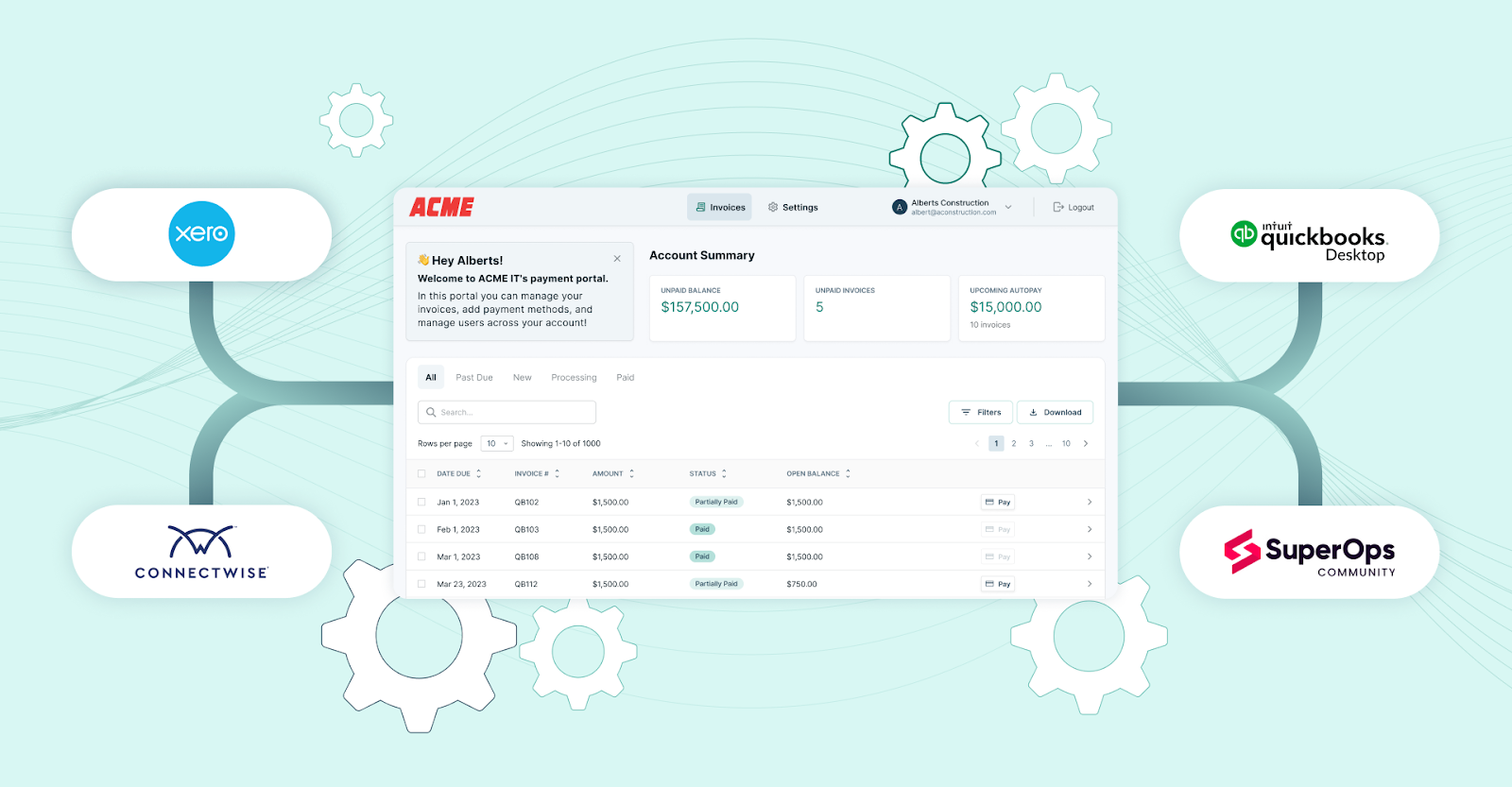
FlexPoint isn’t meant to replace your accounting software: it works alongside it to enhance payment handling.
The platform integrates deeply with professional services automation (PSA) systems, such as ConnectWise PSA, Autotask, SuperOps, and HaloPSA, as well as with accounting software, including QuickBooks Online, QuickBooks Desktop, and Xero.
When you use FlexPoint to collect an ACH payment, that transaction information syncs automatically to QuickBooks, marking invoices as paid and updating your books just as QuickBooks Payments would.
The platform also syncs with your PSA for contract and invoice records. This means you maintain a single source of truth across systems without manual data entry.
Reconciliation is essentially instant and error-free.
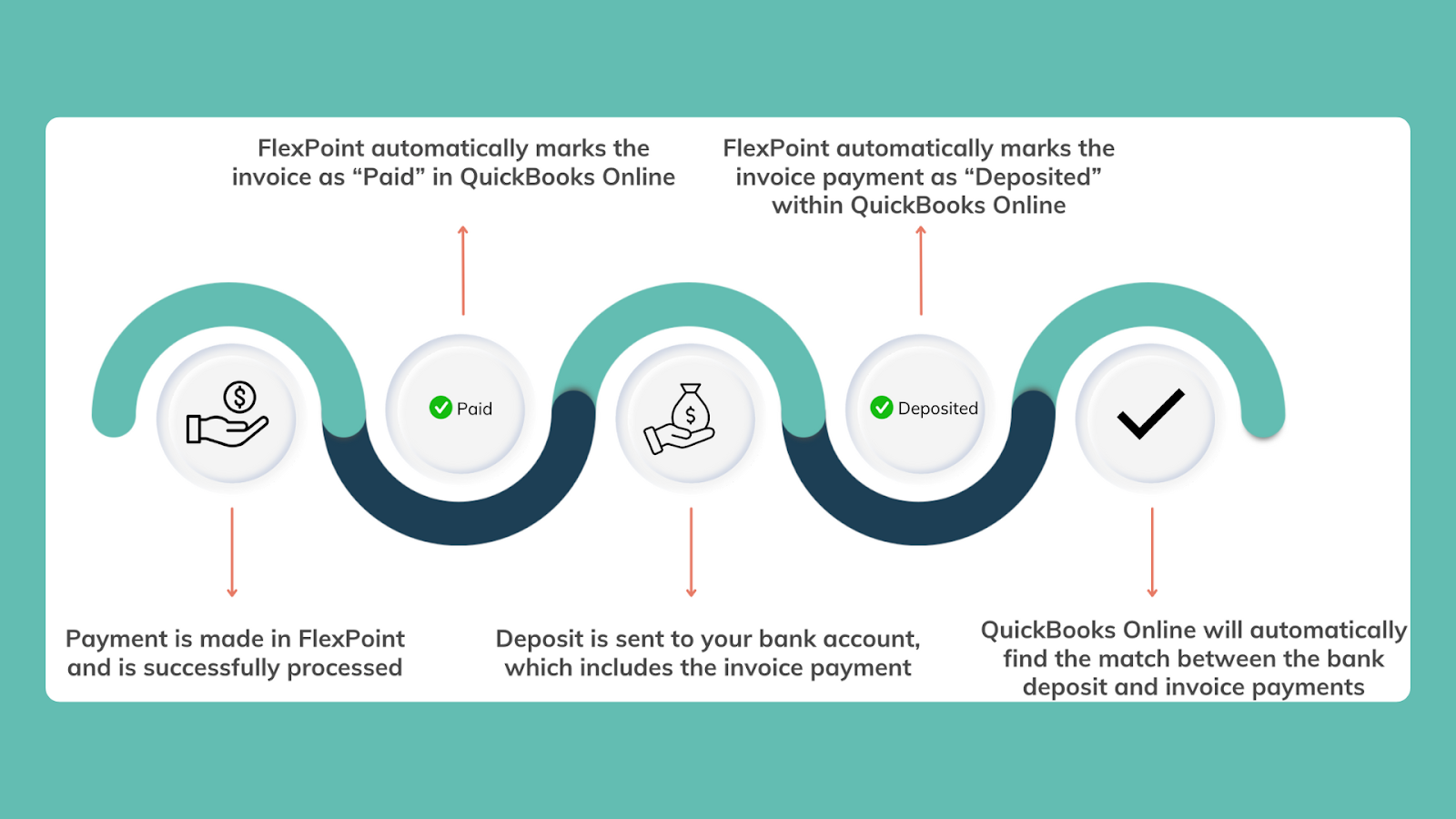
Your finance team can enjoy the same seamless workflow (invoice -> payment -> ledger updated), but with the improved economics and speed that FlexPoint provides.
The integration is secure and bi-directional, so whether an invoice originates in your PSA or QuickBooks, the payment will be correctly applied in both systems.
Conclusion: Save More on ACH Fees With the FlexPoint
ACH payments may seem like a low-cost, “set-and-forget” option in QuickBooks. However, as we’ve seen, the 1% fee and multi-day delays can become costly and cumbersome for MSPs.
Over time, QuickBooks ACH fees can quietly erode your recurring revenue profits, and its processing limits or slow processing times can impede your billing efficiency.
What starts as a cheaper alternative to credit cards can still end up impacting your margins and cash flow more than you anticipated.
Fortunately, MSPs have options.
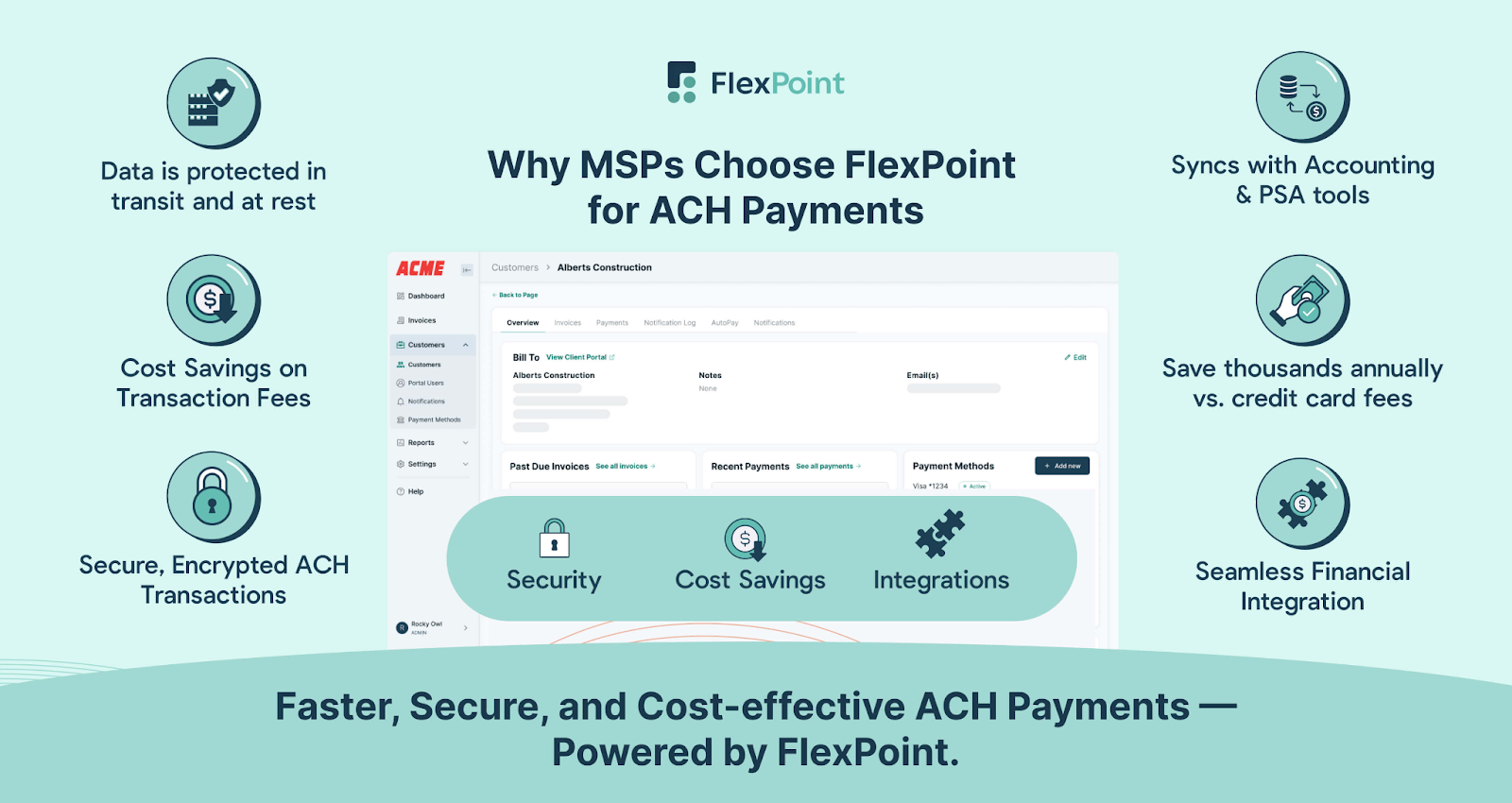
By switching to FlexPoint for ACH collections, an MSP can dramatically lower its payment processing costs and eliminate the waiting game for deposits.
FlexPoint is purpose-built to meet the needs of MSPs, offering features such as same-day ACH, PSA integrations, and client-friendly payment portals, while maintaining transparent and minimal fees.
The result is a smarter ACH experience that scales with your business.
For MSPs handling high-volume or recurring client payments, the choice is clear: you can continue absorbing percentage-based fees and delays, or you can adopt a solution like FlexPoint to retain more of your revenue and get paid faster.
By utilizing the right ACH tool, you can enhance your bottom line and gain greater control over your billing operations, transforming payments into a competitive advantage rather than a cost center.
Tired of paying percentage-based ACH fees in QuickBooks Payments?
FlexPoint offers MSPs flat-rate pricing and seamless integration with QuickBooks.
Book your FlexPoint demo to start saving on every ACH transaction.
Additional FAQs: QuickBooks Payments ACH Fees for MSPs
{{faq-section}}




