


You probably chose Microsoft Dynamics 365 Business Central because it’s a serious financial platform.
It handles accounting, reporting, and operational visibility well for growing businesses that need more structure than entry-level accounting software.
But Business Central wasn't built for the way MSPs actually bill and operate.
As your MSP scales, recurring contracts, PSA-driven invoices, client payment behavior, multi-system reconciliation starts converging on your accounting system at once.
And Business Central, for all its strengths, wasn't designed to handle that on its own.
Luckily, that's exactly what integrations are for.
This guide covers the central Business Central integrations that MSPs actually need: how they work, how they fit together, and how to build a stack that is highly efficient while remaining simple.
For this guide, we focus on integrations that are either natively supported by Microsoft or have established, supported connectors. Tools that require custom development are excluded while ones that lack proven MSP use cases are mentioned only when central to your operations.
If you’re still evaluating billing platforms, start with The Best MSP Billing Software in 2026.
The best Microsoft Dynamics 365 Business Central integrations for MSPs typically include:
- PSA tools like ConnectWise or Autotask for service and billing data
- Payment and AR automation platforms like FlexPoint for invoicing, collections, and reconciliation
- Reporting tools like Power BI for financial visibility
- CRM platforms like Dynamics 365 Sales or HubSpot for pipeline tracking
The right combination depends on your MSP’s size, billing complexity, and growth stage.
Why Integrations Matter More for MSPs Than Most Businesses
Most businesses use accounting software to track revenue after it happens, but MSPs are different.
Most MSP revenue is recurring and contract-driven, which makes billing accuracy and timing far more operationally critical than in typical SMBs.
Revenue is tied directly to services delivered, contracts, and ongoing client relationships. That means billing is not just a financial function, it is an operational system that connects and requires multiple tools.
Business Central was not built specifically for MSP billing workflows. It is designed as a general ERP platform for financial management and operations.
And that creates real friction as MSPs scale.
Instead of a simple invoice flow, you are managing:
- Recurring service agreements
- Usage-based billing
- PSA-driven invoices
- Client payment behavior
Without the right integrations, these processes become manual very quickly.
The result is usually:
- Delayed invoicing
- Inconsistent data between systems
- Time spent reconciling payments instead of growing the business
So for MSPs using Microsoft Dynamics 365 BC, integrations are required for a usable billing system.
All Microsoft Dynamics 365 Business Central Integration Options
Most MSPs end up building a stack around three core systems (though there are some exceptions):
- PSA
- Accounting
- Payments and AR automation
These are the central tools for operating a cash flow engine as an MSP. And while Business Central handles the accounting layer well, it relies on integrations to connect everything else.
Microsoft supports integrations across its ecosystem and external tools through APIs, Microsoft Dataverse, and platforms like Power BI and Power Automate, which are designed to connect data and workflows across systems.
That flexibility is powerful, but it also means:
- You are responsible for choosing the right integrations
- And not all integrations are built equally for MSP workflows
Professional Services Automation (PSA) Integrations
As you are already likely aware, PSA platforms are the foundation of most MSP billing workflows.
They track the work you do for clients, including contracts, tickets, time, and recurring services. All of that data eventually needs to flow into Business Central for invoicing and financial reporting.
Without a PSA integration, your accounting system has no reliable way to reflect actual service delivery.
The most common PSA integrations for Business Central include ConnectWise, Autotask, and HaloPSA.
Each serves the same core purpose, but the experience varies slightly depending on your stack.
The specific PSA matters less than the outcome. What matters is that billing data flows cleanly into your accounting system without manual intervention.
Where PSA integrations:
- Keep contracts and invoices aligned
- Reduce manual data entry between systems
- Ensure financial reports reflect real activity
For most MSPs, this is the first integration they set up. It is also the one everything else depends on.
If your PSA and accounting systems are not fully aligned, billing issues usually show up downstream. Here’s how to identify and improve them: How to Improve MSP Service-Line Profitability
ConnectWise PSA

ConnectWise PSA does not have a direct native integration with Business Central.
The connection is generally handled through DynaConnect, a third-party connector available in the ConnectWise Marketplace that was built specifically to bridge ConnectWise and Microsoft Dynamics 365 Business Central.
DynaConnect supports bidirectional synchronization between the two platforms.
Meaning: customer records, invoices, purchase orders, and payment data flow between ConnectWise PSA and Business Central automatically.
For MSPs running ConnectWise as their PSA of record, DynaConnect is one of the more structured and MSP-focused paths currently available.
It is a third-party dependency, which means setup and maintenance sit outside of either platform's native support, but the integration is designed specifically for this workflow rather than being a generic middleware solution.
What to consider and confirm before setting up:
- DynaConnect requires configuration on both the ConnectWise and Business Central sides
- Sync behavior, field mapping, and frequency should be tested before going live
- Support for DynaConnect runs through the DynaConnect vendor, not ConnectWise or Microsoft directly
Autotask PSA
Similar to Connectwise, Autotask does not offer a native, first-party integration with Microsoft Dynamics 365 Business Central.
But unlike Connectwise, there is no stand out connector. MSPs typically connect Autotask to Business Central using third-party connectors or middleware platforms like Zapier.
Another option is TaskCentral, which is listed on Microsoft AppSource as a connector designed to integrate Autotask PSA operations with Business Central.
But depending on the connector, synchronization may be near real-time or scheduled at defined intervals.
The goal is the same: eliminate manual data transfer between Autotask and Business Central and ensure billing data reflects actual service activity.
Because there is no standardized native integration, the experience can vary.
MSPs evaluating this setup should confirm:
- How data is synced (real-time vs scheduled)
- Which system acts as the source of truth
- How errors or sync failures are handled
For many MSPs, this is where integration complexity starts to increase, especially as billing volume grows.
HaloPSA and SuperOps
HaloPSA and SuperOps may require a different approach depending on your exact Business Central setup.
Publicly available integration options are less standardized than the ConnectWise or Autotask paths, so MSPs often rely on middleware, API-based workflows, or platforms that connect PSA, payments, and accounting together.
That does not mean integration is not possible.
For HaloPSA, third-party automation platforms can connect HaloPSA with the Business Central API, though these workflows may require more configuration than a packaged integration.
For SuperOps, direct Business Central options are less visible publicly, so MSPs should verify the current integration path with the vendor before building around it.
Very similar to Autotask, most MSPs connect these platforms using:
- Middleware tools
- API-based custom integrations
- Or platforms that bridge multiple systems at once
This is where an operational bridge can be useful.
FlexPoint supports integrations with common MSP PSA tools, including ConnectWise, HaloPSA, Autotask, and SuperOps, as well as Microsoft Dynamics 365 Business Central.

Tools like FlexPoint are designed to act as that operational layer. By integrating directly with PSA platforms and Business Central, they can reduce the need for multiple separate connectors while also handling payment collection and reconciliation.
Learn more about FlexPoint's integrations.
Payment and AR Automation Integrations
As you know, generating an invoice in Business Central is not the same as getting paid.
For MSPs running recurring billing across dozens or hundreds of clients, the gap between invoice sent and cash received is where most of the operational friction lives.
The right payment integration handles the entire collection cycle automatically: invoice delivery, client payment experience, AutoPay, reconciliation back into Business Central, and real-time reporting.
When payment collection and reconciliation are manual, the operational cost is significant.
Finance teams spend hours each billing cycle chasing payments and matching transactions that should reconcile automatically.
Late payments remain one of the biggest issues in B2B transactions, with a significant portion of invoices paid after due date, which directly impacts cash flow and operational planning.
For MSPs managing growth on Business Central, payment automation is usually the highest-return integration available after PSA connectivity.
FlexPoint and Microsoft Dynamics 365 Business Central

FlexPoint is a payments and AR automation platform built specifically for MSPs. It integrates directly with Microsoft Dynamics 365 Business Central.
FlexPoint is not just another add-on or a standalone payment processor. It connects your PSA, client payment experience, and Business Central into a single automated workflow.
In practice, that looks like:
Invoices generated in your PSA flow into FlexPoint. Clients pay through a branded, white-labeled payment portal via ACH or card. Payments reconcile back into Business Central automatically, without manual matching or data entry.
For MSPs running Business Central, FlexPoint addresses the gaps that the ERP does not solve on its own.
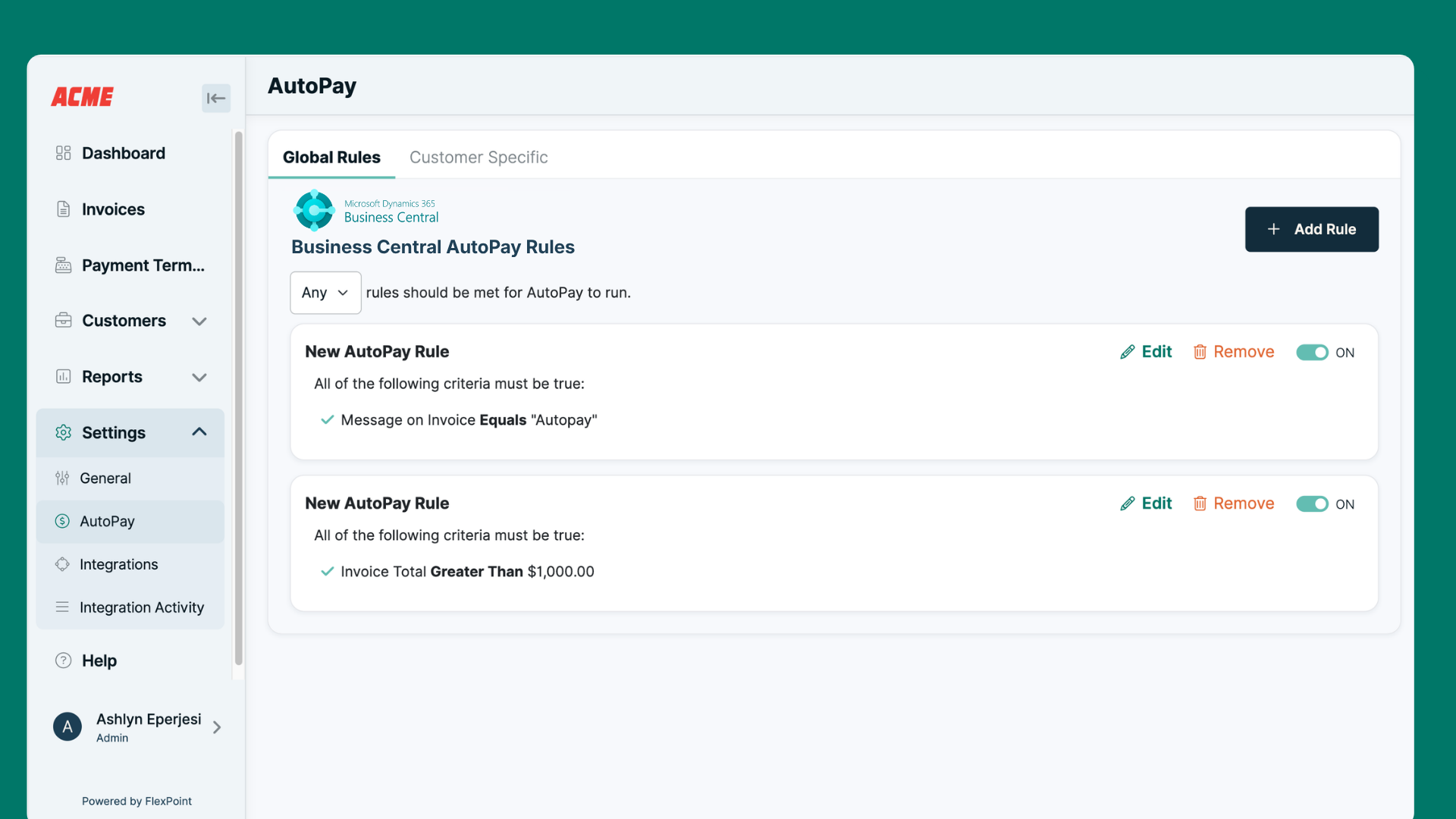
The platform handles the parts of billing that Business Central does not:
- AutoPay enrollment and retry logic
- Same-Day ACH to accelerate settlement
- A branded client payment portal
- FlexLine financing
- Real-time reconciliation back into Business Central
The combination of PSA connectivity, client payment experience, and direct Business Central reconciliation is what separates FlexPoint from a generic payment processor.
General-purpose tools like Stripe or PayPal can process payments, but they have no concept of what makes MSP billing special from other SMBs.
FlexPoint is designed around exactly those workflows.
See exactly how FlexPoint integrates with Microsoft Dynamics 365 Business Central.
Reporting and Business Intelligence Integrations
Business Central includes solid financial reporting out of the box. But for MSPs who want deeper visibility into operational performance, client-level profitability, and real-time financial trends, native reporting has limits.
The most natural reporting integration for Business Central in the Microsoft ecosystem is Power BI.
Learn about the 10 Key Performance Indicators Every MSP Should Monitor
Power BI and Microsoft Dynamics 365 Business Central
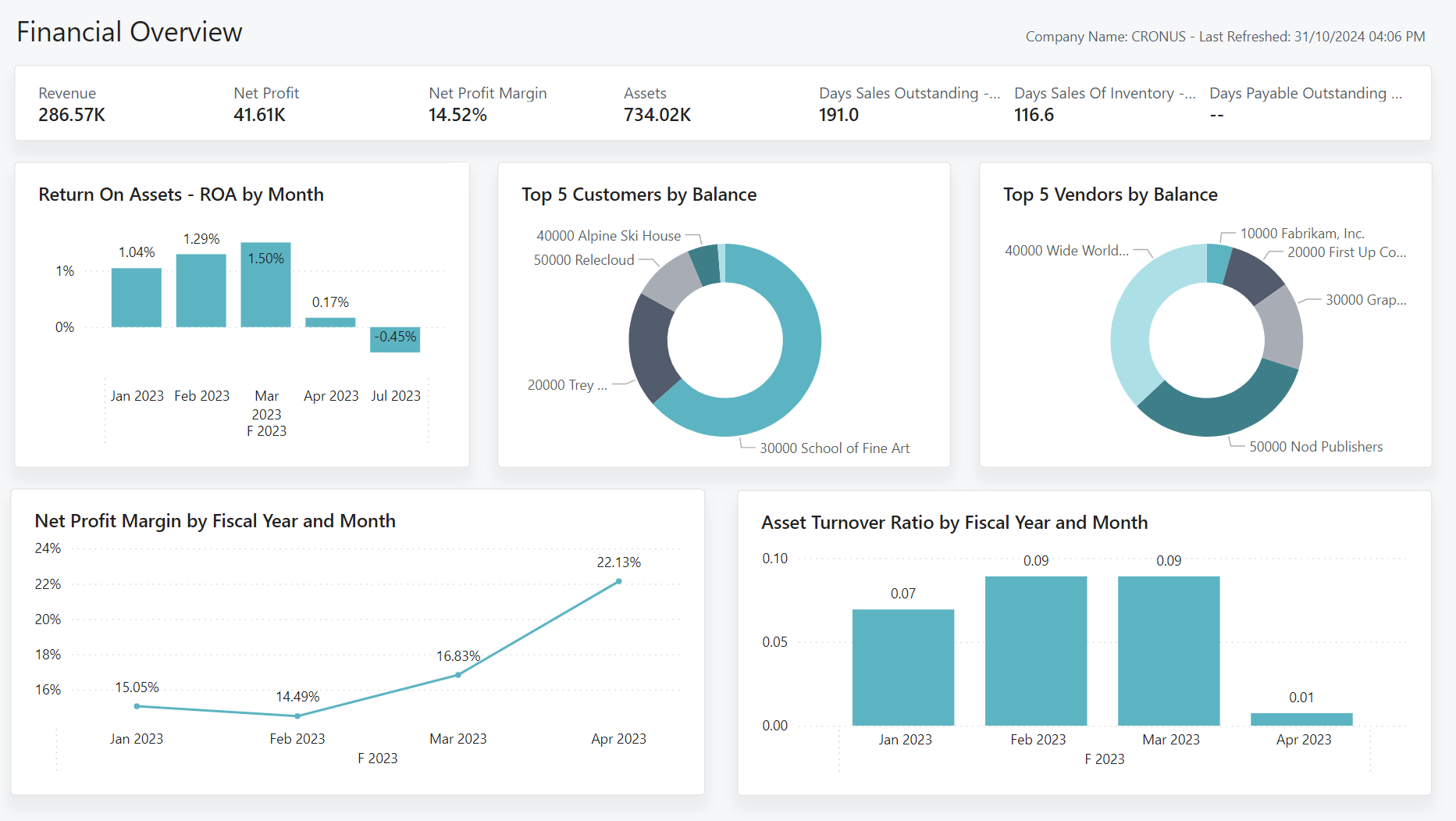
Power BI is Microsoft's business intelligence platform. Power BI integrates natively with Business Central through Microsoft’s certified connector, meaning the integration is maintained and updated by Microsoft.
Once connected, Business Central data surfaces in Power BI alongside data from other sources in your stack. That allows MSPs to build dashboards that combine financial data from Business Central with operational data from your PSA, creating a single view of revenue, profitability, and service delivery performance.
For MSPs on the Microsoft stack, Power BI is the natural reporting layer.
The native integration means less configuration effort than third-party BI tools, and the connector is updated alongside Business Central as the platform evolves.
What Power BI adds that Business Central reporting does not cover natively:
- Cross-system dashboards that combine PSA and financial data
- Client-level profitability views that go beyond standard P&L
- Visual reporting that is easier to share with leadership or external stakeholders
- Automated report scheduling and delivery
For MSPs already invested in the Microsoft ecosystem, connecting Business Central to Power BI is a low-friction way to significantly improve financial visibility.
CRM Integrations
For MSPs that manage a meaningful volume of new business development, the gap between CRM and financial reporting creates forecasting blind spots.
Deals live in one system, revenue recognition happens in another, and connecting the two requires manual work.
The right CRM integration closes that gap so closed deals flow into Business Central without a manual handoff.
Dynamics 365 Sales and Microsoft Dynamics 365 Business Central

Business Central has a native, first-party integration with Dynamics 365 Sales, Microsoft's CRM platform.
Both applications are built on the Microsoft Dataverse, which means they share a common data layer that supports bidirectional synchronization of all your important data.
For MSPs already in the Microsoft ecosystem, this is the most direct CRM path.
Deals closed in Dynamics 365 Sales flow into Business Central to trigger invoicing and revenue recognition, with no middleware or custom development required.
Then Power BI can pull from both systems simultaneously, giving leadership a single view of pipeline and financial performance.
The native integration also means less ongoing maintenance compared to third-party connectors. Updates to either platform are managed by Microsoft rather than requiring action from a third-party vendor.
HubSpot and Microsoft Dynamics 365 Business Central

If, however, you are already committed or familiar with HubSpot, you can integrate with Microsoft Dynamics 365 BC directly from Hubspot's Marketplace:
According to Hubspot's listing, enabling this integration only takes 5 minutes of time and results in:
- Two-way sync: Data is shared between Microsoft Dynamics 365 Business Central and HubSpot in real time
- Default field mappings: Set-up is quick with out-of-the-box field mappings already created for you
- Historical syncing: Your existing data will sync right away, and updates will sync as they happen
Learn more about how to integrate these tools using Hubspot's help center here.
Once connected, closed deals in HubSpot can trigger the creation of customer records or sales orders in Business Central, reducing the manual handoff between sales and finance.
How to Build a Connected Business Central Stack for Your MSP
The value of Business Central integrations is not in any single connection. It is in how the integrations work together to create an unbroken flow from service delivery to invoice to cash.</




%2520(1).jpeg)



