


Late fees can be controversial, but they are not unreasonable.
They are a standard business practice that sets expectations, compensates for the impact on your cash flow impact, and communicates that your payment terms are real.
And the reason many MSPs don't use them is simple: it feels awkward.
Bringing up consequences before there's a problem can feel like you're assuming the worst about a client relationship.
So many MSPs may skip the conversation, send invoices without late fee language, and quietly absorb the cost when clients pay 30, 45, or 60 days late.
But clients who pay late face no consequence, the pattern repeats, and you keep eating the cost, all without any mechanism to recover it.
Late fees fix that because they create a reason to pay on time that doesn't rely entirely on goodwill.
This post covers what a reasonable late fee looks like, how to add one to your contracts and invoices, and how to enforce it without turning a billing policy into a client relationship problem.
What Is the Standard Late Fee for Invoices?
The industry standard for late fees is 1 to 2% per month on the overdue balance, which works out to 12 to 24% annualized. Some service businesses use a flat fee instead, typically $25 to $50 per overdue invoice.
For MSPs specifically, percentage-based fees tend to work better than flat amounts because your invoices vary in size.
A flat $25 late fee on a $5,000 monthly invoice is so small it has no deterrent effect. A 1.5% monthly fee on that same invoice is $75, which is enough to matter without being punitive.
What matters most is not the exact rate you choose, but that the rate is clearly stated in your service agreement and on every invoice before the work begins.
A late fee introduced after an invoice is already overdue is not enforceable and will almost certainly create a dispute.
A quick note on state limits: Late fee enforceability varies by state, and some states cap the monthly rate you can legally charge. Charging above the legal maximum in your client's state makes the fee unenforceable and can create liability.
State-by-state late fee limits guide coming soon, check back here for a full breakdown by state before finalizing your policy.
The short version: 1.5% per month is defensible in most U.S. states and sits within the standard range for professional services. Confirm your state's limit before finalizing your rate.
How to Add a Late Fee to an Invoice
Actually adding a late fee to an invoice is the last step in the process.
Before a fee can appear on an invoice, it needs to exist in your contract, and your client needs to know it's there. Here's how each piece fits together.
Late Fees Start in the Contract, Not the Invoice
A late fee is only enforceable if it was disclosed in your service agreement before the work began. You cannot add a late fee to an invoice retroactively and expect it to hold up either legally or relationally.
Your service agreement should include clear payment terms language before you onboard any client. Here's an example you can adapt:
A few things to nail down in the contract language:
Once this language is in every service agreement, adding fees to overdue invoices is a documented policy that the client agreed to.
How a Late Fee Should Appear as a Line Item
When a fee applies, add it as a separate line item on the invoice. Do not bury it in the total or fold it into an existing charge. Transparency here protects you from disputes and makes the documentation clean if the account ever escalates.
The line item should include:
- A clear description: "Late fee: [X] days overdue"
- The rate applied (e.g., 1.5% per month)
- The base amount the fee was calculated on
- The dollar amount of the fee itself
Keep the tone of the line item professional and factual.
This is simply documentation, not a penalty notice, meaning the client already knew this was coming because it was in their contract. The line item just confirms it applied.
How to Add Late Fees in QuickBooks
QuickBooks Online has a built-in late fee feature that can automate the calculation and application of fees on overdue invoices.
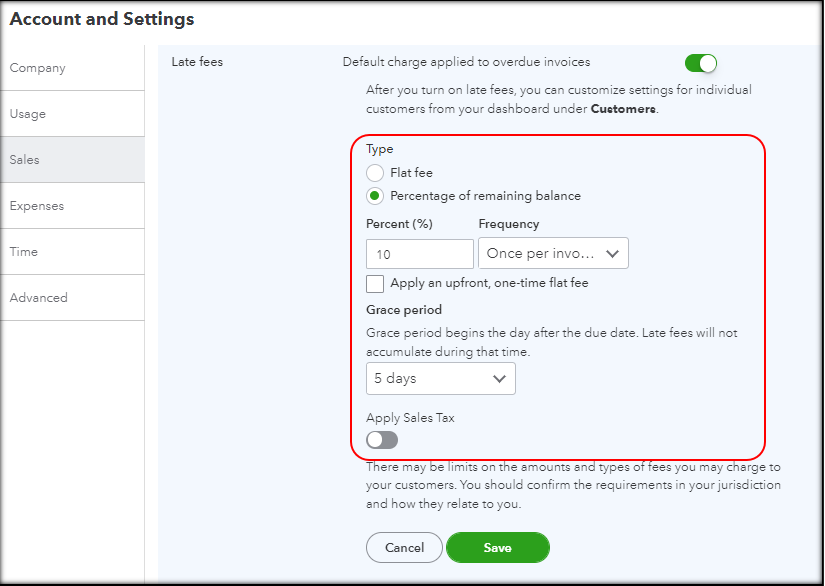
To turn it on:
- Go to Settings (gear icon) and select Account and Settings
- Click Sales, then scroll to Late fees
- Toggle late fees on and configure your rate (percentage or flat fee), the grace period, and whether fees apply to existing or future invoices only
- Save your settings
Once enabled, QuickBooks will calculate and apply the fee automatically when an invoice hits the grace period threshold.
One important note: turning on late fees in QuickBooks is the operational step. You still need to communicate your policy to clients proactively, at contract signing, not when the first fee appears. The fee showing up unexpectedly on an invoice, even if it's technically correct, will create friction that a brief upfront conversation would have prevented.
If you use FlexPoint for payment processing, your QuickBooks late fee settings sync automatically.
When a client logs into the payment portal to pay an overdue invoice, the updated balance (including any late fees that have been applied in QuickBooks) reflects in real time.
There's no manual update required on your end.
How to Add Late Fees in Xero
Xero does not have a native late fee feature.
To add late fees to Xero invoices, you need a third-party tool. Paidnice is the most commonly used integration for this, and it connects directly with Xero to apply late fees based on configurable rules.
With Paidnice, you can set the fee rate, the grace period, and whether fees are applied automatically or queued for review before posting. It also handles late fee notifications to clients, which keeps your communication consistent.
The same rule applies as with QuickBooks: the tool handles the calculation and application, but you are still responsible for making sure clients know the policy existed before it applied.
Surprises on invoices damage trust even when the fee is technically correct.
How to Enforce Late Fees Without Damaging Client Relationships
A late fee policy that exists in a contract but is never enforced is worse than no policy at all.
It signals to clients that your terms are debatable and that non-payment has no real consequence. Consistent enforcement is what gives the policy its teeth and actually makes you look more reliable.
That said, how you enforce matters as much as whether you enforce.
- Set expectations at contract signing, not at invoice time: When onboarding a new client, walk them through your payment terms in plain language, including the late fee policy. A single paragraph in your onboarding summary is enough: "Invoices are due within [X] days. After that, a 1.5% monthly late fee applies to the outstanding balance. We'll always send a reminder before the grace period ends."
- Send a warning before the fee applies: A 3 to 5 day heads-up before the grace period expires gives clients a chance to pay without the fee and reduces disputes dramatically. Most clients who are simply slow will pay immediately when reminded. Save the fee for the ones who don't.
- Notify clients when a fee has been applied: A short, factual email (not a demand letter) explaining that a late fee has been added, the original due date, the fee amount, and the new total. Include a direct payment link. Keep the tone matter-of-fact. The client knew this was coming.
- Be consistent: Waiving fees for some clients and not others creates confusion and perceived unfairness. If you waive a fee, document it internally and treat it as a one-time exception, not a precedent.
- Know when to waive: A long-term client with a spotless payment history who misses once deserves grace. A newer client with a pattern of slow payment does not. Apply the same judgment you'd want applied to you.
For a full walkthrough of the escalation process when invoices go unpaid, including email templates and phone call scripts, see: How to Handle Late Payments From MSP Clients: A 4-Step Escalation Framework
Late Fees Work Better When Follow-Up Is Automatic
The practices above require consistency.
And consistency is usually the first thing that breaks when you're managing late fees manually across dozens of clients.
This is likely something you’ve experienced:
Purpose-built AR automation removes those gaps.
The right platform sends past-due reminders on schedule, applies fees based on your QuickBooks policy, notifies clients automatically when a fee posts, and logs every action for documentation purposes without manual tracking, missed reminders, or unexpected fees.
FlexPoint handles all of that automatically.
Your late fee policy in QuickBooks syncs with the payment portal, so clients always see the accurate current balance when they log in to pay.
Reminders go out on your configured schedule.
And when a fee is applied, the client gets a professional notification with a direct payment link.
And FlexPoint's AR Agents take autonomous action on overdue accounts: following up, escalating, and adjusting communication based on each client's payment history, so the entire collection process runs without requiring someone on your team to manage it manually.
The Bottom Line
Late fees are straightforward when they're set up correctly.
Know your state's legal limit before finalizing your rate, disclose the policy in your service agreement before work begins, not after an invoice goes unpaid, apply fees consistently across your client base, and send a reminder before the grace period ends so clients have a chance to pay without the fee.
Done right, late fees rarely need to be applied at all. Clients who know the policy exists pay on time.
The fee is simply the mechanism that makes the expectation real, not the thing you’re actually wanting to collect.
The final piece is making it easy to pay the moment a client gets a notice.
A late fee notification that requires a client to dig up an invoice, find a payment method, and figure out where to send a check is not going to get paid quickly. But a notification with a direct link to a branded payment portal where the balance is already updated, and payment takes 60 seconds will.
FlexPoint handles both sides: automated follow-up so fees are applied and communicated consistently, and a frictionless payment experience so clients can act immediately when they get the notice.
Book an on-demand demo to see how it works.





.png)



