


%2520(1).jpeg)
A strong MSP Master Service Agreement (MSA) is the single most important document that shapes your margins, your client expectations, and your ability to run a profitable business.
You probably already have an MSA in place, but (as many MSPs do) it’s also likely your MSA is missing critical factors that actually invite client disputes and cash flow drags.
That’s why perfecting your MSA is so critical. Because the gaps show up as both legal client disputes and in your bottom line. They surface as delayed payments, slow approvals, billing pushback, inaccurate revenue reporting, and reduced margins.
This blog breaks down the most common problems with MSP MSAs. We’ll touch on Scope of Work documents (SOWs) and Service-level Agreements (SLAs) as subcategories since they are also critical. We’ll also show you how to resolve these errors before those issues become disputes or churn.
MSA vs SOW vs SLA: What’s the Difference?
There is a crucial difference between MSAs and the SOWs and SLAs.
- MSA = the legal reality of the relationship between an MSP and a client
- SOW (scope of work) = the specific work you deliver
- SLA (service line agreement) = the performance standards you commit to
The MSA establishes the commercial foundation of the engagement. It sets the billing structure, legal protections, responsibilities, liabilities, renewal terms, and the administrative “rules of play.” The SOW documents the actual services being delivered, what you’re supporting, device counts, locations, timelines, project details, and any defined outcomes. The SLA outlines the measurable service expectations: response times, escalation paths, uptime commitments, support windows as well as penalties outlined if not met.
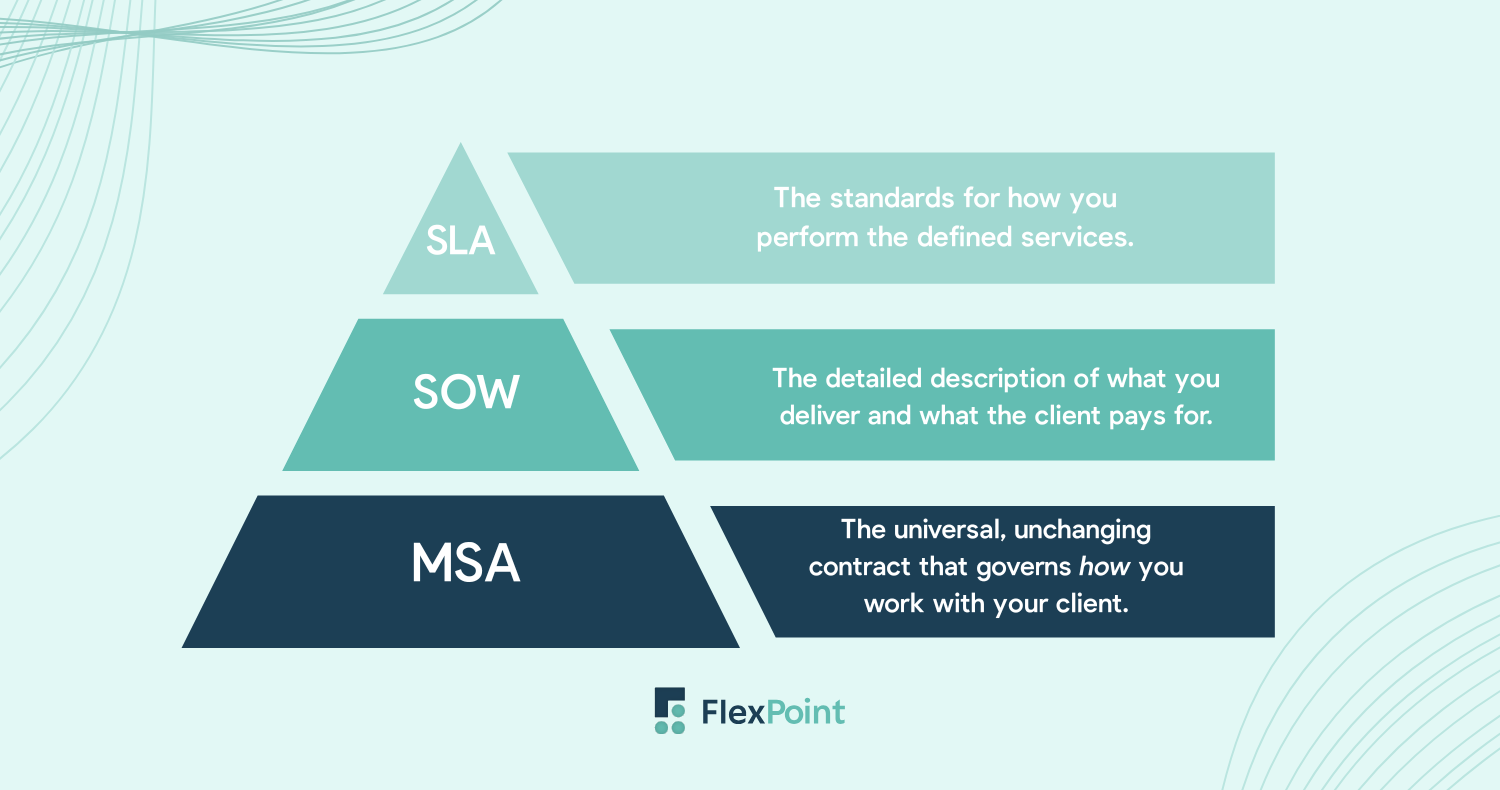
Industry experts consistently warn MSPs to keep these documents separate for a reason: The MSA protects you legally. The SOW protects you operationally. The SLA protects your team’s capacity and expectations.
It’s important to keep this top of mind. Because when you mix them, you hand clients leverage to say: “That wasn’t included.”
Even if it absolutely was, you may have just hid it in the wrong document. We’ll expand on this later on since this confusion is the primary problem with MSP MSAs.
That’s why, contrary to popular belief, billing disputes don’t originate from when billing begins, they begin in the agreement.
A strong MSA gives you predictable revenue because it removes ambiguity which is often the root cause of every billing fight or scope dispute.
The Cost of a Bad MSP Service Agreement
Poor client communication (which includes incomplete MSAs) results in 60% of late payments. That statistic points to a massive red flag. Namely that: bad MSAs create real financial drag. And most MSPs can’t afford that level of cash flow pinching.
Opportunistic clients (it’s okay to accept that they exist) will find the holes. But even your well-meaning clients will experience confusion if you aren’t careful. But it’s not just your clients you have to worry about.
Every vague clause in your documentation introduces friction: clients assume something is included, technicians and sales reps end up making off-the-cuff judgment calls, billing tries to reconcile inconsistent data, and clients push back, causing delays or disputes.
From a bigger picture:
Unclear scope leads to inconsistent billing
Your billing team can only operate using what’s documented. When inclusions and exclusions are vague, they’re forced to rely on interpretation and interpretation leads to inconsistency.
Inconsistent billing causes distrust which turn into disputes and delayed payments.
Scope creep turns into unpaid labor and margin erosion
Scope creep itself is rarely dramatic. It starts with “one small request” and compounds over months. By the time you realize the extent of unpaid labor, the relationship is strained and it’s too late to retroactively bill.
Industry sources report that many MSPs absorb 15–25% of their labor as unrecovered out-of-scope work, which is a significant drain on profitability.
Inaccurate data becomes messy books and unreliable reporting
When MSA/SOW boundaries aren’t clear, tickets get miscoded, labor gets written off, and billable items get lost. That creates:
- Distorted MRR
- Inaccurate forecasting
- Incorrect revenue allocation
- Manual reconciliation work
This is one of the most common issues accounting firms cite when taking over MSP books.
The Most Common Problem with MSP MSAs: It Includes too Much
With that in mind, what is the most common problem with MSP MSAs? And how can you make sure to resolve it?
MSP finance expert Matthew Zaroff from Visionary 360 believes that a strong MSA is modular. It sets the legal foundation, nothing more. Everything else should sit in companion documents.
It’s easy for MSPs to skip this. Cramming detailed scope, service descriptions, support rules, and device counts into the MSA might seem appealing. At the end of it all, you’ll feel like everything was covered in one document and you can leave it at that. Besides, it’s “easier” for your clients to find the master document.
What that doesn’t account for is that suddenly, a document meant to stay stable becomes something you must adjust every time your offering or the client’s environment changes.
A modular structure fixes this: the MSA remains the legal baseline and includes your commercial terms. But your SOWs and SLAs end up being more like living documents that are easy to adjust.
You are also able to create an addenda like “expectations for changing projects” that exists as a separate document.
While one document may seem attractive, it remains a burden for every team and every client.
A modular structure creates flexibility without sacrificing protection. The MSA stays evergreen; the modules and SOW evolve with your services.
And because the MSA isn’t the place to explain what you support, how many devices, which services, what’s covered under each service, and what’s billable as a project, you need the added clarity of individual documentation.
Also in our Common Financial Problems MSPs Face webinar, Dean Trempelas from Empath put it this way: transparency is your friend. The more clearly you document expectations (what you will and won’t do) the easier every future conversation becomes. You never want to pull a fast one on your clients but especially not in your legal documentation. Which also means you don’t want to be too flexible or lenient either.
This will nip disputes in the bud while making you look like a competent service provider with clear boundaries. Essentially, the more intentional you are about these documents the more trust you gain.
Because of this we’ll cover exactly what does and what doesn’t belong in your MSA.
What Belongs in an MSP’s MSA
Your MSA should focus on commercial terms, legal protections, and the predictable mechanics of how you work with the client. These elements rarely change and must stay consistent across all clients.
A strong MSA typically includes:
1. Billing Predictability and Commercial Terms
- How you bill (monthly, quarterly, in advance, milestone-based, etc.).
- When billing adjustments occur (annual price increases, vendor pass-through changes, recalculations tied to environment growth, etc.).
- What triggers extra labor charges (after-hours work, special projects, remediation, escalations, onboarding, client-driven changes).
2. Inclusions and Exclusions at the Category Level
Your MSA should set the service boundaries, not the detailed tasks.
Examples:
- Included categories: managed services, cybersecurity program participation, cloud management, backup oversight, on-site labor thresholds.
- Excluded categories: unsupported workstations, line-of-business apps, hardware failures, third-party vendor issues, compliance remediation, inherited technical debt, etc.
(Hint: you’ll define the specifics in the SOW/SLA.)
3. Responsibilities and Obligations
High-level expectations that apply to every client, such as:
- Your core responsibilities as the MSP.
- Their core responsibilities (security policy adherence, MFA requirements, accurate asset reporting, backup compliance, etc.).
- Liability limitations, indemnification, confidentiality, warranty disclaimers.
4. Relationship Rules
- Term, renewal, and termination language.
- Notice periods.
- Dispute resolution.
- Governing law.
- Intellectual property.
These are universal and stable, exactly what the MSA is designed to hold.
What Does Not Belong in the MSA
Put these in the SOW or SLA so you can update them without reopening the entire contract.
1. A Detailed Scope of Work
Matt Zaroff (Visionary 360) and Dean Trempelas (Empath) hammered this point home during our webinar:
“Make your MSA modular. Keep the legal stuff standard. Then use SOWs and SLAs to add everything beyond the baseline.”
Anything that describes the actual delivery of your services like how many devices you manage, what tools you use, how often you perform tasks, or the specific steps your team takes should never live inside the MSA. These details shift constantly as a client adds users, changes locations, adopts new technology, or starts new projects. Because they’re so dynamic, they belong in your SOW or SLA, where you can revise them without reopening the entire contract. This includes items such as:
- Device counts
- Locations
- Users
- Environments
- Remediation specifics
- Onboarding steps
- Patch schedules
- Backup configurations
- Cloud tenants
- Project descriptions
- Documentation requirements
These change constantly. If you put them in the MSA, you handcuff your ability to evolve your services, which ultimately keeps you from secure scaling.
2. Service Levels and Performance Metrics
SLAs are what should contain:
- Response times, support hours, and communication channels
- Resolution targets, escalation paths, and severity definitions
These are operational expectations, not legal guard rails or overarching rules in your client relationship.
3. Pricing Tables and Service Bundles
Your MSA defines how billing works. Your SOW defines what the client pays for. Put the actual numbers, bundles, SKUs, licensing tiers, and options in the SOW. That’s the document you update as their environment grows.
4. Asset Inventories and Environment Baselines
This is one of the biggest financial landmines in MSP agreements.
The baseline inventory (devices, servers, sites, users, SaaS apps, licensing counts, network infrastructure) must live in the SOW or onboarding documentation. That’s how you:
- Track environment drift
- Guard against “we still have 50 users” (when they definitely have 70+) arguments
- Trigger billing calculations
- Prove when scope expanded
Major takeaway: If it’s measurable, countable, or prone to change, keep it out of the MSA.
When Should You Update Your MSA?
If you’ve put the right information in the right place, your MSA shouldn’t need frequent updates, but your SOWs and SLAs will evolve regularly. Any time you introduce new services, change tools in your tech stack, adjust to vendor pricing shifts, or see a client grow or reorganize, your agreements need to reflect that reality. The same goes for changes in compliance standards, cyber insurance requirements, or a shift in your delivery model (for example, moving from break/fix to managed services). Whenever your operational reality changes, your contracts should change with it.
Strong MSAs Create Stronger MSPs
A clean, modular MSA overall is a strategic advantage. When your commercial terms, service boundaries, and responsibilities are clearly defined (and kept separate from your operational documents), you eliminate the ambiguity that fuels client disputes, billing friction, and margin erosion. MSPs that get this right see better operations and, as a result, better cash flow.
But even the best-crafted MSA can’t protect your margins if your billing processes don’t actually enforce what the agreement says. FlexPoint helps MSPs operationalize the terms in their MSAs, SOWs, and SLAs by ensuring every invoice is accurate, consistent, and aligned with what was delivered every single month. When the contract is clear and your billing reflects it, client disputes drop dramatically.
If you’re ready to face the other financial challenges that go with running an MSP, it may be time to watch the Common Financial Challenges for MSPs and How to Avoid Them with MSP experts Matt Zaroff and Dean Trempelas. They cover all the hard-to-manage places of MSP financial ops.





.png)



