
MSP Accounting
How to Streamline and Modernize Your MSP Accounting Workflow


.png)
According to statistics from Invoicera, businesses lose an average of 21 hours every week to manual invoicing, and DocuClipper reports that 68% still key invoices into accounting systems by hand.
For many Managed Service Providers (MSPs), this time drain comes from outdated accounting workflows built on spreadsheets, manual entry, and disconnected tools. These legacy processes increase billing errors, slow invoice delivery, and delay payments.
As billing cycles stretch, cash flow tightens, and client confidence erodes. What starts as a bookkeeping issue quickly becomes a growth constraint for MSPs that rely on recurring revenue and predictable monthly collections.
Modernizing your MSP’s accounting workflow is essential for efficiency and scalability. By leveraging automation, system integration, and improved processes, you can eliminate tedious data entry, reduce billing errors, and get invoices paid faster.
In this article, we explain how to upgrade an MSP’s accounting workflow using practical steps that reduce manual work and create a scalable, growth-ready finance operation.
You’ll learn what a modern MSP billing process looks like, why traditional approaches break down, and how tools like FlexPoint help streamline invoicing, payments, collections, and reconciliation from end to end.
{{toc}}
What Is an MSP Accounting Workflow?
An MSP accounting workflow covers the end-to-end process of billing and financial management in a managed services business.
It starts with capturing billable services from your PSA (Professional Services Automation) tool and ends with accurate financial reporting in your accounting system.
The key components include:
Billing Intake from the PSA:
Your PSA (e.g., ConnectWise PSA, Autotask, HaloPSA, SuperOps) tracks contracts, tickets, and billable time.
At billing time, this data must flow into your invoicing system so that every service provided is billed.
For MSPs, this intake often includes recurring monthly services, one-time projects, usage-based fees, seat/license changes, and pass-through costs from software vendors.
Invoice Creation and Recurring Billing:
Invoices are generated for each client on a set billing cycle (e.g., monthly).
This includes:
- Recurring service fees
- Any hourly charges
- Product sales
- Reimbursable expenses
Accuracy and timeliness are critical. Invoices should reflect all provided services and go out on schedule to maintain cash flow.
Many MSPs also handle mid-cycle adjustments (adding or removing users, pro-rated charges), which must be captured on the next invoice.
Payment Processing (ACH, Credit Card, AutoPay):
Once invoices go out, clients need convenient ways to pay.
An MSP accounting workflow supports multiple payment methods, including ACH bank transfers, credit cards, and paper checks, and may include AutoPay for recurring charges.
Smooth payment processing is vital for a good client experience.
Collections and Follow-Up:
When invoices become due (or overdue), the workflow should trigger collection activities.
This involves:
- Sending payment reminders
- Following up on past-due invoices
- Communicating with clients about any billing issues
Proactive collections (such as automated reminder emails and gentle “payment due” nudges) help minimize aged receivables.
Reconciliation and Accounting Sync:
As payments come in, they need to be recorded and matched.
An MSP’s workflow should reconcile payments, invoices, and bank deposits in real time, ensuring that your accounting ledger reflects every paid invoice.
This often requires syncing data between the billing system, payment processor, PSA, and accounting software.
Two-way integration is ideal.
For instance, when an invoice is paid via your billing system, it should automatically be marked as paid in both your PSA and accounting software.
Clean reconciliation means no payment goes unaccounted for, and financial records stay accurate.
Reporting and A/R Oversight:
Finally, the workflow produces financial reports and forecasts.
MSP owners and finance teams need visibility into metrics such as monthly recurring revenue, accounts receivable aging, collection rate, and cash flow.
In a modern workflow, data from across systems is consolidated so you can easily see which invoices are open, which clients pay late, and the overall financial performance.
This reporting informs business decisions and ensures you can track revenue accurately and predictably.
Accuracy, speed, and synchronization across systems are the hallmarks of a healthy MSP accounting workflow.
Unlike a traditional business, MSP billing is dynamic: recurring contracts, usage-based charges, and frequent service changes mean the process is never one-and-done.
All systems (PSA, billing, payments, accounting) must remain in sync to avoid errors.
For example, if a client adds two users mid-month, a modern accounting workflow will automatically update the next invoice; a manual workflow might forget those charges or bill them incorrectly.
This complexity is why automation is essential for scaling an MSP’s finances.
With the right process, every step, from invoice generation to deposit reconciliation, happens quickly and accurately, even as the business grows.
Why Traditional MSP Accounting Workflows Break Down
Relying on spreadsheets, manual data entry, and generic software might work for a very small MSP, but traditional workflows break down as you grow.
Common pain points include system limitations and process inefficiencies that make it impossible to keep up with billing complexity:
Generic Accounting Tools:
Standard accounting software (or basic invoicing tools such as PayPal) can record simple transactions. However, this software struggles with MSP-specific needs such as recurring revenue, usage-based billing, and contract changes.
For example, a generic system might not handle mid-month service additions or automatic proration, forcing your team to calculate them manually.
Legacy billing systems often can’t accommodate custom pricing, discounts, or client-specific terms without manual intervention.
This leads to errors like misapplied rates or missed charges.
PSA Integration Gaps:
Most MSPs use a PSA software for service delivery operations and QuickBooks for accounting, but the integration between them is often limited or one-directional.
If your team has to export invoices from the PSA and re-enter them into QuickBooks or vice versa, data does not flow seamlessly, and the workflow breaks down.
This double-entry is time-consuming. However, it also introduces discrepancies (e.g., an invoice amount in ConnectWise might not match what’s in QuickBooks due to a manual edit).
In addition, if payments are recorded in QuickBooks, they may not reflect back in the PSA, leaving client account balances out of sync.
These integration gaps create a constant need for manual reconciliation and fixing of mismatched records.
Manual-Heavy Processes:
A traditional MSP billing cycle relies heavily on people to push it along. Staff might spend days each month compiling time entries, updating Excel invoice templates, and cross-checking numbers.
This manual workload is not only slow but prone to mistakes. Data entry errors, missed line items, or forgotten invoices are common when humans handle every step.
Studies have found that nearly 39% of invoices contain errors in manual processes. And those errors have consequences: over 60% of late payments result from incorrect invoices.
The manual approach also costs valuable time.
As your MSP scales, this level of manual effort simply doesn’t keep pace.
Growing Billing Complexity:
Early on, an MSP might manage billing for a handful of clients with straightforward monthly fees. However, a growing MSP deals with hundreds of invoices, a diverse range of services, and intricate contracts.
Each client may have a custom package that includes managed services, fluctuating cloud usage, projects, and pass-through vendor charges (such as Office 365 licenses). Manual workflows start to buckle under this complexity.
Important details slip through the cracks. This might include an unbilled usage overage or a contract change that isn’t updated across systems.
The margin for error widens as client count and billing lines increase. What used to take a few hours can turn into a week-long scramble at month-end.
This growth exposes the cracks in an outdated process, often resulting in delayed invoicing, back-and-forth corrections with clients, and slower revenue recognition.
Fragmented Financial Data:
In traditional setups, information is siloed. You might have invoice PDFs in one folder, payment info in a payment gateway, and dispute notes in an email thread.
With data spread across disparate tools that don’t talk to each other, it’s hard to get a clear picture of your financial status. Your team ends up “stitching together” data manually, which is inefficient and error-prone.
For example, an accountant might toggle between the PSA, QuickBooks, and bank statements every Friday to reconcile payments. A client might call saying they paid an invoice, and your team scrambles across systems to confirm and update records.
This is not a sustainable or scalable way to operate.
Fragmentation slows everything down, from spotting overdue invoices to closing the books each month, and it increases the risk of missing something.
Even a highly skilled finance team will struggle if its tools aren’t built for MSP workflows. Manual processes and one-way integrations create an uphill battle, with errors, delays, and frustration almost guaranteed.
To support a growing MSP business, the accounting workflow needs an overhaul, replacing the broken pieces with automated, connected solutions designed for recurring-revenue operations.
Steps to Modernize and Streamline Your MSP Accounting Workflow
Modernizing your accounting workflow may sound daunting, but it can be achieved with a series of practical improvements.
Here are key steps MSPs can take to upgrade their billing processes, reduce friction, and improve accuracy:
1. Automate Invoice Generation Across All Billing Models
Replace manual invoice prep with automated billing.
Instead of building invoices by hand (and risking omissions), let your systems do the heavy lifting. Modern PSA and billing software can automatically generate invoices based on your contracts and service records.
This means recurring monthly fees, hourly work logs, usage-based charges, and pass-through expenses are all pulled in and calculated for you.
For example, if a client used extra cloud resources this month, an automated system will add those line items to the invoice without human intervention.
Automation ensures invoices are produced accurately and on schedule, often instantly at the cycle date. This speeds up your billing cycle and reduces errors from copy-paste or spreadsheet formulas.
Fewer manual steps also mean fewer mistakes; an automated process won’t forget to bill a service or apply the wrong rate.
2. Align PSA, Billing, and Accounting Systems with Deep Two-Way Sync
Integrate your PSA, billing platform, and accounting software so data flows seamlessly between them. In a modern MSP workflow, these systems should function as a single unified tool.
When you update something in the PSA (such as adding a new service for a client), it should automatically be reflected in your billing system and, ultimately, in your accounting records.
Deep two-way syncing prevents the scenario of having one amount in your PSA and a different amount in QuickBooks for the same invoice. It eliminates double entry and the tedious reconciliations that follow.
With a two-way integration, invoices, payments, and client info stay consistent across all platforms.
For example, an MSP-specific billing solution can sync data between ConnectWise or Autotask and QuickBooks in both directions.
The PSA sends all billable items to the invoicing system, and when a payment is received, the payment information is sent back to update the PSA and accounting ledgers.
This deep sync yields clean, reliable financial records; you won’t have invoices marked as paid in one system but unpaid in another. It also reduces errors from manual data transfers.
Aligning your systems through robust integration gives you a single source of truth for billing and financial data.
The result is less time spent fixing discrepancies and more confidence that your numbers are correct.
3. Implement Automated Collections Workflows
Automate your accounts receivable collections process to speed up cash flow and reduce delinquent payments.
Instead of manually tracking who has paid and who hasn’t (and sending individual emails), set up an automated collections system. This typically includes scheduled payment reminders, past-due notices, and even thank-you messages upon payment.
For example, you can configure a workflow in which clients receive a polite reminder a few days before an invoice is due, another on the due date, and a follow-up a week late.
These reminders go out automatically, with no one on your team having to remember or intervene.
Automation also extends to AutoPay enrollment and retrying failed payments.
By offering clients the option to sign up for AutoPay, many MSPs significantly reduce late payments.
The impact on cash flow can be dramatic. For example, Excellent Networks, a Texas-based MSP, reduced its average collection time from 25 days to just 5 days by implementing automated payments.
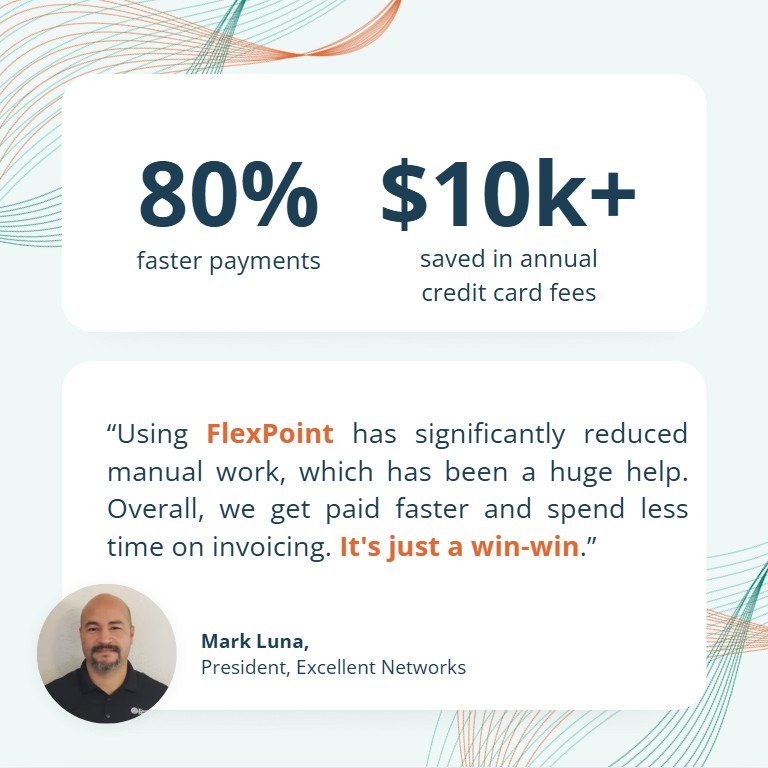
Faster collections mean improved cash flow, and your team can focus on other tasks instead of acting as debt collectors.
4. Adopt Real-Time Reconciliation Tools
Use real-time reconciliation to automatically match payments, invoices, and bank deposits.
In a traditional workflow, reconciling payments (ensuring what clients paid matches your records and bank account) can be a slow, manual process, often done at month-end.
Modernizing this step involves tools that instantly tie everything together.
As soon as a client’s payment is received (through ACH, credit card, etc.), the system should post that payment to the correct invoice, mark it as paid, and log the deposit in your accounting books.
With the right solution, this happens in real time.
The benefits are immense: you eliminate manual matching errors and always know exactly which invoices are paid and which are outstanding.
Month-end close becomes much faster because there isn’t a pile of unreconciled payments to sort out: the work was done daily.
In fact, companies that leverage real-time reconciliation often find that a process that used to take hours each week now requires little oversight.
There’s a 36% chance your finance team is wasting 9 hours a month on manual reconciliation, which is essentially an extra day of work lost.
Real-time reconciliation tools flag any discrepancies immediately, so you can address issues (such as a payment that doesn’t match an invoice amount) on the fly, rather than weeks later.
5. Introduce a Branded Client Billing Portal
Provide a self-service, branded billing portal for your clients. This is a modern must-have that streamlines the client payment experience and reduces friction for you.
Instead of emailing PDF invoices and waiting for clients to act, a portal lets clients log in at their convenience to view invoices, payment history, and upcoming bills.
They can pay invoices directly through the portal via their preferred method (ACH or credit card), save payment methods on file, and even set up automatic recurring payments.
All of this happens in a secure, white-labeled environment that carries your MSP’s branding, giving it a professional touch.
From the MSP’s perspective, a branded portal significantly reduces billing-related back-and-forth. Clients can answer their own questions by checking the portal (no more “Can you resend invoice #123?” emails).
They can update their credit card or ACH info on their own, which means you don’t have to handle sensitive data or spend time on those requests.
A portal also improves on-time payments.
When paying is as simple as clicking a secure link and entering the portal, clients tend to pay faster.
In fact, making payments easier can lead to a 30% increase in ACH usage and more on-time payments as clients opt for the path of least resistance.
6. Standardize Billing Cycles and Processes
Establish standardized billing cycles and procedures to bring consistency to your financial operations. Modernizing means introducing a disciplined, repeatable schedule.
For example, decide that all monthly invoices will be generated on the 1st of the month (or the last day of the month) and sent by a specific day. Align your team and tools to this cycle so it happens routinely.
Standardization also applies to the process: use checklists or workflows for each billing cycle that cover steps such as contract updates, invoice review, invoice sending, and initiating collections.
When everyone follows the same playbook each month, nothing gets overlooked.
Consistent processes prevent the chaos of closing out billing at the last minute. They also make it easier to scale your operation, because new staff can be onboarded into a well-defined system rather than inheriting a mess of exceptions.
Structured billing cycles and automation go hand-in-hand: by automating the routine parts (as discussed above) and scheduling them, you smooth out what used to be an unpredictable crunch time.
The outcome of standardizing is a more predictable cash flow. If invoices go out on time and the collections workflow kicks in consistently, you’ll notice that payments come in more regularly as well.
Your clients appreciate it too; they know exactly when to expect invoices and can budget accordingly, which builds trust.
Internally, standardizing processes reduces stress on your team.
Rather than reinventing the wheel each billing period, you’re following a proven routine.
How FlexPoint Modernizes and Automates MSP Accounting Workflows
FlexPoint is an MSP-specific billing and payments platform that serves as the modernization engine for your accounting workflow.
The platform doesn’t replace your PSA or QuickBooks.
Instead, FlexPoint connects and automates workflows between them, bringing all the features and integrations MSPs need in a single solution.
Here’s how FlexPoint helps upgrade your MSP accounting process:
Automated Billing Engine:
FlexPoint automatically generates accurate invoices for all billing models – whether it’s recurring managed services, hourly project work, one-time fees, or usage-based charges.
You can define contracts and rules (e.g., pro-rated billing for mid-cycle additions), and the system automatically generates invoices. This ensures that no billable work is missed and that invoices are sent each cycle promptly.
Two-Way PSA + QuickBooks Sync:
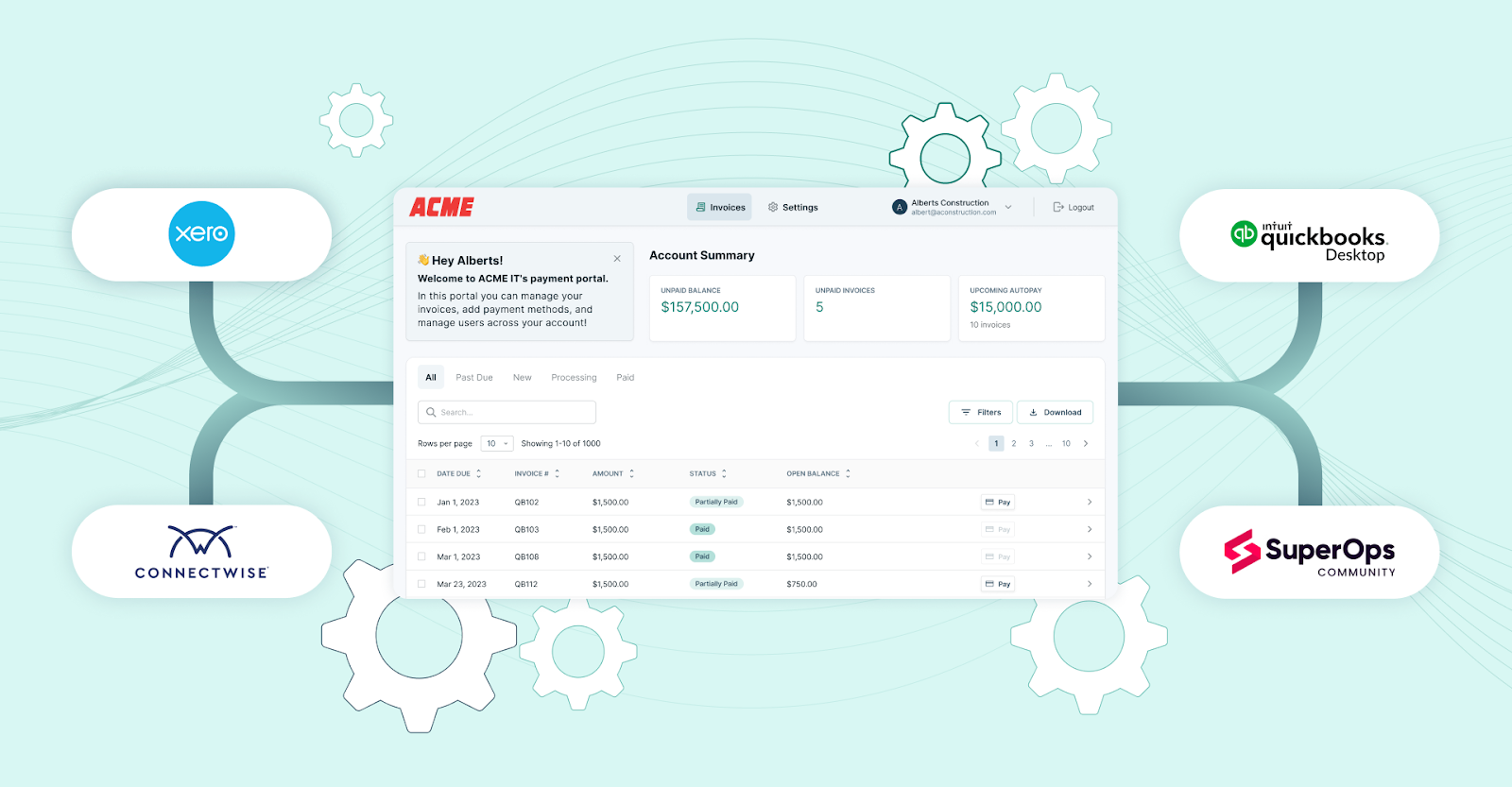
FlexPoint provides deep two-way integration with popular PSA tools (including ConnectWise, HaloPSA, SuperOps, and Autotask) and accounting software (QuickBooks Online, QuickBooks Desktop, and Xero).
Changes in the PSA (new tickets, contract updates) and payments recorded in QuickBooks all stay in sync through FlexPoint.
This dual sync means your billing data is consistent across systems, eliminating duplicate data entry and reconciliation headaches.
Automated Collections:
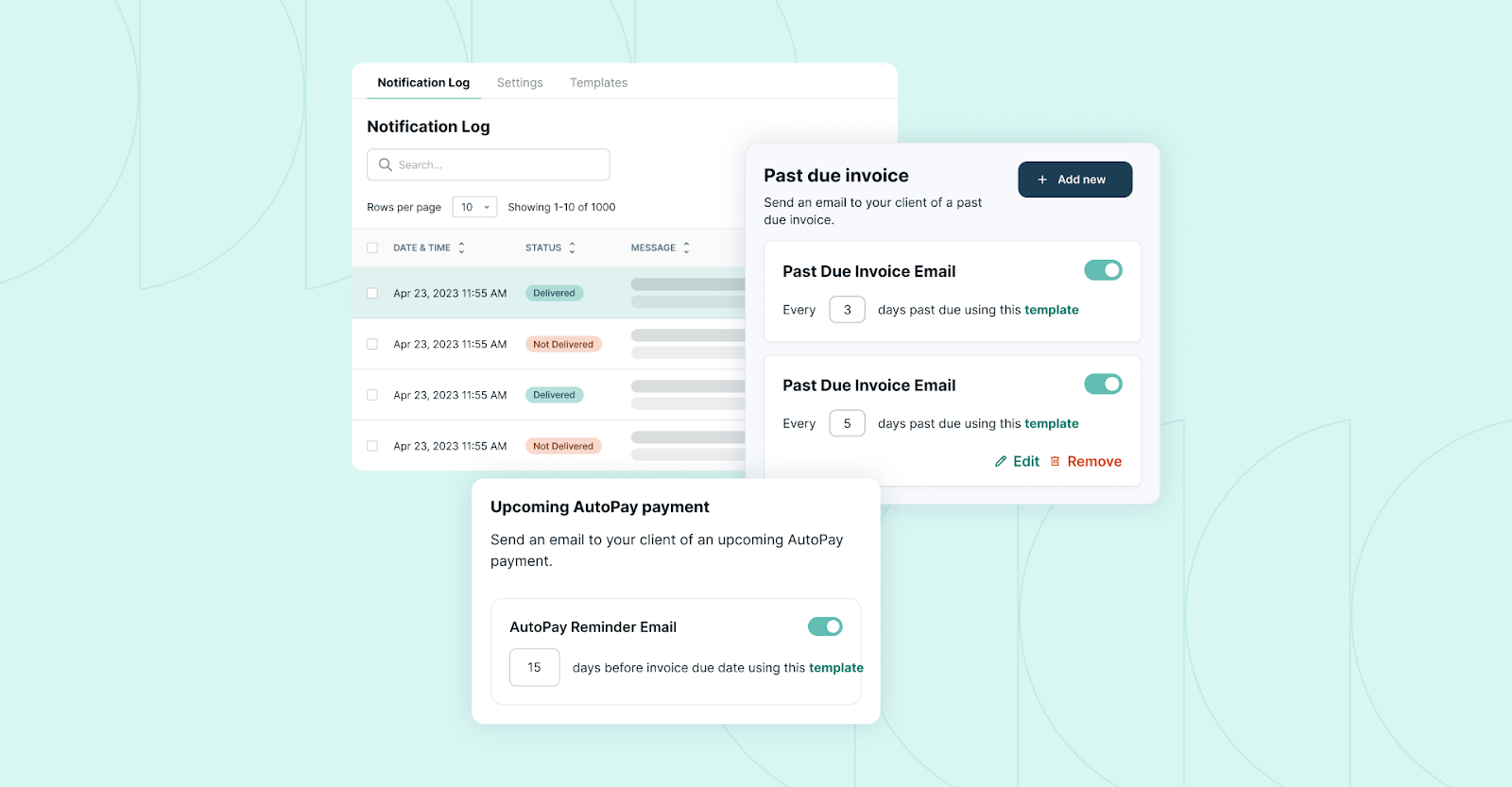
With FlexPoint, you get built-in accounts receivable automation.
The platform schedules and sends payment reminders, past-due notices, and follow-up emails to clients, including email tracking to confirm whether clients viewed the invoice. FlexPoint also enables AutoPay enrollment, allowing clients to be charged automatically each period automatically.
These features can significantly reduce late payments and the need for manual chasing.
Branded Client Portal:
FlexPoint offers a fully branded client payment portal where your clients can log in to view invoices, pay online, and manage their payment methods. The portal is white-labeled with your MSP’s branding for a seamless client experience.
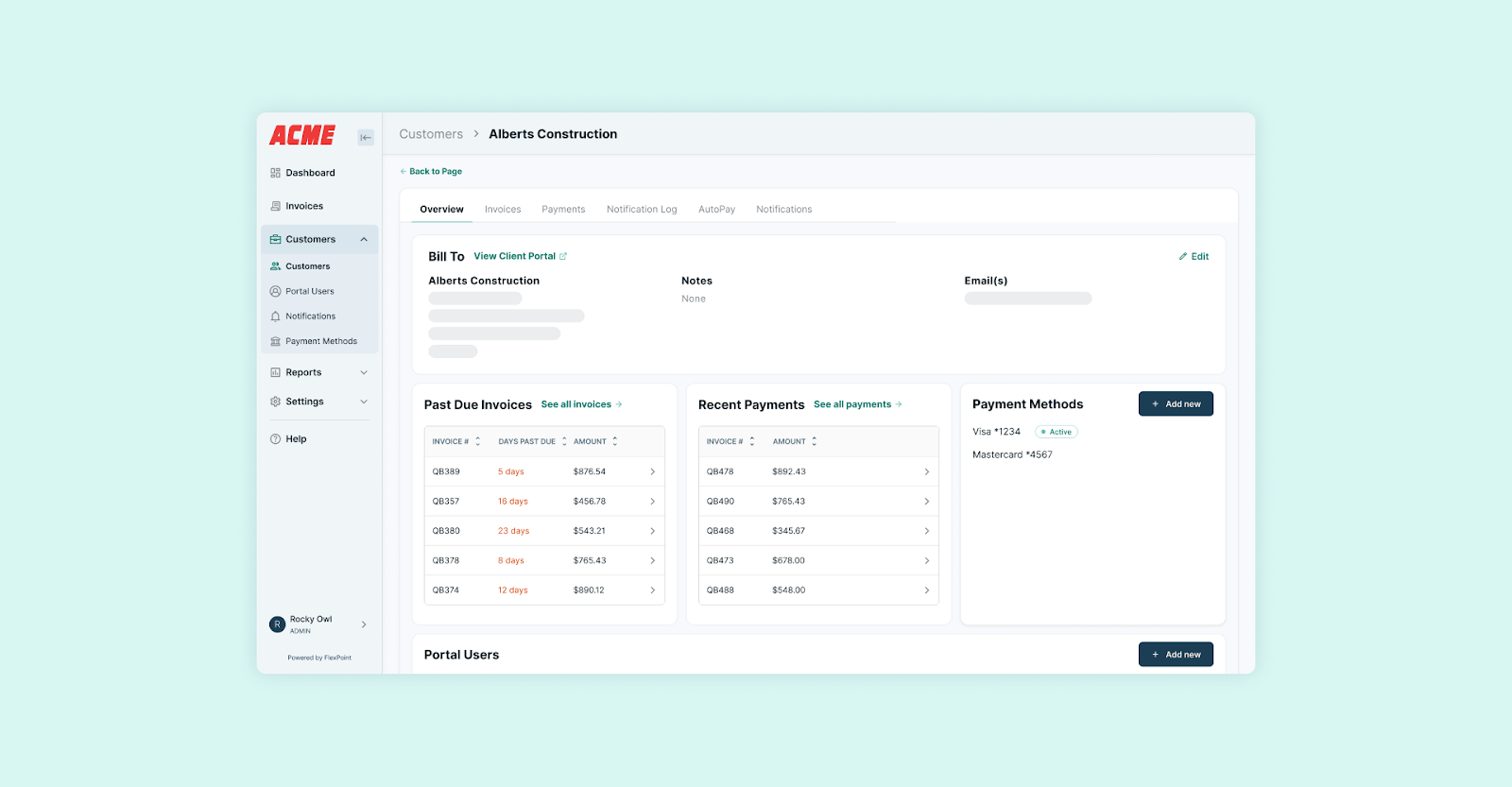
Clients can self-serve their billing 24/7:
- Review invoice details
- Store a credit card or bank account for future payments
- Set up AutoPay with a click
This portal not only makes it easier for clients to pay (leading to faster payments) but also reduces support tickets by keeping all their billing info at their fingertips.
Instant Deposit Reconciliation:
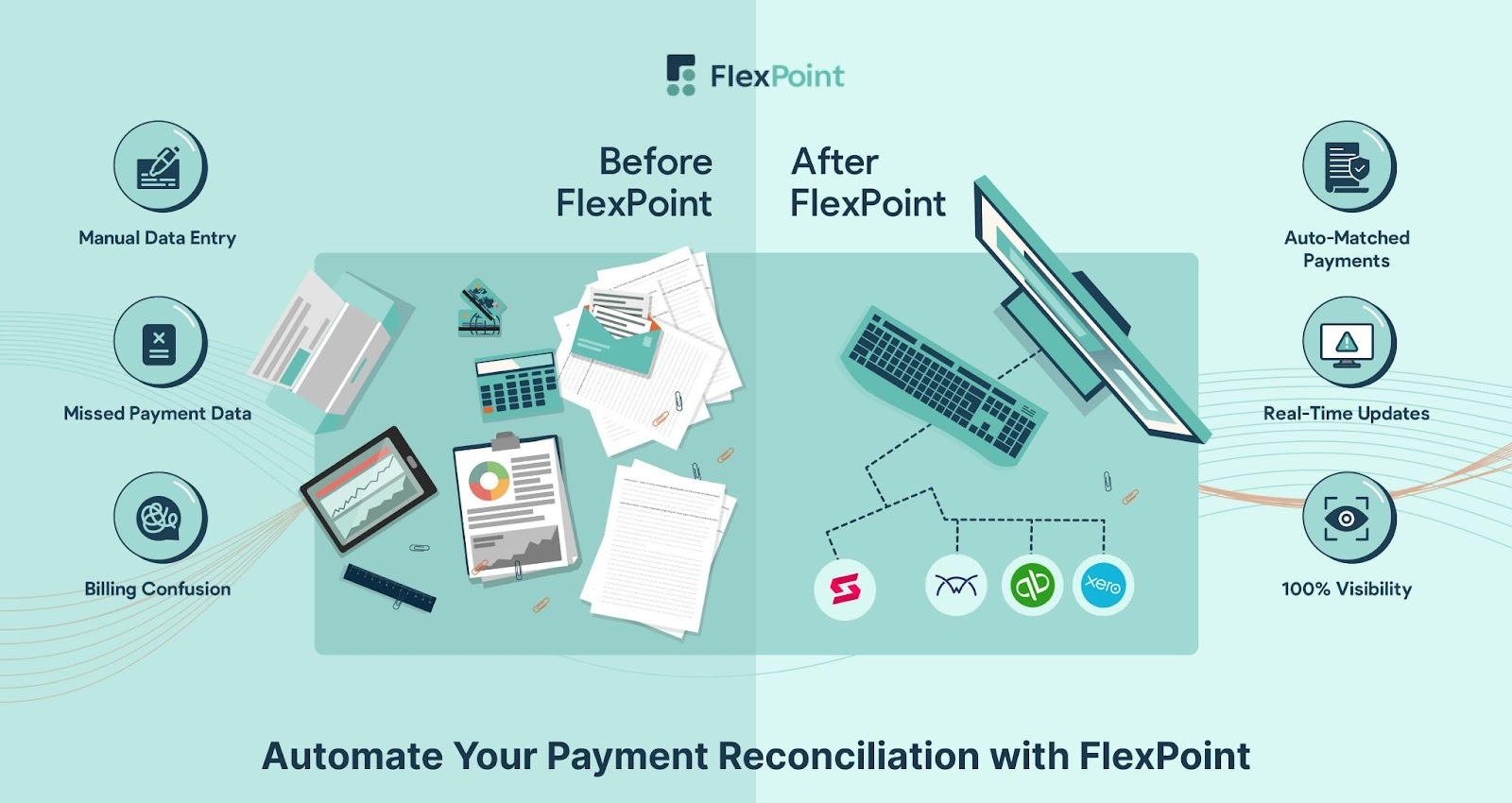
FlexPoint automates the reconciliation of payments and deposits.
When a client makes a payment through the system, FlexPoint instantly records it, marks the invoice as paid, and reconciles the deposit (including any fees) in your accounting system.
There’s no need to manually match transactions or hunt down mismatches at month-end; everything is matched in real time.
This feature virtually eliminates manual reconciliation work and ensures your books are always up to date.
Flat-Rate ACH + CC Surcharge Support:
Payment processing fees can eat into MSP margins, and FlexPoint helps mitigate that.
FlexPoint offers flat-rate ACH fees as low as $0.25 per transaction, which is substantially cheaper than the percentage-based fees many processors charge.
FlexPoint also supports credit card surcharging (where allowed by law), enabling you to pass credit card fees on to clients who choose that payment method.
These capabilities mean you can accept payments cost-effectively, recover fees, and protect your profit on each transaction.
Real-Time Financial Visibility:
FlexPoint provides a real-time dashboard and reports tailored for MSP finances.
You can instantly see key metrics such as:
- Total receivables
- Which invoices are overdue
- Which clients are set on AutoPay
- Daily cash receipts
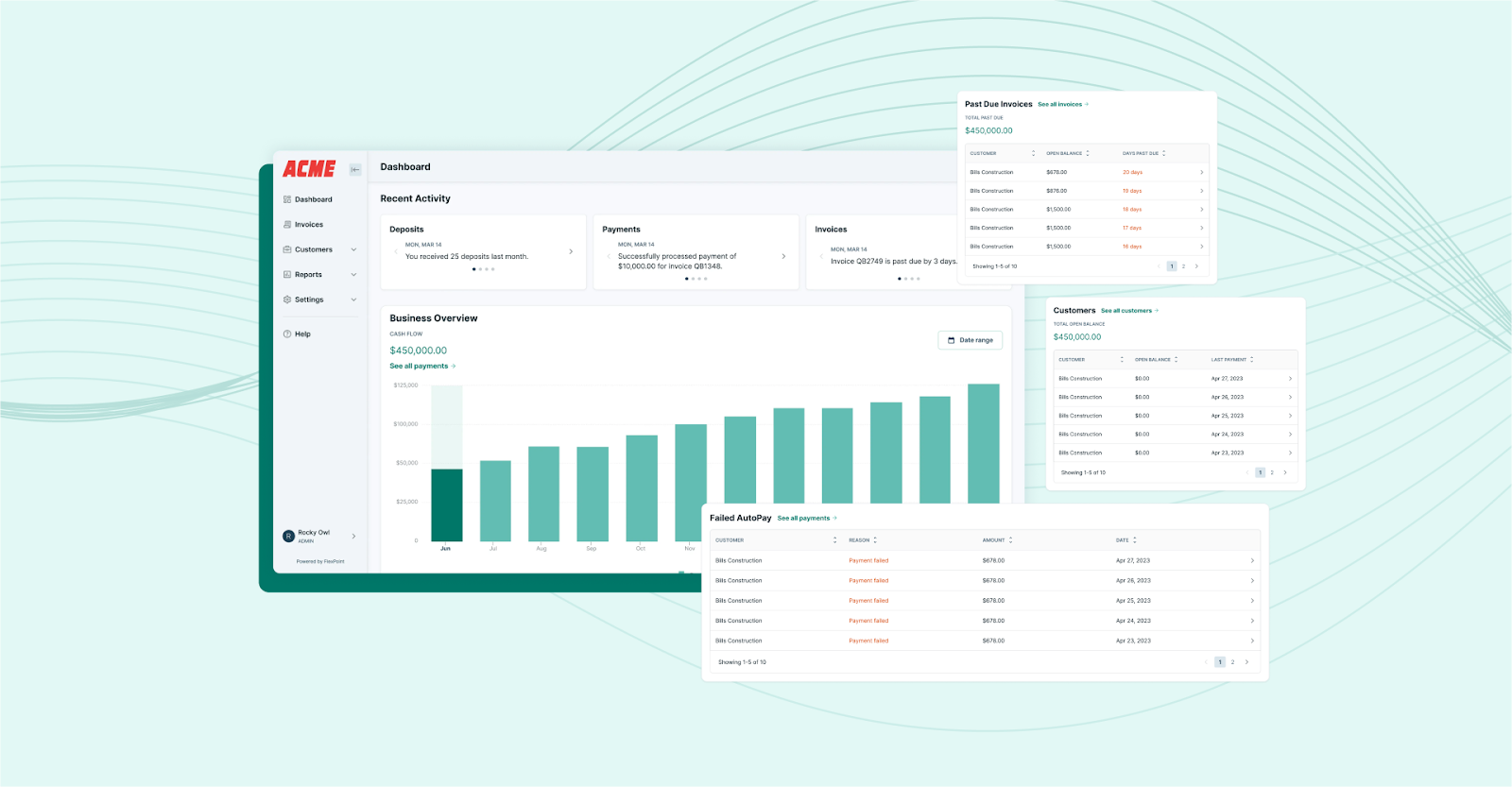
The platform integrates all billing and payment data, giving you complete visibility into cash flow and A/R aging without compiling spreadsheets.
This up-to-the-minute insight helps with forecasting and decision-making. You’ll know if a client’s payment is late or if this month’s revenue is trending above average, without waiting for an end-of-month report.
By automating invoicing, syncing data, streamlining collections, and providing client-friendly payment tools, FlexPoint replaces the manual, error-prone parts of your workflow with efficient, connected processes.
FlexPoint is the all-in-one platform that ties your PSA, billing, and accounting together, allowing your team to focus on service delivery. At the same time, FlexPoint handles the heavy lifting of billing and payments.
Conclusion: Build a Modern Accounting Workflow That Scales With Your MSP
Modernizing your MSP’s accounting workflow is necessary for accuracy, efficiency, and growth. By upgrading from manual, fragmented processes to integrated, automated systems, you can ensure invoices are correct, go out on time, and get paid promptly.
The payoff is a more predictable cash flow, less time spent on billing fires, and happier clients who enjoy a smooth billing experience.
With the right approach (and the right tools), even the most complex recurring revenue billing can operate efficiently.
Automation handles the repetitive tasks and data syncs that humans find tedious and error-prone. Your team is free to analyze finances and serve clients, rather than spend time on paperwork.
FlexPoint is a central part of this modernization for many MSPs: it brings together invoicing, payments, collections, and reconciliation on a single cohesive platform.
By leveraging FlexPoint, you can transform your quote-to-cash process into a tightly coordinated machine that grows alongside your business.
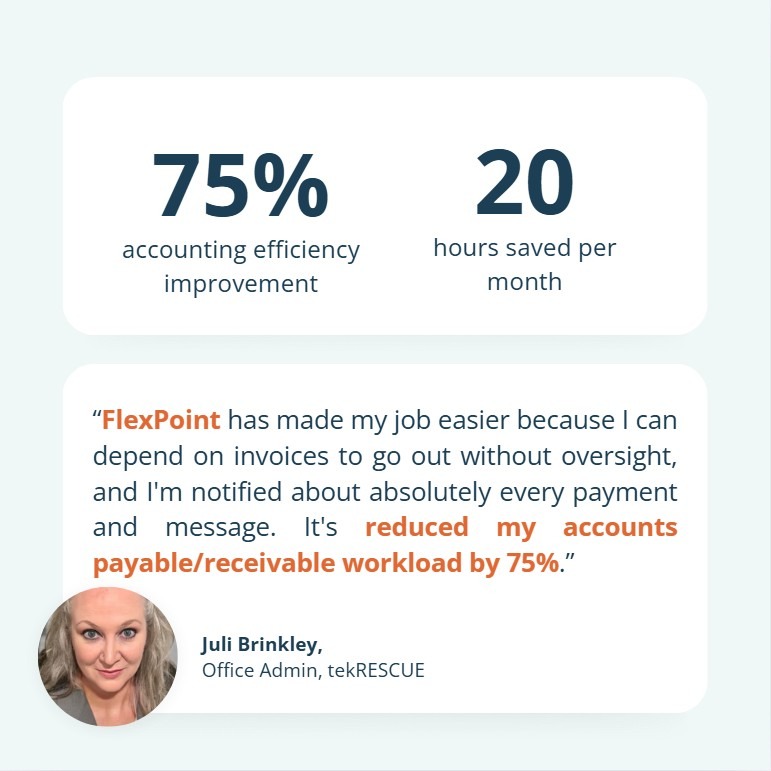
One example is tekRESCUE, which adopted FlexPoint to replace outdated manual billing and payment management processes.
FlexPoint helped TekRESCUE’s Office Administrator save 20 hours per month and improve accounting efficiency by 75%, which made it easier to keep up with billing as the company grew.
Ready to modernize your accounting workflow?
See how FlexPoint automates invoicing, payments, collections, and reconciliation for MSPs.
Schedule a demo to see how FlexPoint upgrades your workflow from start to finish.
Additional FAQs: Modernizing MSP Accounting Workflows
{{faq-section}}

Modernization is achieved through automation, integration, and standardization of billing practices.
This means MSPs must use tools to automate invoice generation (so bills go out accurately each month without manual prep) and adopt an accounts receivable platform that syncs the PSA with accounting software.
Streamlining the process also involves setting up automated payment reminders and online payment options for clients.
Several tools can help MSPs improve their accounting workflow.
Many MSPs start by using native integrations or third-party connectors to link systems (for example, ConnectWise to QuickBooks integrations).
However, the most significant benefit comes from specialized MSP billing software that combines invoicing, payments, and collections into a single solution.
These platforms (like FlexPoint) are designed for recurring IT services and handle complexities like contract changes and usage billing.
FlexPoint streamlines MSP accounting workflows by acting as a central hub for billing and payments.
The platform automates key tasks:
- Generating invoices from your PSA data
- Sending automated payment reminders to clients
- Reconciling payments upon receipt
FlexPoint integrates directly with both your PSA and your accounting software, so information flows in both directions.
The platform also provides a branded client portal for online payments and supports AutoPay, which reduces late payments.


