
MSP Accounting
Top Features to Look for in MSP Accounting Tools


.png)
According to Statista, 64% of small businesses use accounting software for basic bookkeeping. However, MSPs face a far more demanding financial structure than most of those tools were designed to support.
MSPs bill recurring services, adjust seat counts monthly, track usage-based fees, pass through software vendor costs, and manage project revenue across contracts that rarely stay static.
Generic accounting platforms can log transactions, but they lack the logic needed to accurately manage these changes. The result is manual billing work, higher error rates, and revenue leakage that often goes unnoticed until it appears in cash flow reports.
MSPs also rely on Professional Services Automation (PSA) systems to manage tickets and contracts, yet many accounting applications do not integrate deeply with PSA data.
This disconnect leads to duplicate data entry, reconciliation issues, and inconsistent financial records.
Traditional invoicing and collections processes also struggle to keep pace with the volume of micro-transactions MSPs handle, such as license renewals or cloud usage charges billed across dozens of clients each month.
In this article, we’ll discuss the features MSPs should prioritize when evaluating accounting tools and explain why generic software often falls short.
We will also outline the capabilities that support billing accuracy, automation, and tighter PSA-to-accounting workflows, and show how MSP-focused platforms such as FlexPoint help finance teams maintain visibility and control as they scale.
{{toc}}
Why MSPs Need Specialized Accounting Tool Features
MSPs can’t rely on generic accounting features alone because their financial operations are more complex.
5 key reasons MSPs need specialized tools include:
1. Complex Contract Billing:
MSP client agreements often change month-to-month. Seat counts may increase or decrease, new services may be added, and usage-based fees may vary.
Generic invoicing software isn’t built to automatically handle these frequent changes, leading to manual invoice edits that risk mistakes.
Without proper systems, MSPs encounter billing errors and client payment disputes over charges.
Manual invoicing might work with a handful of clients, but it quickly becomes unsustainable as you grow, since miscalculations or missing line items can delay payments.
2. Recurring Revenue Needs:
Most accounting software can send recurring invoices on a fixed schedule, but MSPs need more than static billing.
For example, a client’s monthly bill might depend on actual usage (e.g., cloud storage consumed) or include one-off project fees alongside recurring services. Generic tools lack the logic to dynamically adjust recurring invoices.
MSP-specific platforms support multiple billing models (managed services contracts, one-time projects, usage-based fees), so no revenue slips through the cracks.
3. PSA-Driven Workflows:
MSPs run on PSA software (such as ConnectWise PSA, HaloPSA, SuperOps, Autotask), which houses all service tickets, time entries, and contract terms.
If the accounting tool doesn’t sync deeply with the PSA, finance teams end up re-entering data or importing/exporting invoices. This duplication causes errors and wasted time.
A specialized MSP accounting solution offers bi-directional sync with PSA so that invoices, ticket details, and client information flow automatically between systems, ensuring accuracy.
4. Payment and A/R Complexity:
MSPs often face slow collections and high Days Sales Outstanding (DSO) if they rely on manual processes. Generic tools provide invoicing, but usually minimal help with collections.
No built-in payment automation means finance staff have to chase overdue invoices via email and manually reconcile payments each month. This slows down cash flow.
According to PYMNTS research, manual payment processes require 67% more follow-up time and lead to a 30% longer average DSO.
MSP-specific solutions include automated payment reminders, client payment portals, and multiple payment options to accelerate collections.
5. High Volume of Micro-Transactions:
Unlike a typical business that might issue a few large invoices, MSPs send many smaller charges across various clients. This includes monthly software licenses, cloud subscriptions, or pass-through costs for software vendors for each client.
Managing hundreds of these micro-transactions manually (ensuring each is billed and recorded correctly) is error-prone.
MSP accounting tools are designed with automation and batch processing to handle this scale. They automatically pull in usage data, apply pricing for each client, and bundle charges into invoices.
This level of automation ensures accuracy even when billing a high volume of services, something generic accounting software cannot do efficiently.
MSPs need accounting features built around recurring service models and integration, not just generic bookkeeping.
The next sections outline the must-have features that empower MSPs to streamline billing and financial management.
9 Essential Features Every MSP Accounting Solution Should Include
When evaluating MSP accounting tools, make sure they offer the following essential features:
1. Support for All MSP Billing Models
Your accounting solution must handle the variety of billing scenarios MSPs encounter.
This includes:
- Monthly recurring contracts
- Usage-based or metered billing (for things like cloud resources or bandwidth)
- One-time project fees
- Pass-through expenses (such as vendor licenses resold to clients)
The tool should allow flexible billing terms and proration. MSP-focused platforms integrate directly with your billing systems and PSA to support multiple billing models, preventing revenue from slipping through the cracks.
In practice, this means that if a client’s seat count changes mid-month or they exceed their included usage, the system can automatically adjust the invoice.
2. Two-Way PSA and Accounting Sync
Look for bi-directional integration between your PSA software and the accounting tool.
A two-way sync means client data, contracts, tickets, and invoices update in both systems in real time. This eliminates duplicate data entry and discrepancies.
Over 75% of MSPs say that integrating their platforms saves significant time by automating workflows that would otherwise be manual.
Strong integrations eliminate data silos and minimize errors by keeping all systems consistent.
3. Automated Invoice Generation
Manually drafting invoices by pulling data from spreadsheets or PSA reports is time-consuming and risky.
An MSP accounting solution should automate invoice creation using real-time data from your PSA and contracts.
That means all billable items (including resolved tickets, labor hours, added products, or usage fees) automatically compile into a professional invoice without human intervention.
This feature saves hours each billing cycle and reduces mistakes.
According to the Institute of Finance & Management, manual invoicing can have error rates up to 12%, whereas automated systems are far more accurate.
By having invoices generated directly from service entries and contract terms, MSPs ensure each invoice is precise and complete, reflecting exactly what was provided. This reduces billing disputes and accelerates the invoice-to-cash timeline.
4. Real-Time Deposit Reconciliation
In high-volume MSP billing, payments are constantly coming in via checks, ACH, credit cards, and sometimes in partial amounts (installment plans).
Your accounting tool should offer real-time or automatic payment reconciliation, matching incoming payments to the correct invoices and updating the accounts receivable status instantly.
Modern MSP finance platforms can link deposits to invoices and update records without waiting for manual reconciliation at month-end.
Instant reconciliation means you always know your current cash flow and receivables status, and you won’t waste time hunting down which payments belong to which invoices.
It also improves the accuracy of financial reporting because your books are continuously up-to-date.
5. Automated Collections Workflow
Accounts receivable management is a major pain point for many MSPs using generic tools.
Choose a solution that includes automated collection features to speed up payments.
This typically involves scheduling payment reminder emails and past-due notices, and integrating text reminders or phone call prompts once invoices are overdue.
The system should track when clients open an invoice email and log those activities. By automating these follow-ups, MSPs can reduce their effort and shorten the payment cycle.
Research shows that manual follow-ups contribute to delayed payments; e.g., overdue MSP invoices average ~60 days to be paid, but an automated approach helps reduce that lag.
An MSP-specific platform might also support auto-pay enrollment, where clients agree to have invoices paid automatically via credit card or ACH on the due date, virtually eliminating late payments.
6. Flexible Payment Controls
Handling payments in an MSP environment isn’t a one-size-fits-all approach.
Top accounting tools let you efficiently offer and manage multiple payment ptions. ACH (bank payments), credit/debit cards, and even digital wallets should be supported to make it easy for clients to pay.
The platform should also help minimize fees.
For instance, by encouraging lower-cost ACH transactions (some MSP payment solutions charge a flat ~$0.25 per ACH instead of a % fee) and by enabling credit card fee recovery or surcharging in states where legal (so you can pass on or recoup processing fees if desired).
It should also support features such as installment plans and scheduled payments for clients who need flexibility. Having these controls means you can tailor the payment process to each client’s needs and your cash flow strategy.
For example, you might let a client pay for a large project in 3 installments, or enforce AutoPay for all monthly recurring charges.
Flexible payment features ultimately improve collection rates and reduce costs, directly benefiting your margins.
7. Branded Client Portal
A branded client payment portal (or a white-label payment solution) is a must-have feature now for MSP billing.
This is an online portal (with your company’s branding) where your clients can view invoices, check their account statements, and submit payments securely.
A portal delivers transparency and convenience: clients can self-serve to see what they owe, due dates, and payment history without back-and-forth emails.
Importantly, a secure, branded portal also builds trust: clients log in to a site on your domain, which reassures them and protects them from phishing or fraud attempts that are common with emailed PDFs.
Moving payments into a controlled portal environment means no more exposure of sensitive data via email, and everything is tracked and time-stamped for security.
The portal should support multiple payment methods (ACH, credit cards, installment plans, etc.) and offer features such as saving preferred payment information and enabling autopay enrollment.
8. Accurate Revenue Recognition
MSPs providing recurring services need to ensure their accounting properly recognizes revenue over time, especially to comply with accounting standards.
An MSP-focused accounting tool should help automate revenue recognition for recurring and deferred revenue.
For example, if a client pays annually upfront, the system can defer that income and recognize it monthly rather than booking it all at once, preventing distorted financials.
Alternatively, if a contract changes mid-period, the platform can prorate and adjust recognized revenue accordingly.
Accurate revenue recognition features ensure your books reflect the true revenue earned in each period, which is critical for financial reporting and business analysis.
It also aids in forecasting: you can see future scheduled revenue from contracts.
Generic tools might require manual journal entries or add-ons to handle these scenarios.
In contrast, MSP-specific solutions often include this logic built in, given the prevalence of subscription models in IT services.
9. Audit-Ready Financial Data
Given the complexity of MSP billing, it’s easy for errors or inconsistencies to creep in, unless your system is designed to prevent them.
Look for features that keep your financial data clean, organized, and audit-ready at all times.
Key capabilities include:
- Comprehensive audit trails (the system logs every action taken on an invoice or payment, with timestamps and user information)
- Clear error alerts if anything fails to sync or post correctly
Every invoice, from creation to payment receipt, should be traceable. This level of record-keeping means no more wondering “who updated this invoice?” Instead, you can simply check the log.
The software should also enforce good data hygiene.
For instance, preventing duplicate invoice numbers or flagging discrepancies between PSA records and accounting records before they become a problem.
Compliance features are part of being audit-ready, too. The tool should support standards such as PCI-DSS (for secure payment handling) & SAQ-A, and maintain financial controls that accountants or auditors expect.
When your accounting platform is built for MSP needs, it serves as a continuous guardrail, ensuring accuracy and compliance so that quarterly and yearly audits (or due diligence in an acquisition) run smoothly.
Advanced Capabilities That Improve MSP Financial Operations
Beyond the essentials, leading MSP accounting tools provide advanced capabilities that take financial operations to the next level:
1. Instant Deposit Reconciliation
In a traditional accounting workflow, when you receive electronic payments, you might not see the deposit details in your bank account or accounting software for a day or more. A team member also has to manually match those deposits to invoices.
Advanced MSP solutions eliminate this lag.
Instant deposit reconciliation means that as soon as a client makes a payment, the system automatically reconciles it, updating the invoice status and recording the deposit information immediately.
For example, in some modern MSP payment platforms, such as FlexPoint, a client’s payment triggers the invoice to be marked as paid and posts the transaction to accounting within seconds.
This real-time matching saves accounting hours but also provides up-to-date visibility into cash flow. It also reduces errors, since there’s less chance that a payment won't be applied correctly.
2. Usage Data Automation
MSPs increasingly bill clients based on usage, whether it’s cloud storage consumption, number of active devices, or hours of support beyond a contract threshold.
Usage data automation is an advanced feature where the accounting/billing tool pulls usage metrics directly from relevant sources (PSA, RMM, or cloud management platforms) and incorporates them into invoices.
This saves the MSP from manually exporting usage reports and typing charges into invoices.
More importantly, it ensures accuracy: if a client used 125 GB of cloud backup (up from 100 GB included in their plan), the system will automatically bill the extra 25 GB at the predefined rate.
With deep PSA integration, the software can align real-time client usage data with billing processes so that every billable activity is captured on the invoice.
Automating usage-based billing prevents revenue leakage (by preventing forgetting to bill overages) and provides clients with transparency through detailed usage breakdowns.
3. Payment Behavior Tracking
Advanced accounting tools offer payment behavior analytics, essentially dashboards or reports that track how and when each client pays.
For instance, you can identify chronic late payers versus early payers, average days to pay per client, and trends in overdue invoices.
Real-time reporting can highlight payment trends, such as which clients consistently pay late or which services often lead to disputes.
With this insight, an MSP can take action, e.g., enforce stricter terms or deposits for slow-paying clients, or follow up more frequently on certain types of charges.
Payment behavior tracking might also integrate with collections automation. For example, escalating the collection efforts for chronically late accounts.
This capability goes beyond basic aging reports by leveraging historical data to predict and improve A/R outcomes.
4. Multi-Entity Support
Many MSPs grow to have multiple entities, whether it’s operating in different geographic regions, running separate brands, or managing multiple companies under one umbrella.
Handling finance for multiple entities can be complicated if your software doesn’t support it.
Advanced MSP accounting tools provide multi-entity (and multi-currency) support, enabling you to manage consolidated financials while keeping entity records separate.
It should offer features such as localized invoicing and tax handling, as well as real-time currency conversion if needed.
Multi-entity support also includes flexible reporting: you can view each entity’s performance individually or in aggregate.
If your MSP business structure is multi-location or multi-business-unit, this capability is crucial for efficiency (so you’re not logging in and out of different systems or managing separate QuickBooks files for each entity).
It ensures consistent processes across the board and facilitates compliance by organizing each entity’s finances on a single platform.
5. Security and Compliance Features
Financial data and payment processing entail significant security and compliance burdens. Top MSP-oriented tools have built-in security measures to protect data and help you comply with industry regulations.
This often includes:
- Role-based access controls
- Multi-factor authentication for logins
- Encryption of sensitive data (such as stored payment info)
For MSPs handling credit card payments, compliance with PCI DSS (Payment Card Industry Data Security Standard) is non-negotiable; a good platform will be PCI-compliant out of the box and keep you up to date on requirements.
According to Statista, 60% of business data is now stored in the cloud, and 91% of organizations say cloud services help meet compliance requirements.
Your accounting solution should align with this reality by offering secure cloud access (so your team can work safely from anywhere) and audit logs for compliance audits.
Look for features such as SOC 2 Type II certification, HIPAA compliance support (if applicable), and regular data backups with disaster recovery options.
Advanced platforms might also include fraud detection tools.
For example, flagging unusual payment activity or preventing common billing fraud tactics (as some MSP payment portals do with verified domains).
6. Customizable Reporting and Dashboards
Lastly, high-end MSP accounting solutions provide rich reporting that goes beyond standard financial statements.
Customizable reports and real-time dashboards let MSPs slice and dice data to get actionable insights.
You should be able to track key MSP metrics, including recurring revenue growth, contract profitability, aging accounts receivable, and service line margins, in real time.
Role-based dashboards are also useful: an executive might see a high-level overview of financial health, while a finance manager might see detailed A/R aging and cash flow projections.
Some MSP platforms even integrate operational data (from PSA) with financial data to provide a 360° view, e.g., blending contract utilization stats with revenue outcomes.
This level of insight is typically missing in generic accounting software.
However, an MSP-focused tool will empower you to quickly generate the reports that matter to your business and clients (such as quarterly summaries for top clients showing everything you’ve done and billed).
How FlexPoint Provides the Complete Feature Set MSPs Need for Their Accounting Stack
FlexPoint is an example of a purpose-built platform that delivers all the above capabilities by acting as the MSP accounting automation layer. It’s not a replacement for tools like QuickBooks or Xero.
Instead, FlexPoint integrates with your existing accounting software and PSA to fill in the MSP-specific gaps.
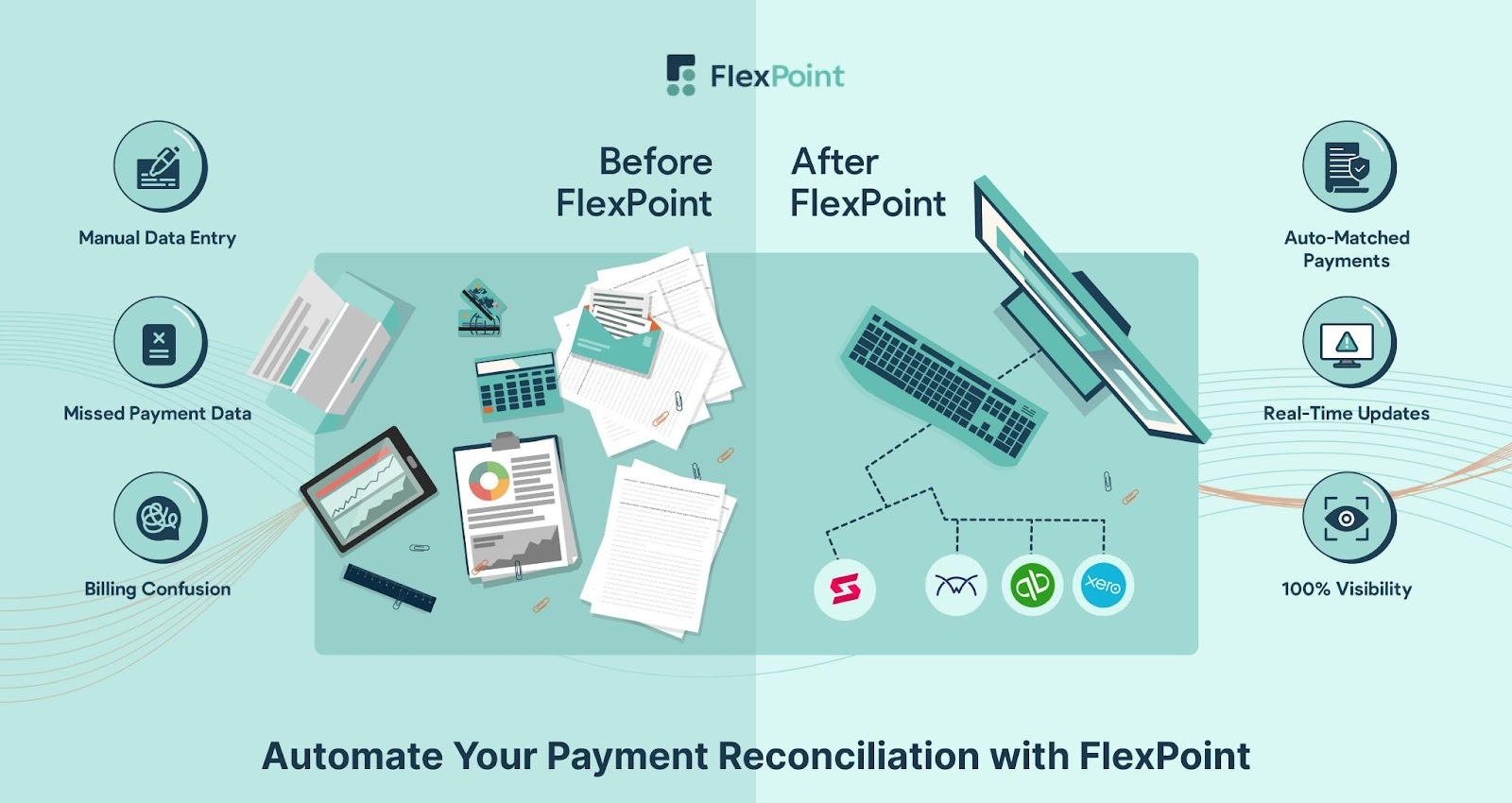
Here’s how FlexPoint covers the features MSPs should look for:
Supports All MSP Billing Models:
FlexPoint supports recurring service contracts, usage-based billing, tiered pricing, and project-based billing.
You can easily customize agreements (add/remove seats, adjust rates) inside your PSA, and FlexPoint will calculate the correct charges so no revenue is missed due to model complexity.
Two-Way PSA & QuickBooks Sync:
The platform offers bi-directional integration that simultaneously connects popular PSA systems (ConnectWise PSA, HaloPSA, SuperOps, Autotask, etc.) to QuickBooks Online, QuickBooks Desktop, and Xero
This ensures a unified workflow: service ticket data and client info flow into invoices, and payment updates flow back to PSA and accounting with no manual steps.
Automated Invoicing & Collections:
FlexPoint automates invoice generation from your PSA data and sends them out on schedule. The platform then handles collections with features such as scheduled reminders, past-due notices, and even email-open tracking.
Finance teams can set it and let the system gently nudge clients to make payments. This level of automation has a big impact.
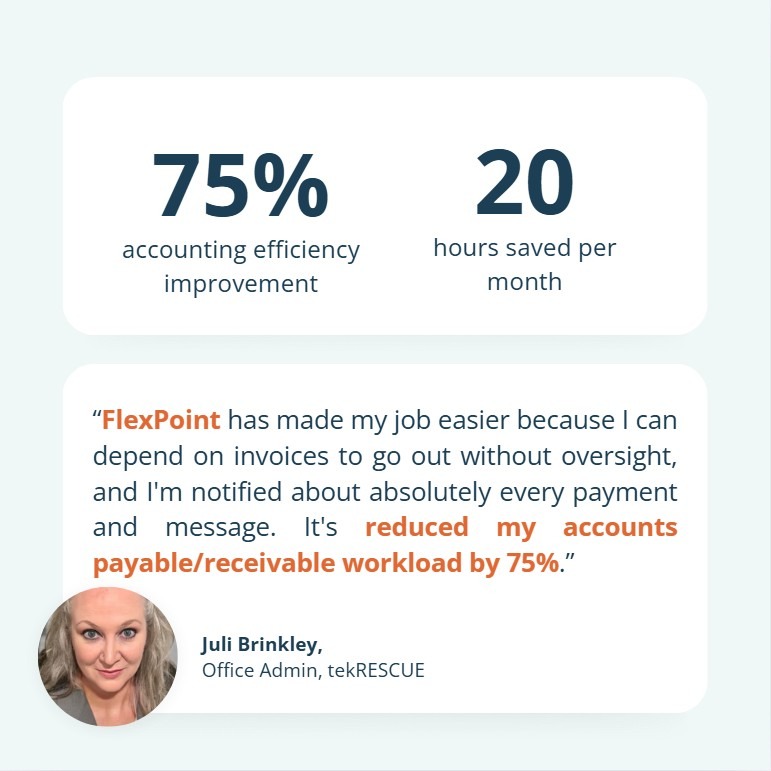
For example, TekRescue, an MSP using FlexPoint alongside QuickBooks, saw a 75% increase in billing efficiency and saved 20 hours per month on manual work.
Branded Client Portal with Autopay:
With FlexPoint, MSPs get a secure, white-labeled portal that lets clients view invoices and pay online. The portal supports AutoPay enrollment, ACH payments, and card payments, as well as client self-service for updating payment information.
Unlike generic portals, it’s fully branded with your company, providing a seamless client experience and building trust.
Flexible Payment Options and Lower Fees:
FlexPoint enables cost-saving payment methods.
The platform offers flat-rate ACH processing (as low as $0.25 per transaction) and allows credit card surcharge or fee recovery options, helping MSPs recoup processing costs.
Clients still have the flexibility to pay how they want, but the MSP doesn’t have to absorb high fees. You can also set up installment plans or one-click financing for larger invoices, thanks to FlexPoint’s payment flexibility.
Instant Deposit Reconciliation:
Every payment collected through FlexPoint is automatically reconciled. The platform instantly updates invoice status and pushes the record into QuickBooks, eliminating manual reconciliation tasks.
No more hunting for deposits or mismatched payments: if a client pays via the portal, your books reflect it right away.
Real-Time Financial Visibility:
Because FlexPoint sits between your PSA and accounting tool, the platform provides real-time dashboards of your billing and payments. MSP owners and finance teams can log in to see current cash flow, outstanding A/R, and revenue trends at a glance.
These insights help identify issues (such as a spike in overdue invoices or a drop in recurring revenue) before they become serious.
FlexPoint provides MSPs with the financial intelligence that generic systems lack, with dashboards purpose-built for recurring-revenue businesses.
FlexPoint delivers the full feature set MSPs need by enhancing standard accounting software with MSP-specific billing automation, integration, and payment tools.
Conclusion: Choose Accounting Tools Built for MSP Workflows
MSPs today should seek out accounting tools that support their complex workflows and recurring revenue streams, rather than settling for generic software designed for other industries.
The difference shows up in accuracy, efficiency, and cash flow.
A generic accounting platform may handle basic bookkeeping, but it can’t keep up with frequent contract changes, PSA ticket data, or the automation required to bill dozens of clients with hundreds of services accurately each month.
MSP-focused solutions provide the integrations, automation, and visibility needed to run finances smoothly.
FlexPoint is one such solution: it fills the gaps by layering MSP-specific billing and payment automation on top of platforms like QuickBooks and Xero, ensuring nothing falls through the cracks.
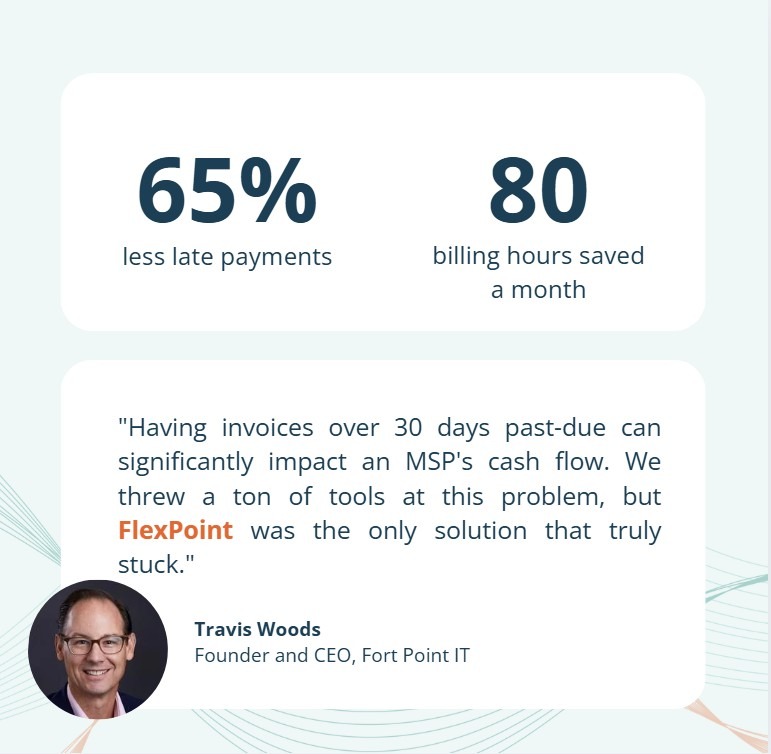
For example, Fort Point IT streamlined its billing process with FlexPoint.
Upon doing so, the IT services provider saved 80 hours per month in billing operations and reduced overdue payments by 65.
Ready to modernize your accounting stack?
Schedule a demo to see how FlexPoint streamlines MSP accounting and accounts receivable operations.
Additional FAQs: MSP Accounting Tools Features
{{faq-section}}

MSP accounting tools improve accuracy by eliminating manual data entry and ensuring billing is based on actual service data.
For example, an MSP-specific tool will pull hours, tickets, and usage from your PSA, ensuring invoices are generated with the correct details every time.
This alignment of real-time data with billing processes prevents common errors such as missed charges and typos.
Automation also means calculations (prorated fees, discounts, taxes) are done consistently by software.
According to IOFM, manual invoicing can have error rates near 12%, whereas automated systems are far more precise.
The most crucial integrations are with your PSA and your accounting system. Connecting to your PSA allows the tool to import contracts, ticket charges, and client info, ensuring invoices match services delivered.
Integration with accounting software is equally important to ensure financial records are updated in real time without duplicate entries.
Payment gateway integration is another must-have: your accounting tool should integrate with payment processors or merchant services. This way, when clients pay online, their payments are recorded automatically in the system.
Many MSPs also value RMM or CRM integrations, but those are secondary to the core PSA and accounting connections.
FlexPoint enhances your existing accounting software by adding an automation layer tailored to MSP needs. It bi-directionally syncs with PSA tools and QuickBooks to keep tickets, invoices, and payments in lockstep.
This means invoices get created automatically from your PSA data, and when a client pays (via FlexPoint’s portal), that payment is instantly synced to QuickBooks and marked off.
FlexPoint also automates A/R tasks like sending payment reminders, scheduling autopay, and reconciling deposits, significantly reducing manual work.
The platform also provides a branded client portal for online payments. Additionally, FlexPoint supports flat-rate ACH and credit card fee recovery to reduce costs. The platform also offers real-time dashboards for your receivables.


